
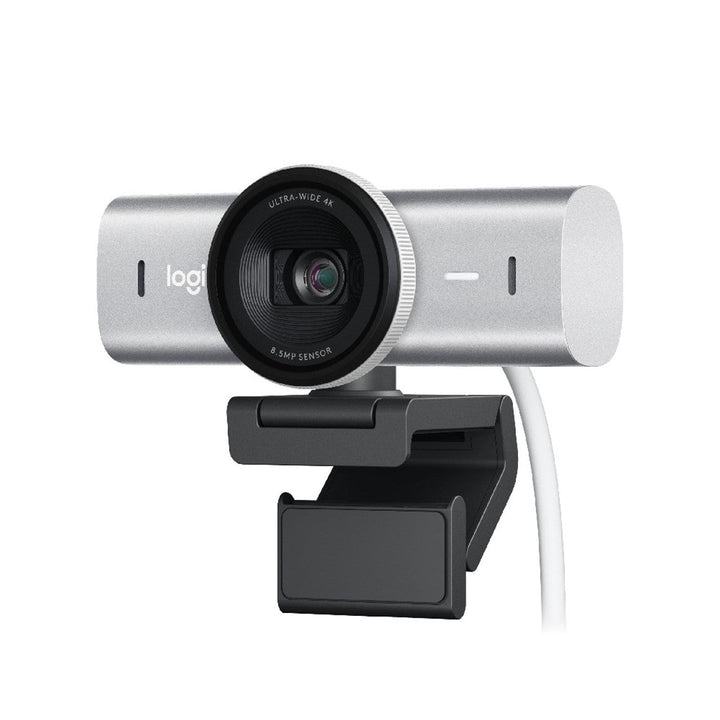


Logitech MX Brio 4K Ultra HD Business Webcam Pale Grey
PRODUCT DESCRIPTION
Logitech MX Brio 4K Ultra HD Webcam Pale Grey — 960-001561 - 2 Years Local Warranty
4K Ultra HD Video from a Sony STARVIS Sensor with Pixels 70% Larger
The Logitech MX Brio is Logitech's most advanced desktop webcam, built on a Sony STARVIS 1/2.8" sensor with 1.45 µm pixels — approximately 70% larger than those in the Brio 4K. Larger pixels gather more light, and Logitech quotes twice the face visibility and twice the fine image detail in difficult lighting. It captures 4K Ultra HD at 30 fps and Full HD 1080p at 60 fps, so it handles both a detailed still frame and smooth motion.
AI Image Enhancement Keeps Your Face Correctly Exposed
MX Brio applies AI face-based image enhancement together with auto-exposure, automatic white balance and image noise reduction. In practice that means the camera prioritises exposing your face correctly rather than the bright window behind you — the single most common problem in Singapore offices where desks sit against glass. A 4x digital zoom and a software-adjustable field of view let you set the framing you want; note that the zoom is digital, not optical.
Show Mode Turns the Camera Into a Desk View
Tilt MX Brio downward and Show Mode engages, sharing whatever is on the desk in front of you — a sketch, a document, a hardware sample — directly into the call without a second camera or a document scanner. It is a genuinely useful feature for design reviews, technical support calls and training sessions.
Integrated Privacy Shutter, USB-C, and 82% Recycled Plastic
A physical privacy shutter is built into the body and closes with a twist of the dial — nothing to clip on and nothing to lose. The detachable 1.5 m USB-C to USB-C cable requires USB 3.0. Dual beamforming noise-reducing microphones handle audio when a headset is not practical. The Graphite finish uses 82% post-consumer recycled plastic and the Pale Grey 75%, with FSC-certified paper packaging, and Logitech states MX Brio is certified carbon neutral.
Logitech MX Brio Datasheet — Technical Specifications
Specifications below come from Logitech's official MX Brio specification page, the logitech.com Singapore product page and Logitech's MX Brio press materials.
General
| Product name | Logitech MX Brio 4K Ultra HD Webcam |
| Part number | 960-001561 |
| Colour | Pale Grey |
| Regulatory model number | VU0066 |
| Category | 4K Ultra HD USB-C webcam for desktop and creator use |
| Post-consumer recycled plastic | 75% |
Camera
| Sensor | Sony STARVIS IMX415, 1/2.8" |
| Pixel size | 1.45 µm |
| Sensor resolution | 4K |
| Maximum resolution | 4K Ultra HD at 30 fps |
| High frame rate mode | Full HD 1080p at 60 fps |
| Field of view | 90°, user-adjustable in software |
| Zoom | 4x digital zoom (Logitech specifies digital zoom only — there is no optical zoom) |
| Focus | Autofocus |
| Image processing | AI face-based image enhancement, auto-exposure, auto white balance and image noise reduction |
| Low-light performance | Logitech states 2x better face visibility and 2x finer image detail in difficult lighting versus Brio 4K, from pixels approximately 70% larger |
| Show Mode | Yes — tilt the camera down to share sketches, documents or physical objects on your desk mid-call |
| Privacy shutter | Integrated, operated by a rotating dial on the camera body |
| RightSight auto-framing | Not available on MX Brio. Logitech reserves RightSight for MX Brio 705 for Business. |
Audio
| Microphones | 2 dual beamforming, noise-reducing microphones |
| Noise cancelling | Yes |
Connectivity
| Connection | Wired USB-C. USB 3.0 is required. |
| Cable | Detachable USB-C to USB-C cable, 1.5 m (5 ft) |
| Windows Hello | Not supported. Logitech states MX Brio does not support Windows Hello and directs users needing facial sign-in to the Brio 4K. |
Design & Sustainability
| Dimensions | 61.6 mm (H) x 98.0 mm (L) x 52.2 mm (D) |
| Weight | 234.3 g including mount clip and cable |
| Mounting | Mount clip for monitors and laptops; tripod mount supported |
| Post-consumer recycled plastic | 82% (Graphite) / 75% (Pale Grey) |
| Carbon | Logitech states MX Brio is certified carbon neutral; published product carbon footprint 13.98 kg CO2e |
| Packaging | FSC-certified paper |
| Warranty | 2 Years Local Warranty (Singapore) |
Compatibility & Software Support
Operating system support
- Windows 10 or later
- macOS 10.15 or later
Platform compatibility
MX Brio is a UVC camera and is recognised without drivers by Microsoft Teams, Zoom, Google Meet, Cisco Webex, Skype, OBS Studio and any other UVC-compliant application. Logitech does not publish a Microsoft Teams, Zoom or Google Meet certification for the MX Brio part numbers 960-001548 and 960-001561, so we do not claim one. Those certifications, along with Works With Chromebook, apply to MX Brio 705 for Business.
Logitech software
- Logi Options+ — Logitech's current app for MX-series devices, used for image and device settings.
- Logi Tune — MX Brio appears on Logitech's supported-device list.
- Logitech G HUB — supported for streaming and creator setups.
- Logitech Sync — not supported. MX Brio does not appear on Logitech's list of Sync-monitored or Sync-managed devices. If central IT management is a requirement, buy MX Brio 705 for Business.
What MX Brio does not do
To set expectations clearly before purchase: no Windows Hello facial sign-in, no RightSight auto-framing, and no Logitech Sync fleet management. Logitech also does not publish HDR or RightLight 5 specifications for these two part numbers — those are stated for MX Brio 705 for Business. Everything else — the 4K sensor, 4x digital zoom, Show Mode, beamforming microphones and integrated privacy shutter — is present on both.
Package Contents & MX Brio Series Ordering Information
In the box
- Logitech MX Brio webcam with mount clip
- Detachable USB-C to USB-C cable (1.5 m)
- User documentation
Logitech does not publish an itemised in-box list for MX Brio. The components above are the ones Logitech documents for this model. If a specific accessory is critical to your order, confirm with the SourceIT sales team before purchase.
MX Brio series ordering information
| Model / Variant | Part Number |
| Logitech MX Brio 4K Webcam — Graphite | 960-001548 |
| Logitech MX Brio 4K Webcam — Pale Grey (this listing) | 960-001561 |
| Logitech MX Brio 705 for Business — Graphite | 960-001531 |
MX Brio is offered in Graphite and Pale Grey. MX Brio 705 for Business is offered in Graphite only.
Alternative Logitech webcams stocked by SourceIT
| Model / Variant | Part Number |
| Logitech Brio 4K Ultra HD Webcam with HDR (APAC pack) — supports Windows Hello | 960-001723 |
| Logitech Brio 505 Full HD 1080p HDR Business Webcam | 960-001461 |
| Logitech Brio 305 Full HD Business Webcam | 960-001472 |
| Logitech C920e Full HD Business Webcam — Teams and Zoom certified | 960-001360 |
Ask the SourceIT sales team for current pricing, stock and volume quotations on any model listed here.
Datasheet & Downloads
All documents below are hosted by Logitech. Links open in a new tab.
- MX Brio Specification — Logitech Support — full official specification table
- Logitech MX Brio Product Page (Singapore)
- Getting Started — MX Brio — setup guide, software downloads and firmware
- Does MX Brio Support Windows Hello? — Logitech Support — read before purchase if facial sign-in matters
- MX Brio 705 for Business Datasheet (PDF) — datasheet for the business version of this camera
Frequently Asked Questions — Logitech MX Brio
Does the MX Brio support Windows Hello?
No. Logitech states directly that MX Brio does not support Windows Hello, and recommends the Brio 4K for users who need facial sign-in. If passwordless Windows sign-in matters to your organisation, order the Logitech Brio 4K instead. We flag this before purchase because the two cameras look similar and the assumption is easy to make.
What is the difference between MX Brio and MX Brio 705 for Business?
The MX Brio 705 for Business is the enterprise version. Logitech certifies it for Microsoft Teams, Zoom and Google Meet, lists it under Works With Chromebook, manages it through Logitech Sync, adds RightSight auto-framing, and publishes RightLight 5 with HDR and a 3-year limited hardware warranty for it. None of those are stated for MX Brio. The 705 is Graphite only. Choose MX Brio for an individual desk or creator setup, and MX Brio 705 for a managed corporate deployment or where certification is a tender requirement.
What is the difference between the Graphite and Pale Grey versions?
Finish, part number, and recycled content. Graphite is 960-001548 and uses 82% post-consumer recycled plastic; Pale Grey is 960-001561 and uses 75%. The camera, optics, microphones and features are the same. The other colour is here: MX Brio Graphite (960-001548).
Which desk or room size does the MX Brio suit?
It is a personal desktop camera. At its 90° field of view it takes in a person at a desk with room either side, and the field of view can be narrowed in software for a tighter head-and-shoulders crop. For a meeting room with a table and a wall display you want an all-in-one video bar with speakers and beamforming microphones, not a webcam.
Can our IT team manage MX Brio centrally with Logitech Sync?
No. MX Brio does not appear on Logitech's list of Sync-monitored or Sync-managed devices. For central monitoring, health checks and firmware push across a fleet, buy MX Brio 705 for Business, or in the C-Series the C920e, C925e or C930e.
Do I need a USB-C port, and do I need a dock or licence?
The supplied cable is USB-C to USB-C and USB 3.0 is required, so you need a USB-C port capable of USB 3.0 or a compatible hub or dock. There is no licence to buy and no compute appliance involved — Logi Options+ and Logi Tune are free Logitech applications.
Does the Logitech MX Brio come with a Singapore warranty and GST invoice?
Yes. Every Logitech MX Brio sold by SourceIT comes with 2 years local Singapore warranty and a GST invoice.


