
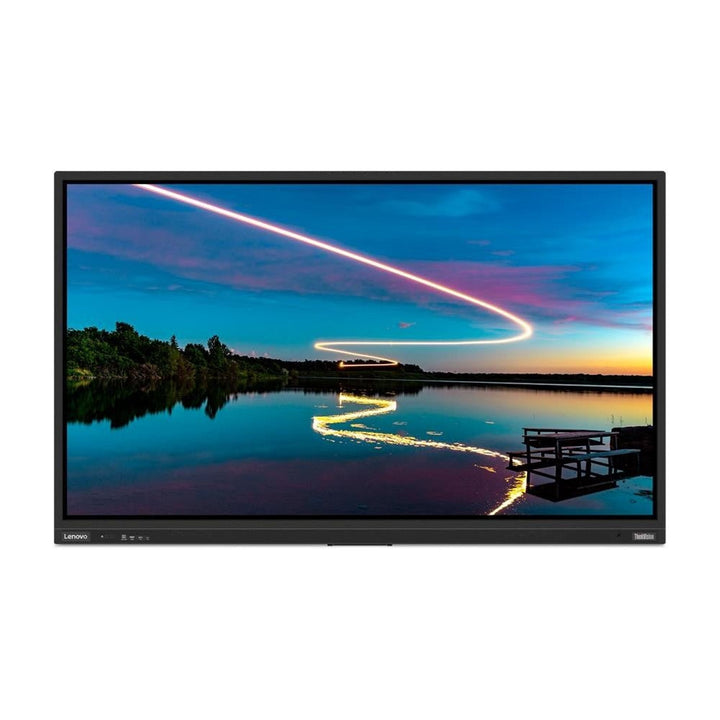


Lenovo ThinkVision T86 86-inch Large Format Display
Currently out of stock. Request a quote and
our team will confirm the latest price, availability and lead time.
PRODUCT DESCRIPTION
Lenovo ThinkVision T86 (62F0KATAWW) - 3 Years Local Warranty
An 86-Inch Interactive 4K Display for Lecture Theatres and Large Boardrooms
The ThinkVision T86 is the largest display in this ThinkVision family: 86 inches, 3840 x 2160, with the same Android 9.0 platform, the same 20-point infrared touch and the same port set as the 65- and 75-inch models. It is specified for rooms where the back row is 8 metres or more from the screen.
A VA Panel — Higher Static Contrast, and Worth Knowing About
Unlike the IPS T65 and T75, the T86 uses a Vertical Alignment (VA) panel with a static contrast ratio of 4000:1 against 1200:1 on its siblings. Blacks are deeper and text on a dark background holds up better in a dimmed lecture theatre. Lenovo still publishes 178° viewing angles in both axes, but VA and IPS behave differently off-axis and it is fair to view one before committing a large room to it.
Twenty Touch Points, and a Glass Specification That Differs From Its Siblings
Infrared touch, 20 simultaneous points, 1.0 mm accuracy, through 3.2 mm anti-glare glass. Note that Lenovo rates the T86's glass at 7 Mohs rather than the 8 Mohs of the T65 and T75. It is still hard glass, but if this display is going somewhere unsupervised, that difference is on the record rather than buried.
68 kg on VESA 800 x 400 — a Structural Installation
The T86 weighs 68 kg bare and 88 kg crated, on a VESA 800 x 400 mm pattern, measuring 1982 mm wide by 1209 mm high. This is a structural wall, a rated bracket and a planned delivery route. Talk to us about installation before the order, not after.
Lenovo ThinkVision T86 Datasheet — Technical Specifications
General
| Product | Lenovo ThinkVision T86 Smart Large Format Display |
| Part Number | 62F0KATAWW |
| Machine Type | 62F0 |
| Type | Interactive large-format display with built-in Android system |
| Colour | Raven black |
| Warranty | 3-Year Limited Warranty (Lenovo, per PSREF) |
| Local Warranty (Singapore) | Included with every SourceIT purchase, with GST invoice |
Panel & Image
| Screen Size | 86" |
| Panel Type | Vertical Alignment (VA), DLED backlight |
| Resolution | 3840 x 2160 (4K UHD) |
| Aspect Ratio | 16:9 |
| Refresh Rate | 60 Hz |
| Response Time | 6.5 ms |
| Brightness | 400 cd/m² |
| Contrast Ratio | 4000:1 typical; 3,000,000:1 dynamic |
| Colour Gamut | 99% sRGB, 85% NTSC (CIE 1931) |
| Colour Depth | 10-bit, 1.07 billion colours |
| HDR | HDR10 compliance (Lenovo datasheet) |
| Viewing Angles | 178° horizontal / 178° vertical |
| Surface | Anti-glare. Lenovo publishes no haze percentage |
| Bezel | 28.3 mm side bezel |
Touch
| Touch Technology | Infrared |
| Touch Points | 20 simultaneous |
| Touch Accuracy | 1.0 mm |
| Touch Glass | 3.2 mm, anti-glare |
| Glass Hardness | 7 Mohs — note this is lower than the 8 Mohs rating Lenovo gives the T65 and T75 |
| Touch Report Rate / Latency | Not published by Lenovo |
Connectivity
| HDMI Inputs | 4 x HDMI 2.0 — 1 on the front panel, 3 on the left side |
| HDMI Output | 1 x HDMI 2.0 out (bottom) — for daisy-chaining a second display |
| DisplayPort | 1 x DisplayPort (left side) |
| VGA | 1 x VGA (left side) |
| Composite | 1 x AV in (bottom) |
| USB Type-A | 5 total — 3 x USB 3.0 (1 front, 2 left) and 2 x USB 2.0 (1 top, 1 bottom) |
| USB Type-C | 2 x USB-C 3.0 (1 front, 1 left). Lenovo publishes no DisplayPort Alt Mode support and no power-delivery wattage for either port |
| USB Type-B (Touch) | 2 x USB-B touch upstream (1 front, 1 left) — carries touch data back to a connected PC |
| Network | 2 x RJ45 — LAN in and LAN out, 10/100/1000 Mbps |
| Audio | 1 x line-in (3.5 mm), 1 x line-out (3.5 mm), 1 x SPDIF out, 1 x PC audio |
| Serial | 1 x RS232 (9-pin) for room-control systems |
| Card Reader | 1 x TF (microSD) card slot |
| OPS Slot | Yes, per Lenovo's product datasheet. Note that Lenovo's PSREF specification sheet contains no OPS row at all — if an OPS module is part of your design, ask us to confirm the slot and module compatibility with Lenovo before ordering |
Built-in Android System
| Operating System | Android 9.0 |
| Processor | Quad-core ARM Cortex-A73 |
| Graphics | ARM Mali-G52 MC2 |
| Memory | 4 GB |
| Storage | 64 GB |
| Wireless | Wi-Fi 5 (802.11ac) 2x2 MIMO, 2.4 GHz and 5 GHz, plus Bluetooth 5.0 |
| Wireless Casting | W20 wireless projection dongle supplied in the box — USB-C, HDMI and USB-A, works with Windows 10, Android 8.0 and iOS 11 and above, no software install required (Lenovo datasheet) |
| Sensors | 1 x ambient light sensor, 1 x human detection sensor |
Audio & Camera
| Speakers | Integrated, 15 W x 2 |
| Microphones | 8-element array. Lenovo's datasheet states pickup within 8 metres |
| Camera | Detachable 4K 8 MP camera with AI voice tracking, 1/2.8-inch sensor, swivel and tilt, single USB connector |
| Camera Field of View | 122° with 4x digital zoom, lens shutter and privacy light — these four figures come from Lenovo's press material, not from PSREF or the datasheet |
Power & Certifications
| Power Consumption | 350 W typical / 410 W maximum |
| Sleep / Off Mode | 43 W |
| Switch-off Mode | ≤ 0.5 W |
| Power Supply | Internal, AC 100–240 V, 50–60 Hz |
| Certifications | RoHS compliant; TÜV Rheinland Flicker Free; TÜV Rheinland Low Blue Light |
| ENERGY STAR / EPEAT / TCO | Not published by Lenovo for this model |
Physical
| Mounting | VESA 800 x 400 mm |
| Dimensions (W x D x H) | 1982.0 x 92.0 x 1209.2 mm (78.0 x 3.6 x 47.61 in) |
| Weight | 68 kg (150 lb) |
| Packaged Dimensions | 2119 x 275 x 1353 mm |
| Packaged Weight | 88 kg (194 lb) |
| Carry Handles | 2 |
| Operating Environment | 0°C to 40°C, 10–80% relative humidity |
| Storage Environment | -10°C to 60°C, 20–80% relative humidity |
Compatibility & Fit
The mount is the first decision, not the last. The ThinkVision T86 ships with a wall mount bracket and takes a VESA 800 x 400 mm pattern. At 68 kg this is a two-person installation into a structural wall — plasterboard alone will not carry it. If the room has no suitable wall, we can quote a mobile trolley or floor stand rated for the weight and pattern; Lenovo mentions floor-stand installation for this family but publishes no stand part number or with-stand dimensions.
Connecting a PC. Touch is carried on a separate USB-B upstream cable, not over the video cable. Run HDMI or DisplayPort for the picture and the supplied USB-B to USB-A cable for touch, otherwise you get an image with no interactivity — the single most common complaint on interactive displays, and entirely avoidable. There are two USB-B touch ports, one front and one on the left side, so a room PC and a guest laptop can each be wired.
USB-C is not a docking port here. Lenovo publishes no DisplayPort Alt Mode support and no power-delivery wattage for either USB-C port on this display. Do not plan on a laptop driving the screen and charging over a single USB-C cable. If that is how your room needs to work, tell us — the answer is usually a small room PC or a dock, and we would rather size it correctly than let you find out on installation day.
Power and network. Budget 350 W typical on the circuit, and note there are two RJ45 ports — LAN in and LAN out — so the display can pass Ethernet through to a room PC or OPS module from a single wall drop. An RS232 port is provided for Crestron, Extron and similar room-control systems.
Access and delivery. A panel this size travels in a crate. Confirm lift dimensions, doorway widths and floor protection before the delivery date. We can arrange delivery, installation and commissioning across Singapore — ask us for a site visit rather than guessing.
Package Contents & ThinkVision Ordering Information
In the box, per Lenovo PSREF:
- Display with wall mount bracket
- Detachable 4K 8 MP camera
- W20 wireless projection dongle
- 2 x stylus
- Remote control with battery
- 1 x HDMI cable, 1 x USB-B to USB-A cable, 1 x power cable
- Quick setup guide and warranty booklet
ThinkVision Large Format Display Ordering Information
| 62F2KATCWW | ThinkVision T65 — 65" interactive 4K IPS, 20-point IR touch, Android 9 |
| 62F4KATCWW | ThinkVision T75 — 75" interactive 4K IPS, 20-point IR touch, Android 9 |
| 62F0KATAWW (this listing) | ThinkVision T86 — 86" interactive 4K VA, 20-point IR touch, Android 9 |
| 62F2KNTCMY | ThinkVision T65 with Camera and MD80 — 65" interactive 4K, bundled with ThinkPlus MD80 |
| 62F4KNTCMY | ThinkVision T75 with Camera and MD80 — 75" interactive 4K, bundled with ThinkPlus MD80 |
| 64A9GAT1MY | ThinkVision E55 — 54.6" non-touch 4K VA, USB-C 96 W, GbE |
| 64ACGAT1MY | ThinkVision E65 — 64.5" non-touch 4K VA, USB-C 96 W, GbE |
Datasheet & Downloads
- Lenovo PSREF specification sheet — ThinkVision T86 (PDF)
- Lenovo ThinkVision T86 product datasheet (PDF)
PSREF is Lenovo's own Product Specifications Reference and is the source for every figure on this page except the items labelled as coming from Lenovo's datasheet or press material. Where the two documents disagree — the OPS slot, and the typical-versus-maximum power figures — this page shows the disagreement rather than choosing silently.
Frequently Asked Questions — Lenovo ThinkVision T86
Does it need a PC connected to work?
No. The display runs Android 9.0 on a quad-core ARM Cortex-A73 with 4 GB of memory and 64 GB of storage, so annotation, casting and the built-in apps work standalone. Connect a PC over HDMI or DisplayPort when you need Windows software, and run the supplied USB-B cable alongside it so touch passes through to the PC.
How does wireless screen sharing work?
A W20 wireless projection dongle ships in the box. Lenovo's datasheet states it presents USB-C, HDMI and USB-A connections, works with Windows 10, Android 8.0 and iOS 11 and above, and needs no software installed on the guest device.
What does the touch layer actually support?
Infrared touch, 20 simultaneous touch points, 1.0 mm touch accuracy, through 3.2 mm anti-glare touch glass. Lenovo publishes no touch report rate or latency figure.
Can I mount it on a trolley or floor stand rather than a wall?
A wall mount bracket is supplied in the box. Lenovo's support documentation for this family mentions floor-stand installation as an option but publishes no stand part number and no with-stand dimensions. Tell us the room and we will quote a trolley or stand rated for the panel's weight and VESA pattern.
Is it certified for Microsoft Teams or Zoom?
Lenovo publishes no Microsoft Teams or Zoom certification for this display, so we do not claim one. It presents its camera, microphones and speakers as standard USB devices to a connected PC, which is how most rooms run Teams or Zoom on it in practice.
What warranty applies in Singapore?
Lenovo PSREF states a 3-year limited warranty as the base warranty for this model, and every unit SourceIT sells carries local Singapore warranty support with a GST invoice. Onsite response for a display this size is worth discussing before you order — ask us about upgraded service.
Why is the T86's panel different from the T65 and T75?
Lenovo specifies a VA panel here rather than IPS. The practical effect is higher static contrast — 4000:1 against 1200:1 — which suits a dimmed room, alongside a different off-axis colour behaviour from IPS. Lenovo publishes 178° viewing angles for both panel types. If a room has viewers at extreme angles, it is worth seeing the panel first.
What is the real power draw?
Lenovo's PSREF sheet states 350 W typical and 410 W maximum. Lenovo's own product datasheet prints those two figures in the opposite order, so the two documents disagree on which is which. Either way, size the circuit against 410 W — and against considerably more if an OPS module is fitted.
We Also Recommend


Lenovo ThinkStation P8 TWR AMD Ryzen 7995WX /512GB /1TB+2TB /W7900
Lenovo ThinkStation P8 TWR AMD Ryzen 7985WX / 512GB /1TB+2TB /W7900


Lenovo ThinkStation P8 TWR Ryzen 7985WX /512GB /512GB /RTX5000


