
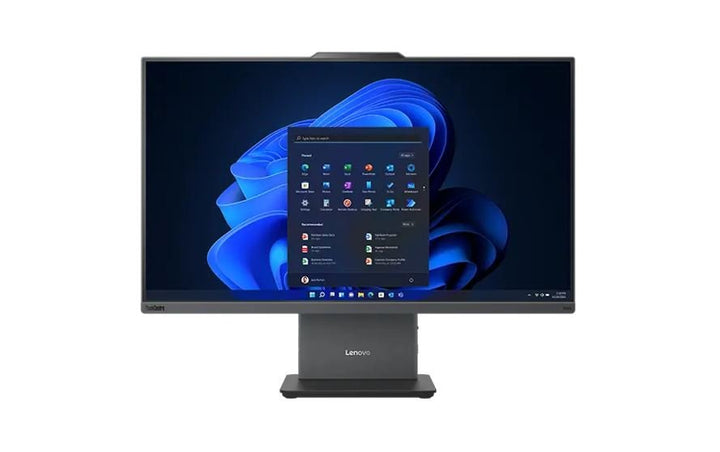


Lenovo ThinkCentre Neo M50a 27" Gen5 i5-13420H/8GB/512GB SSD AIO
PRODUCT DESCRIPTION
Lenovo ThinkCentre neo 50a 27 Gen 5, Core i5-13420H / 8 GB / 512 GB (12SB001USG) - Singapore Local Warranty
A Whole Desk in One Object
A 27-inch FHD all-in-one on an Intel Core i5-13420H: screen, computer, camera, speakers and microphones in a single unit, with one power cable and nothing under the desk but the adapter. For reception counters, classrooms, clinics and shared workstations, the tidiness is most of the point.
What You Are Actually Getting, Not Just What the Range Offers
Lenovo publishes the panel, camera, stand, wireless card, memory and warranty as options for this machine type rather than as facts about any one part number. So this page carries a separate This Configuration table from the distributor's build sheet for 12SB001USG: a 27-inch panel, non-touch, 8 GB DDR5-5200 SODIMM, 5.0 megapixel and Monitor stand. Anything neither source states is marked as not stated.
It Is Also a Monitor for Another Computer
Lenovo publishes an HDMI input on this machine as a port of its own, separate from the HDMI output, which almost nobody mentions. Plug a laptop or a second machine in and the all-in-one becomes its screen — useful on a desk that serves two purposes, and it means the display outlives the computer inside it.
Sized for the Job, and Priced for It
One stand angle, one drive, 32 GB of memory and Wi-Fi 6. For a reception desk, a classroom or a shared terminal that will do the same job for five years, none of that is a limitation and the price reflects it. For a desk somebody works at all day, read the stand note below before you decide — it is the specification most likely to matter.
Lenovo ThinkCentre neo 50a 27 Gen 5 Datasheet — Technical Specifications
General
| Product | Lenovo ThinkCentre neo 50a 27 Gen 5 |
| Lenovo's Official Product Name | ThinkCentre neo 50a 27 Gen 5 — see the note on naming below |
| Part Number | 12SB001USG |
| Machine Type | 12SB |
| Screen Size | 27-inch |
| Line | neo — Lenovo's value tier |
| Warranty | See the warranty note — no 3-year term is documented for this part number |
| Local Warranty (Singapore) | Included with every SourceIT purchase, with GST invoice |
This Configuration — From the Distributor Build Sheet for 12SB001USG
| Processor | Intel Core i5-13420H |
| Memory Fitted | 8 GB DDR5-5200 SODIMM |
| Storage Fitted | 512 GB M.2 PCIe NVMe with Opal |
| Display | 27-inch FHD, non-touch |
| Camera | 5.0 megapixel — no infrared |
| Stand | Monitor stand |
| Wireless | Intel Wi-Fi 6 AX201 |
| Operating System | Windows 11 Pro |
| Warranty on This Build | No upgrade stated on the build sheet. See the warranty note below |
| Bundled With This Build | USB keyboard and mouse |
| Worth Knowing | A note on this listing's web address. The URL for this page ends in another part number entirely. The address is a historical artefact, the product you are looking at is 12SB001USG, and the specification above is correct for it |
Chassis and Platform — From Lenovo PSREF
| Display Options for This Machine Type | Two options, both 27-inch FHD 1920 x 1080 IPS, 300 nits, anti-glare, 16:9, 1300:1, 99% sRGB, 100 Hz, 14 ms, borderless: multitouch or non-touch. Note this is the same FHD resolution as the 23.8-inch model spread over a larger diagonal — roughly 82 pixels per inch against 93 — with 50 more nits. It is a bigger screen, not a sharper one |
| Stand and Mounting | One stand option only: a monitor stand with -5° to +15° tilt. No swivel, no lift, no pivot, and no VESA mounting is published |
| Camera Options | 5.0 megapixel, or 5.0 megapixel with infrared for Windows Hello, with a camera shutter latch. Fixed or pop-up is not published |
| Audio | Realtek ALC233-CG codec; stereo speakers 3 W each, audio by HARMAN; dual-microphone array |
| Processor Options | Intel U300; Core 5 210H; Core 7 240H; Core i3-1315U; Core i5-13420H; Core i7-13620H — mobile U-series and H-series silicon. No TDP and no NPU figure is published |
| Memory | Two DDR5 SODIMM slots, dual-channel capable, up to 32 GB at DDR5-5200 |
| Storage | One drive only — up to 1 TB M.2 2280 SSD on PCIe NVMe 4.0 x4. No 2.5-inch bay |
| Discrete Graphics | None. Integrated graphics only |
| Ports | Left: 3.5 mm combo; 1 x USB-C 10 Gbps with 15 W charging. Rear: 1 x USB-A 10 Gbps; 2 x USB-A 2.0; 1 x HDMI-in 1.4; 1 x HDMI-out 2.1 TMDS; gigabit RJ-45; power. No DisplayPort |
| Networking | Gigabit Ethernet on a Realtek RTL8111H. Wi-Fi 6 with Bluetooth 5.2. No Wi-Fi 6E or 7 |
| Power Supply | External adapter — 90 W at 89% or 135 W at 90%, autosensing |
| Dimensions and Weight | 611.72 x 192 x 473.16 mm; around 7.1 kg |
| Security | Firmware TPM 2.0 in the SoC. Kensington Security Slot, 3 x 7 mm. Camera shutter latch. No smart-card reader, no fingerprint reader |
| Operating System Options | Windows 11 Pro, Home or Home Single Language, or no preload. Lenovo lists Ubuntu on the 23.8-inch book but not on this one, so this page does not carry it across |
| Base Warranty Options | Lenovo publishes 1-year courier or carry-in and 1-year limited onsite only. There is no 3-year base term for this machine type |
| Lenovo's AI PC Category | Field not present. Lenovo assigns this machine type no AI PC designation and publishes no NPU figure |
Compatibility & Fit
A note on this product's name
Our store title calls this a "neo M50a". Lenovo's own name for it is "ThinkCentre neo 50a 27 Gen 5" — there is no "M" in it, and no Lenovo document uses one. We have checked this against both Lenovo's product database and its specification library.
It sounds pedantic and it is not: the name is how you find the right specification sheet, and searching for a product that does not exist finds nothing or, worse, finds the M-series machine of a similar number, which is a different and differently-priced product. The specification below is for ThinkCentre neo 50a 27 Gen 5, machine type 12SB. Quote the machine type and you will always be comparing the right thing.
What to actually think about when buying an all-in-one
On a tower or a Tiny, the specification that matters is the processor. On an all-in-one it usually is not, because you are also buying a monitor, a webcam, a pair of speakers and a stand that you cannot change later. Three things decide whether you will still like it in three years:
- The stand, and whether it takes a VESA mount. A tilt-only stand puts the screen at one height forever. A full-function stand that lifts, swivels and pivots, or a VESA mount onto an arm, is the difference between a machine people are comfortable at and one they are not. It is the specification most often skipped and most often regretted
- Whether the camera has infrared. Without it there is no Windows Hello face sign-in, and on a shared or hot-desked machine that is a daily annoyance
- The panel. Brightness, contrast and colour gamut vary more between these machines than the processors do, and on some models choosing the touchscreen quietly gets you a worse panel
All three are set at the point of order and none can be changed afterwards. The specification tables below give Lenovo's full option list and the build sheet for this exact unit, side by side, so you can see which you are getting.
It doubles as a monitor for another computer
A feature Lenovo publishes and almost nobody mentions: this machine has an HDMI input as a dedicated port, alongside a separate HDMI output. Plug a laptop, a console or a second desktop into it and the all-in-one becomes that machine's screen.
That is genuinely useful on a desk that has to serve two purposes — a work laptop docked beside a permanent desktop, a reception machine that occasionally needs to show something else, a lab bench with an instrument PC. It also means the screen outlives the computer inside it. The M90a Pro adds an on-chassis OSD joystick, which makes switching to the input straightforward; on this model Lenovo does not publish how the input is selected, so ask us if you intend to rely on it. Note the input is HDMI 1.4, so it is matched to this machine's own panel resolution rather than to a 4K source.
Before you order: the stand tilts, and does nothing else
Lenovo publishes one stand option for this machine type — a monitor stand with -5° to +15° tilt. No height adjustment, no swivel, no pivot. And Lenovo's mounting field for this machine reads "None": there is no VESA pattern, so it cannot go on a monitor arm or a wall bracket either.
For a reception desk, a kiosk, a classroom or a shared workstation where the screen sits at a fixed height anyway, that is fine and it is part of why the machine costs what it does. For a desk somebody sits at for eight hours a day, screen height is an ergonomics question rather than a preference, and this machine cannot answer it. The M-series all-in-ones in the ordering table support VESA 100 mm and offer stands that lift up to 150 mm, swivel 45° each way and pivot 90°. We would rather point you at one now than have you discover the limitation after installation.
About the warranty, and why this page does not claim three years
Lenovo's book for this machine type publishes only 1-year base warranty options — courier or carry-in, and limited onsite. There is no 3-year base term for this model. The distributor build sheet for this particular part number does not record a warranty upgrade either, so we are not going to print a three-year claim we cannot substantiate.
Other all-in-ones in the ordering table below do carry a documented 3-year onsite upgrade and their pages say so. What we can tell you about this one is that every unit SourceIT sells carries local Singapore warranty support and a GST invoice, and that we will confirm the exact Lenovo term for this part number in writing before you order — and quote an onsite upgrade if you want one, which is almost always cheaper bought at the time of purchase than added later. On an all-in-one that is worth thinking about properly: when the screen and the computer are one object, a carry-in repair means the whole desk goes away for a week.
Package Contents & ThinkCentre All-in-One Ordering Information
In the box, per Lenovo PSREF:
- Lenovo ThinkCentre neo 50a 27 Gen 5 all-in-one, built to the configuration above
- USB keyboard and mouse
- Power adapter
- Quick start guide and safety documentation
Lenovo does not publish a carton contents list per part number. The build sheet for this unit is reflected above. This machine has no VESA mounting option, so the supplied stand is the only way to position it — see the stand note above.
Lenovo ThinkCentre All-in-One Ordering Information
| 12SD001FSG | Lenovo ThinkCentre neo 50a 24 Gen 5 — i5-13420H / 8GB / 512GB — 23.8-inch, tilt-only stand |
| 12SD001GSG | Lenovo ThinkCentre neo 50a 24 Gen 5 — i5-13420H / 16GB / 512GB — 23.8-inch, tilt-only stand |
| 12SD0027SG | Lenovo ThinkCentre neo 50a 24 Gen 5 — i7-13620H / 16GB / 512GB — 23.8-inch, tilt-only stand |
| 12SB001USG (this listing) | Lenovo ThinkCentre neo 50a 27 Gen 5 — i5-13420H / 8GB / 512GB — 27-inch, 300 nits |
| 12SB001VSG | Lenovo ThinkCentre neo 50a 27 Gen 5 — i5-13420H / 16GB / 512GB — 27-inch, 300 nits |
| 12SB001TSG | Lenovo ThinkCentre neo 50a 27 Gen 5 — i7-13620H / 16GB / 512GB — 27-inch, 300 nits |
| 12SH001QSG | Lenovo ThinkCentre M90a Gen 5 — i7-13700 / 16GB / 512GB, touch — M-series, 23.8-inch touch — not a neo. See note |
| 13F80017SG | Lenovo ThinkCentre neo 55a 24 Gen 6 — Ryzen AI 5 330 / 16GB / 512GB — Copilot+ PC. Non-touch |
| 13F80018SG | Lenovo ThinkCentre neo 55a 24 Gen 6 — Ryzen AI 7 350 / 16GB / 512GB — Copilot+ PC. Non-touch |
| 13F8001CSG | Lenovo ThinkCentre neo 55a 24 Gen 6 — Ryzen AI 7 350 / 32GB / 512GB — Copilot+ PC. Non-touch, 32GB |
| 13F8001ASG | Lenovo ThinkCentre neo 55a 24 Gen 6 — Ryzen AI 5 330 / 16GB / 512GB, touch — Copilot+ PC. Touchscreen |
| 13F80019SG | Lenovo ThinkCentre neo 55a 24 Gen 6 — Ryzen AI 7 350 / 16GB / 512GB, touch — Copilot+ PC. Touchscreen |
| 13F8001BSG | Lenovo ThinkCentre neo 55a 24 Gen 6 — Ryzen AI 7 350 / 32GB / 512GB, touch — Copilot+ PC. Touch, 32GB |
| 13AT001YSG | Lenovo ThinkCentre M90a Gen 6 — Ultra 7 265 / 16GB / 512GB, touch — 23.8-inch touch, VESA, Thunderbolt 4 |
| 13AM0016SG | Lenovo ThinkCentre M90a Pro Gen 6 — Ultra 7 265 / 16GB / 512GB — 27-inch QHD, 400 nits, VESA, Thunderbolt 4 |
| 13AY0038SG | Lenovo ThinkCentre M70a Gen 6 — Ultra 7 265T / 16GB / 512GB, touch — 23.8-inch touch, UltraFlex V stand, VESA |
Datasheet & Downloads
PSREF is Lenovo's own Product Specifications Reference. It publishes per machine type rather than per part number, so this SKU does not appear inside the PDF itself — the PDF is the authority on the chassis, the panel options and the port list, and the distributor build sheet is the authority on which options this unit carries.
Frequently Asked Questions — Lenovo ThinkCentre neo 50a 27 Gen 5
Is this the right product name?
Not quite. Lenovo's own name for this machine is ThinkCentre neo 50a 27 Gen 5, machine type 12SB. Our title inserts an "M" that appears in no Lenovo document. The specification below is Lenovo's for that machine type. When comparing quotes, quote the machine type — it is the one identifier nobody can garble.
Can I put it on a monitor arm, or raise the screen?
No to both. Lenovo publishes one stand for this machine type — tilt only, -5° to +15° — and its mounting field reads "None", so there is no VESA pattern. The screen sits where the stand puts it. For a fixed installation that is fine; for a desk somebody works at all day it is worth considering the M-series all-in-ones in the ordering table, which support VESA 100 mm and offer stands that lift, swivel and pivot.
Does it have Windows Hello face sign-in?
No. The build sheet for this unit records a 5.0-megapixel camera without infrared, and Windows Hello face recognition needs an infrared camera. Lenovo does offer an infrared option on this machine type, so ask us if you need it and we will see whether a build with it can be sourced.
Can I use it as a screen for my laptop?
Yes. Lenovo publishes an HDMI input on this machine as a separate port from the HDMI output. The input is HDMI 1.4, matched to this machine's own panel rather than to a 4K source. How the input is selected is not published for this model, so ask us if you intend to rely on it daily.
Is this a Copilot+ PC?
No, and Lenovo does not claim it is. This machine type predates the designation — its specification book carries no AI PC Category field and publishes no NPU figure at all. If Copilot+ matters, the neo 55a 24 Gen 6 machines in the ordering table are the ones that qualify.
How much memory can it take?
Lenovo publishes up to 32 GB across two DDR5 SODIMM slots for this machine type. Whether the 8 GB in this unit occupies one slot or both is not published by Lenovo or stated on the build sheet — ask us and we will confirm the module configuration before you order.
What warranty does it come with?
Lenovo publishes only 1-year base options for this machine type and the build sheet for this part number records no upgrade, so we are not claiming three years. Every unit SourceIT sells carries local Singapore warranty support and a GST invoice, and we will confirm the exact Lenovo term before you order — and quote an onsite upgrade if you want one, which is cheaper bought now than added later.


