
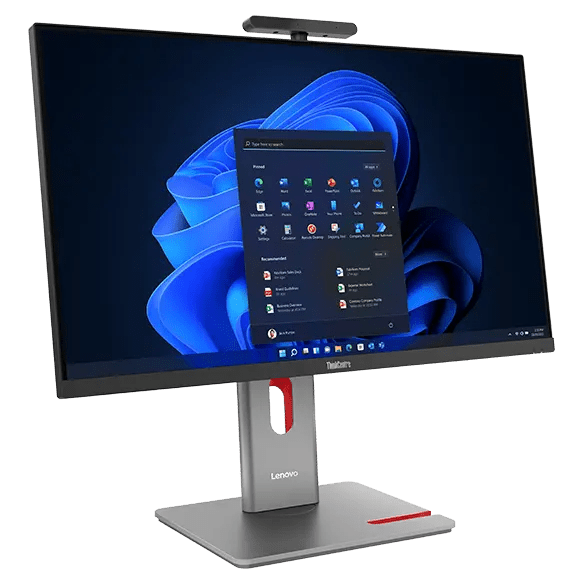


Lenovo ThinkCentre M90a Pro 27 Gen 6 Intel U7 265 /16GB RAM/512GB SSD
PRODUCT DESCRIPTION
Lenovo ThinkCentre M90a Pro Gen 6, Core Ultra 7 265 / 16 GB / 512 GB (13AM0016SG) - 3 Years Onsite, Singapore Local Warranty
A 27-Inch QHD All-in-One at 400 Nits
The largest and brightest screen in this range: 27-inch QHD 2560 x 1440 at 400 nits and 120 Hz, Eyesafe certified, driven by a 20-core Intel Core Ultra 7. It is the only all-in-one here whose panel is a genuine step up rather than the same FHD stretched larger, and the only one with an on-chassis OSD joystick.
What You Are Actually Getting, Not Just What the Range Offers
Lenovo publishes the panel, camera, stand, wireless card, memory and warranty as options for this machine type rather than as facts about any one part number. So this page carries a separate This Configuration table from the distributor's build sheet for 13AM0016SG: 27-inch QHD 2560 x 1440, 400 nits, 120 Hz, Eyesafe certified, non-touch — the brighter of Lenovo's two panel options for this machine type, 16 GB DDR5-5600 SODIMM, 5.0 megapixel infrared and RGB hybrid and Monitor stand, with VESA mounting supported. Anything neither source states is marked as not stated.
It Is Also a Monitor for Another Computer
Lenovo publishes an HDMI input on this machine, sharing one physical port that switches between input and output, which almost nobody mentions. Plug a laptop or a second machine in and the all-in-one becomes its screen — useful on a desk that serves two purposes, and it means the display outlives the computer inside it.
Three Years Onsite on This Build
The build sheet for this part number records 3-year onsite cover. Lenovo's book for this machine type publishes a 3-year onsite option among its base terms. Onsite matters more on an all-in-one than on anything else we sell: when the screen and the computer are one object, a carry-in repair means the entire desk goes away. The full detail is set out below.
Lenovo ThinkCentre M90a Pro Gen 6 Datasheet — Technical Specifications
General
| Product | Lenovo ThinkCentre M90a Pro Gen 6 |
| Lenovo's Official Product Name | ThinkCentre M90a Pro Gen 6 — see the note on naming below |
| Part Number | 13AM0016SG |
| Machine Type | 13AM |
| Screen Size | 27-inch |
| Line | M-series — Lenovo's managed-fleet tier |
| Warranty | 3-year onsite service on this build |
| Local Warranty (Singapore) | Included with every SourceIT purchase, with GST invoice |
This Configuration — From the Distributor Build Sheet for 13AM0016SG
| Processor | Intel Core Ultra 7 265 — 20 cores (8 performance and 12 efficient), up to 5.3 GHz turbo, 36 MB L2 and 30 MB smart cache, with Intel AI Boost up to 13 TOPS |
| Memory Fitted | 16 GB DDR5-5600 SODIMM |
| Storage Fitted | 512 GB PCIe 4.0 x4 with Opal 2.0 |
| Display | 27-inch QHD 2560 x 1440, 400 nits, 120 Hz, Eyesafe certified, non-touch — the brighter of Lenovo's two panel options for this machine type |
| Camera | 5.0 megapixel infrared and RGB hybrid — Windows Hello face sign-in is available |
| Stand | Monitor stand, with VESA mounting supported |
| Wireless | Wi-Fi 7 |
| Also Fitted | Focus Sound is listed on the build sheet for this unit |
| Operating System | Windows 11 Pro |
| Warranty on This Build | 3-year onsite service, per the distributor build sheet. See the warranty note below |
| Bundled With This Build | USB keyboard and mouse, plus a 3-in-1 SD card reader |
Chassis and Platform — From Lenovo PSREF
| Display Options for This Machine Type | 27-inch QHD 2560 x 1440 IPS, non-touch, in two brightness options — 250 nits or 400 nits — both 1500:1, 120 Hz, 14 ms, anti-glare at 17% haze, 99% sRGB, with TÜV Rheinland Low Blue Light (hardware), Flicker Free and Eyesafe Certified 2.0. There is no touchscreen option on this model at all |
| Stand and Mounting | Three options: UltraFlex V (-5° to +70° tilt, up to 164.97 mm lift in flat mode and 71.61 mm vertical); full function (-5° to +22° tilt, 45° swivel each way, 90° pivot, up to 145 mm lift); or no stand. Supports VESA 100 mm mounting. There is no tilt-only stand on this model |
| Camera Options | 5.0 megapixel infrared and RGB hybrid with ThinkShutter and Human Presence Detection by radar, adjustable ±20° tilt and 180° swivel; the same without radar; RGB only; or no camera |
| Audio | Realtek ALC233NL-VB2-CG codec; stereo speakers 5 W each, Dolby Atmos — the loudest all-in-one in this range; dual-microphone array or none. Lenovo also offers a Focus Sound option, which appears in its dimensions table as adding 1.6 mm of depth but which Lenovo does not describe anywhere in the specification book |
| Processor Options | Intel Core Ultra Series 2 desktop parts — Ultra 5 225, 235 and 245; Ultra 7 265; Ultra 9 285. All with Intel AI Boost up to 13 TOPS, and an optional discrete NPU card up to 30 TOPS |
| Memory | Two DDR5 SODIMM slots, dual-channel capable, up to 64 GB at DDR5-5600 |
| Storage | Up to three M.2 SSDs on PCIe NVMe 4.0 x4 and 5.0 x4. Lenovo prints one constraint explicitly: the discrete NPU card and the third SSD are mutually exclusive |
| Discrete Graphics | NVIDIA GeForce RTX 4050, 6 GB GDDR6. Note the RTX 5060 offered on the M90a is not available on this model |
| Ports | Right: 3.5 mm combo; 1 x USB-C Thunderbolt 4 / USB4 40 Gbps; 1 x USB-A 10 Gbps; 1 x USB-C 10 Gbps with 15 W charging; card reader. Rear: 2 x USB-A 10 Gbps; 2 x USB-A 5 Gbps (one Smart Power On); 1 x HDMI combo port working as HDMI-in 1.4 or HDMI-out 2.1; 1 x DisplayPort 1.4a; gigabit RJ-45. An OSD joystick on the chassis — unique to this model, and what makes driving the HDMI input practical. Microphone mute button |
| Networking | Gigabit Ethernet on an Intel I219-LM with Wake-on-LAN. Four wireless options including Intel Wi-Fi 7 BE200 |
| Power Supply | Internal fixed power supply — 180 W, or 230 W with discrete graphics. 80 PLUS Gold or Platinum |
| Dimensions and Weight | Without stand 613.6 x 362.9 x 54.5 mm (388.4 mm deep with the camera; add 1.6 mm for Focus Sound). With a stand 613.6 x 222.21 x 389.68 to 534.68 mm. 8.25 kg without a stand, 11.27 kg with UltraFlex V, 12.31 kg with the full-function stand |
| Security | Discrete TPM 2.0, TCG and FIPS 140-2 certified. Kensington Security Slot, 3 x 7 mm. Optional chassis intrusion switch. ThinkShutter. Smart-card reader not published |
| Operating System Options | Windows 11 Pro, Home or Home Single Language, or no preload |
| Base Warranty Options | Lenovo publishes 1-year terms and a 3-year limited onsite service option |
| Lenovo's AI PC Category | AI PC |
| Certifications | Optional ENERGY STAR 9.0, EPEAT Gold, TCO Certified generation 10 |
Compatibility & Fit
A note on this product's name
Our store title adds a screen-size number that Lenovo's own product name does not carry — Lenovo calls this simply ThinkCentre M90a Pro Gen 6, machine type 13AM. The size in our title is a helpful descriptor rather than an error, but if you are searching Lenovo's own documentation, search the name without it.
What to actually think about when buying an all-in-one
On a tower or a Tiny, the specification that matters is the processor. On an all-in-one it usually is not, because you are also buying a monitor, a webcam, a pair of speakers and a stand that you cannot change later. Three things decide whether you will still like it in three years:
- The stand, and whether it takes a VESA mount. A tilt-only stand puts the screen at one height forever. A full-function stand that lifts, swivels and pivots, or a VESA mount onto an arm, is the difference between a machine people are comfortable at and one they are not. It is the specification most often skipped and most often regretted
- Whether the camera has infrared. Without it there is no Windows Hello face sign-in, and on a shared or hot-desked machine that is a daily annoyance
- The panel. Brightness, contrast and colour gamut vary more between these machines than the processors do, and on some models choosing the touchscreen quietly gets you a worse panel
All three are set at the point of order and none can be changed afterwards. The specification tables below give Lenovo's full option list and the build sheet for this exact unit, side by side, so you can see which you are getting.
It doubles as a monitor for another computer
A feature Lenovo publishes and almost nobody mentions: this machine has an HDMI input, on a combo port that switches between input and output. Plug a laptop, a console or a second desktop into it and the all-in-one becomes that machine's screen.
That is genuinely useful on a desk that has to serve two purposes — a work laptop docked beside a permanent desktop, a reception machine that occasionally needs to show something else, a lab bench with an instrument PC. It also means the screen outlives the computer inside it. This model has an OSD joystick on the chassis, which is what makes driving the input practical rather than fiddly. Note the input is HDMI 1.4, so it is matched to this machine's own panel resolution rather than to a 4K source.
An AI PC, not a Copilot+ PC
Lenovo's AI PC Category field for this machine type reads "AI PC", and its processors carry Intel AI Boost at up to 13 TOPS. Microsoft's Copilot+ tier requires 40 TOPS or more, so this machine does not qualify and Lenovo does not claim it does. Lenovo does offer an optional discrete NPU card rated up to 30 TOPS for this machine type, which is a different thing from a Copilot+ certification.
If Copilot+ is on your requirements list, the neo 55a 24 Gen 6 machines in the ordering table are the all-in-ones that meet it — they use AMD Ryzen AI processors rated up to 50 TOPS. If it is not, 13 TOPS runs the on-device AI features people actually use, and this machine gives you a great deal that the neo does not: VESA mounting, adjustable stands, Thunderbolt on some models, discrete graphics options and a 64 GB memory ceiling.
About the warranty, precisely
Lenovo's book for this machine type publishes a 3-year limited onsite service option among its base warranty terms, alongside 1-year options. That is a real difference from the neo all-in-ones, whose books publish no 3-year term at all.
The distributor build sheet for this unit records 3-year onsite cover. Onsite means an engineer attends the machine rather than you boxing up an all-in-one and shipping it — which on a device with a screen bonded to the computer is worth considerably more than it sounds. Every unit SourceIT sells also carries local Singapore warranty support and a GST invoice, and we will confirm the exact term and start date in writing before you order.
Package Contents & ThinkCentre All-in-One Ordering Information
In the box, per Lenovo PSREF:
- Lenovo ThinkCentre M90a Pro Gen 6 all-in-one, built to the configuration above
- USB keyboard and mouse, plus a 3-in-1 SD card reader
- Power cable
- Quick start guide and safety documentation
Lenovo does not publish a carton contents list per part number. The build sheet for this unit is reflected above. A VESA mounting bracket, if you intend to use one instead of the stand, is a separate item.
Lenovo ThinkCentre All-in-One Ordering Information
| 12SD001FSG | Lenovo ThinkCentre neo 50a 24 Gen 5 — i5-13420H / 8GB / 512GB — 23.8-inch, tilt-only stand |
| 12SD001GSG | Lenovo ThinkCentre neo 50a 24 Gen 5 — i5-13420H / 16GB / 512GB — 23.8-inch, tilt-only stand |
| 12SD0027SG | Lenovo ThinkCentre neo 50a 24 Gen 5 — i7-13620H / 16GB / 512GB — 23.8-inch, tilt-only stand |
| 12SB001USG | Lenovo ThinkCentre neo 50a 27 Gen 5 — i5-13420H / 8GB / 512GB — 27-inch, 300 nits |
| 12SB001VSG | Lenovo ThinkCentre neo 50a 27 Gen 5 — i5-13420H / 16GB / 512GB — 27-inch, 300 nits |
| 12SB001TSG | Lenovo ThinkCentre neo 50a 27 Gen 5 — i7-13620H / 16GB / 512GB — 27-inch, 300 nits |
| 12SH001QSG | Lenovo ThinkCentre M90a Gen 5 — i7-13700 / 16GB / 512GB, touch — M-series, 23.8-inch touch — not a neo. See note |
| 13F80017SG | Lenovo ThinkCentre neo 55a 24 Gen 6 — Ryzen AI 5 330 / 16GB / 512GB — Copilot+ PC. Non-touch |
| 13F80018SG | Lenovo ThinkCentre neo 55a 24 Gen 6 — Ryzen AI 7 350 / 16GB / 512GB — Copilot+ PC. Non-touch |
| 13F8001CSG | Lenovo ThinkCentre neo 55a 24 Gen 6 — Ryzen AI 7 350 / 32GB / 512GB — Copilot+ PC. Non-touch, 32GB |
| 13F8001ASG | Lenovo ThinkCentre neo 55a 24 Gen 6 — Ryzen AI 5 330 / 16GB / 512GB, touch — Copilot+ PC. Touchscreen |
| 13F80019SG | Lenovo ThinkCentre neo 55a 24 Gen 6 — Ryzen AI 7 350 / 16GB / 512GB, touch — Copilot+ PC. Touchscreen |
| 13F8001BSG | Lenovo ThinkCentre neo 55a 24 Gen 6 — Ryzen AI 7 350 / 32GB / 512GB, touch — Copilot+ PC. Touch, 32GB |
| 13AT001YSG | Lenovo ThinkCentre M90a Gen 6 — Ultra 7 265 / 16GB / 512GB, touch — 23.8-inch touch, VESA, Thunderbolt 4 |
| 13AM0016SG (this listing) | Lenovo ThinkCentre M90a Pro Gen 6 — Ultra 7 265 / 16GB / 512GB — 27-inch QHD, 400 nits, VESA, Thunderbolt 4 |
| 13AY0038SG | Lenovo ThinkCentre M70a Gen 6 — Ultra 7 265T / 16GB / 512GB, touch — 23.8-inch touch, UltraFlex V stand, VESA |
Datasheet & Downloads
PSREF is Lenovo's own Product Specifications Reference. It publishes per machine type rather than per part number, so this SKU does not appear inside the PDF itself — the PDF is the authority on the chassis, the panel options and the port list, and the distributor build sheet is the authority on which options this unit carries.
Frequently Asked Questions — Lenovo ThinkCentre M90a Pro Gen 6
Is this the right product name?
Not quite. Lenovo's own name for this machine is ThinkCentre M90a Pro Gen 6, machine type 13AM. Our title adds a screen size that Lenovo's product name does not carry, which is helpful rather than wrong. The specification below is Lenovo's for that machine type. When comparing quotes, quote the machine type — it is the one identifier nobody can garble.
Can I put it on a monitor arm, or raise the screen?
Yes to both. This machine type supports VESA 100 mm mounting, and Lenovo offers stands including a full-function one that lifts, swivels 45° each way and pivots 90°. The build sheet for this unit records a Monitor stand, with VESA mounting supported. If you want a different stand or an arm, ask us before ordering — the stand is chosen at build time.
Does it have Windows Hello face sign-in?
Yes. The build sheet records a 5.0-megapixel infrared and RGB hybrid camera, which is what Windows Hello face sign-in requires. It also has a ThinkShutter physical privacy cover.
Can I use it as a screen for my laptop?
Yes. Lenovo publishes an HDMI input on this machine, on a combo port that switches between input and output. The input is HDMI 1.4, matched to this machine's own panel rather than to a 4K source. This model has an OSD joystick on the chassis for switching.
Is this a Copilot+ PC?
No. Lenovo's AI PC Category field for this machine type reads "AI PC", with Intel AI Boost at up to 13 TOPS. Copilot+ requires 40 TOPS or more. The neo 55a 24 Gen 6 machines in the ordering table use AMD Ryzen AI processors rated up to 50 TOPS and are the all-in-ones here that qualify.
How much memory can it take?
Lenovo publishes up to 64 GB across two DDR5 SODIMM slots for this machine type. Whether the 16 GB in this unit occupies one slot or both is not published by Lenovo or stated on the build sheet — ask us and we will confirm the module configuration before you order.
What warranty does it come with?
3-year onsite service, per the distributor build sheet. Lenovo's book for this machine type publishes a 3-year onsite option among its base terms. On an all-in-one, onsite is worth more than it sounds: the screen and the computer are one object, so a carry-in repair takes the whole desk away. Every unit SourceIT sells also carries local Singapore warranty support and a GST invoice.


