
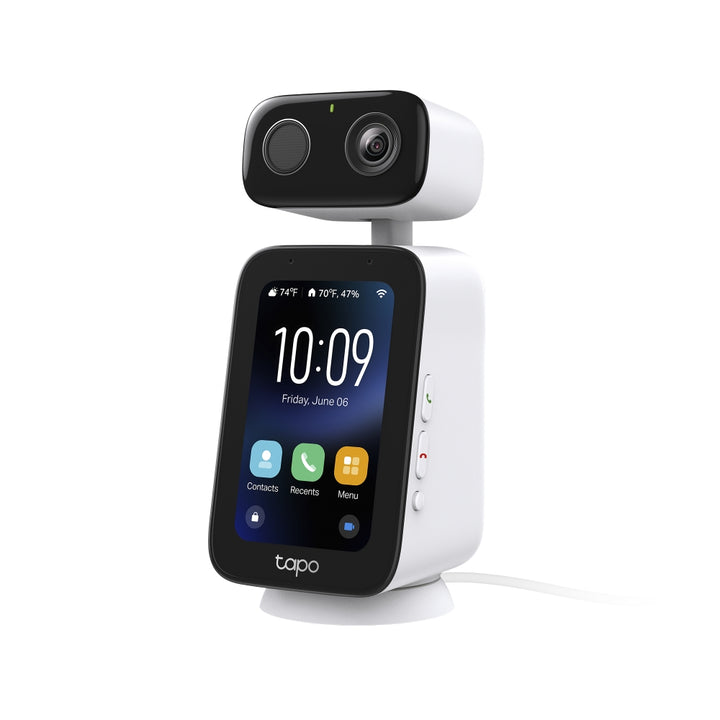


TP-Link Tapo C825 Indoor Video Call Camera
Email sales@sourceit.com.sg or use Request for Quotation below and our team will confirm the latest price, availability and lead time.
PRODUCT DESCRIPTION
TP-Link Tapo Indoor Video Call Camera (Tapo C825) - 3 Years Local Warranty
The Tapo C825 is TP-Link's indoor video call camera: a desktop Tapo camera with its own 3.97-inch touch screen, dedicated Answer and End buttons that can be set as Quick Call keys, a physical Privacy Mode button, dual microphones, a speaker, IR night imaging and a microSD slot, set up and managed in the Tapo app.
Video Calling on a 3.97-inch Touch Screen
TP-Link's setup guide describes the 3.97-inch touch screen as being "for video calling and easy access to screen features", with a lens, dual microphones and a speaker for two-way conversation.
One-Press Answer, End and Quick Call
Pill-shaped Answer and End buttons on the right side pick up or reject and end calls, and either can be configured as a Quick Call button for an assigned contact, so a call can be started with a single press.
Privacy Mode at the Press of a Button
A round Privacy button turns Privacy Mode on or off when you are not on a call. With Privacy Mode on, TP-Link states that streaming and recording functions are disabled.
Tapo App Setup with microSD Storage
Plug in the USB Type-C power adapter, wait about 30 seconds, then add the camera in the Tapo app. A microSD slot on the base provides local storage, and an IR LED supports night viewing.
Ideal For
Homes that want a simple desk or shelf device for video calls with family members, alongside the convenience of a Tapo indoor camera, with a hardware privacy control. Supplied by SourceIT with local Singapore warranty and GST invoice.
Tapo C825 Datasheet — Technical Specifications
General
| Model | Tapo C825 |
| Official Product Name | Tapo C825 Indoor Video Call Camera |
| Brand | TP-Link Tapo |
| Hardware Version | V1 |
| Warranty | 3 Years Local Warranty (Singapore) |
Display & Interface
| Screen | 3.97-inch touch screen (Setup Guide); 4-inch touchscreen (TP-Link France product page) |
| Buttons | Answer Button (configurable as Quick Call); End Button (configurable as Quick Call); Privacy Button; Reset Button |
| Reset Behaviour | 5-second press resets Wi-Fi settings; 10-second press performs factory reset |
| Indicators | System LED |
| Storage Slot | microSD card slot (on the bottom) |
| Power Port | USB Type-C (back of base) |
TP-Link's Setup Guide gives the screen as 3.97 inches, while TP-Link's France product page describes it as a 4-inch touchscreen; both figures are reproduced as published.
Camera & Audio
| Video Resolution | 2K |
| Camera | Camera lens with IR LED for night vision |
| Night Vision | Infrared night vision |
| Pan & Tilt | Pan and tilt; follows you during hands-free video calls |
| Smart Detection | Motion, person and animal detection |
| Privacy | Privacy Mode physically turns the lens away |
| Microphones | Dual microphones |
| Speaker | Built-in speaker |
| Calling | Hands-free video calls |
Network
| Wi-Fi | Dual-band, 2.4 GHz and 5 GHz |
TP-Link notes that incoming and outgoing calls require a Wi-Fi connection.
Storage
| Local Storage | microSD card, up to 512 GB* |
| Cloud Storage | Tapo Care (optional) |
*microSD card sold separately.
Power
| Power Supply | Power adapter with 3 m (9.8 ft) USB-C cable (included) |
Environment
| Operating Temperature | 0°C to 40°C (32°F to 104°F) |
| Base | Round base with silicone non-slip mat |
TP-Link has not published a Singapore product page for the Tapo C825, so the specification above is taken from TP-Link's France product page, together with TP-Link's official Tapo C825 V1 Setup Guide. Neither source publishes a full specification table: the exact pixel resolution, field of view, pan/tilt range, night-vision distance, Wi-Fi standard, power adapter rating, dimensions, weight, humidity range or certifications are not published, so those figures are not listed here. Ask us and we will confirm any specification before you order.
Compatibility & Software Support
| Management App | Tapo app (App Store or Google Play) |
| Setup | Log in to the Tapo app, power on the camera, tap + and select the camera model |
| Calling | Video calls via the touch screen; Quick Call to assigned contacts |
| Privacy | Privacy Mode disables streaming and recording |
| Voice Assistants | Amazon Alexa, Google Assistant |
| Cloud Service | Tapo Care (optional) |
TP-Link has not published minimum iOS / Android versions for the C825.
Package Contents & Ordering Information
Package Contents
| In the Box | Tapo C825 camera x1; 3 m (9.8 ft) USB-C cable x1; power adapter x1; Quick Start Guide |
Ordering Information
| Model | Tapo C825 |
| SKU | Tapo C825 |
| Warranty | 3 Years Local Warranty (Singapore) |
Datasheet & Downloads
Frequently Asked Questions — Tapo C825
Is the C825 a security camera?
TP-Link calls it an indoor video call camera. It is a Tapo camera with a touch screen and call buttons, designed for video calling as well as indoor viewing in the Tapo app, with 2K video and motion, person and animal detection.
How do I stop it streaming or recording?
Press the Privacy button when not on a call. TP-Link states Privacy Mode disables streaming and recording.
How do I reset it?
Hold the Reset button for 5 seconds to reset Wi-Fi, or 10 seconds for a factory reset.
What warranty does SourceIT provide?
Three years local Singapore warranty, under TP-Link's published replacement warranty terms, with a GST invoice.
Can SourceIT quote this for an office or a project?
Yes. Send us the quantity and we will quote with local warranty, delivery and support.


