
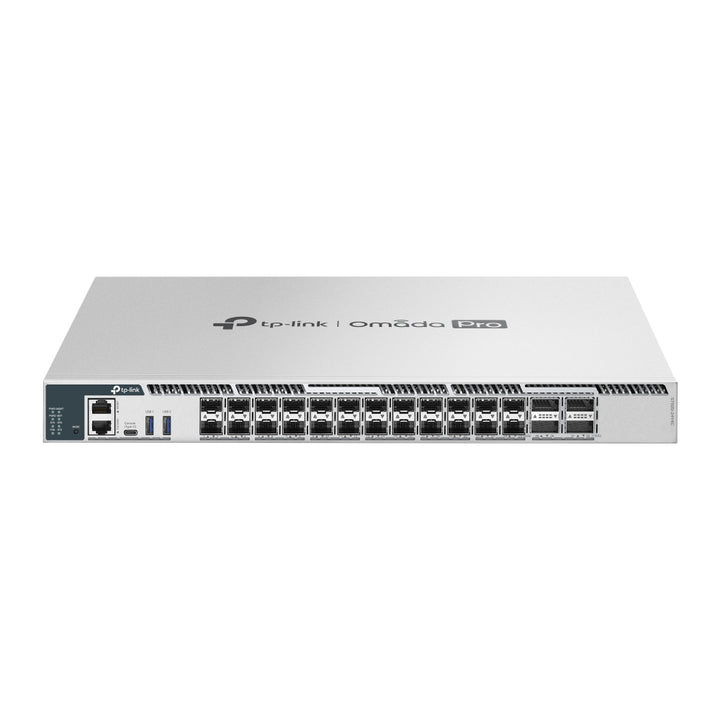


TP-Link Omada Pro 24-Port 25G Stackable L3 Managed Aggregation/Core Switch with 4 100G Slots
Email sales@sourceit.com.sg or use Request for Quotation below and our team will confirm the latest price, availability and lead time.
PRODUCT DESCRIPTION
TP-Link Omada Pro 24-Port 25G Stackable L3 Managed Aggregation/Core Switch with 4 100G Slots (S7500-24Y4C) - 5 Years Local Warranty
The S7500-24Y4C packs 24× 1/10/25G SFP28 slots and 4× 40/100G QSFP28 slots into 1U, with 2,000 Gbps of switching capacity per unit. It is sized as a 25G aggregation switch for larger campuses or as the collapsed core of a mid-size site, running OSPF, BGP, IS-IS, VRRP and PIM routing.
24× 25G SFP28 Plus 4× 100G QSFP28
Twenty-four 1/10/25G SFP28 slots aggregate 10G or 25G links from access stacks and servers, and four 40/100G QSFP28 slots take traffic to the core or form a stack. Switching capacity is 2,000 Gbps per unit and packet forwarding 810 Mpps, with an 8 MB packet buffer and a 128 K MAC address table.
Stack Up to 12 Units at 800 Gbps
All four QSFP28 uplinks can be used as stacking ports for up to 800 Gbps of stack bandwidth, and up to 12 units stack in standalone mode. TP-Link notes that stacking runs only over 100G DAC or 100G QSFP28 modules rather than 40G DAC or 40G QSFP.
Layer 3 Routing for Aggregation or Collapsed Core
OSPFv2/v3, BGP, IS-IS with IPv6 and BFD, RIP and RIPng, PBR and uRPF are supported, with 102,400 IPv4 network routes (shared with IPv6), 15,300 host routes and 24,576 dynamic ARP entries. ECMP spreads traffic across up to 32 next hops per destination, VRRP v2/v3 runs up to 64 instances, and PIM-SM/DM/SSM routes multicast between subnets.
Hot-Swap Power and Fans
Two field-replaceable, hot-swappable power supply bays and four hot-swappable fans keep the switch serviceable in place. It ships with one PSM550-AC; the redundant second module is a separate purchase. ERPS, BFD and dual image/dual configuration add resilience at the network and firmware level.
Security, ISP-Grade Tools and Visibility
802.1X with MAB and guest VLAN, RADSEC, TACACS+, dynamic ARP inspection, IPv4/IPv6 source guard, port security, storm control and Secure Boot protect the network. TP-Link also lists 802.3ah Ethernet Link OAM, L2PT, DLDP, DDM optical monitoring and sFlow, plus 64 WRED profiles for congestion handling.
Centralized Management Through Omada Pro
TP-Link positions the S7500-24Y4C for its Omada Pro platform: the switch is managed centrally from the Omada Pro Cloud-Based, Hardware or Software Controller, with the Omada App and cloud access working through that controller. Zero-Touch Provisioning lets a replacement or new unit be pre-configured in the Omada Pro Cloud-Based Controller and pull its configuration on first boot, so a site does not need an engineer on hand with a console cable. Where a controller is not wanted, the switch is fully manageable on its own through the web GUI, CLI (console or telnet) and SNMPv1/v2c/v3.
Ideal For
Campuses moving their aggregation layer to 25G, mid-size sites that want a compact 25G collapsed core with 100G uplinks, and server rooms needing a routed 25G top-of-rack switch. Supplied by SourceIT with local Singapore warranty, GST invoice and project pricing on request.
S7500-24Y4C Datasheet — Technical Specifications
General
| Model | S7500-24Y4C |
| Official Product Name | Omada Pro 24-Port 25G Stackable L3 Managed Aggregation/Core Switch with 4 100G Slots |
| Brand | TP-Link Omada |
| Product Line | S7500 Series campus switch (Omada Pro managed) |
| Warranty | 5 Years Local Warranty (Singapore) |
Hardware Features
| Interface | 24× 1/10/25G SFP28 Slots; 4× 40/100G QSFP28 Slots; 2× USB 3.0 Ports; 1× RJ45 Console Port; 1× USB Type-C Console Port; 1× RJ45 Management Port |
| Fan Quantity | Four Field-replaceable and Hot-swappable Fans |
| Power Supply | Two Field-replaceable and Hot-swappable Power Supply Modules* (100–240 VAC, 50/60 Hz) |
| Dimensions (W x D x H) | 17.3 × 15.0 × 1.7 in (440 × 380 × 44 mm) |
| Mounting | Rackmountable |
| Max. Power Consumption | 137.63 W (220 V/50 Hz) |
| Max. Heat Dissipation | 469.6 BTU/hr (220 V/50 Hz) |
Performance
| Packet Buffer Memory | 8 MB |
| Jumbo Frame | 9 KB |
| Stacking | Stacking Number: 12 (standalone mode); Stacking Port: 100G QSFP28 Slot (all uplink ports can be used as stacking ports)**; Stack Bandwidth: Up to 800 Gbps (4 stacking ports) |
| Switching Capacity | 2000 Gbps per Unit |
| Packet Forwarding Rate | 810 Mpps |
| MAC Address Table | 128 K |
Layer 3 Features
| L3 Interface | 256 (IPv4, IPv6) |
| Static Route | 2,048 IPv4, 1,024 IPv6 |
| Host Route Table | Max 15,300 entries |
| IPv4 Network Router Entries | 102,400 (shared with IPv6 Network Router entries) |
| IPv6 Network Router Entries | 51,200 (shared with IPv4 Network Router entries) |
| ECMP | 256 entries, max 32 ECMP Nexthops per Destination |
| Static ARP | 1,024 static entries |
| Dynamic ARP / ND | 24,576 dynamic entries / 24,576 |
| DHCP Server | Max 64 IP pool, Max 8,000 IP entries |
| DHCPv4/v6 Relay | Yes |
| VRRP | Version v2/v3, Max 64 instances, Max 32 Virtual IP per instance |
| OSPFv2 | OSPF Instance: 16; Network Entries: 256; Area Entries for Stub or NSSA: 16 per instance; Area Range Entries: 16 per instance; Virtual-link Entries: 16 per instance |
| OSPFv3 | Area Entries for Stub or NSSA: 16 per instance; Area Range Entries: 16 per instance |
| RIPv1/v2 / RIPng | Network Entries: 256; Redistribute Entries: 20 / Yes |
| IS-IS | IS-IS Interfaces: 128; IS-IS Area Numbers: 3; Max Redistribute Configs: 10; IS-IS IPv6; IS-IS BFD |
| BGP | Max 20 redistribute configs |
| PIM-SM/PIM-DM/PIM-SSM | IP Multicast Route Entries: 1K; PIM Neighbors: 256; Max PIM Interfaces: 128 |
| IGMP | Version v1/v2/v3, Max 2,048 multicast groups |
| BFD | 16 template numbers, 8 session numbers |
| PBR / uRPF | Yes / Yes |
Layer 2, VLAN & Quality of Service
| L2 / L2+ Features | Link Aggregation; Spanning Tree Protocol; Port-based and VLAN-based Loopback Detection; 802.3x Flow Control; ERPS; Mirroring; RSPAN; MAC Address Table |
| Multicast | IGMP Snooping; MLD Snooping; Multicast VLAN Registration (MVR); Max Multicast Table: 4K (IPv4, IPv6); Fast Leave; Static Multicast Groups; Multicast Filtering; IGMP Snooping Authentication |
| Max VLAN Group | Max 4K VLAN Group (802.1q VLAN) |
| VLAN Types | 802.1Q Tagged VLAN; Multicast VLAN; Management VLAN; GVRP; Voice VLAN; Private VLAN |
| MAC VLAN Entries | 200 |
| VLAN VPN (QinQ) | Max 256 entries |
| Protocol VLAN | Protocol Template 16, Protocol VLAN 12 entries |
| Quality of Service | 8 Queues of Priority; Port Priority; IEEE 802.1p Priority; DSCP Priority; Queue Min-Bandwidth; Schedule Mode (SP, WRR, SP+WRR); Rate Limit; Storm Control; Voice VLAN; User-Defined OUI; Smoother Performance; QoS remark (802.1P Remark, DSCP Remark); WRED profile: 64 |
| Advanced / ISP Features | Automatic Device Discovery‡; Batch Configuration‡; Batch Firmware Upgrading‡; Intelligent Network Monitoring‡; Abnormal Event Warnings‡; Unified Configuration‡; Reboot Schedule‡; 802.3ah Ethernet Link OAM; L2PT (Layer 2 Protocol Tunneling); Device Link Detect Protocol (DLDP); DDM; sFlow |
Security
| Port Isolation / CPU-Defend | Yes / Yes |
| ARP Inspection | Dynamic ARP Inspection |
| DoS Defend / DHCP Filter | Yes / Yes |
| IP-MAC-Port Binding | 1,024 Entries; DHCP Snooping; ARP Inspection; IPv4 Source Guard |
| IPv6-MAC-Port Binding | 1,024 Entries; DHCPv6 Snooping; ND Detection; ND Snooping; IPv6 Source Guard |
| Static/Dynamic Port Security | Up to 64 MAC addresses per port |
| Broadcast/Multicast/Unknown-unicast Storm Control | kbps/ratio control mode |
| 802.1X | Port base authentication; Mac base authentication; VLAN Assignment; MAB; Guest VLAN; RADIUS authentication and accountability support |
| AAA | TACACS+ |
| Secure Management | HTTPS with SSLv3/TLS 1.2; SSHv2 |
| IP/Port/MAC-based Access Control | Yes |
| Secure Boot / RADSEC | Yes / Yes |
Management
| Omada App | Yes, through Omada Pro Controller |
| Centralized Management | Omada Pro Cloud-Based Controller, Omada Pro Hardware Controller, Omada Pro Software Controller |
| Cloud Access | Yes, through Omada Pro Controller |
| Zero-Touch Provisioning | Yes. Requiring the use of Omada Pro Cloud-Based Controller. |
| Management Features | Web-based GUI; Command Line Interface (CLI) through console port, telnet; SNMPv1/v2c/v3 (Trap/Inform, RMON 1, 2, 3, 9 groups); SDM Template; DHCP/BOOTP Client; 802.1ab LLDP/LLDP-MED; DHCP Auto Install; Dual Image, Dual Configuration; CPU Monitoring; Password Recovery; SNTP; System Log |
Environment
| Operating Temperature | -5 °C to 50 °C (23 °F to 122 °F) @ 300 meters; -5 °C to 45 °C (23 °F to 113 °F) @ 2,000 meters; -5 °C to 40 °C (23 °F to 104 °F) @ 3,000 meters |
| Storage Temperature | -40 °C to 70 °C (-40 °F to 158 °F) |
| Operating Humidity | 10–90% RH non-condensing |
| Storage Humidity | 5–90% RH non-condensing |
TP-Link Footnotes
*Ships with one PSM550-AC module by default, and another field-replaceable redundant power supply requires a separate purchase.
‡These functions require the use of the Omada Pro SDN Controller. Zero-Touch Provisioning requires the use of the Omada Pro Cloud-Based Controller.
△Supports 12 units of physical stacking in standalone mode.
**The 100G QSFP28 slots support stacking only through 100G DAC/100G QSFP28 modules rather than 40G DAC/40G QSFP modules.
TP-Link publishes the maximum power consumption and heat dissipation for this model at 220 V/50 Hz only; no 110 V figure is published.
Compatibility & Software Support
The S7500-24Y4C is an Omada Pro switch. TP-Link lists the Omada Pro controllers — not the standard Omada SDN controller — as its centralized-management platform, so plan the controller with the switch.
| Omada Pro SDN Controller | Supported — centralized management through the Omada Pro Cloud-Based Controller, Omada Pro Hardware Controller or Omada Pro Software Controller |
| Omada App | Supported — through an Omada Pro Controller |
| Cloud Access | Supported — through an Omada Pro Controller |
| Zero-Touch Provisioning | Supported — requires the Omada Pro Cloud-Based Controller |
| Standalone Management | Supported — web-based GUI, CLI (console port, telnet) and SNMPv1/v2c/v3 |
| Stacking Mode Limit | Up to 12 units in standalone mode |
| Transceivers & Cabling | 1/10/25G SFP28 slots; 40/100G QSFP28 slots — stacking only through 100G DAC/100G QSFP28 modules rather than 40G DAC/40G QSFP modules. |
TP-Link's note: these functions require the use of the Omada Pro SDN Controller. Zero-Touch Provisioning requires the use of the Omada Pro Cloud-Based Controller.
Package Contents & Ordering Information
What’s in the Box
| Package Contents | S7500-24Y4C Switch, Power Cord, RJ45 Console Cable, Quick Installation Guide, Rackmount Kit, Rubber Feet |
Ordering Information
| Model | S7500-24Y4C |
| Recommended Retail Price (incl. GST) | S$20,999.00 |
| Power Supply Shipped | 1× PSM550-AC (550 W AC Power Supply Module), installed by default |
| Redundant Power Supply | PSM550-AC — second module sold separately |
Datasheet & Downloads
Frequently Asked Questions — S7500-24Y4C
Does the S7500-24Y4C need an Omada controller?
No. The S7500-24Y4C can be run standalone through its web-based GUI or the CLI (console port or telnet). TP-Link lists the Omada Pro Cloud-Based, Hardware and Software Controllers for centralized management; the Omada App and cloud access work through an Omada Pro Controller, and Zero-Touch Provisioning requires the Omada Pro Cloud-Based Controller. Tell SourceIT which controller your site already runs and we will confirm the fit before you order.
Does the S7500-24Y4C ship with redundant power supplies?
Not as standard. The S7500-24Y4C has two field-replaceable, hot-swappable power supply bays (100–240 VAC, 50/60 Hz), but TP-Link ships it with one PSM550-AC module by default. The second, redundant module is a separate purchase — add a PSM550-AC to the order if the switch must keep running through a power-supply failure. SourceIT can supply it with the switch.
What warranty does SourceIT provide?
Five years local Singapore warranty. Every S7500-24Y4C sold by SourceIT comes with a GST invoice.
Is stock held locally?
Campus-class switches such as the S7500-24Y4C are typically brought in on indent rather than held on the shelf. Ask SourceIT for the current lead time before committing to a project date.
Can SourceIT quote this for a project or tender?
Yes. Send the bill of materials and we will quote the whole build — core and aggregation switching, access switches, power supply modules, transceivers and DAC cables — with local warranty and support.
Is this model available for project orders?
Yes. TP-Link supplies this model for project deployments; contact SourceIT with your bill of materials for pricing and lead time.


