


TP-Link Omada Hardware Controller for 500 Devices and 15,000 Clients
Email sales@sourceit.com.sg or use Request for Quotation below and our team will confirm the latest price, availability and lead time.
PRODUCT DESCRIPTION
TP-Link Omada Hardware Controller (OC300) - 5 Years Local Warranty
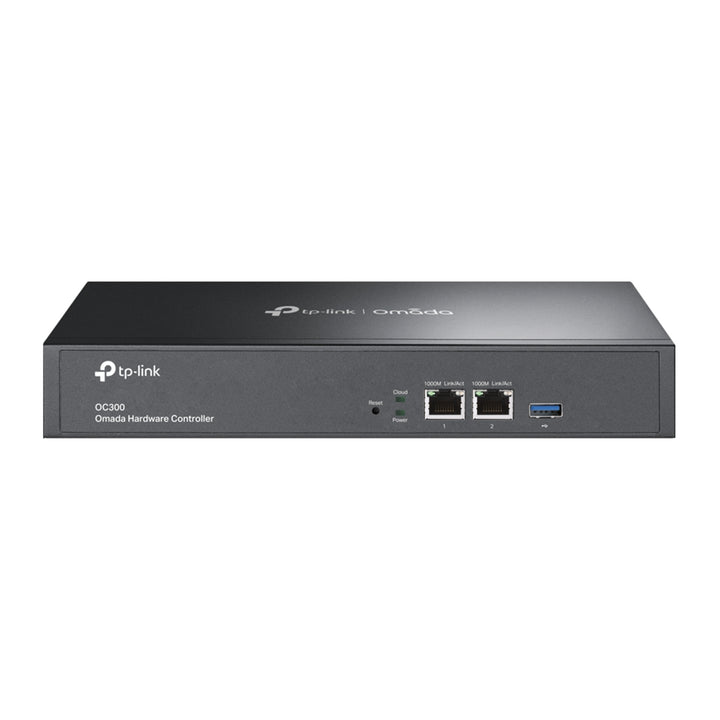
The OC300 is the mid-range Omada hardware controller: a 1U rack appliance with two Gigabit Ethernet ports and a USB 3.0 port, managing up to 500 Omada access points, switches and routers with up to 15,000 clients. It is the controller for a multi-floor office, a school or a hotel — well past what the OC200 covers, without the multi-tenant scale of the OC400.
Five Hundred Devices and Fifteen Thousand Clients
The OC300 manages up to 500 Omada access points, JetStream switches and SafeStream routers with up to 15,000 clients. In practice that covers a large single campus or several branch sites under one roof of management — five times the access point capacity of the OC200 and fifteen times its client count. Multi-site management keeps each location's configuration and reporting separate inside the one appliance.
One Appliance Instead of a Server and a Licence
Running the Omada Software Controller means providing a server, keeping its operating system patched and accepting that the network's management plane depends on that machine. The OC300 replaces all of it with a dedicated 1U appliance that boots into the controller and nothing else, with no per-device licence fee for the devices it manages and no cloud subscription required. For a Singapore business without a virtualisation estate that is usually the cheaper and simpler answer.
Layer 3 and Multi-Site Management
L3 management means the controller can adopt and manage Omada devices across routed subnets rather than only on its own broadcast domain — essential on a segmented network where access points sit in their own VLAN. Combined with multi-site management, one OC300 can hold several sites, each with its own device set, SSIDs, portal configuration and reporting, administered from a single login.
Batch Configuration and Batch Firmware Upgrades
Management features cover automatic device discovery, batch configuration, batch firmware upgrading, intelligent network monitoring, abnormal event warnings, unified configuration, reboot schedules and captive portal configuration. Batch operations are the reason a controller pays for itself: a firmware update or an SSID change applies across every adopted device in one action rather than being repeated per unit.
Cloud Access and the Omada App
The OC300 supports Omada cloud access and the Omada app, so an administrator can check a site, adopt a newly delivered access point or push a configuration change from a phone without a VPN back to the office. Because the controller is on premises, the configuration and client data stay on site while remote access runs through Omada's cloud layer.
Rack-Mountable, Fifty-Degree Rated
The unit measures 294 × 180 × 44 mm and ships with a rackmount kit, an Ethernet cable and a power cord. It runs on 100–240 V at 0.6 A and is rated to a 50 °C operating temperature — ten degrees above most of the Omada range, which matters in an unconditioned Singapore comms room where a rack can sit well above ambient.
Ideal For
Singapore businesses, schools, hotels and managed-service providers building on Omada, and IT teams that want a controller they can adopt, monitor and update centrally rather than box by box. Supplied by SourceIT with local Singapore warranty, GST invoice and project pricing on request.
OC300 Datasheet — Technical Specifications
General
| Model | OC300 |
| Official Product Name | Omada Hardware Controller |
| Brand | TP-Link Omada |
| Warranty | 5 Years Local Warranty (Singapore) |
Specifications
| Interface | 2× 10/100/1000 Mbps Ethernet Ports, 1× USB 3.0 Port |
| Centralized Management Capacity | Up to 500 Omada access points, JetStream switches and SafeStream routers; up to 15,000 clients |
| L3 Management | Yes |
| Multi-site Management | Yes |
| Omada App | Yes |
| Cloud Access | Yes |
| Management Features | Automatic device discovery, batch configuration, batch firmware upgrading, intelligent network monitoring, abnormal event warnings, unified configuration, reboot schedule, captive portal configuration |
| Power Supply | 100–240 V ~ 50/60 Hz, 0.6 A |
| Dimensions (W x D x H) | 11.6 × 7.1 × 1.7 in (294 × 180 × 44 mm) |
| Operating Temperature | 0 °C to 50 °C (32 °F to 122 °F) |
| Storage Temperature | -40 °C to 70 °C (-40 °F to 158 °F) |
| Operating Humidity | 10% to 90% RH non-condensing |
| Storage Humidity | 5% to 90% RH non-condensing |
| System Requirements | Windows 10/8/7/Vista/XP or macOS, NetWare, UNIX, Linux |
| Certification | CE, FCC, RoHS |
Compatibility & Software Support
The OC300 is part of the Omada ecosystem: gateways, switches and access points are managed together from one controller, under one set of policies, with one view of the network. Cloud and app features listed below require the device to be adopted into an Omada Controller.
| Omada SDN Controller | Supported — adopt and manage centrally from the Omada Software Controller, Hardware Controller or Cloud-Based Controller |
| Omada App | Supported — remote management from iOS and Android |
| Omada Cloud Access | Supported — no licence fee for cloud management |
| Standalone Mode | Supported — the device can also be configured on its own via its web interface |
Package Contents & Ordering Information
What’s in the Box
| Package Contents | Omada Hardware Controller OC300, Quick Installation Guide, Ethernet Cable, Power Cord, Rackmount Kit |
Ordering Information
| Model | OC300 |
| Brand | TP-Link Omada |
| Local Warranty | 5 Years (Singapore) |
Datasheet & Downloads
Frequently Asked Questions — OC300
Do I need an Omada Controller if I have this unit?
The OC300 is the controller. It is the appliance that adopts and manages your Omada access points, switches and gateways, so you do not run the Omada Software Controller on a server or pay for cloud management alongside it.
Should I buy the OC300 or the OC200?
It comes down to device and client count. The OC300 manages up to 500 Omada devices and 15,000 clients in a rack-mount chassis with a USB 3.0 port. The OC200 manages up to 100 access points, 20 switches and 10 routers with 1,000 clients, and is powered over PoE. For anything beyond a single floor or a few dozen access points, the OC300 is the safer specification.
What warranty does SourceIT provide?
Five years local Singapore warranty. Every OC300 sold by SourceIT comes with a GST invoice.
Is stock held locally?
SourceIT holds fast-moving Omada lines in Singapore. Anything not in local stock is brought in on indent — ask us for the current lead time before committing to a project date.
Can SourceIT quote this for a project or tender?
Yes. Send the bill of materials and we will quote the whole Omada build — controller, gateway, switching, access points and optics — with local warranty and support.
Product Video
We Also Recommend


