
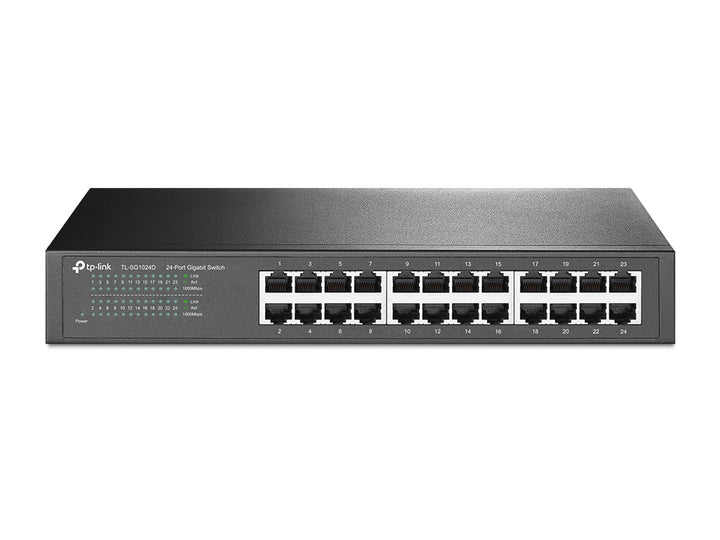


TP-Link Omada 24-Port Gigabit Desktop/Rackmount Switch
Email sales@sourceit.com.sg or use Request for Quotation below and our team will confirm the latest price, availability and lead time.
PRODUCT DESCRIPTION
TP-Link 24-Port Gigabit Desktop/Rackmount Switch (TL-SG1024D) - 5 Years Local Warranty
The TL-SG1024D packs twenty-four Gigabit ports into a 294 mm half-width chassis that works equally well on a shelf or in a rack. It adds hardware Loop Prevention and Isolation Mode to the unmanaged formula, so a mis-patched cable or a shared guest segment is handled by the switch itself — with no interface to log into and nothing to configure.
Twenty-Four Ports in a Half-Width Chassis
At 294 x 180 x 44 mm the TL-SG1024D is roughly two-thirds the width of a full rack switch, yet carries the same twenty-four Gigabit ports. Rackmount kits and rubber feet are both in the box, so the same unit can sit on a shelf in a small office or be screwed into a cabinet later. Every port auto-negotiates 10, 100 or 1000 Mbps with Auto MDI/MDIX, so cabling is never the problem.
Loop Prevention and Port Isolation in Hardware
Loop Prevention runs across ports 1 to 24 and shuts down a port that has been patched back into the switch — the single most common way a small network is brought down by accident. Isolation Mode on ports 1 to 22 separates client ports from one another, which suits guest, public or tenant segments. Both are hardware behaviours on an unmanaged switch: there is nothing to enable and nothing that can be misconfigured.
48 Gbps Fabric With an 8K MAC Table
The 48 Gbps switching capacity covers all twenty-four ports at full duplex simultaneously, and the 35.7 Mpps forwarding rate holds line rate at minimum frame size. An 8K MAC address table absorbs a floor of endpoints sitting behind access points and daisy-chained desk switches, and jumbo frames up to 10 KB help NAS, imaging and backup traffic. Store-and-forward switching discards corrupted frames at the switch rather than passing them on.
Fanless and Low Power
There is no fan in the TL-SG1024D. TP-Link publishes a maximum draw of 13.62 W at 220 V/50 Hz and 46.44 BTU/h of heat, so the switch needs no active cooling and makes no noise — a real consideration when twenty-four ports have to live in a cupboard or under a reception desk rather than in a server room. Green Technology trims power further on idle ports and short cable runs.
Ideal For
Singapore offices, retail sites and schools that need twenty-four unmanaged Gigabit ports where space is tight, plus built-in protection against patching loops. Supplied by SourceIT with local Singapore warranty, GST invoice and project pricing on request.
TL-SG1024D Datasheet — Technical Specifications
General
| Model | TL-SG1024D |
| Official Product Name | 24-Port Gigabit Desktop/Rackmount Switch |
| Brand | TP-Link Omada |
| Warranty | 5 Years Local Warranty (Singapore) |
Specifications
| Standards and Protocols | IEEE 802.3i, IEEE 802.3u, IEEE 802.3ab, IEEE 802.3x |
| Interface | 24× 10/100/1000 Mbps RJ45 Ports (Auto Negotiation / Auto MDI/MDIX) |
| Network Media | 10BASE-T: UTP category 3, 4, 5 cable (max 100 m); 100BASE-TX/1000BASE-T: UTP category 5, 5e or above (max 100 m) |
| Switching Capacity | 48 Gbps |
| Packet Forwarding Rate | 35.7 Mpps |
| MAC Address Table | 8K |
| Advanced Functions | Isolation Mode (Ports 1–22); Loop Prevention (Ports 1–24) |
| Jumbo Frame | 10 KB |
| Green Technology | Yes |
| Transfer Method | Store-and-Forward |
| Fan Quantity | Fanless |
| Physical Security Lock | No |
| Power Supply | 100–240 VAC, 50/60 Hz |
| Dimensions (W x D x H) | 11.6 × 7.1 × 1.7 in (294 × 180 × 44 mm) |
| Mounting | Rack Mountable |
| Max Power Consumption | 13.62 W (220 V/50 Hz) |
| Max Heat Dissipation | 46.44 BTU/h |
| Operating Temperature | 0 °C to 40 °C (32 °F to 104 °F) |
| Storage Temperature | -40 °C to 70 °C (-40 °F to 158 °F) |
| Operating Humidity | 10% to 90%, non-condensing |
| Storage Humidity | 5% to 90%, non-condensing |
| Certification | FCC, RoHS |
Reproduced exactly as TP-Link publishes it. Two power figures appear on the product page — a Power Consumption row reading "Maximum: 13.1 W (220 V/50 Hz)" and a Max Power Consumption row reading 13.62 W; the higher published figure is shown above. Note also that the certification row lists FCC and RoHS only, with no CE mark stated. TP-Link publishes no packet buffer, EAN or carton pack size figure for this model, so those rows are omitted.
Compatibility & Software Support
The TL-SG1024D is an unmanaged switch with no PoE. There is no web interface, command line or controller adoption.
| Omada SDN Controller | Not supported — this model cannot be adopted into an Omada Software, Hardware or Cloud-Based Controller |
| Omada App / Cloud Access | Not supported |
| Web Management | None — unmanaged, plug and play |
| Power over Ethernet | Not supported — this model does not supply PoE on any port |
| If You Need PoE or Central Management | Choose an Omada JetStream smart or L2+ managed switch, or an unmanaged PoE+ model such as the TL-SG1218MP — ask SourceIT for the equivalent |
Package Contents & Ordering Information
In the Box
| Package Contents | Switch, Power Cord, Installation Guide, Rackmount Kits, Rubber Feet |
Ordering Information
| Model | TL-SG1024D |
| Recommended Retail Price (incl. GST) | S$192.00 |
Datasheet & Downloads
Frequently Asked Questions — TL-SG1024D
How is it different from the TL-SG1024?
Both have twenty-four Gigabit ports. The TL-SG1024D is the 294 mm desktop/rackmount version and publishes Isolation Mode and Loop Prevention; the TL-SG1024 is the full-width 440 mm rack chassis. Tell us the cabinet and we will confirm the right one.
Does it supply PoE?
No. The TL-SG1024D has no PoE on any port.
Can it be adopted into an Omada Controller?
No. It is unmanaged and has no management interface of any kind.
What does Loop Prevention actually do?
If two ports are accidentally patched into the same segment, the switch detects the loop and disables the offending port instead of letting broadcast traffic saturate the network. It works across ports 1 to 24 with no configuration.
What warranty does SourceIT provide?
Five years local Singapore warranty, in line with TP-Link's replacement warranty policy for unmanaged Gigabit switches. Every unit sold by SourceIT comes with a GST invoice.


