
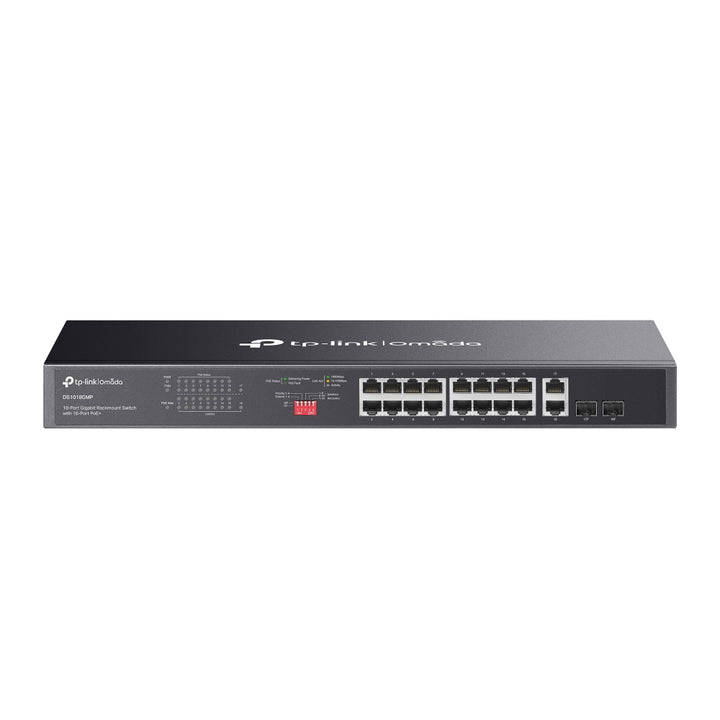


TP-Link Omada 18-Port Gigabit Unmanaged Rackmount Switch with 16-Port PoE+ 250W
Email sales@sourceit.com.sg or use Request for Quotation below and our team will confirm the latest price, availability and lead time.
PRODUCT DESCRIPTION
TP-Link Omada 18-Port Gigabit Unmanaged Rackmount Switch with 16-Port PoE+ (DS1018GMP) - 5 Years Local Warranty
The DS1018GMP powers sixteen devices and needs no configuration to do it. Sixteen Gigabit PoE+ ports share a 250 W budget, two combo Gigabit SFP slots handle the uplink in copper or fibre, and a set of hardware mode switches covers the jobs that usually force people onto a managed switch — long cable runs, port isolation and PoE auto-recovery.
Sixteen PoE+ Ports on a 250 W Budget
Ports 1 to 16 are 802.3at/802.3af compliant with a switch-wide PoE budget of 250 W. That comfortably covers a floor of Wi-Fi access points and IP cameras, or a mixed load of phones, door readers and signage. TP-Link footnotes that its PoE budget figures come from laboratory testing and that the real-world budget varies with the powered devices and the environment — so plan against your actual device list rather than the headline number.
Two Combo Gigabit SFP Slots for the Uplink
Alongside the sixteen PoE+ ports sit two combo Gigabit SFP slots, giving the choice of copper or fibre back to the core without a media converter. Switching capacity is 36 Gbps with an 8 K MAC address table, 4.1 Mbit packet buffer and 10 KB jumbo frame support, and the switch handles 802.1p/DSCP QoS and 802.3x flow control automatically.
Extend Mode Reaches 250 Metres on Ports 1-4
Extend Mode on ports 1 to 4 trades speed for distance, letting a camera or access point sit beyond the usual 100 metre Ethernet limit. TP-Link notes that ports in extend mode drop to 10 Mbps and that the actual distance varies with the powered device's consumption and the cable quality and type — for a fixed-function camera at the end of a long run that trade is usually worth making, and it removes the need for a mid-span injector.
Priority, Isolation and PoE Auto Recovery Without a Web UI
Priority Mode gives ports 1-4 precedence when the PoE budget is under pressure, so the important devices stay powered. Isolation Mode separates ports 1-8 from 9-16, which is a practical way to keep a camera VLAN's traffic away from everything else on an unmanaged switch. PoE Auto Recovery monitors powered devices on ports 1-16 and power-cycles one that stops responding — the single feature that saves the most site visits on a camera install.
Rackmount, Locked, and Built for a Cupboard
The 440 x 180 x 44 mm chassis is full-rack width and 1U high with a rackmount kit and rubber feet in the box, plus a physical security lock. Two fans keep it inside a 0-50 C operating range. Consumption is 19 W with nothing powered, rising to 293.34 W with a full 250 W PoE load — figures worth having when sizing the UPS.
Ideal For
Singapore offices, retail sites, warehouses and small buildings powering a floor of cameras and access points from one rack unit, where nobody wants to administer a managed switch. Supplied by SourceIT with local Singapore warranty, GST invoice and project pricing on request.
TP-Link lists the DS1018GMP as End of Sale. SourceIT still supplies it while stock lasts — ask us to confirm current availability and the recommended replacement before committing to a project date.
DS1018GMP Datasheet — Technical Specifications
General
| Model | DS1018GMP |
| Official Product Name | Omada 18-Port Gigabit Unmanaged Rackmount Switch with 16-Port PoE+ |
| Hardware Version | 1.0 |
| Brand | TP-Link Omada |
| Warranty | 5 Years Local Warranty (Singapore) |
| Lifecycle Status | End of Sale, as published by TP-Link |
Hardware
| Standards and Protocols | IEEE 802.3, 802.3u, 802.3ab, 802.3x, 802.3af, 802.3at, 802.3z, 802.1p |
| Interface | 16x 10/100/1000 Mbps PoE+ RJ45 Ports, 2x Combo Gigabit SFP Slots |
| Network Media | 10BASE-T, 100BASE-TX, 1000BASE-T over UTP Cat 5/6 and STP; multimode and single-mode fibre |
| PoE Standard | 802.3at/802.3af compliant |
| PoE Ports | Ports 1-16 |
| PoE Power Budget | 250 W. TP-Link footnote: "PoE budget calculations are based on laboratory testing. Actual PoE power budget is not guaranteed and will vary as a result of client limitations and environmental factors." |
| Fan Quantity | 2 |
| Physical Security Lock | Yes |
| Power Supply | 100-240 VAC, 50/60 Hz |
| Max. Power Consumption | 19 W (220 V/50 Hz, no PD connected); 293.34 W (220 V/50 Hz, with 250 W PD connected) |
| Max. Heat Dissipation | 64.79 BTU/h (no PD connected); 1000.29 BTU/h (with 250 W PD connected) |
| Dimensions (W x D x H) | 17.3 x 7.1 x 1.73 in (440 x 180 x 44 mm) |
| Mounting | Rack mountable |
Performance
| Switching Capacity | 36 Gbps |
| MAC Address Table | 8 K |
| Packet Buffer Memory | 4.1 Mbit |
| Jumbo Frame | 10 KB |
TP-Link's page prints the packet forwarding rate as "26.78 Mbps". The unit is wrong for a forwarding rate, which is measured in packets per second, so the row is omitted here rather than reproduced with an incorrect unit or silently corrected.
Advanced Features
| Extend Mode | Ports 1-4. TP-Link footnote: "The speed of the ports in extend mode will downgrade to 10 Mbps. The actual transmission distance may vary due to power consumption of PoE-powered devices or the cable quality and type." |
| Priority Mode | Ports 1-4 |
| Isolation Mode | Ports 1-8 / 9-16 |
| PoE Auto Recovery | Ports 1-16 |
| QoS | 802.1p/DSCP QoS |
| Flow Control | IEEE 802.3x |
Others
| Certification | CE, FCC, RoHS |
| Operating Temperature | 0-50 C (32-122 F) |
| Storage Temperature | -40-70 C (-40-158 F) |
| Operating Humidity | 10-90% RH non-condensing |
| Storage Humidity | 5-90% RH non-condensing |
Compatibility & Software Support
The DS1018GMP is an unmanaged switch. Its modes are set by hardware switches on the chassis, not software — there is no web interface, no CLI and no SNMP. TP-Link states plainly in its own documentation that Omada Unmanaged Switches do not support Omada SDN central management.
| Omada SDN Controller | Not supported — the DS1018GMP cannot be adopted into an Omada Software, Hardware or Cloud-Based Controller |
| Omada App | Not supported |
| Omada Cloud Access | Not supported |
| Web / CLI Management | None — modes are selected with physical switches on the unit |
| Powers Omada Devices | Yes — the PoE+ ports will power Omada access points and PoE cameras normally; those devices remain managed by their own controller |
| SFP Slots | Two combo Gigabit SFP slots. Send us your reach and fibre type and we will match the optics to the port. |
If central management of the switch itself is required, the Omada managed PoE+ range — SG3428XMP and above — is the alternative.
Package Contents & Ordering Information
What's in the Box
| Package Contents | DS1018GMP, Installation Guide, Power Cord, Rackmount Kit, Rubber Feet |
Ordering Information
| Model | DS1018GMP |
| Price (incl. GST) | S$349.00 |
| EAN / Carton Pack Size | Not published by TP-Link for this model |
Datasheet & Downloads
Frequently Asked Questions — DS1018GMP
Is it 16 ports or 18?
Eighteen in total: sixteen Gigabit PoE+ RJ45 ports plus two combo Gigabit SFP slots. TP-Link's official product name is "Omada 18-Port Gigabit Unmanaged Rackmount Switch with 16-Port PoE+".
What does Extend Mode actually do?
It pushes ports 1-4 beyond the normal 100 metre Ethernet limit at a reduced speed. TP-Link states the ports downgrade to 10 Mbps in extend mode and that the achievable distance varies with the powered device's consumption and the cable quality and type. It suits a fixed camera at the end of a long run.
Can it be managed from an Omada Controller?
No. It is unmanaged, and TP-Link states that Omada Unmanaged Switches do not support Omada SDN central management. The access points and cameras it powers remain managed themselves.
What warranty does SourceIT provide?
Five years local Singapore warranty. Every DS1018GMP sold by SourceIT comes with a GST invoice.
Is stock held locally?
TP-Link has marked the DS1018GMP End of Sale, so availability is limited. Ask SourceIT to confirm current stock and the recommended replacement before committing to a project date.


