
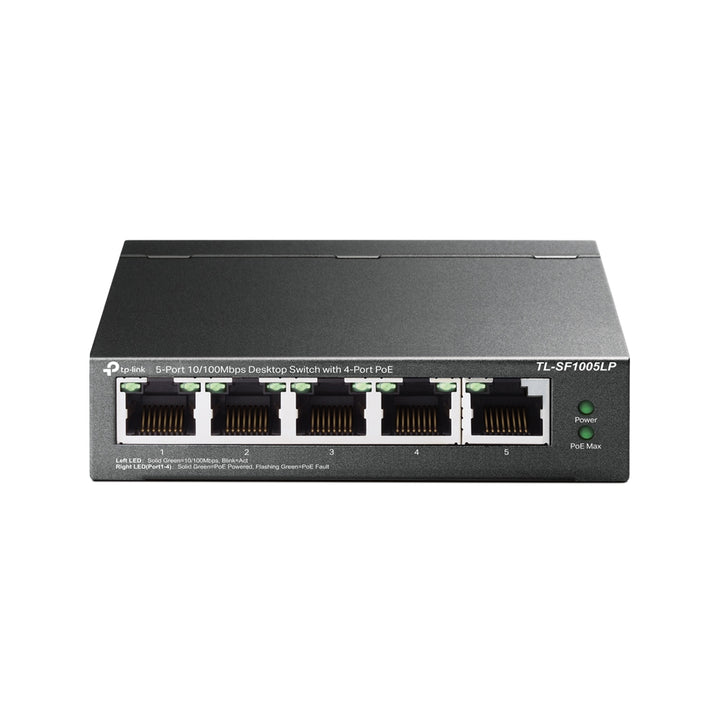


TP-Link Omada 5-Port 10/100Mbps Desktop PoE Switch with 4-Port PoE and 41W Budget
Email sales@sourceit.com.sg or use Request for Quotation below and our team will confirm the latest price, availability and lead time.
PRODUCT DESCRIPTION
TP-Link 5-Port 10/100Mbps Desktop PoE Switch with 4-Port PoE (TL-SF1005LP) - 5 Years Local Warranty
The TL-SF1005LP is a plug-and-play Fast Ethernet PoE switch: four 802.3af PoE ports sharing a 41 W budget, one uplink, and two front-panel buttons that trade speed for reach or for priority. There is nothing to configure — no web interface, no controller, no setup. It powers a camera cluster or a couple of IP phones from a single mains outlet.
Four 802.3af PoE Ports on a 41 W Budget
Ports 1 to 4 deliver 802.3af PoE with 41 W of supply across them, and the switch is compatible with 802.3af and 802.3at compliant powered devices. Port 5 is the uplink. Forty-one watts is the right size for a handful of Fast Ethernet cameras, an IP phone or two, or a door entry panel — the devices that do not need Gigabit and do not justify a managed switch. TP-Link notes that its PoE budget figures come from laboratory testing and that real-world power varies with the connected devices and the environment.
Extend Mode: 250 Metres Instead of 100
A front-panel Extend Mode button covers ports 1 to 4 and pushes PoE well beyond the usual 100 m cable limit. TP-Link is explicit about the cost: ports in extend mode downgrade to 10 Mbps, and actual distance varies with the power draw of the connected device and with cable quality and type. For a Fast Ethernet camera at the far end of a car park or a compound, 10 Mbps is ample and the extra reach saves an entire cabling run.
Priority Mode for the Ports That Matter
A second button sets Priority Mode on ports 1 and 2, giving traffic on those ports precedence over the rest. On a switch with no management interface that is a practical way to protect a camera stream or a phone from being starved by a bulk transfer elsewhere — a single button press rather than a QoS policy. MAC address auto-learning and auto-ageing, 802.3x flow control in full duplex and backpressure in half duplex all operate without configuration.
Fanless, Lockable, Built to Be Forgotten
The switch is fanless and therefore silent, with a physical security lock slot for exposed locations. It draws 1.9 W with no powered device attached and 47 W with a full 41 W load, from an external 53.5 V DC / 0.81 A adapter, and dissipates 6.48 BTU/h idle or 160.27 BTU/h loaded. At 100 x 98 x 25 mm it fits behind a monitor, above a ceiling tile or in a shallow cabinet. Certification is FCC, CE and RoHS.
Ideal For
Singapore shops, clinics, small offices and site huts running a few Fast Ethernet cameras, IP phones or door devices, where the value is in powering them over the existing cable rather than in managing the switch. Supplied by SourceIT with local Singapore warranty, GST invoice and project pricing on request.
TL-SF1005LP Datasheet — Technical Specifications
General
| Model | TL-SF1005LP |
| Official Product Name | 5-Port 10/100Mbps Desktop PoE Switch with 4-Port PoE |
| Brand | TP-Link |
| Warranty | 5 Years Local Warranty (Singapore) |
Specifications
| Interface | 5× 10/100 Mbps RJ45 Ports (Ports 1-4 support 802.3af PoE); Auto-Negotiation; Auto MDI/MDIX |
| PoE Standard | 802.3af compliant |
| PoE Ports | Ports 1-4 |
| PoE Power Supply | 41 W |
| Switching Capacity | 1 Gbps |
| Packet Forwarding Rate | 0.744 Mpps |
| MAC Address Table | 2K |
| Jumbo Frame | 2 KB |
| Transmission Method | Store-And-Forward |
| Network Media | 10BASE-T: UTP category 3, 4, 5 cable (max 100 m), EIA/TIA-568 100Ω STP (max 100 m); 100BASE-TX: UTP category 5, 5e cable (max 100 m), EIA/TIA-568 100Ω STP (max 100 m) |
| Dimensions (W x D x H) | 3.9 × 3.9 × 1.0 in (100 × 98 × 25 mm) |
| Fan | Fanless |
| Physical Security Lock | Supported |
| Power Supply | External Power Adapter (Output: 53.5 V DC / 0.81 A) |
| Max. Power Consumption | 1.9 W (220 V / 50 Hz, no PD connected); 47 W (220 V / 50 Hz, with 41 W PD connected) |
| Max. Heat Dissipation | 6.48 BTU/h (no PD connected); 160.27 BTU/h (with 41 W PD connected) |
| Advanced Features | Compatible with IEEE 802.3af/at compliant PDs; Extend Mode button (Ports 1-4); Priority Mode button (Ports 1-2); MAC address auto-learning and auto-ageing; IEEE 802.3x flow control for full-duplex mode and backpressure for half-duplex mode |
| Certification | FCC, CE, RoHS |
| Operating Temperature | 0 °C to 40 °C (32 °F to 104 °F) |
| Storage Temperature | -40 °C to 70 °C (-40 °F to 158 °F) |
| Operating Humidity | 10% to 90% RH, non-condensing |
| Storage Humidity | 5% to 90% RH, non-condensing |
TP-Link's published notes, reproduced
| PoE budget | "PoE budget calculations are based on laboratory testing. Actual PoE power budget is not guaranteed and will vary as a result of client limitations and environmental factors." |
| Extend Mode | "The speed of the ports in extend mode will downgrade to 10 Mbps. The actual transmission distance may vary due to power consumption of PoE-powered devices or the cable quality and type." |
TP-Link publishes no MTBF figure and no hardware version on this model's product page, so neither is claimed here.
Compatibility & Software Support
The TL-SF1005LP is an unmanaged switch. It has no web interface, no CLI and no configurable firmware, and it cannot be adopted into an Omada Software Controller, Hardware Controller or Cloud-Based Controller. It will not appear in the Omada console and cannot be configured or monitored from it. It can, however, power Omada access points and other 802.3af devices perfectly well within its budget.
| Omada SDN Controller | Not supported — the switch cannot be adopted or centrally managed |
| Omada App / Cloud Access | Not supported |
| Management Interface | None — plug and play, with Extend Mode and Priority Mode set by front-panel button |
| Powering Omada Access Points | Supported for any 802.3af compliant AP within the 41 W budget; check the AP's power class first |
| Powered Devices | Compatible with IEEE 802.3af/at compliant PDs, within the 41 W total budget |
If you need the switch itself visible and configurable in Omada, the ES205GP is the Easy Managed alternative — Gigabit, 802.3at PoE+ and a 65 W budget, adoptable into an Omada Controller.
Package Contents & Ordering Information
Package Contents
| Included | TL-SF1005LP; Power Adapter; Installation Guide |
| Not Included | Ethernet patch leads; security lock |
Ordering Information
| Model | TL-SF1005LP |
| Managed Alternative | ES205GP — Gigabit, 802.3at PoE+, 65 W, Omada-adoptable |
| Supplied By | SourceIT Pte Ltd, Singapore |
TP-Link publishes no EAN and no carton pack size for this model, so neither is stated here. Ask SourceIT for current pricing and carton quantities.
Datasheet & Downloads
Frequently Asked Questions — TL-SF1005LP
Can this switch be managed from an Omada Controller?
No. It is an unmanaged switch with no web interface and no controller support, so it will not appear in the Omada console. It can still power Omada access points within its 41 W budget. If you need the switch itself managed, look at the ES205GP.
Is it Gigabit?
No. All five ports are 10/100 Mbps Fast Ethernet. That is usually fine for Fast Ethernet cameras and IP phones, but not for anything that needs Gigabit throughput.
What does Extend Mode actually do?
It pushes PoE beyond the normal 100 m limit on ports 1 to 4. TP-Link states that ports in extend mode downgrade to 10 Mbps and that actual distance varies with the powered device's consumption and with cable quality and type.
Will the 41 W run four cameras?
Usually, for Fast Ethernet cameras — but it depends on each camera's power class. Send us the model numbers and we will confirm the budget properly rather than assume.
What warranty does SourceIT provide?
Five years local Singapore warranty, under TP-Link's replacement warranty tier for unmanaged PoE switches. Every TL-SF1005LP sold by SourceIT comes with a GST invoice.


