
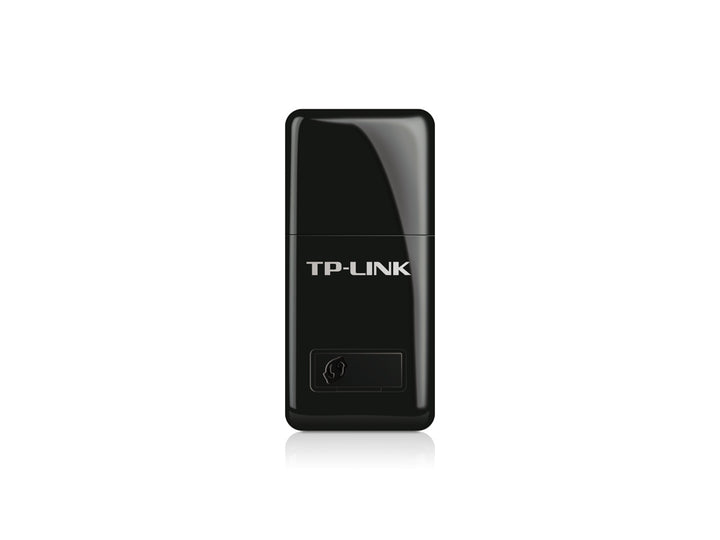


TP-Link TL-WN823N 300Mbps Mini Wireless N USB Adapter
PRODUCT DESCRIPTION
TP-Link 300Mbps Mini Wireless N USB Adapter (TL-WN823N) - 3 Years Local Warranty
The TL-WN823N is a 39 x 18.35 x 7.87 mm nano-format USB adapter that adds 300 Mbps 2.4 GHz Wi-Fi to a laptop or desktop and can be left permanently in the port. Beyond joining a network as a client, it also publishes a Soft AP mode, letting the host machine share its connection as a small Wi-Fi hotspot.
Small Enough to Leave In
The defining feature of this model is its size. At under 40 mm long it protrudes barely past the edge of a laptop, so it can stay in the port when the machine goes into a bag rather than being unplugged and lost. TP-Link rates it at up to 300 Mbps on 11n, 54 Mbps on 11g and 11 Mbps on 11b across 2.400~2.4835 GHz, with an internal antenna.
Soft AP Mode Turns the Host Into a Hotspot
TP-Link publishes two wireless modes for this adapter: Soft AP Mode and Client Mode (Ad-hoc / Infrastructure). Soft AP is the interesting one. With the host machine connected to the internet — over Ethernet, for instance — the adapter can publish its own Wi-Fi network for phones and tablets nearby. In a meeting room, a workshop or a site office with one wired point and no access point, that is a usable stopgap.
WPS Button and WPA2 Security
A Wi-Fi Protected Setup button on the adapter joins a WPS-capable router with a single press. Published wireless security covers 64/128-bit WEP, WPA-PSK/WPA2-PSK and WPA/WPA2, so the connection can carry the same protection as the rest of the network rather than falling back to something weaker.
Check the Operating System Before You Order
TP-Link's published system requirements for this model are Windows 8.1/8/7/XP (32/64-bit), Mac OS X 10.7 to 10.10, and Linux. Windows 10 and Windows 11 are not on that list, and neither are current macOS releases. Driver availability for newer operating systems changes over time — check TP-Link's download page for your hardware version, linked below, or ask us before ordering for a modern machine.
What TP-Link Publishes, and What It Does Not
Certification is published as CE, FCC, IC and RoHS. The adapter is rated for 0°C to 40°C in operation, -40°C to 70°C in storage, at 10% to 90% non-condensing humidity. TP-Link publishes no antenna gain, no net weight, no LED row and no transmission-power figure for this model, so none of those is claimed here.
Ideal For
Laptops that need a spare or replacement wireless adapter, desktops in Singapore homes and small offices without built-in Wi-Fi, and anyone who needs an adapter small enough to live permanently in a USB port. Supplied by SourceIT with local Singapore warranty and a GST invoice.
TL-WN823N Datasheet — Technical Specifications
General
| Model | TL-WN823N |
| Official Product Name | 300Mbps Mini Wireless N USB Adapter |
| Brand | TP-Link |
| Warranty | 3 Years Local Warranty (Singapore) |
Hardware
| Interface | USB 2.0 |
| Button | Wi-Fi Protected Setup (WPS) |
| Dimensions | 39 x 18.35 x 7.87 mm (1.54 x 0.72 x 0.31 in) |
| Antenna | Internal |
Wireless
| Standards | IEEE 802.11b, IEEE 802.11g, IEEE 802.11n |
| Frequency | 2.400 ~ 2.4835 GHz |
| Signal Rate | Up to 300 Mbps (11n), 54 Mbps (11g), 11 Mbps (11b) |
| Wireless Modes | Soft AP Mode, Client Mode (Ad-hoc / Infrastructure) |
| Wireless Security | WEP 64/128-bit, WPA-PSK/WPA2-PSK, WPA/WPA2 |
Environment & Certification
| Certification | CE, FCC, IC, RoHS |
| Operating Temperature | 0°C ~ 40°C |
| Storage Temperature | -40°C ~ 70°C |
| Operating Humidity | 10% ~ 90% non-condensing |
TP-Link publishes no antenna gain, net weight, LED or transmission-power row for this model, so none is claimed here.
Compatibility & Software Support
| Windows | Windows 8.1/8/7/XP (32/64-bit) — as published by TP-Link |
| macOS | Mac OS X 10.7 ~ 10.10 — as published by TP-Link |
| Linux | Supported |
| Host Port | USB 2.0 (works in a USB 3.0 port at USB 2.0 speeds) |
| Bands Supported | 2.4 GHz only — this adapter has no 5 GHz radio |
| Soft AP Mode | Supported — the host machine can publish its own Wi-Fi network through the adapter |
| Driver Source | Bundled Resource CD, or the TP-Link download page for your hardware version |
Windows 10, Windows 11 and current macOS releases are not on TP-Link's published system-requirements list for this model. Driver availability changes over time — check TP-Link's download page for your hardware version, or ask us, before ordering for a modern machine.
Package Contents & Ordering Information
What's in the Box
| Package Contents | Wireless adapter, Resource CD, Quick Installation Guide |
No USB extension cable is listed in TP-Link's published package contents for this model. TP-Link still lists a Resource CD; current cartons may ship without one, and the same drivers are available from the download page linked below.
Ordering Information
| Model | TL-WN823N |
| SKU | TL-WN823N |
| Warranty | 3 Years Local Warranty (Singapore) |
Datasheet & Downloads
Frequently Asked Questions — TL-WN823N
How is this different from the TL-WN821N?
Both are 300 Mbps 2.4 GHz USB adapters. The TL-WN823N is far smaller (39 mm against 69 mm), uses an internal antenna, adds a published Soft AP mode, and does not ship with a USB extension cable. The TL-WN821N is larger with an on-board antenna and includes the extension cable.
Will it work on Windows 11?
TP-Link's published system requirements for this model stop at Windows 8.1. Check the download page for your hardware version, or ask us, before ordering for a current machine.
Can it create a Wi-Fi hotspot?
Yes. TP-Link publishes a Soft AP mode for this adapter, which lets the host computer share its connection as a Wi-Fi network.
What warranty does SourceIT provide?
Three years local Singapore warranty, in line with TP-Link's published replacement-warranty policy. Every unit sold by SourceIT comes with a GST invoice.
Can SourceIT quote this in volume?
Yes. Send us the quantity and we will quote, with local warranty and support. Ask for the current lead time before committing to a rollout date.
We Also Recommend


