
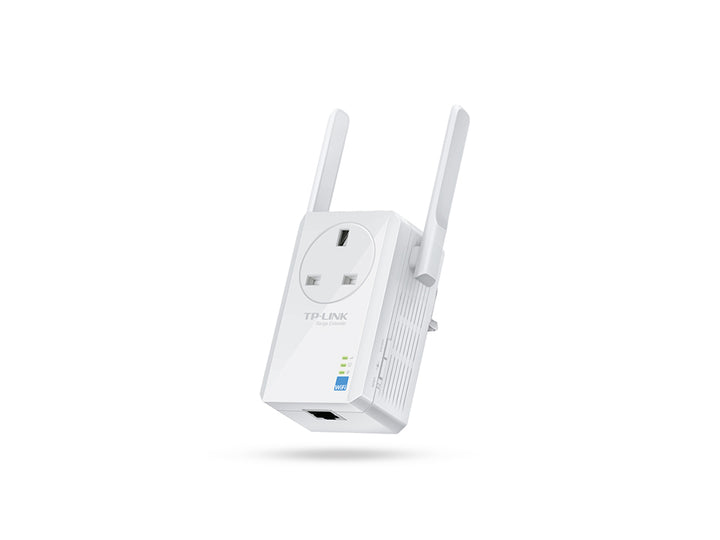


TP-Link TL-WA860RE 300Mbps Wi-Fi Range Extender with AC Passthrough
PRODUCT DESCRIPTION
TP-Link 300Mbps Wi-Fi Range Extender with AC Passthrough (TL-WA860RE) - 3 Years Local Warranty
The TL-WA860RE is a wall-plugged N300 range extender whose distinguishing feature is in its official name: AC passthrough, so the mains socket it occupies is not lost. It repeats an existing 2.4 GHz network at up to 300 Mbps across two external antennas, adds one 10/100 Mbps Ethernet port for a wired device, and can also run in Access Point mode.
AC Passthrough Means You Keep the Socket
TP-Link names this model the 300Mbps Wi-Fi Range Extender with AC Passthrough. In a Singapore flat where sockets are scarce and often already carrying a fan, a lamp or a charger, that is the practical difference between this model and a plain wall-plug extender: the extender goes where the signal needs help rather than where a socket can be spared. TP-Link does not publish a rating for the passthrough socket in this model's specification table, so ask us before planning a high-current appliance behind it.
N300 Coverage Across Two External Antennas
The published wireless specification is IEEE 802.11n/g/b on 2.4~2.4835 GHz, with signal rates of up to 300 Mbps on 11n, 54 Mbps on 11g and 11 Mbps on 11b, across two external antennas. External antennas can be angled towards the router or towards the dead zone, which usually buys a more reliable link than the internal-antenna models in the same family. Wireless security covers 64/128/152-bit WEP and WPA-PSK/WPA2-PSK.
An Ethernet Port for a Wired Device in the Dead Zone
The single 10/100 Mbps RJ45 port turns the extender into a wireless bridge for one wired-only device. A smart TV, a games console, a network printer or a desktop in a back bedroom can take a wired connection from the extender rather than needing its own Wi-Fi adapter — often a more stable arrangement for a device that streams or prints large jobs.
Range Extender and Access Point Modes
TP-Link publishes two working modes for this model: Range Extender and Access Point. Range Extender mode repeats an existing wireless network. Access Point mode takes a wired uplink through the Ethernet port and publishes a new Wi-Fi network from it, which is the better option wherever a cable already reaches the room, because an access point does not halve throughput the way a wireless repeater does.
Low Power Draw and Straightforward Setup
Input is 100-240 V, 50/60 Hz at about 3 W maximum, so the unit costs almost nothing to leave plugged in. It carries an RE (Range Extender) button for pairing and a Reset button, and measures 110.0 x 65.8 x 75.2 mm. Certification is published as CE and RoHS, and the unit is rated for 0°C to 40°C operation at 10% to 90% non-condensing humidity.
Ideal For
Singapore homes and small offices with a dead zone at the far end of the flat, especially where the only available socket is already in use and where one wired device in that room also needs a connection. Supplied by SourceIT with local Singapore warranty and a GST invoice.
TL-WA860RE Datasheet — Technical Specifications
General
| Model | TL-WA860RE |
| Official Product Name | 300Mbps Wi-Fi Range Extender with AC Passthrough |
| Brand | TP-Link |
| Warranty | 3 Years Local Warranty (Singapore) |
Wireless
| Standards and Protocols | IEEE 802.11n, IEEE 802.11g, IEEE 802.11b |
| Frequency | 2.4 ~ 2.4835 GHz |
| Signal Rate | 11n up to 300 Mbps, 11g up to 54 Mbps, 11b up to 11 Mbps |
| Working Modes | Range Extender / Access Point |
| Wireless Security | 64/128/152-bit WEP, WPA-PSK/WPA2-PSK |
| Transmission Power | CE: <15 dBm |
Hardware
| Plug Type | EU, UK, US |
| Interface | 1x 10/100 Mbps Ethernet Port (RJ45) |
| Buttons | RE (Range Extender) Button, Reset Button |
| Input Power | 100-240 V ~ 50/60 Hz |
| Max. Power Consumption | About 3 W |
| Dimensions (W x D x H) | 110.0 x 65.8 x 75.2 mm (4.3 x 2.6 x 3.0 in) |
| Antenna | 2x External |
Others
| Certification | CE, RoHS |
| System Requirements | Windows 98SE through Windows 10, Mac OS, NetWare, UNIX, Linux |
| Operating Temperature | 0°C ~ 40°C |
| Storage Temperature | -40°C ~ 70°C |
| Operating Humidity | 10% ~ 90% non-condensing |
| Storage Humidity | 5% ~ 90% non-condensing |
TP-Link names this model "with AC Passthrough" but publishes no electrical rating for the passthrough socket, no net weight, no LED row and no FCC mark in this model's specification table. None of those is claimed here.
TP-Link publishes no mesh, OneMesh or EasyMesh row for this model, so no mesh claim is made.
Compatibility & Software Support
| Router Compatibility | Works with 2.4 GHz IEEE 802.11b/g/n wireless routers and access points |
| Bands Supported | 2.4 GHz only — this model has no 5 GHz radio |
| Wired Client | 1x 10/100 Mbps Ethernet port in either working mode |
| System Requirements | Windows 98SE through Windows 10, Mac OS, NetWare, UNIX, Linux |
| Omada SDN | Not applicable — the TL-WA860RE is a standalone consumer extender and cannot be adopted into an Omada Controller |
TP-Link publishes no app-support row for this model, so no Tether app claim is made here. Setup is by the RE button or the unit's web interface.
Package Contents & Ordering Information
What's in the Box
| Package Contents | Range extender, RJ-45 Ethernet Cable, Resource CD, Quick Installation Guide |
TP-Link still lists a Resource CD in the published package contents. Current cartons may ship without one; the same files are available from the TP-Link download page linked below.
Ordering Information
| Model | TL-WA860RE |
| SKU | TL-WA860RE |
| Warranty | 3 Years Local Warranty (Singapore) |
Datasheet & Downloads
Frequently Asked Questions — TL-WA860RE
Can I still use the socket it plugs into?
Yes — that is what AC passthrough means, and it is part of TP-Link's official name for this model. TP-Link does not publish a current rating for the passthrough socket, so check with us before running a high-draw appliance through it.
Does it support 5 GHz?
No. This is a 2.4 GHz-only N300 model. If your router's faster network is on 5 GHz, ask us about a dual-band extender instead.
Which button pairs it with my router?
TP-Link publishes an RE (Range Extender) button and a Reset button for this model. The RE button is the one used for pairing.
What warranty does SourceIT provide?
Three years local Singapore warranty, in line with TP-Link's published replacement-warranty policy. Every unit sold by SourceIT comes with a GST invoice.
Can SourceIT quote this in volume?
Yes. Send us the quantity and we will quote, with local warranty and support. Ask for the current lead time before committing to a project date.
We Also Recommend


