
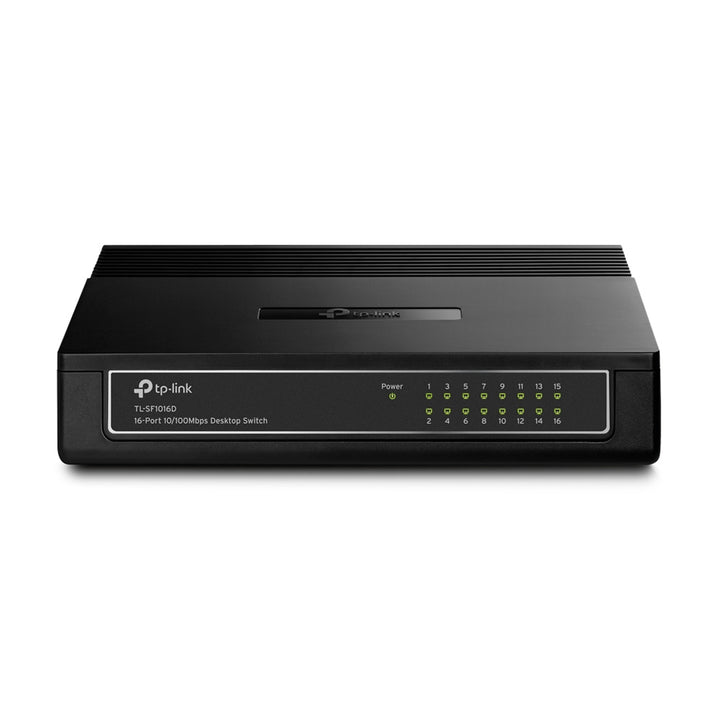


TP-Link Omada 16-Port 10/100Mbps Desktop Switch
Email sales@sourceit.com.sg or use Request for Quotation below and our team will confirm the latest price, availability and lead time.
PRODUCT DESCRIPTION
TP-Link 16-Port 10/100Mbps Desktop Switch (TL-SF1016D) - Local Warranty
The TL-SF1016D is the compact member of TP-Link's 16-port Fast Ethernet family: a 200 mm desktop case running from a 5VDC adapter, fanless and silent, with CE certification alongside FCC and RoHS. It is the one to reach for when 16 low-bandwidth ports are needed somewhere there is no rack and very little shelf.
16 Ports in a 200 mm Desktop Case
At 200 x 142 x 40 mm this is by some margin the smallest 16-port switch in the TL-SF range - roughly a third of the width of the rackmount TL-SF1016 and small enough to sit behind a monitor, inside a reception desk or on a shallow wall shelf. All 16 ports are 10/100Mbps RJ45 with auto-negotiation and Auto MDI/MDIX, so every device settles its own speed and duplex and either cable type works at either end.
Low-Voltage 5VDC Supply and No Fan
Power comes from an external adapter supplying 5VDC at 0.6A - a lower voltage than the 9VDC used by the larger desktop models in the family - which keeps the case cool and the adapter small. Maximum power consumption is 3.2W with heat dissipation of 11.0 BTU/h. There is no fan, so the unit is silent and has no moving part to fail or filter to clean, which is what makes it viable inside furniture or in a quiet consulting room where an audible switch would be intrusive.
CE Certification Alongside FCC and RoHS
TP-Link publishes CE, FCC and RoHS certification for the TL-SF1016D. That is a broader set than several of its siblings in the same family, which list FCC and RoHS only, and it is worth noting where a tender or a landlord's fit-out specification asks for CE marking on installed equipment. Store-and-forward transmission and IEEE 802.3x flow control are both implemented, so congestion is signalled back to the sender rather than resolved by silently dropping frames.
Green Technology Power Saving
TP-Link's Green Technology reduces consumption on ports where no link is detected, so a switch with half its ports unused draws noticeably less than the 3.2W headline. In practice this matters most where the switch shares a small UPS with a router or a till system and every watt shortens or lengthens runtime during an outage. Nothing has to be enabled - the behaviour is built into the hardware and is active from the moment the adapter is plugged in.
Unmanaged: No VLANs, No PoE, No Controller
There is no web interface, no VLAN or QoS configuration, no SNMP and no PoE, and this is not an Omada SDN device - it cannot be adopted into an Omada Controller. Note also that the MAC address table is 2K rather than the 8K of the larger siblings, which is ample for a small desktop segment but worth checking if the switch will sit behind a busy multi-VLAN network. Where a project needs segmentation or central visibility, SourceIT can quote the Omada smart or managed equivalent.
Ideal For
Singapore small offices, clinics, classrooms, reception areas and home offices needing 16 Fast Ethernet ports with no rack and minimal desk space. Supplied by SourceIT with local Singapore warranty, GST invoice and project pricing on request.
TL-SF1016D Datasheet — Technical Specifications
General
| Model | TL-SF1016D |
| Official Product Name | 16-Port 10/100Mbps Desktop Switch |
| Hardware Version | V7 |
| Brand | TP-Link |
| Warranty | Local Warranty (Singapore) |
Hardware Features
| Interface | 16× 10/100Mbps RJ45 Ports, Auto Negotiation / Auto MDI/MDIX |
| Fan Quantity | Fanless |
| Physical Security Lock | No |
| External Power Supply | External Power Adapter (Output: 5.0VDC / 0.6A) |
| Max. Power Consumption | 3.2 W |
| Max. Heat Dissipation | 11.0 BTU/h |
| Dimensions (W x D x H) | 7.9 × 5.6 × 1.6 in. (200 × 142 × 40 mm) |
| Mounting | Desktop |
Performance
| MAC Address Table | 2K |
| Transmission Method | Store and Forward |
| Advanced Features | Green Technology, 802.3x Flow Control |
Environment & Compliance
| Certification | FCC, CE, RoHS |
| Operating Temperature | 0 °C to 40 °C (32 °F to 104 °F) |
| Storage Temperature | -40 °C to 60 °C (-40 °F to 140 °F) |
| Operating Humidity | 10% to 90% non-condensing |
| Storage Humidity | 5% to 90% non-condensing |
TP-Link does not publish a switching capacity, packet forwarding rate, standards list or buffer size for this model, so those rows are omitted rather than carried across from a sibling.
Compatibility & Software Support
The TL-SF1016D is an unmanaged switch. It has no management interface and is not adopted into an Omada Controller; it forwards traffic between any IEEE 802.3-compliant devices connected to it.
| Management | Unmanaged — no web GUI, CLI, SNMP or console port |
| Omada SDN Controller | Not supported — this model cannot be adopted or centrally managed |
| Configuration Required | None — plug and play |
| Device Compatibility | Any 10BASE-T or 100BASE-TX device; connects to Gigabit uplink switches at 100 Mbps |
Package Contents & Ordering Information
Package Contents
| In the Box | 16-Port 10/100Mbps Desktop Switch TL-SF1016D, Power Adapter, User Guide |
Ordering Information
| Model | TL-SF1016D |
| Recommended Retail Price (incl. GST) | S$53.00 |
Datasheet & Downloads
Frequently Asked Questions — TL-SF1016D
How does the TL-SF1016D differ from the TL-SF1016DS and TL-SF1016?
All three give 16 Fast Ethernet ports. The TL-SF1016D is the compact 200 mm desktop unit on a 5VDC adapter with a 2K MAC table; the TL-SF1016DS is a 294 mm desktop/rackmount chassis with an internal mains supply; the TL-SF1016 is the full 440 mm rack version. Ask SourceIT which fits the space.
Can it be rack mounted?
No rackmount kit is supplied with this model — it is a desktop unit. For a 16-port Fast Ethernet switch that racks, ask SourceIT about the TL-SF1016DS or TL-SF1016.
Does it supply PoE?
No. The TL-SF1016D has no PoE ports. Powered devices need a PoE injector or a PoE switch.
Can it be configured or managed?
No. There is no web interface, no VLAN or QoS support and no SNMP. For segmentation or central management, ask SourceIT about the equivalent Omada smart or managed switch.
What warranty does SourceIT provide?
Local Singapore warranty, with a GST invoice on every unit. Ask us to confirm the current warranty duration for this model before purchase.


