
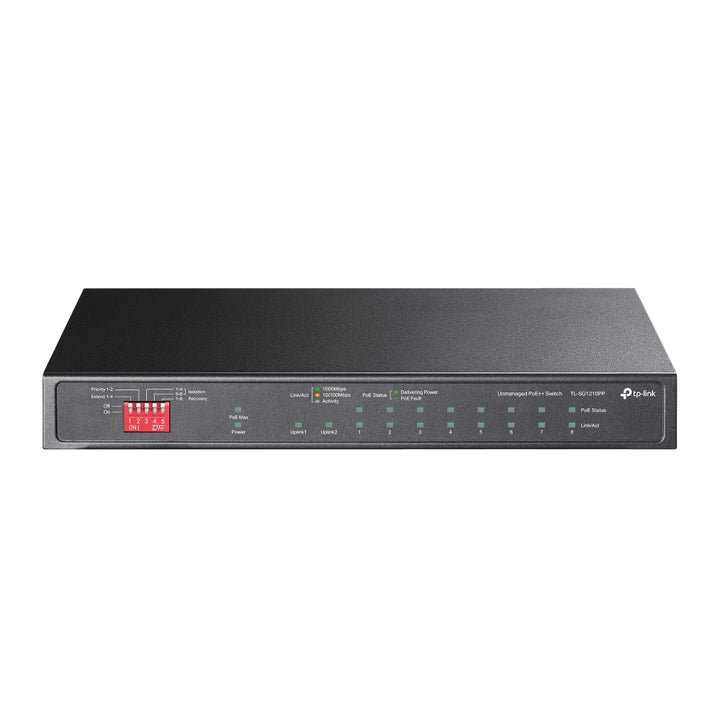


TP-Link Omada 10-Port Gigabit Desktop Switch with 6-Port PoE+ and 2-Port PoE++ 123W
Email sales@sourceit.com.sg or use Request for Quotation below and our team will confirm the latest price, availability and lead time.
PRODUCT DESCRIPTION
TP-Link 10-Port Gigabit Desktop Switch with 6-Port PoE+ and 2-Port PoE++ (TL-SG1210PP) - 5 Years Local Warranty
The TL-SG1210PP is the 802.3bt member of TP-Link's desktop PoE range: two ports deliver PoE++ for high-draw devices such as PTZ cameras and Wi-Fi 6E or Wi-Fi 7 access points, six more deliver standard PoE+, and a combo SFP/RJ45 port handles uplink. A 123 W budget, fanless chassis and no configuration at all make it a straightforward drop-in for a comms cupboard or under a desk.
Two 802.3bt PoE++ Ports for the Devices Others Cannot Power
Ports 1 and 2 are 802.3af, 802.3at and 802.3bt compliant, so they carry the higher-wattage devices that a PoE+ switch has to leave on a local power brick — outdoor and PTZ cameras with heaters and motors, multi-radio access points, and video bars. Ports 3 to 8 remain 802.3af/at PoE+, which covers the bulk of a typical estate. Splitting the switch this way means one unit powers a mixed deployment rather than forcing an injector for the two demanding devices.
123 W Shared Budget Across Eight Powered Ports
All eight PoE ports draw from a common 123 W budget supplied by an external 53.5 V DC adapter. That is sized for a realistic mix rather than eight devices at maximum draw: a pair of bt devices plus six af cameras fits comfortably, and the switch allocates on demand rather than reserving per port. Maximum system consumption is 144.1 W with the full 123 W load connected, and only 8.7 W with nothing powered.
Extend Mode, PoE Auto Recovery, Isolation and Priority
Extend Mode pushes PoE power and data up to 250 m — four times the normal 100 m limit — which is what makes a far-end car park camera or gate reader reachable without an intermediate cabinet. PoE Auto Recovery watches powered devices and power-cycles a port when a device stops responding, so a frozen camera recovers without a site visit. Isolation Mode separates client ports from one another, and Priority Mode guarantees bandwidth to ports 1 and 2. All four are hardware switch settings, not a configuration interface.
20 Gbps Fabric, IGMP Snooping and a Combo SFP Uplink
Nine Gigabit RJ45 ports plus one Gigabit combo SFP/RJ45 port sit on a 20 Gbps non-blocking fabric with a 14.88 Mpps forwarding rate and a 4K MAC address table. The combo uplink takes a fibre module where distance or electrical isolation demands it, or a copper patch where it does not. IGMP snooping keeps multicast video from flooding every port, and 802.1p/DSCP QoS plus 802.3x flow control run automatically.
Ideal For
Singapore offices, retail units, clinics and small sites deploying a mix of PoE++ and PoE+ devices without a rack or a managed switch. Supplied by SourceIT with local Singapore warranty, GST invoice and project pricing on request.
TL-SG1210PP Datasheet — Technical Specifications
General
| Model | TL-SG1210PP |
| Official Product Name | 10-Port Gigabit Desktop Switch with 6-Port PoE+ and 2-Port PoE++ |
| Brand | TP-Link Omada |
| Warranty | 5 Years Local Warranty (Singapore) |
Specifications
| Interface | 9× 10/100/1000 Mbps RJ45 Ports, 1× 1000 Mbps Combo SFP/RJ45 Port; Auto Negotiation; Auto MDI/MDIX |
| Network Media | 10BASE-T/100BASE-TX/1000BASE-T UTP category 3–6+ cable (max 100 m); EIA/TIA-568 100Ω STP |
| PoE Ports (RJ45) | Ports 1–2: 802.3af/at/bt; Ports 3–8: 802.3af/at; Power Supply: 123 W |
| Switching Capacity | 20 Gbps |
| Packet Forwarding Rate | 14.88 Mpps |
| MAC Address Table | 4K |
| Advanced Features | IEEE 802.3af/at/bt compatibility; MAC auto-learning and auto-aging; 802.3x Flow Control; 802.1p/DSCP QoS; IGMP Snooping; Extend Mode (250 m PoE range); PoE Auto Recovery; Isolation Mode; Priority Mode |
| Transmission Method | Store-And-Forward |
| Fan Quantity | Fanless |
| External Power Supply | External Power Adapter (Output: 53.5 VDC / 2.43 A) |
| Dimensions (W x D x H) | 8.2 × 5.0 × 1.0 in (209 × 126 × 26 mm) |
| Max Power Consumption | 8.7 W (no PD connected); 144.1 W (with 123 W PD connected) |
| Max Heat Dissipation | 29.67 BTU/h (no PD connected); 491.38 BTU/h (with 123 W PD connected) |
| Operating Temperature | 0 °C to 40 °C |
| Storage Temperature | -40 °C to 70 °C |
| Operating Humidity | 10% to 90% RH, non-condensing |
| Certification | FCC, CE, RoHS |
TP-Link does not publish a MAC packet buffer, jumbo frame, EAN or carton pack size figure for this model, so those rows are omitted rather than carried across from a sibling.
Compatibility & Software Support
The TL-SG1210PP is an unmanaged switch. Its features are set by hardware switches on the chassis; there is no web interface, command line or controller adoption.
| Omada SDN Controller | Not supported — this model cannot be adopted into an Omada Software, Hardware or Cloud-Based Controller |
| Omada App / Cloud Access | Not supported |
| Web Management | None — unmanaged, plug and play |
| Powering Omada Devices | Supported — ports 1–2 deliver 802.3bt PoE++ and ports 3–8 deliver 802.3af/at PoE+ to Omada access points, cameras and other powered devices |
| Hardware Feature Switches | Extend Mode, Isolation Mode, Priority Mode |
| If You Need Central Management | Choose an Omada JetStream smart or L2+ managed switch instead — ask SourceIT for the equivalent model |
Package Contents & Ordering Information
In the Box
| Package Contents | TL-SG1210PP, Power Adapter, Installation Guide |
Ordering Information
| Model | TL-SG1210PP |
| Recommended Retail Price (incl. GST) | S$220.00 |
Datasheet & Downloads
Frequently Asked Questions — TL-SG1210PP
What is the difference between this and the TL-SG1210MP?
Both are ten-port desktop switches with a 123 W budget. The TL-SG1210MP gives eight 802.3af/at PoE+ ports; the TL-SG1210PP gives six PoE+ ports plus two 802.3bt PoE++ ports for higher-draw devices. Choose the PP if anything on site needs more than 30 W.
Can it be adopted into an Omada Controller?
No. It is unmanaged, so it will not appear in a controller — though it will power and connect Omada access points perfectly well. Ask us about the JetStream smart and managed ranges if the switch itself needs to be managed.
What does Extend Mode actually do?
It extends PoE power and data delivery to 250 m instead of the usual 100 m, at reduced speed. It is enabled by a hardware switch on the chassis and is useful for a far-end camera or reader that would otherwise need its own cabinet.
What warranty does SourceIT provide?
Five years local Singapore warranty, in line with TP-Link's replacement warranty policy for unmanaged PoE switches. Every unit sold by SourceIT comes with a GST invoice.
Can SourceIT quote this for a project or tender?
Yes. Send the bill of materials and we will quote the whole build — switching, access points, cameras and optics — with local warranty and support.


