
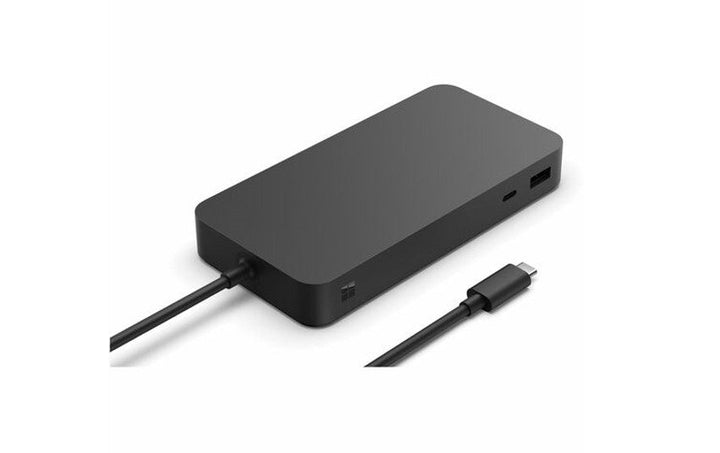


Microsoft Thunderbolt 4 Docking Station
PRODUCT DESCRIPTION
Microsoft Surface Thunderbolt 4 Dock (T8I-00006) - 1 Year Local Warranty
Six Data Ports, 2.5 Gigabit Ethernet and Up to 96 W Back to the Host
The Surface Thunderbolt 4 Dock turns one cable into a desk. Microsoft specifies three USB-A ports at USB 3.2 Gen 2 and 7.5 W each, three USB-C ports at USB4 / Thunderbolt 4 and 15 W each, a 2.5 Gbit/s Ethernet port and a 3.5 mm audio jack, with a 165 W power supply in the box delivering up to 96 W back to the connected device. One port on the front of each type keeps a headset or a drive within reach.
Two 4K Displays From a Thunderbolt 4 Host, One From a USB-C Host
This distinction matters and it is easy to get wrong. Microsoft states that a Thunderbolt 4 connection "supports up to two 4K external displays at 60Hz (when supported by device and display)", while a plain USB-C connection "supports one external display up to 4K at 60Hz", with daisy-chaining offered as the route to more. Check which port your machine actually has before you plan a two-screen desk around this dock.
Video Runs Over the USB-C Ports — There Is No HDMI or DisplayPort
Microsoft's port list for this dock contains no HDMI socket and no DisplayPort socket. Displays connect through the USB-C / Thunderbolt 4 ports, which Microsoft describes as "video display enabled". If your monitors are HDMI or DisplayPort you will need the appropriate USB-C adapter or cable for each one. Ask our team and we will quote those alongside the dock.
Manageable in a Fleet: SEMM for Dock
For managed estates, Microsoft publishes SEMM for Dock — described as being "designed to quickly lock down the ports of your dock in mission-critical environments and restrict functionality to specific devices". Microsoft notes that port access control requires a software licence for some features, sold separately. The dock also carries a security lock slot for physical security.
Specification note. Every figure on this page is quoted from Microsoft's Surface Thunderbolt 4 Dock overview on Microsoft Learn, its Microsoft Support article and its Microsoft Store specification block, all listed below. Note in particular that this dock has no HDMI and no DisplayPort output — video runs over the USB-C / Thunderbolt 4 ports. Microsoft does not publish manufacturer part numbers for this range, so the code T8I-00006 in the heading is the distributor part number this listing is sold against. The one-year warranty in the heading is SourceIT's local warranty; Microsoft publishes no duration for Surface accessories on its public support pages.
Surface Thunderbolt 4 Dock Datasheet — Technical Specifications
Ports and Connections
| USB-A | 3 ports (1 front-facing, 2 rear-facing), USB 3.2 Gen 2, 7.5 W each |
| USB-C | 3 ports (1 front-facing, 2 rear-facing), USB4 / Thunderbolt 4, video display enabled, 15 W each |
| Ethernet | 1 port, 2.5 Gbit/s |
| Audio | 1 x 3.5 mm audio jack |
| HDMI / DisplayPort | None. Microsoft's port list contains neither; displays connect over the USB-C / Thunderbolt 4 ports |
| Host cable | USB4 / Thunderbolt 4 cable with LED charging indicator, 80 cm, captive |
| Physical security | Security lock slot |
Power
| Power supply | 165 W (22 volts at 7.5 amps), power supply model 2055 |
| Power to the host device | Up to 96 W |
Displays
| From a Thunderbolt 4 host | Up to two 4K external displays at 60 Hz, when supported by the device and the display |
| From a USB-C host | One external display up to 4K at 60 Hz, when supported by the device and the display. Microsoft describes daisy-chaining as the route to more |
Data Rate and Management
| Data rate | Microsoft publishes up to 40 Gbps on a USB4 / Thunderbolt 4 host and up to 10 Gbps on other hosts |
| Fleet management | SEMM for Dock. Microsoft notes that port access control requires a software licence for some features, sold separately |
Physical
| Dimensions | 150 x 75 x 21.3 mm (5.91 x 2.95 x 0.84 in) |
| Weight | 410 g (0.9 lb) |
What Microsoft Does Not Publish for This Product
The following are commonly asked about but are not stated on any current official Microsoft source for this product, so SourceIT does not quote them: a manufacturer part number, an operating temperature range and a published figure for simultaneous peak draw across all six data ports. We would rather leave a field blank than print a figure we cannot substantiate.
Product Status, Availability and Warranty
The Surface Thunderbolt 4 Dock is a current Microsoft product. Microsoft maintains a full IT-facing overview on Microsoft Learn, a Microsoft Support setup article and a live Microsoft Store specification block for it, and lists it on its Surface dock identification page alongside its other current docks.
Stock of this product is held locally in Singapore. Contact our team for the current stock position, a written quotation and the delivery lead time.
Warranty Position
SourceIT supplies this product in Singapore with a one-year local warranty, which is the term stated in the heading of this listing. That term is SourceIT's, not a figure quoted from Microsoft. Microsoft's current PC Accessory warranty page publishes no duration at all for Surface and Microsoft accessories — it directs the buyer to their proof of purchase to establish the warranty period, and the underlying limited hardware warranty terms are distributed as regional PDF documents rather than stated on the page. We would rather tell you that plainly than print a warranty term Microsoft does not publish for this product. Ask our team to confirm the warranty position in writing before you order.
Compatibility, Setup and Software
The dock connects over its captive 80 cm USB4 / Thunderbolt 4 cable. Microsoft describes it as optimised for devices with a USB4 / Thunderbolt 4 port, and publishes different capabilities depending on which port the host actually has: up to 40 Gbps and two 4K displays at 60 Hz on a Thunderbolt 4 host, up to 10 Gbps and one 4K display at 60 Hz on a plain USB-C host.
Ethernet features that matter in a managed estate are published: the dock supports Wake-on-LAN and MAC address pass-through as documented in Microsoft's dock material, and SEMM for Dock allows an organisation to lock down its ports. SEMM itself is Microsoft's Surface Enterprise Management Mode, a UEFI-level feature that lets IT prepare and apply firmware settings configurations, protected by a certificate against unauthorised tampering or removal.
Before you order for a multi-monitor desk, tell us the exact model of the host machine and the connection type on each monitor. That is the single question that decides whether this dock will do what you need it to do, and we would rather answer it before the purchase order than after.
Host and Display Compatibility
| Host connection | USB4 / Thunderbolt 4 recommended. Works on a plain USB-C host with reduced display and data capability |
| On a Thunderbolt 4 host | Up to 40 Gbps; up to two 4K displays at 60 Hz |
| On a USB-C host | Up to 10 Gbps; one display up to 4K at 60 Hz |
| Monitor connection | Through the dock's USB-C / Thunderbolt 4 ports. Adapters or USB-C-to-HDMI / USB-C-to-DisplayPort cables are needed for HDMI or DisplayPort monitors and are not included |
| Management | SEMM for Dock; Microsoft notes a separate software licence is required for some port access control features |
Official Microsoft Sources & Downloads
- Surface Thunderbolt 4 Dock overview (Microsoft Learn)
- Use Surface Thunderbolt 4 Dock (Microsoft Support)
- Surface Thunderbolt 4 Dock technical specifications (Microsoft Store)
- Identify your Surface Dock and features (Microsoft Support)
- Surface Enterprise Management Mode (Microsoft Learn)
- Microsoft PC Accessory warranty (Microsoft Support)
- Hardware protection, warranty and repair (Microsoft Support)
Where a figure appears on this page it is quoted from one of these Microsoft pages; where Microsoft publishes nothing, this page says so instead of quoting a number. Supplied by SourceIT in Singapore with a GST invoice and local support. For a written quotation, current stock position or delivery lead time, contact our team.
Frequently Asked Questions — Surface Thunderbolt 4 Dock
Does this dock have an HDMI port?
No. Microsoft's published port list for the Surface Thunderbolt 4 Dock contains no HDMI socket and no DisplayPort socket. Displays connect through the USB-C / Thunderbolt 4 ports, which Microsoft describes as video display enabled. For an HDMI or DisplayPort monitor you will need a USB-C adapter or cable, which is not supplied with the dock. Ask us to quote those with it.
How many monitors will it drive?
It depends on the host, and Microsoft is explicit about the difference. From a Thunderbolt 4 connection, up to two 4K external displays at 60 Hz when the device and the display support it. From a plain USB-C connection, one external display up to 4K at 60 Hz, with daisy-chaining offered as the way to add more. Check which port your machine has before planning a two-screen desk.
Will it charge my laptop?
It delivers up to 96 W back to the connected device from its 165 W power supply, so it will power and charge most machines that accept charge over USB-C. Whether 96 W is enough for a particular workstation-class laptop under full load depends on that machine's own requirement — send us the model and we will check its rated input.
Does it work with non-Surface computers?
Microsoft describes the dock as optimised for devices with a USB4 / Thunderbolt 4 port and publishes its capability by host port type rather than by brand. It is not a Surface-only accessory. The SEMM for Dock management feature is a Surface-ecosystem feature and some of its port access control functions require a separate software licence.
What warranty comes with it?
SourceIT supplies it with a one-year local warranty in Singapore. Microsoft publishes no warranty duration for its accessories on any public page — its PC Accessory warranty page directs buyers to their proof of purchase instead. We will confirm the position in writing with your quotation.


