
Microsoft Surface Pro Signature Cover with Surface Pen 2 Ice Blue
PRODUCT DESCRIPTION
Microsoft Surface Pro Signature Keyboard with Slim Pen 2 Ice Blue (8X8-00055) - 1 Year Local Warranty
Built for Surface Pro 8, Surface Pro 9, Surface Pro X, Surface Pro 10 for Business and Surface Pro (11th Edition)
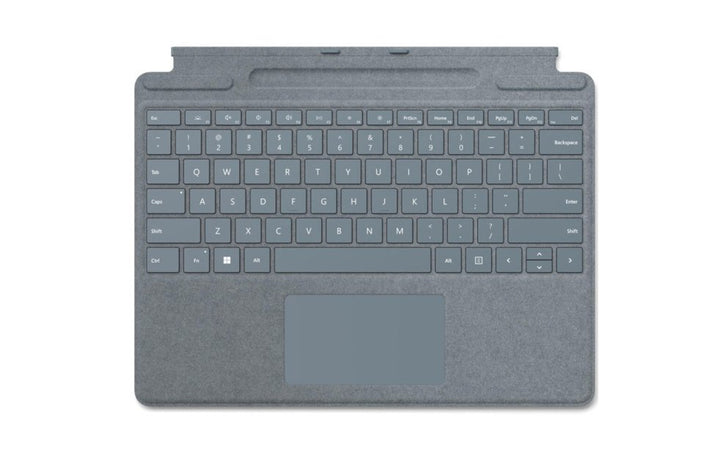
This is the Surface Pro Signature Keyboard, the keyboard Microsoft lists against Surface Pro (11th Edition), Surface Pro 10 for Business, Surface Pro 9, Surface Pro 8, and Surface Pro X. It clicks onto the bottom edge of the tablet magnetically, folds back flat to become a stand-angled typing deck, and closes over the screen as a cover. There is nothing to pair and nothing to charge.
Backlit Mechanical Keys and a Large Glass Touchpad
Microsoft specifies moving mechanical keys with a full row of function keys from F1 to F12, backlit keys, and a large glass touchpad. It is a full typing surface rather than a membrane travel keyboard, which is why most buyers add one rather than working on the tablet alone.
Alcantara Finish in Ice Blue
The palm rest and outer surface are finished in Alcantara® fabric in Ice Blue. Microsoft publishes the folded dimensions as 289.1 x 226.1 x 4.89 mm and the weight as 280 g for the keyboard on its own, so it adds very little to what you carry.
Surface Slim Pen 2 Included, Stored and Charged in the Keyboard
This part number ships the keyboard together with the Surface Slim Pen 2. The pen lives in a tray along the keyboard's hinge, held magnetically, and charges while it sits there. Microsoft specifies 4,096 pressure levels, zero force inking and Bluetooth 5.0, at 13 g and 137 mm long. Its haptic tactile signals work in select apps on Windows 11 on Surface Pro 9, Surface Pro 8, Surface Pro X, Surface Laptop Studio and Surface Laptop Studio 2.
Check Before You Order: Signature Keyboard or Signature Type Cover?
Microsoft sells two similar-sounding keyboards for two different generations of Surface Pro. Its compatibility table lists the Surface Pro Signature Type Cover against Surface Pro 7+, Surface Pro 7, Surface Pro 6, Surface Pro (5th Gen), Surface Pro 4 and Surface Pro 3 — and the Surface Pro Signature Keyboard on this page against Surface Pro 8, Surface Pro X and later. They are not interchangeable. If your tablet is a Surface Pro 7+ or older, this keyboard will not fit it; tell us which Surface you have and we will quote the right one.
Specification note. Every specification on this page is quoted from Microsoft's own current Surface Pro Signature Keyboard pages, listed in full under "Official Microsoft Sources" below. Microsoft does not publish manufacturer part numbers for this range, so the code 8X8-00055 in the heading is the distributor part number this listing is sold against, not a Microsoft-published reference. Microsoft's current specification page does not list Ice Blue among the published finishes, so treat this colour as an earlier line and confirm availability with us. The one-year warranty in the heading is SourceIT's local warranty. Microsoft publishes no duration for Surface accessories on its public support pages.
Surface Pro Signature Keyboard with Slim Pen 2 Ice Blue Datasheet — Technical Specifications
Keyboard
| Product family | Surface Pro Signature Keyboard |
| Compatible Surface models | Surface Pro (11th Edition), Surface Pro 10 for Business, Surface Pro 9, Surface Pro 8, and Surface Pro X |
| Keys | Moving (mechanical) keys with a full row of function keys (F1 - F12) |
| Backlight | Backlit keys |
| Touchpad | Large glass touchpad |
| Connection to the tablet | Magnetic |
| Pen tray | Surface Slim Pen (2nd Edition) storage and charging |
| Exterior | Alcantara® fabric — Ice Blue |
| Dimensions | 289.1 x 226.1 x 4.89 mm (11.38 x 8.90 x 0.19 in) |
| Weight | 280 g (0.62 lb), keyboard only |
| Windows Hello | Microsoft offers a separate "Surface Pro Signature Keyboard with Fingerprint Reader" variant. Microsoft publishes no part-number mapping, so confirm the fingerprint position with us in writing before you order |
Surface Slim Pen 2 (included)
| Product name | Surface Slim Pen 2 (Surface Slim Pen, 2nd Edition) |
| Pressure sensitivity | 4,096 pressure levels |
| Inking | Zero force inking |
| Haptic feedback | Tactile signals in select apps on devices running Windows 11. Microsoft lists tactile signal support on Surface Pro 9, Surface Pro 8, Surface Pro X, Surface Laptop Studio and Surface Laptop Studio 2 |
| Wireless | Bluetooth 5.0 |
| Dimensions | 137 x 11.3 x 6.3 mm (5.38 x 0.44 x 0.25 in) |
| Weight | 13 g (0.03 lb) |
| Charging | Stores and charges in the keyboard's pen tray |
| Battery life | Microsoft publishes only "all-day battery life" — no capacity or rated hours |
What Microsoft Does Not Publish for This Product
The following are commonly asked about but are not stated on any current official Microsoft source for this product, so SourceIT does not quote them: manufacturer part numbers, key travel distance, touchpad dimensions, Windows Precision Touchpad certification, backlight brightness levels, any battery or power figure for the keyboard, pen battery capacity and a rated battery life in hours. We would rather leave a field blank than print a figure we cannot substantiate.
Product Status, Availability and Warranty
The Surface Pro Signature Keyboard is the current-generation keyboard for the Surface Pro line. Microsoft continues to publish and maintain its support documentation and a full technical specification block for it, and lists it against Surface Pro models up to and including Surface Pro (11th Edition).
One point worth knowing before you order: Microsoft's current specification page lists the keyboard's Alcantara exterior in Sapphire, Forest, Platinum, Poppy Red and Black. Ice Blue is an earlier finish for this keyboard and does not appear on that list, so it may be end-of-line at Microsoft. Ask our team to confirm availability before you order.
Colour availability moves independently of the keyboard itself, and stock of individual finishes in Singapore varies. Contact our team for the current stock position and lead time on this finish rather than relying on the availability shown on this page.
Warranty Position
SourceIT supplies this product in Singapore with a one-year local warranty, which is the term stated in the heading of this listing. That term is SourceIT's, not a figure quoted from Microsoft. Microsoft's current PC Accessory warranty page publishes no duration at all for Surface and Microsoft accessories — it directs the buyer to their proof of purchase to establish the warranty period, and the underlying limited hardware warranty terms are distributed as regional PDF documents rather than stated on the page. We would rather tell you that plainly than print a warranty term Microsoft does not publish for this product. Ask our team to confirm the warranty position in writing before you order.
Compatibility, Setup and Software
Microsoft states plainly which tablets this keyboard fits: Surface Pro (11th Edition), Surface Pro 10 for Business, Surface Pro 9, Surface Pro 8, and Surface Pro X. The keyboard attaches magnetically to the bottom edge of the tablet and draws power through that connection, so there is no Bluetooth pairing, no charging cable and no dongle.
It will not fit Surface Pro 7+, Surface Pro 7, Surface Pro 6, Surface Pro (5th Gen), Surface Pro 4 or Surface Pro 3. Those tablets take the older Surface Pro Signature Type Cover instead, which is a different product with a different connector geometry. Microsoft's keyboards-and-Type-Covers article carries the compatibility table that establishes this; if you are replacing a keyboard, check which tablet you actually have before you order.
The keyboard is a Windows accessory. Microsoft does not publish macOS, iPadOS, Android or Linux support for it, and this page does not claim any.
Compatibility at a Glance
| Microsoft lists as compatible | Surface Pro (11th Edition), Surface Pro 10 for Business, Surface Pro 9, Surface Pro 8, and Surface Pro X |
| Not compatible | Surface Pro 7+, Surface Pro 7, Surface Pro 6, Surface Pro (5th Gen), Surface Pro 4, Surface Pro 3 — these take the older Surface Pro Signature Type Cover |
| Operating system | Windows. Microsoft publishes no support for any other platform |
| Connection | Magnetic connection to the tablet. No Bluetooth, no cable, no receiver |
Official Microsoft Sources & Downloads
- Use Surface Pro Signature Keyboard (Microsoft Support)
- Surface Pro Signature Keyboard technical specifications (Microsoft Store)
- Learn more about Surface Pro Keyboards and Type Covers (Microsoft Support)
- Surface Pen compatibility and features (Microsoft Support)
- Surface Slim Pen 2 technical specifications (Microsoft Store Singapore)
- Use Surface Slim Pen 2 (Microsoft Support)
- Microsoft PC Accessory warranty (Microsoft Support)
- Hardware protection, warranty and repair (Microsoft Support)
Where a figure appears on this page it is quoted from one of these Microsoft pages; where Microsoft publishes nothing, this page says so instead of quoting a number. Supplied by SourceIT in Singapore with a GST invoice and local support. For a written quotation, current stock position or delivery lead time, contact our team.
Frequently Asked Questions — Surface Pro Signature Keyboard with Slim Pen 2 Ice Blue
Will this fit my Surface Pro?
It fits the models Microsoft names: Surface Pro (11th Edition), Surface Pro 10 for Business, Surface Pro 9, Surface Pro 8, and Surface Pro X. It does not fit Surface Pro 7+ or any earlier Surface Pro — those take the older Surface Pro Signature Type Cover. If you are unsure which tablet you have, send us the serial number and we will check it for you before you order.
Is a Surface Pro Signature Keyboard the same thing as a Surface Pro Signature Type Cover?
No. They are two different Microsoft products for two different generations of Surface Pro. Microsoft's compatibility table lists the Surface Pro Signature Type Cover against Surface Pro 7+ and earlier, and the Surface Pro Signature Keyboard against Surface Pro 8, Surface Pro X and later. Buying the wrong one is the single most common ordering mistake in this range.
Does it need charging or pairing?
No. The keyboard connects magnetically to the bottom edge of the tablet and takes power and data through that connection. There is no Bluetooth pairing step, no charging cable and no USB receiver. Microsoft publishes no battery figure for the keyboard because it does not have one.
Is the pen in this bundle a Surface Pen or a Surface Slim Pen 2?
It is the Surface Slim Pen 2 — Microsoft's flat-sided pen that sits in the tray under the keyboard and charges there. It is not the older cylindrical Surface Pen. Microsoft's own name for the pen supplied in this bundle is the Surface Slim Pen 2, which Microsoft also writes as Surface Slim Pen (2nd Edition). It gives 4,096 pressure levels, zero force inking and Bluetooth 5.0, and its haptic tactile signals work in select apps on Windows 11 on Surface Pro 9, Surface Pro 8, Surface Pro X, Surface Laptop Studio and Surface Laptop Studio 2.
Where does the pen live?
In the keyboard itself. Microsoft's specification block lists "Surface Slim Pen (2nd Edition) storage and charging" — the pen sits in a tray along the hinge, held magnetically, and charges while it is there. You do not need a separate charger or a cable.
Does this one have the fingerprint reader?
This listing is for the standard keyboard. Microsoft describes the fingerprint reader as an optional feature and names a separate "Surface Pro Signature Keyboard with Fingerprint Reader" variant, but publishes no part-number mapping. If Windows Hello sign-in from the keyboard matters to you, ask our team before you order and we will confirm the correct part number in writing.
What warranty comes with it?
SourceIT supplies it with a one-year local warranty in Singapore. Microsoft itself publishes no warranty duration for its accessories on any of its public pages — its PC Accessory warranty page directs buyers to their proof of purchase instead. We will confirm the position in writing with your quotation.


