


Microsoft Modern USB-C Speaker
Currently out of stock. Request a quote and
our team will confirm the latest price, availability and lead time.
PRODUCT DESCRIPTION
Microsoft Modern USB-C Speaker (8KZ-00009) - Local Warranty
Microsoft Modern USB-C Speaker — A Teams-Certified Speakerphone on One Cable
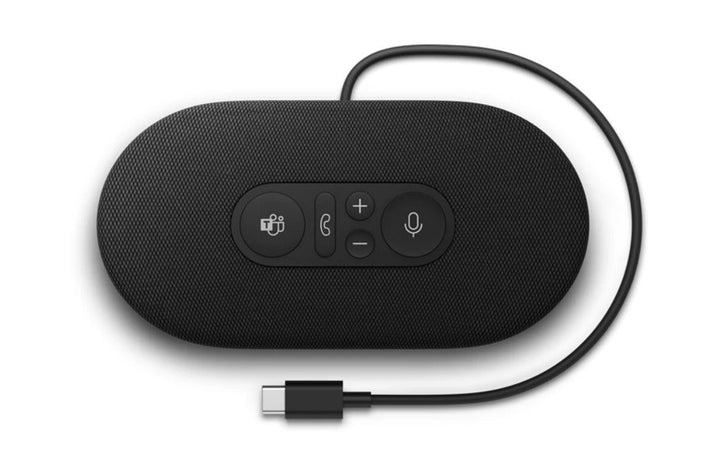
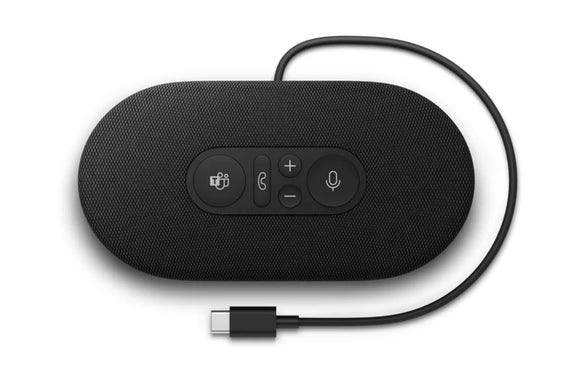
The Microsoft Modern USB-C Speaker (8KZ-00009) is Microsoft’s own USB-C speakerphone, certified for Microsoft Teams, with a dedicated Teams button and an omnidirectional background-noise-reducing microphone. A single USB-C cable carries audio and power, so there is no adapter and no separate supply to lose.
It suits a huddle space, a small meeting room or a desk where a headset is impractical — anywhere two or three people need to join the same call without passing a laptop around.
Push-to-Talk While Muted — The Control That Actually Gets Used
Beyond the Teams button, answer and end call, volume and mute, Microsoft publishes one control worth calling out: push-to-talk while muted. Hold the mute button to speak, release to return to muted. In a room where the default state is muted, that single behaviour prevents most of the “you’re on mute” interruptions.
The mute indicator lights red when active, and there is cable storage built into the base so the lead travels with the device rather than tangling in a bag.
What Microsoft No Longer Publishes
Microsoft has withdrawn the consumer listing for this product entirely — its Store identifier returns a not-found error in both the United States and United Kingdom markets. A “for Business” page survives, but its specification table has been stripped, leaving only marketing copy.
As a result Microsoft no longer publishes the driver size, frequency response, sound output, cable length, dimensions, weight or any warranty term for this speaker. Those figures circulate elsewhere but are not Microsoft-published, so this page omits them. Supplied by SourceIT in Singapore with a GST invoice and local support. For a written quotation, current stock position or delivery lead time, contact our team.
Specification note. Microsoft has withdrawn its own-brand PC accessory catalogue. The consumer listing for this speaker has been removed from Microsoft’s catalogue entirely — its Store identifier returns a not-found error in both the United States and United Kingdom markets — and while a “for Business” page survives, its specification table has been stripped. No current Microsoft page displays the part number 8KZ-00009. Microsoft therefore publishes no driver size, frequency response, sound output, cable length, dimensions, weight or warranty term for this product, and this page does not state them. Figures for those fields circulate elsewhere but are not Microsoft-published. What remains below is drawn from Microsoft’s Teams support documentation.
Microsoft Modern USB-C Speaker Datasheet — Technical Specifications
General
| Product Name | Microsoft Modern USB-C Speaker |
| Part Number (SourceIT) | 8KZ-00009 |
| Product Type | USB-C speakerphone |
| Certification | Certified for Microsoft Teams |
| Connection | USB-C — a single cable carries audio and power |
| Microphone | Omnidirectional, background-noise-reducing |
| Manufacturer Warranty | Not published by Microsoft |
| Local Warranty (Singapore) | Supplied by SourceIT with local support and a GST invoice |
Controls and Design
| Controls | Microsoft Teams button, answer and end call, volume up and down, mute |
| Mute Indicator | Lights red when mute is active |
| Push to Talk | Hold the mute button to speak while muted |
| Cable Storage | Built into the base |
Compatibility
| Operating System | Windows 10 and Windows 11 PCs |
| Configuration Software | Microsoft Accessory Center — not available for macOS |
What Microsoft Does Not Publish for This Product
The following are commonly asked about but are not stated on any current official Microsoft source for this product, so SourceIT does not quote them: driver size, frequency response, sound output in decibels, cable length, dimensions, weight and a manufacturer warranty term. We would rather leave a field blank than print a figure we cannot substantiate.
Product Status, Availability and Warranty
The consumer listing for this speaker has been removed from Microsoft’s catalogue. Its Store product identifier returns a not-found error in both the United States and United Kingdom markets, which is a firmer signal than the redirects seen across the rest of this range.
The surviving “for Business” page has had its specification table stripped. The page still loads, but every technical field has gone; only marketing copy remains. That is why this datasheet carries so few figures.
The microsoft.com/accessories product pages for this range now redirect to Microsoft's general hardware-warranty and PC-accessories support pages, and the Microsoft Store Singapore PC-accessories collection returns no results. Microsoft has published no formal discontinuation notice for this product; the evidence is the removal of the pages themselves.
Microsoft’s Teams support documentation survives and is the source for the certification, the controls, the push-to-talk behaviour and the cable storage stated above.
This listing shows zero inventory in our system. Contact SourceIT for the current stock position and lead time before you raise a purchase order.
Warranty Position
Microsoft no longer publishes a warranty term for this product. Microsoft's current PC accessory warranty page states only that the accessory "comes with a 'limited hardware warranty' depending on the device" and directs the buyer to check their proof of purchase to identify the warranty period. SourceIT therefore does not quote a manufacturer term for this item. Ask our team to confirm the warranty position in writing before you order.
The local warranty named in the heading of this listing is SourceIT's own commercial term, not a figure published by Microsoft. Ask our team to confirm the term in writing with your quotation.
Compatibility, Setup and Software
Microsoft publishes Windows 10 and Windows 11 PCs for this speaker. Microsoft Accessory Center is the configuration app for this device. Microsoft states that Accessory Center is not available for macOS. We therefore do not present this as a Mac product.
The connection is USB-C, carrying both audio and power on one cable. On a machine with only USB-A ports you will need an adapter, which Microsoft does not supply.
The speaker is certified for Microsoft Teams, which is a statement about its behaviour in Teams specifically. It presents as a standard USB audio device to other applications, but we do not extend Microsoft’s certification beyond what Microsoft publishes.
Official Microsoft Sources & Downloads
- Use Microsoft Modern USB-C Speaker with microphone in Microsoft Teams — Microsoft support
- Microsoft Modern USB-C Speaker for Business — surviving Microsoft Store listing
- Microsoft Accessory Center download — Microsoft support
- Microsoft PC accessory warranty — support.microsoft.com
- Microsoft PC accessories support hub
Microsoft’s consumer listing for this speaker has been removed from its catalogue and the surviving business page has lost its specification table, which is why this page publishes so little.
Frequently Asked Questions — Microsoft Modern USB-C Speaker
Is it certified for Microsoft Teams?
Yes. Microsoft publishes it as certified for Microsoft Teams, with a dedicated Teams button.
What is push-to-talk while muted?
Hold the mute button to speak, then release to go back to muted. Microsoft publishes this as a feature of the speaker, and in a room that defaults to muted it is the control people use most.
What are the driver size and frequency response?
Microsoft does not publish either for this speaker. Its consumer listing has been removed from the catalogue and the surviving business page has had its specification table stripped, so Microsoft no longer publishes them.
How big is it and how long is the cable?
Microsoft no longer publishes dimensions, weight or cable length for this product. Figures circulating for this product elsewhere are not Microsoft-published, and we do not repeat them. Ask us and we will request the distributor build sheet.
Does it work on a Mac?
Microsoft publishes Windows 10 and Windows 11 only, and states that Microsoft Accessory Center is not available for macOS. We do not present it as a Mac product.
Does it need a power adapter?
No. A single USB-C cable carries both audio and power.
What warranty applies?
Microsoft publishes no warranty term for this speaker. Its current PC accessory warranty page directs buyers to their proof of purchase. SourceIT supplies it with local support and a GST invoice. The local warranty named in the heading of this listing is SourceIT's own commercial term, not a figure published by Microsoft. Ask our team to confirm the term in writing with your quotation.
We Also Recommend


Microsoft 365 E5 Annual Subscription (12 Months)


Microsoft 365 E3 Annual Subscription (12 Months)
Microsoft 365 F3 Annual Subscription (12 Months)
Microsoft 365 Business Premium Annual Subscription (12 Months)


Microsoft 365 Business Standard Annual Subscription (12 Months)