


Microsoft Modern 1080P HD USB Webcam
Currently out of stock. Request a quote and
our team will confirm the latest price, availability and lead time.
PRODUCT DESCRIPTION
Microsoft Modern Webcam (8L3-00009) - Local Warranty
Microsoft Modern Webcam — Teams-Certified, With a Physical Privacy Shutter
The Microsoft Modern Webcam (8L3-00009) is Microsoft’s own Teams-certified USB webcam. Microsoft publishes it as a Microsoft Teams-certified webcam, which for organisations standardising on Teams is the specification that actually matters: certification covers how the device behaves with Teams, not just whether it produces a picture.
Note the name. Microsoft publishes this product as the Microsoft Modern Webcam. “Modern 1080P HD USB Webcam” is not a Microsoft product name — order against the part number 8L3-00009, which is unambiguous.
A Manual Privacy Shutter and a Microphone That Is Off by Default
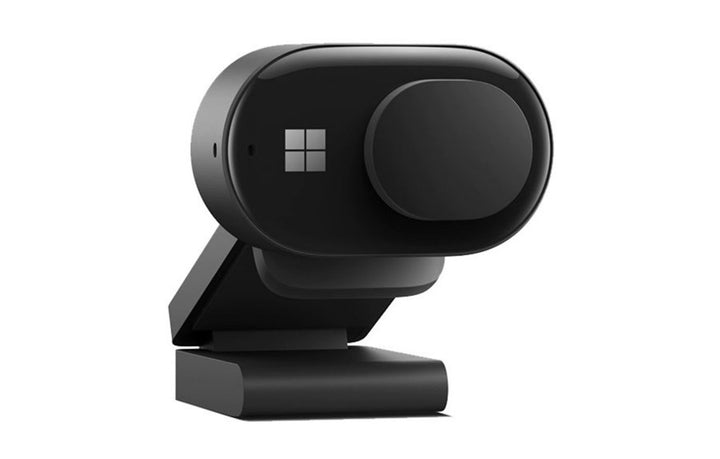
Two published details make this a sensible camera for shared and home-office desks. There is a manual sliding privacy shutter plus an LED usage indicator, so a user can see and physically control when the camera can see them. And the built-in microphone is disabled by default, enabled through Microsoft Accessory Center — a deliberate default that avoids a room being recorded by a camera nobody thought had a microphone.
Three Ways to Mount It, Including a Tripod Thread
Microsoft publishes three mounting modes: on a display, on a desk, or on a tripod using the built-in tripod thread on the bottom of the camera. The head tilts manually. For a room where the camera needs to sit off to one side, or on a stand at seated eye level, the tripod thread removes the usual improvisation.
What Microsoft No Longer Publishes
This product has been withdrawn from Microsoft’s catalogue entirely — not merely redirected. As a result Microsoft no longer publishes its sensor resolution, capture resolution, frame rate, still-image resolution, field of view, focus type, lens, HDR or low-light behaviour, cable type or length, dimensions, weight or warranty term. Figures for those fields circulate elsewhere but are not Microsoft-published, so this page omits them. Supplied by SourceIT in Singapore with a GST invoice and local support. For a written quotation, current stock position or delivery lead time, contact our team.
Specification note. Microsoft has withdrawn this product from its catalogue entirely. Its Store product identifier returns a not-found error in both the United States and United Kingdom markets, which is a stronger signal than the redirects seen elsewhere in this range — the product is gone rather than merely delisted. The only surviving official source is Microsoft’s support documentation, which is what this page is built from. Microsoft no longer publishes the sensor resolution, capture resolution, frame rate, field of view, focus type, dimensions, weight or warranty term for this camera, so this page does not state them. Microsoft’s own name for this product is the Microsoft Modern Webcam.
Microsoft Modern Webcam Datasheet — Technical Specifications
General
| Product Name | Microsoft Modern Webcam |
| Part Number (SourceIT) | 8L3-00009 |
| Product Type | USB webcam |
| Certification | Microsoft Teams-certified webcam |
| Connection | USB |
| Manufacturer Warranty | Not published by Microsoft |
| Local Warranty (Singapore) | Supplied by SourceIT with local support and a GST invoice |
Privacy, Mounting and Controls
| Privacy Shutter | Manual sliding privacy shutter |
| Usage Indicator | LED |
| Built-in Microphone | Present, and disabled by default — enabled through Microsoft Accessory Center |
| Mounting Modes | On a display, on a desk, or on a tripod |
| Tripod Thread | Built into the bottom of the camera |
| Tilt | Manual |
Compatibility
| Setup | Windows 10 and Windows 11 |
| Configuration Software | Microsoft Accessory Center — not available for macOS |
What Microsoft Does Not Publish for This Product
The following are commonly asked about but are not stated on any current official Microsoft source for this product, so SourceIT does not quote them: sensor resolution, video capture resolution and frame rate, still-image resolution, field of view, focus type, lens construction, HDR or low-light behaviour, whether the microphone is mono or stereo, cable type and length, dimensions, weight and a manufacturer warranty term. We would rather leave a field blank than print a figure we cannot substantiate.
Product Status, Availability and Warranty
This product has been withdrawn from Microsoft’s catalogue. Its Microsoft Store product identifier returns a not-found error in both the United States and United Kingdom markets. That is a firmer signal than the redirects seen across the rest of Microsoft’s accessory range: the entry has been removed rather than delisted. No “for Business” Store listing survives either.
Microsoft has withdrawn its own-brand PC accessory catalogue. The microsoft.com/accessories product pages for this range now redirect to Microsoft's general hardware-warranty and PC-accessories support pages, and the Microsoft Store Singapore PC-accessories collection returns no results. Microsoft has published no formal discontinuation notice for this product; the evidence is the removal of the pages themselves.
The surviving official documentation is Microsoft’s Teams support article for the camera, which is the source for the certification, privacy shutter, microphone default, mounting modes and tripod thread stated above.
Microsoft publishes this product as the Microsoft Modern Webcam. Microsoft no longer publishes a capture resolution for this camera, so no resolution figure is stated on this page. Order against the part number 8L3-00009, which is unambiguous.
This listing shows zero inventory in our system. Contact SourceIT for the current stock position and lead time before you raise a purchase order.
Warranty Position
Microsoft no longer publishes a warranty term for this product. Microsoft's current PC accessory warranty page states only that the accessory "comes with a 'limited hardware warranty' depending on the device" and directs the buyer to check their proof of purchase to identify the warranty period. SourceIT therefore does not quote a manufacturer term for this item. Ask our team to confirm the warranty position in writing before you order.
The local warranty named in the heading of this listing is SourceIT's own commercial term, not a figure published by Microsoft. Ask our team to confirm the term in writing with your quotation.
Compatibility, Setup and Software
Microsoft publishes Windows 10 and Windows 11 for setup and for Microsoft Accessory Center. Microsoft Accessory Center is the configuration app for this device. Microsoft states that Accessory Center is not available for macOS.
The camera is Teams-certified, which is Microsoft’s statement about its behaviour in Teams specifically rather than a general compatibility claim. It presents as a standard USB video device, but we do not extend Microsoft’s certification to other platforms or applications on its behalf.
The built-in microphone is off by default. If you deploy these and users report that nobody can hear them, that is the expected out-of-box behaviour, not a fault — the microphone is enabled in Microsoft Accessory Center. Worth putting in your deployment notes.
Official Microsoft Sources & Downloads
- Use Microsoft Modern Webcam in Microsoft Teams — Microsoft support
- Microsoft Accessory Center download — Microsoft support
- Microsoft PC accessory warranty — support.microsoft.com
- Microsoft PC accessories support hub
Microsoft’s product listing for this camera has been removed from its catalogue, so the support documentation above is the only surviving official source.
Frequently Asked Questions — Microsoft Modern Webcam
Is it certified for Microsoft Teams?
Yes. Microsoft publishes it as a Microsoft Teams-certified webcam.
What resolution does it capture at?
Microsoft no longer publishes a capture resolution or frame rate for this camera, so we do not quote one.
Does it have a privacy shutter?
Yes, a manual sliding shutter, alongside an LED usage indicator.
Why can nobody hear me on calls?
The built-in microphone is disabled by default. Microsoft publishes this as intended behaviour; enable it in Microsoft Accessory Center. Many users assume the camera is faulty.
Can I mount it on a tripod?
Yes. Microsoft publishes a built-in tripod thread on the bottom of the camera, alongside display and desk mounting.
Does it work on a Mac?
Microsoft publishes Windows 10 and Windows 11 for setup, and states that Microsoft Accessory Center is not available for macOS. Without Accessory Center you cannot enable the microphone, so we do not present this as a Mac product.
What warranty applies?
Microsoft publishes no warranty term for this camera. Its current PC accessory warranty page directs buyers to their proof of purchase. SourceIT supplies it with local support and a GST invoice. The local warranty named in the heading of this listing is SourceIT's own commercial term, not a figure published by Microsoft. Ask our team to confirm the term in writing with your quotation.
We Also Recommend


Microsoft 365 E5 Annual Subscription (12 Months)


Microsoft 365 E3 Annual Subscription (12 Months)
Microsoft 365 F3 Annual Subscription (12 Months)
Microsoft 365 Business Premium Annual Subscription (12 Months)


Microsoft 365 Business Standard Annual Subscription (12 Months)