
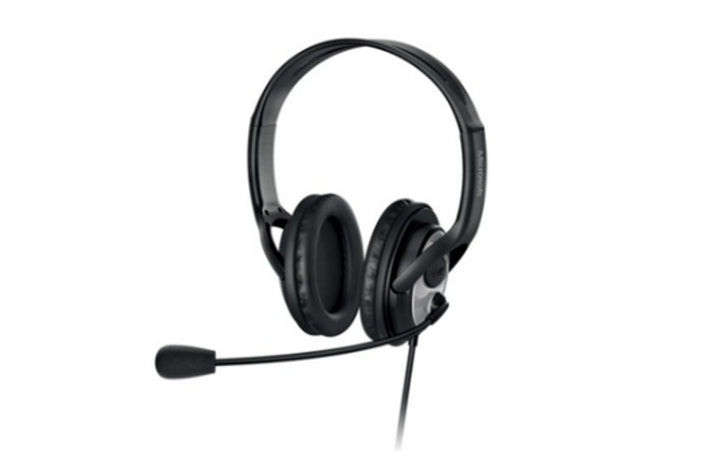


Microsoft LifeChat LX-3000
PRODUCT DESCRIPTION
Microsoft LifeChat LX-3000 (JUG-00017) - Local Warranty
Microsoft LifeChat LX-3000 — A Long-Serving Wired USB Headset
The Microsoft LifeChat LX-3000 (JUG-00017) is a wired USB headset from Microsoft’s LifeChat range. Its Microsoft Store listing still resolves and shows the product as currently not available at Microsoft.
This page is deliberately short, because Microsoft publishes very little about this headset now. Rather than fill a specification table from reseller listings, we have printed the few requirements Microsoft still states and named everything it does not.
What Microsoft Still Publishes Tells You How Old the Design Is
Microsoft’s surviving system requirements for this headset are an Intel Pentium III 550 MHz processor, with a Pentium 4 1.4 GHz recommended, a CD-ROM drive as a required media drive, and broadband internet access. Those requirements place the design well before Microsoft Teams existed.
That is not a reason to avoid it — a wired USB headset is a simple device and the class driver in any current operating system handles it. It is a reason to be honest about what generation of product you are buying.
Not Certified for Skype for Business — and We Will Not Imply Otherwise
Microsoft’s USB device certification register lists the LifeChat LX-4000 and LX-6000, both from 2011. The LX-3000 is absent from that register. Microsoft publishes no Teams certification for it either, and there is no Teams button on the device.
If your requirement is a certified headset for Teams or Skype for Business, this is not it. We list Microsoft’s Modern USB-C Headset and Modern Wireless Headset, both of which Microsoft publishes as certified for Microsoft Teams with a dedicated Teams button.
What Microsoft No Longer Publishes
Driver size, frequency response, microphone type, noise cancellation, connection detail, on-device controls, cable length, dimensions, weight and any warranty term are all absent from Microsoft’s current sources for this headset. Figures for those fields circulate elsewhere but are not Microsoft-published, so this page omits them. Supplied by SourceIT in Singapore with a GST invoice and local support. For a written quotation, current stock position or delivery lead time, contact our team.
Specification note. Microsoft has withdrawn its own-brand PC accessory catalogue. A Microsoft Store listing for this headset still resolves and shows it as currently not available; the accessories product page has been withdrawn, and no current Microsoft page displays the part number JUG-00017. Microsoft no longer publishes this headset’s driver size, frequency response, microphone type, noise cancellation, cable length, dimensions, weight or warranty term, so this page does not state them. Figures for those fields circulate elsewhere but are not Microsoft-published. This headset is not listed in Microsoft’s Skype for Business certification register and carries no Teams certification; if you need a certified headset, choose the Modern USB-C Headset or Modern Wireless Headset instead.
Microsoft LifeChat LX-3000 Datasheet — Technical Specifications
General
| Product Name | Microsoft LifeChat LX-3000 |
| Part Number (SourceIT) | JUG-00017 |
| Product Type | Wired USB headset |
| Microsoft Teams Certification | None published |
| Skype for Business Certification | Not listed. Microsoft’s certification register lists the LifeChat LX-4000 and LX-6000, but not the LX-3000 |
| Teams Button | None |
| Manufacturer Warranty | Not published by Microsoft |
| Local Warranty (Singapore) | Supplied by SourceIT with local support and a GST invoice |
System Requirements as Microsoft Publishes Them
| Processor | Intel Pentium III 550 MHz; Intel Pentium 4 1.4 GHz or higher recommended |
| Required Media Drive | CD-ROM drive |
| Internet | Broadband internet access required |
| Operating System | Microsoft’s Store listing states Windows 11 Home / Pro, Windows 10, Windows 8.1, Windows 8, Windows 7, Windows Vista, or Windows XP with SP2. Microsoft’s Store catalogue data for the same product omits Windows 11 and tops out at Windows 10 — both readings are Microsoft’s |
What Microsoft Does Not Publish for This Product
The following are commonly asked about but are not stated on any current official Microsoft source for this product, so SourceIT does not quote them: driver size, frequency response, microphone type, noise cancellation, connection detail beyond wired USB, on-device controls, cable length, dimensions, weight and a manufacturer warranty term. We would rather leave a field blank than print a figure we cannot substantiate.
Product Status, Availability and Warranty
Microsoft has withdrawn its own-brand PC accessory catalogue. The microsoft.com/accessories product pages for this range now redirect to Microsoft's general hardware-warranty and PC-accessories support pages, and the Microsoft Store Singapore PC-accessories collection returns no results. Microsoft has published no formal discontinuation notice for this product; the evidence is the removal of the pages themselves.
A Microsoft Store listing for this headset still resolves and shows it as currently not available at Microsoft. The accessories product page and the legacy hardware page have both been withdrawn.
Two Microsoft sources disagree on operating-system support. The Store listing includes Windows 11 in its compatibility line; Microsoft’s Store catalogue data for the same product identifier omits Windows 11 and stops at Windows 10. Both readings appear above.
This headset is not in Microsoft’s Skype for Business certification register. The register lists the LifeChat LX-4000 and LX-6000, both qualified in 2011, but not the LX-3000. We do not claim certification it does not have.
This listing shows zero inventory in our system. Contact SourceIT for the current stock position and lead time before you raise a purchase order.
Warranty Position
Microsoft no longer publishes a warranty term for this product. Microsoft's current PC accessory warranty page states only that the accessory "comes with a 'limited hardware warranty' depending on the device" and directs the buyer to check their proof of purchase to identify the warranty period. SourceIT therefore does not quote a manufacturer term for this item. Ask our team to confirm the warranty position in writing before you order.
The local warranty named in the heading of this listing is SourceIT's own commercial term, not a figure published by Microsoft. Ask our team to confirm the term in writing with your quotation.
Compatibility, Setup and Software
As a wired USB headset it presents as a standard USB audio device, which current versions of Windows and macOS handle without a driver. Microsoft’s own published compatibility list covers Windows only, and its two sources disagree on whether Windows 11 is included.
Microsoft’s published requirement for a CD-ROM drive relates to the supplied software rather than to basic headset operation. Most machines bought in the last decade have no optical drive; plan accordingly if you intend to use the bundled software.
There is no Teams button and no published Teams certification. The headset will work as an audio device in Teams, but call control from the headset and certified behaviour are not features Microsoft publishes for this model.
Official Microsoft Sources & Downloads
- Microsoft LifeChat LX-3000 — Microsoft Store listing
- Skype for Business certified USB devices register — Microsoft Learn
- Microsoft PC accessory warranty — support.microsoft.com
- Microsoft PC accessories support hub
Only the Microsoft sources above were used to build this page; every field Microsoft no longer publishes is named rather than filled.
Frequently Asked Questions — Microsoft LifeChat LX-3000
Is it certified for Microsoft Teams or Skype for Business?
No. Microsoft publishes no Teams certification for this headset, and its Skype for Business certification register lists the LifeChat LX-4000 and LX-6000 but not the LX-3000. For a certified headset, look at the Microsoft Modern USB-C Headset or Modern Wireless Headset, which we list separately.
What are the driver size and frequency response?
Microsoft does not publish either figure for this headset, so we do not quote them. Figures circulating for this headset elsewhere are not Microsoft-published, and we do not repeat them.
Do I really need a CD-ROM drive?
Microsoft lists one as a required media drive, which relates to the supplied software rather than to using the headset. As a USB audio device it works without it.
Does it work on Windows 11?
Microsoft’s Store listing says yes; Microsoft’s catalogue data for the same product stops at Windows 10. The two official sources differ, so ask us to confirm if it matters.
Does it work on a Mac?
Microsoft publishes Windows compatibility only. As a standard USB audio device it should be handled natively by macOS, but that is not a Microsoft-supported configuration and we do not warrant it.
What warranty applies?
Microsoft publishes no warranty term for this headset. Its current PC accessory warranty page directs buyers to their proof of purchase. SourceIT supplies it with local support and a GST invoice. The local warranty named in the heading of this listing is SourceIT's own commercial term, not a figure published by Microsoft. Ask our team to confirm the term in writing with your quotation.


