
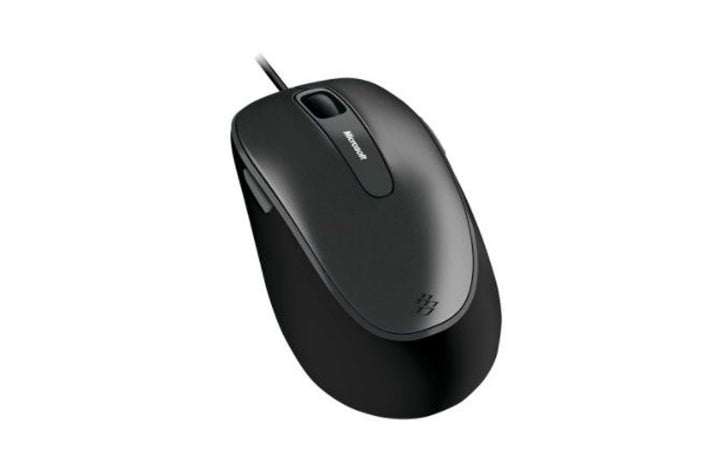


Microsoft Comfort Mouse 4500
PRODUCT DESCRIPTION
Microsoft Comfort Mouse 4500 (4FD-00027) - Local Warranty
Microsoft Comfort Mouse 4500 — A Plain Wired Mouse That Stays Put
The Microsoft Comfort Mouse 4500 (4FD-00027) is a corded USB mouse built for shared desks, training rooms, reception counters and any position where a flat battery on a Monday morning is not acceptable. It draws power from the USB port, so it never needs charging, never needs pairing, and cannot walk off in someone’s bag without the cable following it.
BlueTrack Tracking on Awkward Surfaces
Microsoft BlueTrack Technology is the tracking system in this mouse. Microsoft’s stated benefit is precise tracking on a wide range of everyday surfaces rather than only on a mouse mat — useful on laminate desks, painted metal benches and the textured tops common in workshop and warehouse offices. Note that glass is the documented exception for BlueTrack, not a supported surface.
Five Buttons, Customisable in Mouse and Keyboard Center
Microsoft publishes five customisable buttons on this mouse. Assignments are configured in the Microsoft Mouse and Keyboard Center, which is still published and maintained. Thick rubber side grips are the other feature Microsoft calls out, aimed at keeping the mouse in the hand during long sessions.
Sensible for Fleet and Shared-Desk Deployments
Because it is wired, the Comfort Mouse 4500 sidesteps the two recurring costs of wireless mice in a managed estate: battery replacement and lost USB transceivers. For call-centre rows, hot desks and public-facing terminals it remains one of the simpler things to standardise on. Supplied by SourceIT in Singapore with a GST invoice and local support. For a written quotation, current stock position or delivery lead time, contact our team.
Specification note. Microsoft has withdrawn its own-brand PC accessory catalogue and publishes only a short surviving Microsoft Store listing for this mouse. That listing does not state DPI, dimensions, weight, cable length, colour or a warranty term, and no current Microsoft page displays the part number 4FD-00027. Rather than repeat figures from reseller sites, this page prints only what Microsoft still publishes and names the gaps. Ask our team if you need a dimension or a warranty position confirmed in writing.
Microsoft Comfort Mouse 4500 Datasheet — Technical Specifications
General
| Product Name | Microsoft Comfort Mouse 4500 |
| Part Number (SourceIT) | 4FD-00027 |
| Product Type | Wired USB mouse |
| Tracking Technology | Microsoft BlueTrack Technology |
| Grip | Thick rubber side grips |
| Manufacturer Warranty | Not published by Microsoft |
| Local Warranty (Singapore) | Supplied by SourceIT with local support and a GST invoice |
Connectivity & Controls
| Connection | Wired USB — no batteries and no transceiver |
| Buttons | 5 customisable buttons |
| Configuration Software | Microsoft Mouse and Keyboard Center |
Specifications Microsoft Does Not Publish for This Product
The following are commonly asked about but are not stated on any current official Microsoft source for this part number, so SourceIT does not quote them: resolution in DPI, scroll type, hand orientation, operating-system list, dimensions, weight, cable length, colour and a manufacturer warranty term. We would rather leave a field blank than print a figure we cannot substantiate.
Product Status, Availability and Warranty
Microsoft has withdrawn its own-brand PC accessory catalogue. The microsoft.com/accessories product pages for this range now redirect to Microsoft's general hardware-warranty and PC-accessories support pages, and the Microsoft Store Singapore PC-accessories collection returns no results. Microsoft has published no formal discontinuation notice for this product; the evidence is the removal of the pages themselves.
A Microsoft Store listing for the Comfort Mouse 4500 still resolves and shows the product as out of stock at Microsoft. Microsoft has published no end-of-support date for it.
The Microsoft Store listing for this mouse is unstable: the same product resolves on one URL form and redirects away on another, sometimes within minutes. If the link in the sources section below does not open, that is the catalogue withdrawal in progress.
This listing shows zero inventory in our system. Contact SourceIT for the current stock position and lead time before you raise a purchase order.
Warranty Position
Microsoft no longer publishes a warranty term for this product. Microsoft's current PC accessory warranty page states only that the accessory "comes with a 'limited hardware warranty' depending on the device" and directs the buyer to check their proof of purchase to identify the warranty period. SourceIT therefore does not quote a manufacturer term for this item. Ask our team to confirm the warranty position in writing before you order.
The local warranty named in the heading of this listing is SourceIT's own commercial term, not a figure published by Microsoft. Ask our team to confirm the term in writing with your quotation.
Compatibility, Setup and Software
Microsoft does not publish an operating-system compatibility list for this mouse on any current page. As a wired USB mouse it presents as a standard HID pointing device, which is handled natively by current versions of Windows, macOS and Linux without a driver — but basic HID operation is not the same as a manufacturer compatibility statement, and we do not present it as one.
Button customisation requires the Microsoft Mouse and Keyboard Center. Check the current Microsoft Mouse and Keyboard Center supported-device list before you plan a deployment around remapped buttons.
Setup is plug and play: connect the mouse to a USB-A port. There is nothing to pair and no battery to fit.
Official Microsoft Sources & Downloads
- Microsoft Comfort Mouse 4500 — Microsoft Store listing
- Microsoft PC accessory warranty — support.microsoft.com
- Devices supported by Microsoft Mouse and Keyboard Center
- Microsoft PC accessories support hub
Only the Microsoft sources above were used to build this page. Where Microsoft publishes nothing, this page says so rather than filling the gap.
Frequently Asked Questions — Microsoft Comfort Mouse 4500
Is this mouse wired or wireless?
Wired. It connects by USB cable and needs no batteries and no transceiver.
What DPI is it?
Microsoft does not publish a DPI figure for the Comfort Mouse 4500 on any current page, so we do not quote one. Figures circulating on reseller sites are not Microsoft-published and we will not repeat them.
How many buttons does it have?
Microsoft publishes five customisable buttons. Assignments are set in the Microsoft Mouse and Keyboard Center.
Does it work on glass?
No. BlueTrack works across a wide range of everyday surfaces, but glass is the documented exception rather than a supported surface. Use a mat on a glass desk.
Does it work with a Mac?
Microsoft publishes no operating-system list for this mouse. It is a standard USB HID mouse, which macOS handles natively, but Microsoft does not state Mac support and the Mouse and Keyboard Center software is Windows-only.
What warranty comes with it?
Microsoft no longer publishes a warranty term for this product; its current PC accessory warranty page directs buyers to their proof of purchase. SourceIT supplies the mouse with local support and a GST invoice. Ask us to confirm the warranty position in writing before you order. The local warranty named in the heading of this listing is SourceIT's own commercial term, not a figure published by Microsoft. Ask our team to confirm the term in writing with your quotation.
Is it still in production?
Microsoft has withdrawn its own-brand PC accessory catalogue and shows this mouse as out of stock on its own store, without publishing a formal discontinuation notice. Treat remaining Singapore stock as finite.


