
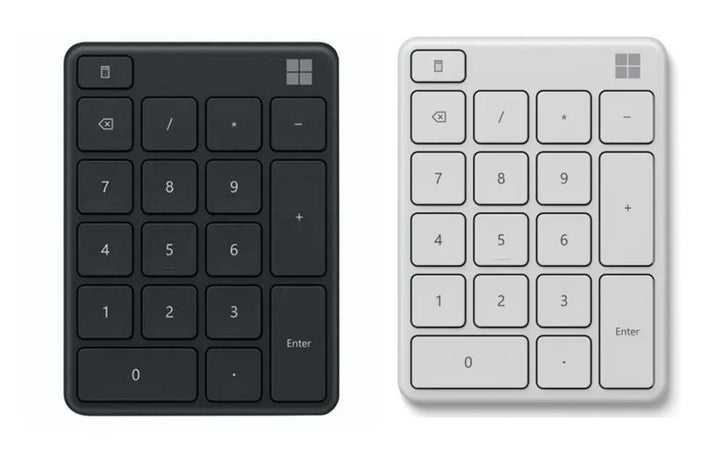


Microsoft Bluetooth Number Pad Black/Glacier
Currently out of stock. Request a quote and
our team will confirm the latest price, availability and lead time.
PRODUCT DESCRIPTION
Microsoft Number Pad (23O-00005) - 1 Year Local Warranty
Microsoft Number Pad — Numeric Entry Back on a Compact Keyboard
The Microsoft Number Pad (23O-00005) gives finance, accounts and data-entry users a proper ten-key block alongside a compact or laptop keyboard, without forcing the whole desk back to a full-width board. It is a Bluetooth device at 81.8 × 110.8 × 9.1 mm and 78 g, so it travels between desks and sits where a right-handed user wants it — or on the left, which a full-width keyboard cannot offer.
One naming point before you order: Microsoft publishes this product as the Microsoft Number Pad. Microsoft publishes no product called the Microsoft Bluetooth Number Pad.
Connects to Three Devices at Once
Microsoft states that the Number Pad pairs with up to three devices, which is the feature that distinguishes it from a plain USB ten-key block. A user working across a laptop, a desktop and a tablet keeps one number pad on the desk and switches between them. Swift Pair is supported on Windows for the initial connection.
Scissor Keyset, 1.35 mm Travel, and a Calculator Key
Microsoft publishes a scissor keyset with 1.35 mm low-profile key travel — the shallow, stable action of a good laptop keyboard rather than the deeper throw of a desktop board. There is also a dedicated Calculator key that opens the Windows Calculator app directly.
Two Years on One Coin Cell
The Number Pad runs on a single CR2032 lithium coin battery, included and pre-installed, which Microsoft rates at up to 24 months with the usual caveat that battery life varies with use. Microsoft publishes it in Matte Black and Glacier. Supplied by SourceIT in Singapore with a GST invoice and local support. For a written quotation, current stock position or delivery lead time, contact our team.
Specification note. Microsoft has withdrawn its own-brand PC accessory catalogue; the plain product address for this item now redirects, and the specifications below survive only on Microsoft’s routed Microsoft Store listings, which show the product as out of stock at Microsoft. No current Microsoft page displays the part number 23O-00005. Microsoft publishes Matte Black and Glacier as separate finishes and does not map either to this part number. Confirm the colour with our team before you order.
Microsoft Number Pad Datasheet — Technical Specifications
General
| Product Name | Microsoft Number Pad — published as New Microsoft Number Pad on the Microsoft Store |
| Part Number (SourceIT) | 23O-00005 |
| Product Type | Bluetooth numeric keypad |
| Colours Published by Microsoft | Matte Black and Glacier — not mapped by Microsoft to individual part numbers |
| Manufacturer Warranty | 1-year limited warranty, per the Microsoft Store specification block |
| Local Warranty (Singapore) | Supplied by SourceIT with local support and a GST invoice |
Connectivity
| Connection | Bluetooth Low Energy 5.0; the same Microsoft Store page’s compatibility line states the host must support Bluetooth 4.0 or higher |
| Paired Devices | Up to 3 devices |
| Pairing | Swift Pair supported; power on into pairing mode, or hold the pair button for 5 seconds until the LED flashes |
Keys
| Keyset | Scissor keyset |
| Key Travel | 1.35 mm low profile |
| Dedicated Key | Calculator key — opens the Calculator app |
Power, Physical & Compatibility
| Battery | 1 × CR2032 lithium coin battery, included and pre-installed |
| Battery Life | Up to 24 months — Microsoft notes battery life may vary based on user and computer conditions |
| Dimensions | 81.8 × 110.8 × 9.1 mm (3.22 × 4.36 × 0.36 in) |
| Weight | 78 g (2.75 oz) including battery |
| Operating System | Windows 11 Home / Pro, Windows 10, Windows 8.1 |
Specifications Microsoft Does Not Publish for This Product
The following are commonly asked about but are not stated on any current official Microsoft source for this part number, so SourceIT does not quote them: macOS, iPadOS or Android support, a colour mapped to this specific part number and a Singapore-specific warranty term. We would rather leave a field blank than print a figure we cannot substantiate.
Product Status, Availability and Warranty
Microsoft has withdrawn its own-brand PC accessory catalogue. The microsoft.com/accessories product pages for this range now redirect to Microsoft's general hardware-warranty and PC-accessories support pages, and the Microsoft Store Singapore PC-accessories collection returns no results. Microsoft has published no formal discontinuation notice for this product; the evidence is the removal of the pages themselves.
The plain Microsoft Store address for this product redirects to a general support page, but Microsoft’s routed Store listings still resolve with the full specification table and show the product as out of stock at Microsoft. Those routed listings are the source for this datasheet.
Microsoft uses two names for this product. Its support article and the Mouse and Keyboard Center supported-device list call it the Microsoft Number Pad; the Microsoft Store calls it the New Microsoft Number Pad. Microsoft's own name for this product is the Microsoft Number Pad.
Microsoft states two Bluetooth figures on the same page: the specification block says Bluetooth Low Energy 5.0 while the compatibility line on that same listing says the host must support Bluetooth 4.0 or higher. Both are reproduced above.
This listing shows zero inventory in our system. Microsoft publishes Matte Black and Glacier as the product’s colour range but does not map either finish to a part number, so contact SourceIT to confirm the finish you are ordering.
Warranty Position
Microsoft's surviving Microsoft Store specification block for this product states a "1-year limited warranty". Note that Microsoft's current PC accessory warranty support page names no term at all and directs buyers to their proof of purchase, so the two Microsoft sources do not agree. We publish the Microsoft Store figure and attribute it; ask our team to confirm the position in writing before you order.
SourceIT supplies this product in Singapore with a one-year local warranty, which is the term stated in the heading of this listing. That term is SourceIT's, not a figure quoted from Microsoft.
Compatibility, Setup and Software
Microsoft publishes support for Windows 11 Home and Pro, Windows 10 and Windows 8.1, on a host supporting Bluetooth 4.0 or higher. Microsoft publishes no macOS, iPadOS or Android compatibility claim for this product, so we do not make one — a point worth noting given that the three-device pairing might otherwise suggest mixed-platform use.
Microsoft’s support article covers pairing, the three-device limit and the battery-door procedure: press a pin into the small hole, slide the door off and fit the coin cell positive side up.
The Number Pad appears in the current Microsoft Mouse and Keyboard Center supported-device list under number pads, so its Calculator key and layout are configurable in Microsoft’s software.
Official Microsoft Sources & Downloads
- Use Microsoft Number Pad — Microsoft support
- New Microsoft Number Pad — Microsoft Store technical specifications
- New Microsoft Number Pad — Microsoft Store UK listing
- Microsoft PC accessory warranty — support.microsoft.com
- Devices supported by Microsoft Mouse and Keyboard Center
The plain Microsoft product address for this item now redirects; the routed Microsoft Store listings above are the surviving official specification source.
Frequently Asked Questions — Microsoft Number Pad
Is it called the Microsoft Number Pad or the Microsoft Bluetooth Number Pad?
Microsoft calls it the Microsoft Number Pad, and the Microsoft Store calls it the New Microsoft Number Pad. There is no Microsoft product called the Microsoft Bluetooth Number Pad. The part number is the reliable identifier.
How many devices can it pair with?
Up to three, per Microsoft’s support article and Store listing. That is the main advantage over a wired ten-key block.
What colour will I receive?
Microsoft publishes Matte Black and Glacier as the product’s colour range but does not map either to a part number, so confirm the finish with our team when you order.
What battery does it use and how long does it last?
One CR2032 lithium coin cell, included and pre-installed. Microsoft rates it at up to 24 months, noting that battery life varies with use.
Does it work with a Mac or an iPad?
Microsoft publishes no macOS, iPadOS or Android support for this product, so we do not claim it. Microsoft lists Windows 11, Windows 10 and Windows 8.1 only.
What Bluetooth version is it?
Microsoft’s specification block states Bluetooth Low Energy 5.0, while the compatibility line on the same Microsoft page says the host needs Bluetooth 4.0 or higher. Both are Microsoft statements, so we publish both.
What warranty applies in Singapore?
The Microsoft Store specification block states a 1-year limited warranty, while Microsoft’s current PC accessory warranty page names no term and directs buyers to their proof of purchase. SourceIT supplies the number pad with local support and a GST invoice. SourceIT supplies this product in Singapore with a one-year local warranty, which is the term stated in the heading of this listing. That term is SourceIT's, not a figure quoted from Microsoft.
We Also Recommend


Microsoft 365 E5 Annual Subscription (12 Months)


Microsoft 365 E3 Annual Subscription (12 Months)
Microsoft 365 F3 Annual Subscription (12 Months)
Microsoft 365 Business Premium Annual Subscription (12 Months)


Microsoft 365 Business Standard Annual Subscription (12 Months)