



Microsoft Arc Bluetooth Mouse Ergonomic for Remote Worker
Currently out of stock. Request a quote and
our team will confirm the latest price, availability and lead time.
PRODUCT DESCRIPTION
Microsoft Arc Mouse (ELG-00005) - 1 Year Local Warranty
Microsoft Arc Mouse — Flat to Carry, Curved to Use
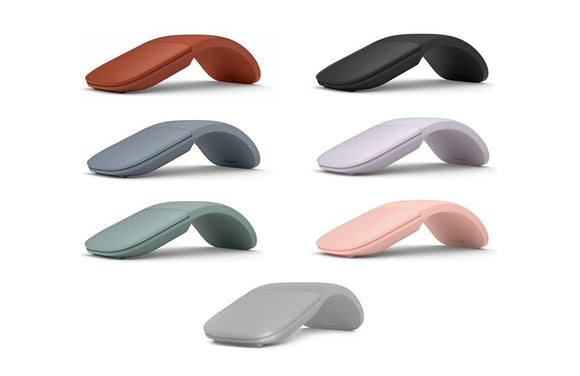
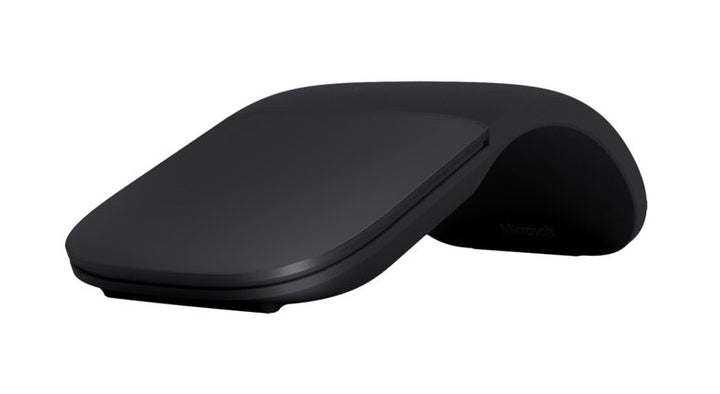
The Microsoft Arc Mouse (ELG-00005) snaps from flat to curved. Flat, it slides into a laptop sleeve or a jacket pocket and switches itself off; curved, it takes the shape of your palm and powers up. For hot-desking, client visits and the commute between home and a Singapore CBD office, that single hinge is the whole argument for this mouse.
Microsoft publishes this product under two different names depending on the market: Microsoft Arc Mouse on its US and Australian storefronts, and Surface Arc Mouse on the Singapore storefront. They carry the same published specification. We list it as the Microsoft Arc Mouse and note the alternative name here so you can match it against a Microsoft quote or an internal asset register.
Full Scroll Plane Instead of a Wheel
In place of a scroll wheel the Arc Mouse has a touch-sensitive scroll plane that reads both vertical and horizontal movement. Long documents, wide spreadsheets and large CAD or design canvases pan in any direction without reaching for a scrollbar. Microsoft publishes two buttons, left and right, alongside that scroll plane.
BlueTrack Tracking at 1000 DPI
Microsoft BlueTrack Technology tracks at 1000 points per inch (39.4 per mm), which in practice means the mouse works on desks, laminate, fabric and the arm of a meeting-room chair rather than demanding a mouse mat. Microsoft publishes a wireless range of 10 metres (32.8 feet) in open areas and 5 metres (16.4 feet) in a typical office environment.
Six Months on a Pair of AAA Batteries
The Arc Mouse runs on two AAA alkaline batteries, supplied in the box, which Microsoft rates at up to six months of use. It pairs over Bluetooth 4.1 with no dongle to lose, so it does not consume one of the scarce USB ports on a modern ultrabook. At 82.49 g including batteries and 14.22 mm thick when flat, it adds very little to a laptop bag.
Specification note. Microsoft has withdrawn its own-brand PC accessory catalogue, and no current Microsoft page displays the part number ELG-00005. The specifications below are taken from Microsoft's surviving Microsoft Store listings for the Arc Mouse / Surface Arc Mouse and are published by Microsoft at product level, not at part-number level. Colour variants may differ in ways Microsoft no longer documents. Confirm the exact variant with our team before you order.
Microsoft Arc Mouse Datasheet — Technical Specifications
General
| Product Name | Microsoft Arc Mouse (published as Surface Arc Mouse on Microsoft’s Singapore storefront) |
| Part Number (SourceIT) | ELG-00005 |
| Product Type | Portable Bluetooth mouse, snap-flat design |
| Tracking Technology | Microsoft BlueTrack Technology |
| Resolution | 1000 points per inch (39.4 per mm) |
| Manufacturer Warranty | 1-year limited warranty, per the Microsoft Store specification block |
| Local Warranty (Singapore) | Supplied by SourceIT with local support and a GST invoice |
Connectivity
| Connection | Bluetooth 4.1 |
| Wireless Range | 10 m (32.8 ft) open area; 5 m (16.4 ft) typical office environment |
| Transceiver | None required — direct Bluetooth pairing |
Controls & Power
| Buttons | 2 (left and right) |
| Scrolling | Full scroll plane — vertical and horizontal |
| Power Switch | Snap flat to switch off, curve to switch on |
| Battery | 2 × AAA alkaline (included) |
| Battery Life | Up to 6 months |
Physical & Compatibility
| Dimensions | 131.31 × 55.11 × 14.22 mm |
| Weight | 82.49 g (2.91 oz) including batteries |
| Operating System | Windows 11 Home / Pro, Windows 10, Windows 8.1, Windows 8 — requires Bluetooth 4.0 or later |
Specifications Microsoft Does Not Publish for This Product
The following are commonly asked about but are not stated on any current official Microsoft source for this part number, so SourceIT does not quote them: hand orientation, polling rate, a Singapore-specific warranty term and a colour mapped to this specific part number. We would rather leave a field blank than print a figure we cannot substantiate.
Product Status, Availability and Warranty
Microsoft has withdrawn its own-brand PC accessory catalogue. The microsoft.com/accessories product pages for this range now redirect to Microsoft's general hardware-warranty and PC-accessories support pages, and the Microsoft Store Singapore PC-accessories collection returns no results. Microsoft has published no formal discontinuation notice for this product; the evidence is the removal of the pages themselves.
The Microsoft Store listings for the Arc Mouse and Surface Arc Mouse still resolve but show the product as out of stock at Microsoft. Microsoft has not published an end-of-support date for this mouse.
Two official Microsoft sources disagree on connectivity. Microsoft’s Singapore page for this mouse lists both Bluetooth 4.1 and a 2.4 GHz frequency range, while the US and Australian pages list Bluetooth 4.1 only. The mouse pairs over Bluetooth and needs no USB transceiver. We publish both readings rather than choosing between them; if the distinction matters to your deployment, ask us to confirm in writing.
This listing shows zero inventory in our system. Contact SourceIT for the current stock position and lead time before you raise a purchase order.
Warranty Position
Microsoft's surviving Microsoft Store specification block for this product states a "1-year limited warranty". Note that Microsoft's current PC accessory warranty support page names no term at all and directs buyers to their proof of purchase, so the two Microsoft sources do not agree. We publish the Microsoft Store figure and attribute it; ask our team to confirm the position in writing before you order.
SourceIT supplies this product in Singapore with a one-year local warranty, which is the term stated in the heading of this listing. That term is SourceIT's, not a figure quoted from Microsoft.
Compatibility, Setup and Software
Microsoft states support for Windows 11 Home and Pro, Windows 10, Windows 8.1 and Windows 8, on a device that supports Bluetooth 4.0 or later. Microsoft does not publish macOS, iPadOS or Android support for this mouse, so we do not claim it. The mouse may well work as a generic Bluetooth pointing device on those platforms, but that is not a Microsoft-supported configuration and we cannot warrant it.
Pairing is standard Bluetooth: curve the mouse to switch it on, hold the pairing button underneath until the light blinks, then add it from Windows Bluetooth settings.
Customisation is handled by the Microsoft Mouse and Keyboard Center. Check the current Microsoft Mouse and Keyboard Center supported-device list before you rely on a customised button assignment for this model.
Official Microsoft Sources & Downloads
- Microsoft Arc Mouse — Microsoft accessories page (en-US)
- Microsoft Arc Mouse (Black) — Microsoft Store listing with tech specs
- Microsoft Arc Mouse — Microsoft Singapore accessories page
- Microsoft PC accessory warranty — support.microsoft.com
- Devices supported by Microsoft Mouse and Keyboard Center
Every specification on this page is drawn from the Microsoft sources listed above. Supplied by SourceIT in Singapore with a GST invoice and local support. For a written quotation, current stock position or delivery lead time, contact our team.
Frequently Asked Questions — Microsoft Arc Mouse
Is this the Microsoft Arc Mouse or the Surface Arc Mouse?
Both names refer to this product. Microsoft publishes it as the Microsoft Arc Mouse on its US and Australian storefronts and as the Surface Arc Mouse on its Singapore storefront, with the same published specification. If a Microsoft quotation you hold uses the other name, it is the same mouse.
Does it need a USB dongle?
No. It connects directly over Bluetooth 4.1, so it uses no USB port. Your PC needs Bluetooth 4.0 or later.
Does it work with a Mac, an iPad or an Android tablet?
Microsoft publishes support for Windows only. Behaviour on other platforms is not confirmed here because Microsoft does not document it for this model, and SourceIT does not warrant a configuration the manufacturer does not state.
How does the on/off work?
There is no switch. Snapping the mouse flat powers it down; curving it powers it up. That is also what makes it flat enough to carry in a laptop sleeve.
What is the battery life?
Microsoft rates it at up to six months on the two AAA alkaline batteries supplied in the box.
Is the Arc Mouse still made?
Microsoft has withdrawn its own-brand PC accessory catalogue and shows this product as out of stock on its own store, but has published no formal discontinuation notice. Stock in Singapore is finite. Ask us for the current position before you standardise on it for a fleet.
What warranty applies in Singapore?
Microsoft’s surviving Microsoft Store specification block states a 1-year limited warranty. Microsoft’s current PC accessory warranty page names no term and refers buyers to their proof of purchase. SourceIT supplies the mouse with local support and a GST invoice; ask us to confirm the warranty position in writing before you order. SourceIT supplies this product in Singapore with a one-year local warranty, which is the term stated in the heading of this listing. That term is SourceIT's, not a figure quoted from Microsoft.
We Also Recommend


Microsoft 365 E5 Annual Subscription (12 Months)


Microsoft 365 E3 Annual Subscription (12 Months)
Microsoft 365 F3 Annual Subscription (12 Months)
Microsoft 365 Business Premium Annual Subscription (12 Months)


Microsoft 365 Business Standard Annual Subscription (12 Months)