
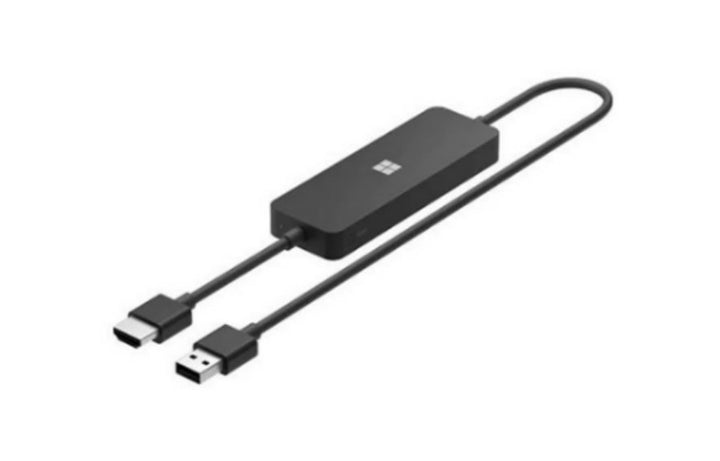


Microsoft 4K Wireless Display Adapter Miracast Supported
Currently out of stock. Request a quote and
our team will confirm the latest price, availability and lead time.
PRODUCT DESCRIPTION
Microsoft 4K Wireless Display Adapter (UTH-00032) - Local Warranty
Microsoft 4K Wireless Display Adapter — The Only Model That Does 4K
The Microsoft 4K Wireless Display Adapter (UTH-00032) plugs into an HDMI input and receives a Miracast screen cast from a Windows or Android device. Microsoft is unambiguous that this is the capable model in the range: “Only the Microsoft 4K Wireless Display Adapter can display in 4K”, and the display must support 3840×2160 resolution or higher.
It is also the only model in the range that supports Miracast over Wi-Fi — Miracast over infrastructure — rather than only a direct device-to-adapter link. In a meeting room already on managed Wi-Fi, that is the difference between a reliable cast and a fight with the wireless.
Windows and Android — and Android Only on This Model
Microsoft publishes support for “Miracast enabled Windows 10 and Windows 11 devices and Android devices”, and notes that Android support is specific to the 4K model. If you have a mixed estate that includes Android tablets or phones, this is the adapter that covers them.
There is no published support for iPhone, iPad or macOS — Apple devices do not use Miracast, and Microsoft makes no claim here that they do.
The Network and Security Conditions Worth Knowing Before Deployment
Microsoft publishes several conditions that catch out corporate deployments. The adapter connects by HDMI out and is powered over USB, requiring at least 5 W (5 V, 1 A) — a low-power USB port on an older display may not be enough. HDCP must be enabled in the casting application. Networks must use WPA, WPA2 or WPA3, and enterprise authentication is not supported. The adapter does not work behind a proxy server. And the 2.4 GHz band must be enabled when pairing.
That combination — no enterprise authentication, no proxy — is the single most common reason one of these fails in a corporate meeting room. Check it against your wireless design before you order in quantity.
What Microsoft No Longer Publishes for This Model
Microsoft has withdrawn this product from its catalogue: the Store identifier returns a not-found error in both the United States and United Kingdom markets, and only support documentation survives. Microsoft no longer publishes a refresh rate, dimensions, weight, cable length, wireless range or warranty term for the 4K model.
Microsoft does still publish a full specification for the original, non-4K Microsoft Wireless Display Adapter, including a range figure, dimensions, a weight and a one-year warranty. Those are a different product and we have deliberately not carried them onto this page. Supplied by SourceIT in Singapore with a GST invoice and local support. For a written quotation, current stock position or delivery lead time, contact our team.
Specification note. Microsoft has withdrawn this product from its catalogue — the Store identifier returns a not-found error in both the United States and United Kingdom markets, and only support documentation survives. Microsoft no longer publishes a refresh rate, dimensions, weight, cable length, wireless range or warranty term for the 4K model, so this page does not state them. Figures for those fields circulate elsewhere but are not Microsoft-published. Note in particular that Microsoft publishes a complete specification for the original, non-4K Wireless Display Adapter, including a 7 m range and a one-year warranty — that is a different product and none of its figures have been carried across. Check the network conditions in the compatibility section before ordering: this adapter does not support enterprise authentication and will not work behind a proxy server.
Microsoft 4K Wireless Display Adapter Datasheet — Technical Specifications
General
| Product Name | Microsoft 4K Wireless Display Adapter |
| Part Number (SourceIT) | UTH-00032 |
| Product Type | Miracast wireless display adapter |
| Wireless Standard | Miracast |
| Maximum Resolution | 4K — Microsoft states only the 4K model can display in 4K, and the display must support 3840×2160 or higher |
| Refresh Rate | Not published by Microsoft |
| Miracast over Wi-Fi | Supported — Microsoft states only the 4K model supports Miracast over Wi-Fi |
| Manufacturer Warranty | Not published by Microsoft |
| Local Warranty (Singapore) | Supplied by SourceIT with local support and a GST invoice |
Connections and Power
| Video Output | HDMI |
| Power | Powered over USB, requiring at least 5 W (5 V, 1 A) |
| HDCP | Must be enabled in the casting application |
Host Devices and Network Conditions
| Supported Hosts | Miracast-enabled Windows 10 and Windows 11 devices, and Android devices |
| Android | Supported — Microsoft states Android support is specific to the 4K model |
| Apple Devices | No support published. Apple devices do not use Miracast |
| Wireless Security | Networks must use WPA, WPA2 or WPA3 |
| Enterprise Authentication | Not supported |
| Proxy Servers | Does not work behind a proxy server |
| Pairing | The 2.4 GHz band must be enabled when pairing |
What Microsoft Does Not Publish for This Product
The following are commonly asked about but are not stated on any current official Microsoft source for this product, so SourceIT does not quote them: refresh rate, wireless range for the 4K model, dimensions, weight, cable length and a manufacturer warranty term. We would rather leave a field blank than print a figure we cannot substantiate.
Product Status, Availability and Warranty
Microsoft has withdrawn this product from its catalogue. Its Store product identifier returns a not-found error in both the United States and United Kingdom markets, and every Store address form fails or redirects. Only Microsoft’s support documentation survives, and every figure on this page is quoted from it.
Microsoft has withdrawn its own-brand PC accessory catalogue. The microsoft.com/accessories product pages for this range now redirect to Microsoft's general hardware-warranty and PC-accessories support pages, and the Microsoft Store Singapore PC-accessories collection returns no results. Microsoft has published no formal discontinuation notice for this product; the evidence is the removal of the pages themselves.
Do not confuse this with the original Wireless Display Adapter. Microsoft still publishes a complete specification for that separate, non-4K product — including a range of up to 7 m, dimensions of 103.5 × 22.0 × 11.0 mm, a weight of 33.1 g, a 300 mm cable and a 1-year limited warranty. Those figures belong to a different adapter and none of them have been carried onto this page. A range figure of roughly 7 m also appears in a shared troubleshooting article, in passages about the standard adapter; we have not attributed it to the 4K model.
This listing shows zero inventory in our system. Contact SourceIT for the current stock position and lead time before you raise a purchase order.
Warranty Position
Microsoft no longer publishes a warranty term for this product. Microsoft's current PC accessory warranty page states only that the accessory "comes with a 'limited hardware warranty' depending on the device" and directs the buyer to check their proof of purchase to identify the warranty period. SourceIT therefore does not quote a manufacturer term for this item. Ask our team to confirm the warranty position in writing before you order.
The local warranty named in the heading of this listing is SourceIT's own commercial term, not a figure published by Microsoft. Ask our team to confirm the term in writing with your quotation.
Compatibility, Setup and Software
Microsoft publishes support for Miracast-enabled Windows 10 and Windows 11 devices and Android devices, with Android support specific to the 4K model. There is no published support for iPhone, iPad or macOS, which do not use Miracast.
Check these network conditions before ordering for a corporate environment. Microsoft publishes that the network must use WPA, WPA2 or WPA3; that enterprise authentication is not supported; that the adapter does not work behind a proxy server; and that the 2.4 GHz band must be enabled when pairing. Many corporate wireless networks use enterprise authentication as standard, which rules this adapter out.
The adapter draws power over USB and requires at least 5 W, or 5 V at 1 A. A low-power USB service port on an older display or projector may not supply that, in which case use a mains USB supply.
HDCP must be enabled in the casting application. If the screen goes black on protected content, that is the usual cause.
Official Microsoft Sources & Downloads
- Use the Microsoft Wireless Display Adapter — Microsoft support
- Troubleshooting the Microsoft Wireless Display Adapter — Microsoft support
- Use the Microsoft Wireless Display Adapter — Microsoft Surface support
- Microsoft PC accessory warranty — support.microsoft.com
- Microsoft PC accessories support hub
Microsoft’s product listing for this adapter has been removed from its catalogue, so the support documentation above is the only surviving official source.
Frequently Asked Questions — Microsoft 4K Wireless Display Adapter
Does it really do 4K?
Yes, and Microsoft states that this is the only model in the range that can: “Only the Microsoft 4K Wireless Display Adapter can display in 4K.” The display must support 3840×2160 or higher.
Will it work on our corporate Wi-Fi?
Check first. Microsoft publishes that the network must use WPA, WPA2 or WPA3, that enterprise authentication is not supported, and that the adapter does not work behind a proxy server. Many corporate networks use enterprise authentication, which rules it out. Ask us and we will review your wireless design before you order in quantity.
Does it work with an iPhone, iPad or Mac?
No. It uses Miracast, and Apple devices do not. Microsoft publishes support for Miracast-enabled Windows 10 and Windows 11 devices and Android devices only.
Does it work with Android?
Yes, and Microsoft notes that Android support is specific to the 4K model rather than to the range as a whole.
What is the wireless range?
Microsoft does not publish a range figure for the 4K model. A figure of roughly 7 m appears in a shared troubleshooting article in passages about the standard, non-4K adapter, and we have not attributed it to this product.
How is it powered?
Over USB, requiring at least 5 W, or 5 V at 1 A. A low-power USB service port on an older display may not be sufficient; use a mains USB supply in that case.
What warranty applies?
Microsoft publishes no warranty term for the 4K model. It does publish a one-year limited warranty for the separate, original non-4K Wireless Display Adapter, but that is a different product and we do not extend its term to this one. SourceIT supplies this adapter with local support and a GST invoice. The local warranty named in the heading of this listing is SourceIT's own commercial term, not a figure published by Microsoft. Ask our team to confirm the term in writing with your quotation.
We Also Recommend


Microsoft 365 E5 Annual Subscription (12 Months)


Microsoft 365 E3 Annual Subscription (12 Months)
Microsoft 365 F3 Annual Subscription (12 Months)
Microsoft 365 Business Premium Annual Subscription (12 Months)


Microsoft 365 Business Standard Annual Subscription (12 Months)