
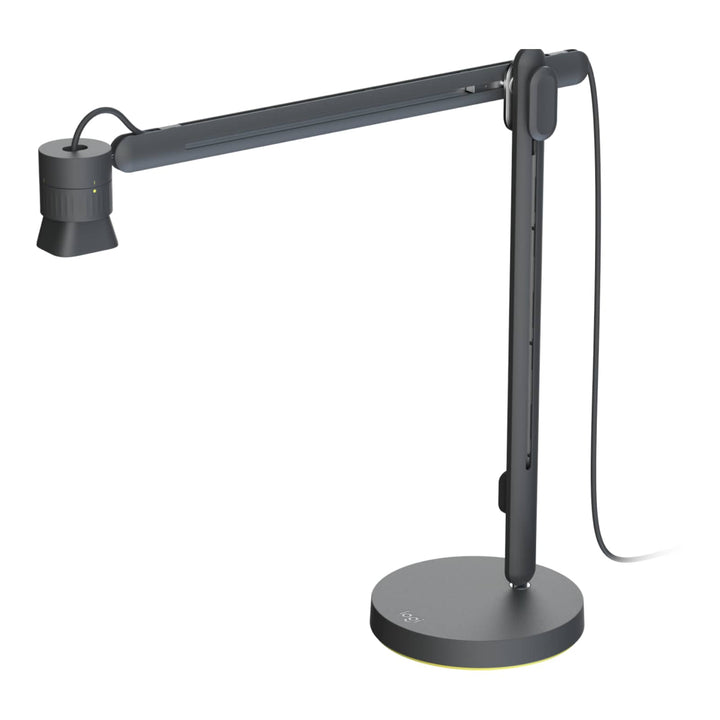


Logitech Reach Adjustable Content Camera with Base Mount
Email sales@sourceit.com.sg or use Request for Quotation below and our team will confirm the latest price, availability and lead time.
PRODUCT DESCRIPTION
Logitech Reach Adjustable Content Camera with Base Mount (960-001670) - 2 Years Local Warranty
Overhead Content Camera for Product Demos, Documents and Hands-On Teaching
Logitech Reach is an adjustable overhead camera on an articulating arm, built for showing physical things — product samples, printed documents, circuit boards, lab work, sketches — to people on the other end of a video call. Where a standard webcam frames your face, Reach frames what is on your desk. For Singapore sales teams demonstrating hardware and for trainers running hands-on sessions, it removes the awkward business of tilting a laptop or holding a phone over the table.
1080p60 StreamCam Optics with 4.3x Lossless Zoom
Reach is powered by Logitech StreamCam, so the image quality is a genuine step above a document camera: 1080p at 60 fps in MJPEG through a Full HD glass lens at f/2.0 with a 3.7 mm focal length and a 78° diagonal field of view. Autofocus and intelligent exposure keep small detail sharp, and 4.3x lossless zoom lets you go from a 30 x 55 cm view of the whole desk down to a 7 x 13 cm close-up of one component. Dual omnidirectional microphones with a noise reduction filter are built in.
Weighted Base Mount for Free-Standing Placement on Any Desk
This part number ships Reach with the weighted base mount, which needs no clamping and no fixing — you set it down and it stays put, thanks to a non-marring grip layer on the underside. That makes it the right choice for glass tables, thick desks, hot-desking areas and shared demo benches where you cannot clamp to an edge. The trade-off is footprint and weight: 19 cm square, and 4.05 kg for the complete assembly against 1.5 kg for the clamp version.
Manual Adjustment, USB-C Plug-and-Play, No Software to Install
Every movement is manual and mechanical — one-handed sliders give 32.3 cm of horizontal travel and 31 cm of vertical travel, with 360° panning, plus 360° rotation and 180° tilt at the camera head. There are no motors and nothing to configure. It connects over a single USB-C cable as a standard UVC camera, so Windows, macOS, ChromeOS and iPad all see it immediately, and it can be selected as the camera in Microsoft Teams, Zoom or Google Meet with no drivers to deploy.
Logitech Reach Datasheet — Technical Specifications
General
| Product | Logitech Reach adjustable content camera with base mount |
| Purpose | Overhead capture of objects, samples, models, artifacts and documents |
| Model number | VU0054 |
| Part number | 960-001670 (EAN 097855196545) |
| Base mount accessory part number | 952-000191, if purchased separately |
| Warranty | 2 Years Local Warranty (Singapore) |
Camera
| Camera platform | Powered by Logitech StreamCam |
| Maximum video resolution | 1080p at 60 fps in MJPEG |
| Lens | Premium Full HD glass lens, f/2.0, 3.7 mm focal length |
| Field of view | 78° diagonal (DFOV) |
| Zoom | 4.3x lossless zoom |
| Focus | Autofocus with intelligent exposure |
| Audio | Dual omnidirectional microphones with noise reduction filter |
| Pan / tilt | Manual and mechanical. There are no motors, no presets and no remote PTZ control. |
Reach & Articulation
| Horizontal travel | 32.3 cm (12.73 in) of one-handed lateral travel, plus 360° panning rotation |
| Vertical travel | 31 cm (12.22 in) via a multipoint push-button adjustment |
| Camera head movement | 360° rotation on the camera ring, 180° tilt and 360° rotation on the ball joint |
| View area at maximum zoom out | 30 x 55 cm (12 x 21.5 in) of desktop surface |
| View area at maximum zoom in | 7 x 13 cm (2.75 x 5 in) of desktop surface |
| Modes | Desktop mode with the arm extended over the surface, and a stowed compact mode for presenter view or storage |
Connectivity
| Connection | USB-C, plug-and-play UVC. No proprietary software to install. |
| Cable length | Approximately 0.9 m (3 ft) of usable USB-C cable |
| Extension | Logitech notes that extension cables can be used for additional range but may affect maximum video quality. A Reach USB-C extension cable is sold separately. |
Design & Power
| Dimensions, compact mode | 59 x 19 x 19 cm (23.2 x 7.48 x 7.48 in) |
| Dimensions, desktop mode | 53 x 55 x 19 cm (20.87 x 21.65 x 7.48 in) |
| Weight, complete with base mount | 4.05 kg (8.93 lb) |
| Base mount alone | 28.5 mm (H) x 190 mm (W) x 190 mm (D), 3,193 g |
| Grip | Non-marring grip layer on the underside of the base |
| Power | USB connected |
Compatibility & Software Support
Logitech Reach is a standard USB (UVC) camera. It needs no drivers and no proprietary software, which is what makes it straightforward to deploy across a mixed fleet.
| Host devices | Most computers, including iPads and Chromebooks, that support USB cameras |
| Windows | Works as a USB camera; Windows Camera app supported |
| macOS | Works as a USB camera; QuickTime supported |
| ChromeOS | Works as a USB camera; Google Camera app supported |
| Microsoft Teams, Zoom, Google Meet | Reach can be selected as the camera source in all three. This is compatibility, not certification. |
| Zoom second-camera share | Zoom’s second-camera feature lets you share Reach alongside your personal webcam simultaneously |
| Streaming software | Streamlabs and similar UVC-compatible applications |
| Logitech Sync / CollabOS | Not applicable. Reach is not a CollabOS device and does not appear in Logitech’s CollabOS or RoomMate certification matrices. |
Reach is not listed by Logitech as a content camera for Rally Bar, Rally Bar Mini, Rally Bar Huddle or RoomMate appliance rooms. If you need an appliance-mode content or whiteboard camera, the Logitech Scribe is the product Logitech certifies for that role.
Package Contents & Reach Series Ordering Information
In the box
This part number supplies the Reach camera and articulating arm together with the base mount, its USB-C cable and documentation.
Reach series ordering information
| Reach Adjustable Content Camera with Base Mount — 960-001670 (this listing) | View listing |
| Reach Adjustable Content Camera with Clamp Mount — 960-001673 | View listing |
| Reach Base Mount, accessory only — 952-000191 | View listing |
| Reach Clamp Mount, accessory only — 952-000192 | View listing |
Swapping between mounts
Logitech sells both bases as standalone accessories precisely so one camera can move between setups — a desk with a clamp today, a free-standing base tomorrow. If you expect to move the camera between rooms, you can add the second mount rather than a second camera.
Regional part numbers
Logitech’s Reach datasheet labels 960-001670 and 960-001673 as the Americas and Asia-Pacific part numbers (excluding Japan), which are the correct part numbers for Singapore.
Datasheet & Downloads
Frequently Asked Questions — Logitech Reach
What is the difference between the base mount and the clamp mount version?
The camera and arm are identical; only the mounting foot differs. The base mount (this listing, 960-001670) is a weighted free-standing base with a 19 cm square footprint and a total assembly weight of 4.05 kg. The clamp mount version (960-001673) grips a desk edge, has a 10 cm footprint and weighs 1.5 kg complete. Choose the base for glass or thick desks and shared spaces; choose the clamp to save desk space.
What is Reach actually for?
Showing physical content on a video call: product demonstrations, printed documents, samples, models, lab and workshop tasks, hands-on teaching. It is a content camera, not a room camera and not a participant camera. If you need to frame the people in a meeting room, look at MeetUp 2 or Rally Bar Huddle instead.
Is it certified for Microsoft Teams, Zoom or Google Meet?
No. Reach is not platform-certified, but it can be selected as the camera source in Microsoft Teams, Zoom and Google Meet, and Zoom’s second-camera feature lets you share Reach and your webcam at the same time. It behaves as a standard USB camera everywhere.
Can I use Reach as a content camera with a Rally Bar or RoomMate appliance room?
That use is not listed by Logitech. Reach is positioned as a USB peripheral for a PC, Mac, Chromebook or iPad. For an appliance-mode content or whiteboard camera on a CollabOS room system, the product Logitech certifies for that role is Logitech Scribe.
Does it have optical zoom or motorised pan and tilt?
Neither. The zoom is 4.3x lossless, not optical, and all arm and head movement is manual and mechanical — there are no motors, no presets and no remote. That is by design: you reposition it with one hand while you are talking.
How far does the arm reach, and how much desk can it see?
32.3 cm of horizontal travel with 360° panning, 31 cm of vertical travel, and 360° rotation plus 180° tilt at the camera head. Zoomed out it covers a 30 x 55 cm area of desk; zoomed in, 7 x 13 cm. It also folds into a stowed compact mode for presenter view or storage.
Can I buy the other mount separately and swap between them?
Yes, and that is Logitech’s stated intent. The Reach Base Mount (952-000191) and Reach Clamp Mount (952-000192) are both sold on their own, so one camera can move between a clamped desk and a free-standing setup.
Does the Logitech Reach come with a Singapore warranty?
Yes. Every Logitech Reach sold by SourceIT comes with 2 years local Singapore warranty and a GST invoice.


