
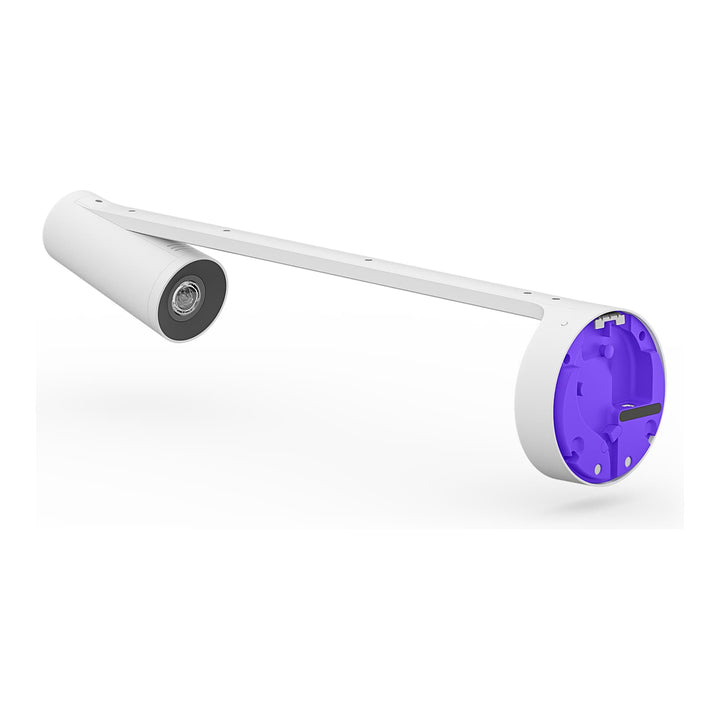


Logitech Scribe Whiteboard Camera for Conferencing Rooms
Email sales@sourceit.com.sg or use Request for Quotation below and our team will confirm the latest price, availability and lead time.
PRODUCT DESCRIPTION
Logitech Scribe AI-Powered Whiteboard Camera for Conference Rooms (960-001332) - 2 Years Local Warranty
Logitech Scribe — AI Whiteboard Camera for Hybrid Meeting Rooms
Logitech Scribe (960-001332) broadcasts an AI-enhanced image of a physical whiteboard straight into a video meeting, so remote participants see what the people in the room are drawing. It outputs 1080p at 15 fps across a 148° field of view and covers a whiteboard up to 1.2 x 1.8 m (4 x 6 ft) — the standard board size in most Singapore meeting rooms and training spaces.
See Through the Presenter, Read Every Marker
Scribe's built-in AI applies a transparency effect so participants can see through the presenter standing at the board, and automatically enhances the colour and contrast of dry erase markers so text and sketches remain legible on a remote screen. Image segmentation also recognises and shows other content such as sticky notes. Any brand of dry erase marker works, on any whiteboard surface.
Wireless Share Button and a Single Cat5e Run
A wireless, adhesive-backed Share Button links over Bluetooth Low Energy through the supplied dongle transceiver, so sharing the board is one press with no menus. The camera connects over Cat5e SF/UTP AWG26 or higher — two 5.0 m cables are included and Logitech supports a total run of up to 35 m — with the included power injector supplying power over the same cabling.
Works in Appliance Rooms and PC Rooms Alike
In appliance mode, Scribe plugs into the USB-A port on Logitech Rally Bar, Rally Bar Mini or RoomMate with CollabOS 1.5.707 or higher. In a PC-based room it connects to the in-room PC or Mac through the included power injector. Logitech lists compatibility with Zoom Rooms on Windows and macOS, Microsoft Teams Rooms on Windows and on Android, Zoom Rooms Appliances, Google Meet, Tencent Meeting, DingTalk and Lark, and Scribe can also run as a plain USB camera with virtually any conferencing application. Logitech Sync manages the fleet, and the device carries full disk AES-128 encryption.
Logitech Scribe Datasheet — Technical Specifications
General
| Product | Logitech Scribe — AI-powered whiteboard camera |
| Part Number | 960-001332 |
| Category | Whiteboard capture camera for video meetings |
| Device Management | Logitech Sync |
| Security | Full disk encryption AES-128 |
| Warranty | 2 Years Local Warranty (Singapore) |
Camera & Capture
| Output Resolution | 1080p at 15 fps |
| Field of View | 148° |
| AI Image Stream | Broadcasts an AI-enhanced image stream into video meetings |
| Presenter Transparency | Built-in AI delivers a transparency effect so participants can see through the presenter |
| Content Enhancement | Automatically enhances the colour and contrast of dry erase markers to make text and sketches easier to read |
| Sticky Notes | Image segmentation recognises and shows other forms of content such as sticky notes |
| Marker Compatibility | Works with any set of dry erase markers and all whiteboard surfaces |
Whiteboard Support
| Maximum Whiteboard Size (H x W) | 1.2 x 1.8 m (4 x 6 ft) |
| Recommended Whiteboard | White or clear glass, 6 ft wide x 4 ft high |
| Mounting Height | Approximately 12.4 cm (5 in) between the bottom edge of the camera base and the top edge of the whiteboard |
| Lighting Guidance | Avoid mounting facing windows, harsh direct light on the board, or very low-light rooms |
Connectivity
| Camera Port | Category cable port (not USB at the camera end) |
| Cable Type | Cat5e SF/UTP AWG26 or higher |
| Cable Included | 2 x 5.0 m (16.4 ft) Cat5e cables — 10 m total |
| Maximum Total Cable Run | Up to 35 m (115.83 ft) using customer-supplied Cat5e or higher |
| Host Connection | Scribe presents as a USB camera; it connects to the USB-A port on Rally Bar, Rally Bar Mini or RoomMate in appliance mode, or to an in-room PC via the included power injector and Cat5 cabling |
| Share Button Link | Bluetooth Low Energy via the included dongle transceiver |
| Dongle Transceiver | 23 x 31 x 84 mm, 500 mm cable, USB-A |
Share Button
| Type | Wireless, Bluetooth Low Energy, adhesive-backed |
| Power | 2 x CR2032 battery |
| Dimensions | 12.7 mm high x 71.8 mm diameter |
| Weight | 108 g |
| Platform Note | Share Button is supported on most platforms except Google Meet and DingTalk on PC-based systems |
Design & Power
| Camera Dimensions (H x W x D) | 149 x 119 x 593 mm (5.9 x 4.7 x 23.4 in) |
| Camera Weight | 1.1 kg |
| Power Injector Dimensions | 91 x 60.2 x 36.3 mm (3.58 x 2.37 x 1.43 in) |
| Power Input | 100–240 V auto-switching power supply with international adaptor set |
| Mounting | Camera installation kit and mounting template included; cable retention clips included |
Compatibility & Software Support
Scribe requires external compute. There are two supported deployment paths. In appliance mode, Scribe connects to the USB-A port on Logitech Rally Bar, Rally Bar Mini or Logitech RoomMate, and requires CollabOS 1.5.707 or higher with Scribe firmware v1.1.4 or later. Alternatively it connects to an in-room PC or Mac using the included power injector and Cat5 cabling.
Platform compatibility per Logitech's Scribe compatibility matrix: Zoom Rooms on Windows or macOS; Microsoft Teams Rooms on Windows; Microsoft Teams Rooms on Android; Zoom Rooms Appliances; Google Meet (with Meet compute or ChromeOS); Tencent Meeting; DingTalk; and Lark. Scribe can also be used as a standard USB camera with virtually any video conferencing application.
Share Button. Supported on most platforms, with the exception of Google Meet and DingTalk on PC-based systems.
Management. Logitech Sync handles monitoring and firmware updates; Scribe carries full disk AES-128 encryption.
Certification wording. Logitech's current language for Scribe is "integrates with" on its compatibility matrix rather than a formal certification statement, so we describe compatibility rather than claiming certification.
Package Contents & Scribe Ordering Information
In the box
- Logitech Scribe camera
- Share Button
- Dongle transceiver
- Power supply (power injector) with international adaptor set
- 2 x 5.0 m (16.4 ft) Cat5e cables
- Cable retention clips
- Camera installation kit including mounting template
- Documentation
Scribe ordering information
| Logitech Scribe whiteboard camera | 960-001332 (this listing) |
| Logitech Scribe Polarizer | 952-000116 — Scribe Polarizer (minimises glare and reflections captured off the whiteboard) |
| Logitech Scribe Glass Mount | 952-000120 — Scribe Glass Mount (secure mounting to glass surfaces, 114 x 114 x 14 mm) |
| Logitech Rally Bar (appliance host) | 960-001312 — Rally Bar Graphite |
| Logitech Rally Bar Mini (appliance host) | 960-001340 — Rally Bar Mini Graphite |
| Logitech RoomMate (appliance host) | 950-000085 — Logitech RoomMate |
| Extended warranty (Logitech) | 994-000147 (1 year) / 994-000164 (3 years) |
Regional note: Logitech's hardware-to-service SKU mapping guide also lists Scribe under 960-001333, 960-001334 and 960-001383 as regional variants of the same camera. Please quote 960-001332 when ordering against this listing.
Datasheet & Downloads
Frequently Asked Questions — Logitech Scribe
What size whiteboard does Scribe cover?
Up to 1.2 x 1.8 m (4 x 6 ft). Logitech's recommended board is a white or clear glass surface 6 ft wide by 4 ft high, with the camera mounted so that roughly 12.4 cm (5 in) sits between the bottom edge of the camera base and the top edge of the board.
Does Scribe need a room PC?
Not necessarily. In appliance mode Scribe plugs into the USB-A port on Rally Bar, Rally Bar Mini or RoomMate, needing CollabOS 1.5.707 or higher and Scribe firmware v1.1.4 or later. In a PC-based room it connects to the in-room PC or Mac using the included power injector and Cat5 cabling. It can also be used as a plain USB camera with almost any conferencing application.
How does it stop the presenter blocking the board?
Scribe's built-in AI applies a transparency effect so remote participants can see through the person standing at the board. The same processing enhances the colour and contrast of dry erase markers, and image segmentation recognises other content such as sticky notes. It works with any brand of dry erase marker.
Can I mount Scribe on a glass whiteboard?
Regular glass is not recommended for direct mounting. For frosted glass Logitech requires a primer before mounting, and the supported route for glass surfaces is the Scribe Glass Mount (952-000120). If glare off the board is an issue, the Scribe Polarizer (952-000116) attaches to the camera lens to manage reflections.
How far can Scribe be from the compute device?
Up to 35 m (115.83 ft) of total Cat5e SF/UTP AWG26 or higher cabling. Two 5.0 m Cat5e cables are included, giving 10 m out of the box; longer runs use customer-supplied cable. Note the camera end uses a category cable port rather than a USB connector.
How does the Share Button work?
It is a wireless, adhesive-backed button that links over Bluetooth Low Energy through the included dongle transceiver, powered by two CR2032 batteries. One press shares the whiteboard into the meeting. Logitech notes the Share Button is supported on most platforms except Google Meet and DingTalk on PC-based systems.
Does the Logitech Scribe come with local warranty in Singapore?
Yes. Every Logitech Scribe sold by SourceIT comes with 2 years local Singapore warranty and a GST invoice.


