
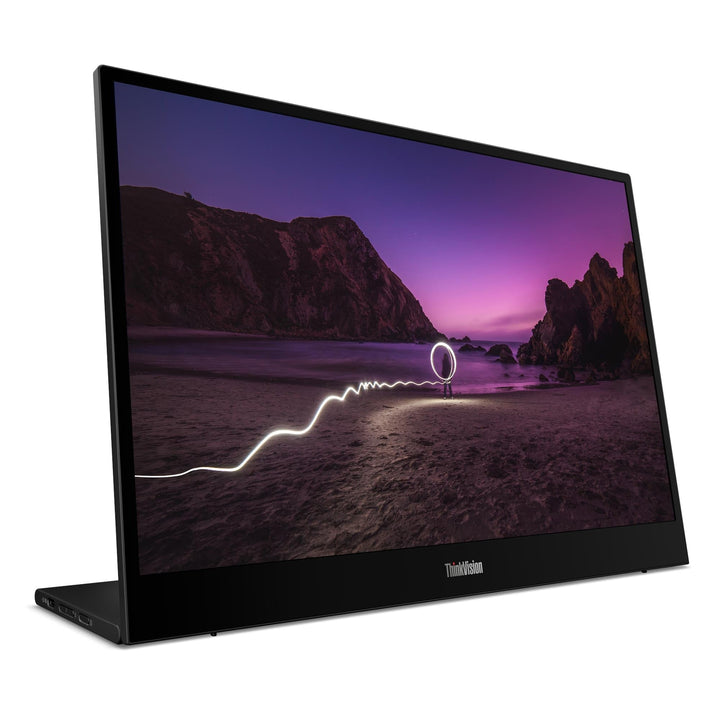


Lenovo ThinkVision M16 16-inch WUXGA Portable Monitor
PRODUCT DESCRIPTION
Lenovo ThinkVision M16 Portable Monitor (64BFUAR1WW) - 3 Years Local Warranty
A 16-Inch 16:10 Portable Monitor That Draws Just 4.5 Watts
The ThinkVision M16 is the largest portable in the range at 16 inches, running 1920 x 1200 in a 16:10 shape, and it is comfortably the most efficient: 4.5 W typical, 5.5 W maximum, against 8 W typical on the M15. Less power drawn from the host means less drain on the laptop battery when the monitor is running off bus power on a train or in a lounge.
16:10 and 3-Side NearEdgeless
The 16:10 aspect ratio gives about 11% more vertical space than a 16:9 panel of the same width, and Lenovo's 3-side NearEdgeless design keeps the top and side bezels to around 7 mm. On a screen carried in a bag, less bezel means more screen for the same footprint.
1500:1 Contrast at 300 Nits
Lenovo publishes 1500:1 typical contrast and 300 cd/m² brightness — brighter and higher-contrast than the M15's 250 nits and 1000:1. Colour coverage is 45% NTSC, the same as the M15, so this is a productivity panel rather than a colour-work one; for colour, the M14d publishes 100% sRGB.
Two Things to Check Before You Order
Lenovo publishes no VESA mount support for the M16. Every other ThinkVision portable states 100 mm VESA; this model's specification has no VESA entry at all, so we will not claim one. And as with the rest of the family: no power adapter and no speakers in the box.
Lenovo ThinkVision M16 Datasheet — Technical Specifications
General
| Product | Lenovo ThinkVision M16 Portable Monitor |
| Part Number | 64BFUAR1WW |
| Machine Type | 64BF |
| Colour | Eclipse black |
| Warranty | 3-Year Limited Warranty (Lenovo, per PSREF) |
| Local Warranty (Singapore) | Included with every SourceIT purchase, with GST invoice |
Panel & Image
| Screen Size | 16" |
| Panel Type | 3-side NearEdgeless In-Plane Switching (IPS), WLED backlight |
| Resolution | 1920 x 1200 (WUXGA) |
| Aspect Ratio | 16:10 |
| Pixel Pitch | 0.1795 mm |
| Refresh Rate | 60 Hz |
| Response Time | 6 ms Extreme mode / 8 ms Normal mode |
| Brightness | 300 cd/m² |
| Contrast Ratio | 1500:1 typical; 3,000,000:1 dynamic |
| Colour Gamut | 45% NTSC (CIE 1976) — Lenovo publishes no sRGB figure for this model |
| Colour Depth | 8-bit (6-bit + FRC), 16.7 million colours |
| Viewing Angles | 178° horizontal / 178° vertical |
| Surface | Anti-glare. Lenovo publishes no haze percentage |
| Bezel | 7.1 mm sides and top, 27 mm bottom; 7.0 mm head |
| Touch | None — this model is not a touchscreen |
Connectivity
| USB-C | 2 x USB-C, one on each side — USB Power Delivery 3.0, DisplayPort 1.2, up to 65 W per port. Data transfer rate is Hi-Speed USB (USB 2.0) |
| Power Input | DC 5 V / 9 V / 15 V / 20 V over USB-C |
| Security | Kensington Nano Security Slot (2.5 x 6 mm) |
| Power Adapter | Not included. Lenovo supplies no power adapter with this monitor. It runs on bus power from the host over USB-C, or from a USB-C Power Delivery adapter you supply |
| Speakers | None. Lenovo's specification for this model contains no audio output of any kind — no speakers and no headphone jack |
| Battery | None. The monitor has no internal battery |
| HDMI | None. There is no micro-HDMI or HDMI input. The only video path is DisplayPort Alt Mode over USB-C, so the host device must support it |
Stand & Mounting
| Stand | Integrated |
| Tilt | 0° to +90° — this model does not tilt forward |
| Lift | Up to 10 mm |
| VESA | Not published by Lenovo for this model. Every other ThinkVision portable states 100 mm VESA support; the M16 specification has no VESA entry, so we do not claim one. If you need to arm-mount it, ask us to confirm with Lenovo first |
Power & Certifications
| Power Consumption | 4.5 W typical / 5.5 W maximum — the lowest in this family |
| Sleep Mode | < 0.5 W |
| Switch-off Mode | < 0.3 W |
| Power Supply | External — no adapter bundled |
| Certifications | ENERGY STAR certified; EPEAT Gold registered; EU Energy Label class B; TÜV Rheinland Flicker Free; TÜV Rheinland Low Blue Light (hardware solution) |
| TCO / Eyesafe / RoHS | Not published by Lenovo in this model's specification |
Physical
| Dimensions (W x D x H) | 360.0 x 116.8 x 252.1 mm at lowest height; 360.0 x 116.5 x 262.1 mm at highest |
| Weight | 0.97 kg (2.1 lb) with stand |
| Packaged Dimensions | 413.0 x 300.0 x 76.0 mm |
| Packaged Weight | 2.2 kg |
Compatibility & Fit
The compatibility question that decides everything. Video reaches this monitor only as DisplayPort 1.2 Alt Mode over USB-C. There is no HDMI port. If your laptop's USB-C port carries data and power but not DisplayPort Alt Mode, it cannot drive this monitor. Tell us the laptop model and we will confirm before you order.
Mounting — read this if you plan to use an arm. Lenovo's specification for the M16 contains no VESA entry. The M14, M14d, M14t Gen 2 and M15 all explicitly publish 100 mm VESA support; this one does not. We will not tell you it mounts when Lenovo has not said so. If arm-mounting is part of your plan, ask us and we will get a written answer from Lenovo before you order.
Powering it. At 4.5 W typical the M16 is the least demanding monitor in this family, so a laptop's USB-C port will normally run it without complaint. Both ports accept up to 65 W if you want to power the monitor and charge the laptop from one adapter. No adapter is supplied — ask us to quote one.
Choosing between the M16 and the M15. The M16 is bigger, brighter, higher-contrast, taller in shape and far more efficient. The M15 is 16:9 rather than 16:10 and publishes VESA support. Colour coverage is 45% NTSC on both, so neither is a colour-work display — that is the M14d.
Package Contents & ThinkVision Portable Monitor Ordering Information
In the box, per Lenovo PSREF:
- Monitor with integrated stand
- 1 x USB-C to USB-C cable (1 m)
- 1 x sleeve
- Quick setup guide
Not in the box: a power adapter. Lenovo lists an external power supply and includes no adapter with this model.
ThinkVision Portable Monitor Ordering Information
| 61DDUAR6WW | ThinkVision M14 — 14" FHD IPS, 300 nits, 0.598 kg, sleeve included |
| 63AAUAR6WW | ThinkVision M14d — 14" 2.2K 16:10, 100% sRGB, 0.6 kg |
| 63FDUAR6WW | ThinkVision M14t Gen 2 — 14" 2.2K 16:10 touch, pen included, 0.7 kg |
| 62CAUAR1WW | ThinkVision M15 — 15.6" FHD IPS, 250 nits, 0.9 kg, sleeve included |
| 64BFUAR1WW (this listing) | ThinkVision M16 — 16" WUXGA 16:10, 4.5 W typical, 0.97 kg |
Datasheet & Downloads
PSREF is Lenovo's own Product Specifications Reference and is the source for every figure on this page except items labelled as coming from Lenovo's product datasheet. PSREF publishes its spec sheets per model; a per-part-number detail page also exists at psref.lenovo.com and will render in a normal browser if you need this exact SKU confirmed before ordering.
Frequently Asked Questions — Lenovo ThinkVision M16
Can I mount the M16 on a monitor arm?
Lenovo does not publish VESA support for this model, so we cannot promise that you can. Its siblings all state 100 mm VESA with 2 screw holes; the M16 specification has no VESA row at all. Rather than assume it carried over, we are flagging the gap. If arm-mounting matters, ask us and we will get Lenovo to confirm before you order.
Why does it use so much less power than the M15?
Lenovo publishes 4.5 W typical for the M16 against 8 W for the M15 — a newer panel and backlight design in a physically larger screen. In practice it means less drain on a laptop battery when the monitor is running on bus power away from a socket.
Is it good for photo or design work?
Not especially. Lenovo publishes 45% NTSC colour coverage for the M16, the same as the M15. It is a productivity panel. For colour-sensitive work in a portable, the M14d publishes 100% sRGB coverage with 1500:1 contrast and 375 cd/m² peak brightness — linked in the ordering table above.
Does a power adapter come in the box?
No. Lenovo ships no power adapter with any monitor in this family. In most cases you do not need one — a laptop's USB-C port will power the monitor directly. You need an adapter only if your host cannot supply enough power, or if you want to charge the laptop and run the monitor from one wall socket at the same time. Lenovo's own datasheet recommends its 65 W adapter (part SA10E75874) for that. Ask us to quote one alongside the monitor.
Does it have speakers?
No. Lenovo publishes no audio specification for this monitor at all — no speakers, no headphone jack. Sound comes from your laptop or from a separate device. This surprises a lot of buyers, which is why we state it plainly rather than leaving it to be discovered.
Can I connect it over HDMI?
No. There is no HDMI or micro-HDMI port. Video arrives only as DisplayPort Alt Mode over USB-C, which means the host device must support DisplayPort Alt Mode on its USB-C port. Most business laptops from the last several years do; many budget laptops, some tablets and most desktop USB ports do not. If you are unsure about your machine, tell us the model and we will check before you order.
Will it work with a Mac, an iPad or a phone?
Any host that outputs DisplayPort Alt Mode over USB-C and can supply enough power will drive it. Lenovo publishes compatibility for Windows; it does not publish a certified list for macOS, iPadOS or Android for this model, so we will not claim one. If a specific device matters to you, ask us and we will check it against Lenovo before you commit.
How fast are the USB ports for data?
This is worth reading carefully. Lenovo labels the ports with a USB 3.x generation, but the data transfer rate published for them is USB 2.0. The downstream port is there for a mouse, a keyboard or a dongle — it is not a fast data hub, and an external SSD plugged into it will run at USB 2.0 speeds.
What warranty applies in Singapore?
Lenovo PSREF states a 3-year limited warranty as the base warranty for this model, and every unit SourceIT sells comes with local Singapore warranty support and a GST invoice.


