
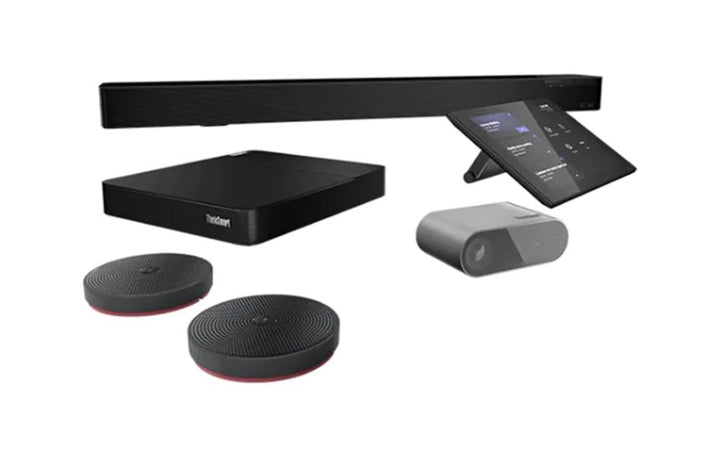
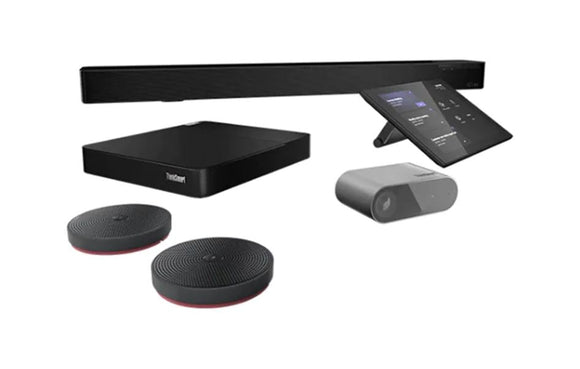


Lenovo ThinkSmart Core Bundle for Zoom Rooms
Email sales@sourceit.com.sg or use Request for Quotation below and our team will confirm the latest price, availability and lead time.
PRODUCT DESCRIPTION
Lenovo ThinkSmart Core Full Room Kit for Zoom Rooms (11S50008SG) - 3 Years Local Warranty
A Complete Meeting Room in One Order
This is Lenovo's Full Room tier: a ThinkSmart Core, a ThinkSmart Controller, a ThinkSmart Cam and a ThinkSmart Bar, with optional satellite microphones. Lenovo describes this tier as "a complete solution in one box" — everything the room needs except the display and the mounting.
A Separate 4K Camera and a Separate Soundbar
The camera is a ThinkSmart Cam at 4K 30 frames per second with a 100° horizontal field of view, auto-framing and speaker tracking. The audio is a ThinkSmart Bar with four microphones covering 180° to a range of 8.5 metres and 20 W + 20 W of speakers. Being separate pieces, each can be placed where it works best — the camera by the screen, the bar where the sound carries.
The Controller Connects by USB, So Plan the Cable Run
This kit uses the USB ThinkSmart Controller — a 10.1-inch 10-point touch panel with occupancy sensors, plugged into the Core's dedicated controller port. Lenovo does not publish the cable length, which matters: the controller has to sit within USB reach of the compute unit. If the table is a long way from where the Core will be mounted, the IP Controller versions in the ordering table run over network cable up to 100 metres and are the better choice.
Certified for Zoom Rooms, Not Merely Compatible
Lenovo publishes this as certified and preloaded with Zoom Rooms, and the kit appears on Zoom's own certified-device listing. That is a tested certification rather than a compatibility statement — which matters if your organisation's procurement requires certified conferencing endpoints. Note that Teams and Zoom versions are separate part numbers with separate factory images, not a setting you change.
Lenovo ThinkSmart Core Full Room Kit for Zoom Rooms Datasheet — Technical Specifications
General
| Product | Lenovo ThinkSmart Core Full Room Kit for Zoom Rooms |
| Part Number | 11S50008SG |
| Machine Type | 11S5 |
| Kit Tier | Complete room system with ThinkSmart Cam and ThinkSmart Bar |
| Warranty | 3-year limited onsite service, per Lenovo's specification sheet |
| Local Warranty (Singapore) | Included with every SourceIT purchase, with GST invoice |
ThinkSmart Core — the Compute Unit
| What It Is | A small standalone computer that runs the meeting platform and drives the room's displays. Everything else in the room — controller, camera, audio — connects to it |
| Processor | 11th Generation Intel Core i5-1145G7E, 4 cores and 8 threads, 1.5 GHz base and up to 4.1 GHz, 8 MB cache, with Iris Xe graphics |
| Memory | 16 GB soldered DDR4-3200, not upgradable |
| Storage | Up to 256 GB M.2 NVMe PCIe 3.0 x4 |
| Display Outputs | 2 x HDMI 1.4, specified at 1920 x 1080 at 60 Hz. Note this is Full HD per display, not 4K — the Gen 2 Core moves to HDMI 2.1 if you need more |
| Other Ports | 1 x Thunderbolt 4; 1 x USB-C 3.2 Gen 1 marked for the Controller; 1 x USB-C 3.2 Gen 2; 1 x USB 3.2 Gen 1; 2 x USB 3.2 Gen 2; HDMI in; gigabit Ethernet |
| Operating System | Windows 11 IoT Enterprise for Collaboration |
| Dimensions and Weight | 226 x 200 x 37.5 mm; 1.1 kg. Raven black, VESA mountable |
| Warranty | 3-year limited onsite service, per Lenovo's specification sheet |
ThinkSmart Controller — the Touch Console
| Screen | 10.1-inch, 10-point touch, 1280 x 800, 16:10, anti-glare and anti-fingerprint, under 340 nits |
| Sensors | Integrated infrared sensors for room occupancy |
| Connection | USB. It plugs into the Core's dedicated USB-C controller port |
| Cable Length | Not published by Lenovo. This matters for planning — the controller has to sit within USB cable reach of the Core. If the table is far from the compute unit, specify the IP Controller version instead |
ThinkSmart Cam — the Camera
| Resolution | 4K at 30 frames per second, or 1080p at 60 frames per second, over USB 3.2 Gen 1 |
| Field of View | 100° horizontal, 125° diagonal |
| Intelligence | Auto-zoom and auto-framing, active speaker tracking, whiteboard awareness |
| Mounting | Table-top, wall or on top of a display |
| Certification | Lenovo publishes it as certified for compatibility with both Microsoft Teams Rooms and Zoom Rooms |
ThinkSmart Bar — the Audio
| What It Is | A soundbar. It has no camera — the camera in this kit is the separate ThinkSmart Cam above |
| Microphones | 4 built-in, 180° coverage, range up to 8.5 metres |
| Speakers | 20 W + 20 W across 4 speaker units, loudness up to 97 dB |
| Connection | USB 2.0 or USB-C, plus Bluetooth 5.0 |
| Dimensions | 800 x 55 x 90 mm; 1.9 kg |
| Certification | Lenovo publishes it as Microsoft Teams Rooms certified and Zoom Rooms compatible — note the difference in wording, which is Lenovo's |
Platform & Certification
| Platform | Zoom Rooms |
| Lenovo's Wording | "Certified and preloaded with Zoom Rooms" |
| Independent Confirmation | Zoom lists Lenovo ThinkSmart Core hardware on its certified hardware list |
| Is the Platform Licence Included? | Not published by Lenovo. Lenovo says the platform is "preloaded", which describes the software image rather than the subscription entitlement. Budget for the Zoom Rooms licence separately unless we confirm otherwise for you |
| Can It Be Switched to the Other Platform? | Lenovo publishes a support article describing a unified-communications swap feature using ThinkSmart Manager. We can confirm the article exists but cannot read its contents, so we make no claim about which models it covers or what it requires. Ask us and we will get it confirmed in writing |
| A Note on Zoom Certification of This Generation | Lenovo's Zoom kit datasheet adds a condition: "Must be paired with ThinkSmart Bar XL and used with the included mic pods." Zoom's own kit page also names the Bar XL rather than the standard Bar. If certified-configuration compliance matters to you, ask us to confirm which bar ships in this SKU before ordering |
Compatibility & Fit
What "Full Room Kit" means, and how it differs between generations
Lenovo's Full Room tier is the one that includes the camera and the audio. Its own description is "a complete solution in one box", against the Controller-only tier which it sells for rooms "with existing A/V technology".
But the contents changed between generations, and this catches people out. A Gen 1 Full Room Kit contains a separate ThinkSmart Cam and a separate ThinkSmart Bar soundbar. A Gen 2 Full Room Kit contains a single ThinkSmart Bar 180 video bar with three cameras built in, and no separate ThinkSmart Cam. Someone replacing a Gen 1 room with a Gen 2 kit and expecting a discrete camera in the box will be surprised. Neither arrangement is worse — they are different approaches to the same job — but they are not interchangeable in a quote.
Teams and Zoom are different part numbers, not a setting
Lenovo builds these as separate machine types with separate factory software images. The Teams and Zoom versions of the same kit are different products: Core with Controller is machine type 11LR for Teams and 11LT for Zoom; the Hub Gen 2 is 11H1 for Teams and 11H3 for Zoom. A Teams SKU is not a Zoom SKU. Order the platform your organisation actually runs.
Lenovo does publish a support article describing a unified communications swap feature between Microsoft Teams Rooms and Zoom Rooms using ThinkSmart Manager. We can confirm the article exists; its body is not readable to us, so we cannot tell you which models it covers, what licences it needs or what its limitations are, and we are not going to promise you a room system can be converted between platforms. If that flexibility matters, ask us and we will get a written answer from Lenovo first.
One more thing Lenovo does not publish: whether the Microsoft Teams Rooms or Zoom Rooms subscription licence is included. Lenovo's datasheets say the platform is "preloaded" or "preinstalled", which describes the software image rather than the entitlement. Budget for the platform licence separately unless we confirm otherwise for you.
Room sizing, with Lenovo's actual words rather than ours
Lenovo publishes no table of participant counts or room dimensions for these kits, so we are not going to invent one. What Lenovo does say:
- Core Full Room Kit — "small and medium rooms with participants facing the front of the room or in a U-shape layout"
- Core Gen 2 Full Room Kit — Lenovo's own page titles it a conferencing solution "for medium spaces"
- ThinkSmart Bar — "from huddle rooms to boardrooms to home offices", with a stated 8.5 metre speaker and microphone range
- ThinkSmart Bar 180 — "small and medium meeting rooms", detecting up to four people or clusters and identifying up to 10 speakers
- ThinkSmart Cam — "from home offices or huddle rooms to medium and large conference rooms"
The only hard numbers Lenovo gives are those audio pickup ranges and the IP Controller's 100 metre cable run. For a real room, send us the dimensions, the table shape and where people sit — and where the display, the power and the network drops are. We will size it against Lenovo's room configurator and tell you what actually fits, which is a better answer than any figure we could put on a web page.
What you still need to supply. The display or displays, their wall mounting, the power and network drops, and the platform licence. A room system is an installation rather than a box — tell us the room and we will put a complete bill of materials together with you.
Package Contents & ThinkSmart Room System Ordering Information
In the box, per Lenovo PSREF:
- ThinkSmart Core compute unit
- ThinkSmart Controller — 10.1-inch touch console
- ThinkSmart Cam — 4K camera with auto-framing
- ThinkSmart Bar — soundbar with four microphones
- Satellite microphone pods, where Lenovo's kit configuration includes them
Not included: the display, its mounting, and the Zoom Rooms platform licence. Lenovo publishes the kit bill of materials at family level rather than per part number, so if a specific item is decisive, ask us to confirm the carton before you order.
ThinkSmart Core Room Kit Ordering Information
| 11LR0005SG | Lenovo ThinkSmart Core + Controller Kit for Microsoft Teams Rooms — Compute + touch controller. No camera, no audio |
| 11LR000BSG | Lenovo ThinkSmart Core + Controller Kit for Microsoft Teams Rooms — Compute + touch controller. No camera, no audio |
| 11S30008SG | Lenovo ThinkSmart Core Full Room Kit for Microsoft Teams Rooms — Complete room — Core, Controller, Cam and Bar |
| 11S3000LSG | Lenovo ThinkSmart Core Full Room Kit for Microsoft Teams Rooms — Complete room — Core, Controller, Cam and Bar |
| 12QJ0004SG | Lenovo ThinkSmart Core + IP Controller Kit for Microsoft Teams Rooms — Compute + PoE controller. No camera, no audio |
| 12QN0004SG | Lenovo ThinkSmart Core Full Room + IP Controller Kit for Microsoft Teams Rooms — Complete room with a PoE controller |
| 12VL0000SG | Lenovo ThinkSmart Core Full Room Kit + ThinkSmart Bar 180 — Complete room — Bar 180 video bar instead of Cam + Bar |
| 12VR0000SG | Lenovo ThinkSmart Core Full Room Kit + IP Controller + Bar 180 for Microsoft Teams Rooms — Complete room — Bar 180 with a PoE controller |
| 11LT0006SG | Lenovo ThinkSmart Core + Controller Kit for Zoom Rooms — Compute + touch controller. No camera, no audio |
| 11LT000CSG | Lenovo ThinkSmart Core + Controller Kit for Zoom Rooms — Compute + touch controller. No camera, no audio |
| 11S50008SG (this listing) | Lenovo ThinkSmart Core Full Room Kit for Zoom Rooms — Complete room — Core, Controller, Cam and Bar |
| 11S5000KSG | Lenovo ThinkSmart Core Full Room Kit for Zoom Rooms — Complete room — Core, Controller, Cam and Bar |
| 12QL0004SG | Lenovo ThinkSmart Core + IP Controller Kit for Zoom Rooms — Compute + PoE controller. No camera, no audio |
| 12QR0004SG | Lenovo ThinkSmart Core Full Room + IP Controller Kit for Zoom Rooms — Complete room with a PoE controller |
| 12WA000ASG | Lenovo ThinkSmart Core Gen 2 + Controller Kit for Microsoft Teams Rooms, Core Ultra 5 135H — Gen 2 compute + controller. No camera, no audio |
| 12WA000BSG | Lenovo ThinkSmart Core Gen 2 + Controller Kit for Microsoft Teams Rooms, Core Ultra 7 165H — Gen 2 compute + controller. No camera, no audio |
| 12WE000BSG | Lenovo ThinkSmart Core Gen 2 + IP Controller Kit for Microsoft Teams Rooms, Core Ultra 5 135H — Gen 2 compute + PoE controller. No camera, no audio |
| 12WE000CSG | Lenovo ThinkSmart Core Gen 2 + IP Controller Kit for Microsoft Teams Rooms, Core Ultra 7 165H — Gen 2 compute + PoE controller. No camera, no audio |
| 12WJ0008SG | Lenovo ThinkSmart Core Gen 2 Full Room Kit + ThinkSmart Bar 180 — Gen 2 complete room — Bar 180 video bar |
| 12WN000CSG | Lenovo ThinkSmart Core Gen 2 Full Room + IP Controller + Bar 180, Core Ultra 5 135H — Gen 2 complete room — Bar 180, PoE controller |
| 12WN000DSG | Lenovo ThinkSmart Core Gen 2 Full Room + IP Controller + Bar 180, Core Ultra 7 165H — Gen 2 complete room — Bar 180, PoE controller |
Datasheet & Downloads
- Lenovo PSREF — ThinkSmart Core for Zoom (PDF)
- Lenovo ThinkSmart Core Kits datasheet, Zoom (PDF)
- Zoom — Zoom Spaces certified hardware
Lenovo publishes ThinkSmart specifications at family level in PSREF, not per part number. The documents above are the family specification sheets and kit datasheets that govern this product, plus the platform vendors' own certified-device listings, which are the authority on the certification claims. Lenovo's per-SKU support page gives the official product name and drivers but no bill of materials — so if the exact carton contents decide your purchase, ask us and we will confirm them with Lenovo before you order.
Frequently Asked Questions — Lenovo ThinkSmart Core Full Room Kit for Zoom Rooms
What exactly comes in the box?
A ThinkSmart Core, a ThinkSmart Controller, a ThinkSmart Cam 4K camera and a ThinkSmart Bar soundbar, with satellite microphone pods where the configuration includes them. You supply the display and its mounting.
What is the difference between the Controller and the IP Controller?
The same 10.1-inch touch panel, connected differently. The ThinkSmart Controller plugs into the Core over USB — simple, but it has to sit within cable reach, and Lenovo does not publish the cable length. The Lenovo IP Controller runs over CAT5e Ethernet with Power over Ethernet, up to 100 metres from the compute unit, can be wall mounted, and adds lag-free HDMI passthrough to the table. It needs a PoE network drop at the controller position. This kit has the USB Controller. The IP versions are in the ordering table above.
Can I run Microsoft Teams Rooms on it instead?
Not as supplied. Lenovo builds the Teams and Zoom versions as separate machine types with separate factory software images — they are different part numbers, not a setting. Lenovo does publish a support article describing a swap feature using ThinkSmart Manager, but we cannot read its contents and will not promise convertibility on that basis. The Teams version of this kit is in the ordering table above; order the platform you actually run.
Is the Zoom Rooms licence included?
Lenovo does not publish an answer. Its datasheets say the platform is "preloaded" or "preinstalled", which describes the software image on the machine rather than the subscription entitlement. Budget for the platform licence separately, and ask us — we will confirm it for your order before you commit.
What room size is this for?
Lenovo publishes no participant counts or room dimensions, so we will not invent any. What Lenovo says is that the Core Full Room Kit suits "small and medium rooms with participants facing the front of the room or in a U-shape layout". The hard numbers it does give are audio ranges: the ThinkSmart Bar covers 8.5 metres, and the Bar 180 identifies up to 10 speakers and frames up to four clusters. Send us the room's dimensions and table layout and we will size it properly against Lenovo's room configurator.
What do I still need to buy?
The display or displays and their mounting, the power and network drops, and the platform licence. We sell the ThinkVision large-format displays these rooms are usually built around — ask us and we will quote the whole room rather than the box.
What warranty applies in Singapore?
Lenovo publishes 3-year limited onsite service for the ThinkSmart Core family. Every unit SourceIT sells also carries local Singapore warranty support and a GST invoice.
We Also Recommend


Lenovo ThinkStation P8 TWR AMD Ryzen 7995WX /512GB /1TB+2TB /W7900
Lenovo ThinkStation P8 TWR AMD Ryzen 7985WX / 512GB /1TB+2TB /W7900


Lenovo ThinkStation P8 TWR Ryzen 7985WX /512GB /512GB /RTX5000


