
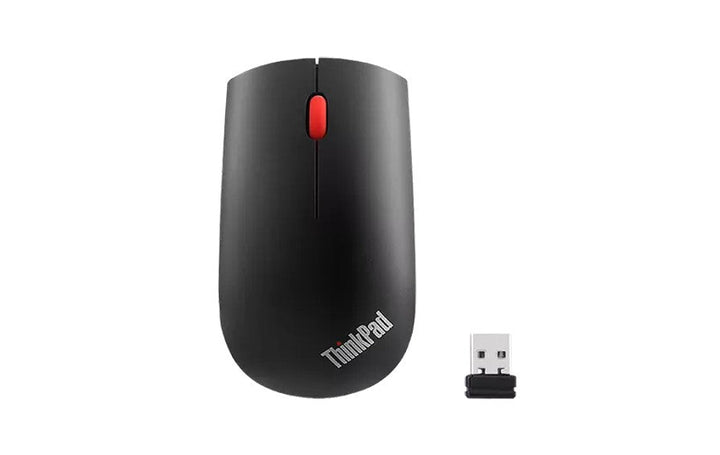


Lenovo ThinkPad Essential Wireless Mouse
PRODUCT DESCRIPTION
Lenovo ThinkPad Essential Wireless Mouse (4X30M56887) - 1 Year Singapore Local Warranty
What Lenovo publishes for the Essential Wireless Mouse
Lenovo's Keyboards and Mice Brochure gives this mouse a red optical sensor at 1200 DPI, three buttons, a 2.4 GHz wireless connection through a USB-A dongle, one AA battery with up to 12 months of life, dimensions of 61 x 106 x 33 mm and a weight of 60 g. Lenovo's Singapore and India pages call it a "compact ambidextrous design" and also a "full-size mouse for all day comfort". That is Lenovo's own wording, and we use it rather than calling a symmetric mouse ergonomic, which is what the previous version of this page did. This is a live current part, not an end-of-life one.
It is a 2.4 GHz receiver mouse, not a Bluetooth one
This mouse pairs to a nano USB receiver, not to Bluetooth, and that receiver occupies a USB-A port for as long as you use the mouse. On a modern thin notebook that is a real consideration: Lenovo's PSREF book for the ThinkPad X1 Carbon Gen 11 publishes just two USB-A ports for the whole machine, and one of them will be spoken for. Lenovo also publishes nothing at all about replacing or re-pairing the receiver, so treat a lost dongle as very likely ending the mouse's usable life. If you would rather not give up a port, the ThinkPad Bluetooth Silent Mouse (4Y50X88822) is the alternative we carry.
Operating systems: exactly what Lenovo lists, and no more
Lenovo publishes "Windows 7, 8, 8.1, 10" for this mouse and nothing else. Lenovo's list does not extend to Windows 11, and we are not going to extrapolate in either direction: we will not tell you it works on Windows 11 because Lenovo has not said so, and we will not tell you it fails there because Lenovo has not said that either. If you are buying for a Windows 11 fleet, that is the honest position and it is worth knowing before you order. The previous version of this listing claimed Windows, macOS and Linux compatibility. Lenovo publishes no macOS or Linux support for this part, so that claim has been removed.
Warranty and service in Singapore
One year. Lenovo's Keyboards and Mice Brochure publishes a one-year warranty for this part, so the duration in the heading above is Lenovo's own published figure rather than an assumption on our side. Warranty service in Singapore is handled locally. Ask us if you need the terms in writing before you order.
ThinkPad Essential Wireless Mouse Datasheet — Technical Specifications
How This Page Is Sourced — Nothing Here Comes From the Distributor Build Sheet or From Lenovo PSREF
| Distributor build sheet | None. This accessory listing carries no distributor Detailed Specification block, so there is no build sheet for us to quote and nothing on this page is sourced from one. |
| Lenovo PSREF | Lenovo publishes no PSREF specification book for keyboards and mice, so there is no Lenovo PSREF entry for this part. The specification group below is taken from Lenovo's Keyboards and Mice Brochure instead. |
| What we used instead | Lenovo's Keyboards and Mice Brochure, plus Lenovo's own Singapore, UK and India product pages for this part. Where a value comes from a regional product page rather than the brochure, the row says so. |
This Product — From Lenovo's Keyboards and Mice Brochure
| Lenovo official product name | ThinkPad Essential Wireless Mouse |
| Part numbers in the brochure column | 4X30M56887, 4X30M56888 |
| Our SKU on this listing | 4X30M56887 |
| Sensor | Red optical |
| Resolution | 1200 DPI. This is a single fixed value in Lenovo's brochure. No adjustable DPI steps are published for this mouse. |
| Buttons | 3 |
| Connection | Wireless via USB-A dongle. Lenovo's Singapore, UK and India pages describe it as a "plug-and-forget 2.4 GHz Wireless USB connection" with a nano receiver. |
| Battery | 1 x AA battery |
| Battery life | Up to 12 months. Lenovo's Singapore and India pages add "may vary based on usage". |
| Dimensions | 61 x 106 x 33 mm (2.4 x 4.17 x 1.3 inches) |
| Weight | 60 g (0.13 lbs) |
| Design | Lenovo's Singapore and India pages state "compact ambidextrous design" and also "full-size mouse for all day comfort". |
| Included accessory published by Lenovo | Nano USB receiver |
| Operating systems | Windows 7, 8, 8.1, 10. That is Lenovo's complete published list for this part. |
| Warranty | 1 year, published in Lenovo's Keyboards and Mice Brochure |
| Product status | Live, not end of life. Lenovo Singapore serves a current page marked Available, and the part is also live in the UK and India. |
Ordering and Compatibility — What Lenovo Does Not Publish
| Windows 11 support | Not stated. Lenovo's published operating system list for this mouse stops at Windows 10. We neither claim nor deny Windows 11 support, because Lenovo says nothing either way. |
| macOS and Linux support | Not stated. Lenovo publishes no macOS or Linux support for this part. The previous version of this listing claimed both; the claim has been removed. |
| Wireless range or operating distance | Not stated. Lenovo's brochure has no range row for this mouse. |
| Scroll wheel type | Not stated. A wheel is implied by the three-button count, but Lenovo does not describe it. |
| Whether an AA battery ships in the box | Not stated. Lenovo publishes the nano USB receiver as the included accessory and does not say whether a battery is supplied. Do not count on one arriving with the mouse. |
| Receiver replacement or re-pairing | Not stated. Lenovo publishes nothing about replacing the nano receiver or pairing the mouse to a different one, so a lost receiver very likely ends the mouse's usable life. |
| Colour | Not stated in the Lenovo documents we read for this part. |
| Surface performance | Not stated for this mouse. Lenovo makes a surface claim for the ThinkPad Bluetooth Silent Mouse but not for this one. |
| What to check before you order | That you have a free USB-A port to give up permanently; that your operating system is on Lenovo's published list, or that you accept the risk if it is not; and that you have an AA battery to hand. |
Compatibility & Fit
What this mouse needs from your machine
| Port required | One USB-A port, permanently, for the nano receiver. This mouse has no Bluetooth mode and no USB-C receiver. |
| On a thin notebook | Lenovo's PSREF book for the ThinkPad X1 Carbon Gen 11 publishes only two USB-A ports, so the receiver takes half of them. If ports are tight, the ThinkPad Bluetooth Silent Mouse (4Y50X88822) leaves them free. |
| Operating systems | Lenovo publishes Windows 7, 8, 8.1 and 10 for this mouse. Windows 11 does not appear on Lenovo's list, and neither macOS nor Linux appears on it. |
| Bluetooth machines | Bluetooth is irrelevant here. The mouse will not pair over Bluetooth at all, whether or not your machine has it. |
| Range | Not published by Lenovo. If you need a specific operating distance, for example for a presentation setup, do not buy on the assumption of one. |
| Losing the receiver | Lenovo publishes no replacement receiver and no re-pairing procedure. Keep the dongle in the machine or in the mouse, because losing it very likely ends the mouse's usable life. |
| Battery | One AA battery, with up to 12 months of life per Lenovo. Whether a battery is in the box is not published. |
Package Contents & ThinkPad Ordering Information
Lenovo's brochure lists one included accessory for this part. We list what Lenovo lists and nothing more.
- The ThinkPad Essential Wireless Mouse itself
- The nano USB receiver, which Lenovo's Keyboards and Mice Brochure publishes as the included accessory for this part
Whether an AA battery is supplied in the box is not published by Lenovo, so please do not plan on one. If it matters, ask us to check the physical carton before you buy.
The three ThinkPad accessories we carry, this one included
| 4X20V24682 | ThinkPad 65W Slim AC Adapter (USB Type-C), region UK/HK/SGP/SRI, USB-C power for a ThinkPad, S$50.00, Singapore local warranty (Lenovo publishes no warranty term for this part) |
| 4X30M56887 (this listing) | ThinkPad Essential Wireless Mouse, 2.4 GHz with a nano receiver that occupies a USB-A port, S$20.00, 1 year Singapore local warranty |
| 4Y50X88822 | ThinkPad Bluetooth Silent Mouse, dual-host Bluetooth 5.0 with no receiver, silent buttons that Lenovo publishes at an average of 22.8 dB, and three DPI steps, S$42.50, 1 year Singapore local warranty |
The real difference between the two mice is how they connect, not what they cost. The Essential Wireless needs a free USB-A port for its nano receiver; the Bluetooth Silent needs a machine with Bluetooth and pairs to two devices. Prices are in Singapore dollars. Stock, prices and availability change without notice, so please confirm with us before ordering.
Datasheet & Downloads
Lenovo publishes no per-part datasheet for this mouse. The brochure below is Lenovo's own document and is the source of every figure in the specification group above.
- Lenovo Keyboards and Mice Brochure (PDF) — the published specification source for this mouse
- Lenovo Support — drivers, documentation and warranty lookup
Warranty for this part is the one-year term published in the brochure above. Ask us if you need SourceIT's service terms in writing before you order.
Frequently Asked Questions — ThinkPad Essential Wireless Mouse
Does it connect over Bluetooth?
No. This is a 2.4 GHz mouse that pairs to a nano USB receiver, and the receiver has to stay in a USB-A port while you use it. If you want a Bluetooth mouse instead, that is the ThinkPad Bluetooth Silent Mouse (4Y50X88822).
Will it work on Windows 11?
Lenovo publishes "Windows 7, 8, 8.1, 10" for this mouse and nothing else. Lenovo's list does not extend to Windows 11, and we are not going to extrapolate in either direction: we will not tell you it works on Windows 11 because Lenovo has not said so, and we will not tell you it fails there because Lenovo has not said that either. If you are buying for a Windows 11 fleet, that is the honest position and it is worth knowing before you order. The previous version of this listing claimed Windows, macOS and Linux compatibility. Lenovo publishes no macOS or Linux support for this part, so that claim has been removed.
Does it work with a Mac or with Linux?
Lenovo publishes no macOS or Linux support for this mouse. Its published operating system list is Windows 7, 8, 8.1 and 10 only. The previous version of this listing claimed macOS and Linux support; we removed it because Lenovo does not publish it.
What happens if I lose the receiver?
Lenovo publishes nothing about replacing the nano receiver or pairing the mouse to another one, so you should assume a lost receiver ends the mouse's usable life. At this price that is worth knowing before you buy rather than after.
Is a battery included?
Not stated. Lenovo publishes the nano USB receiver as the included accessory and says nothing about a battery, so we do not promise one. The mouse takes one AA battery, with up to 12 months of life per Lenovo.
This page was rewritten. What changed?
We rebuilt this listing from Lenovo's Keyboards and Mice Brochure and Lenovo's own regional product pages, and corrected the following. The old copy claimed compatibility with Windows, macOS and Linux; Lenovo publishes Windows 7, 8, 8.1 and 10 only, so the macOS and Linux claim is gone. It described a symmetric ambidextrous mouse as ergonomic and comfortable for extended use, which is filler rather than a published characteristic, so we now use Lenovo's own wording. It did not tell you that the receiver occupies a USB-A port for the life of the mouse, or that Lenovo publishes no replacement receiver. It also gave no dimensions, weight or battery figures, all of which Lenovo does publish and which are now in the table above.


