
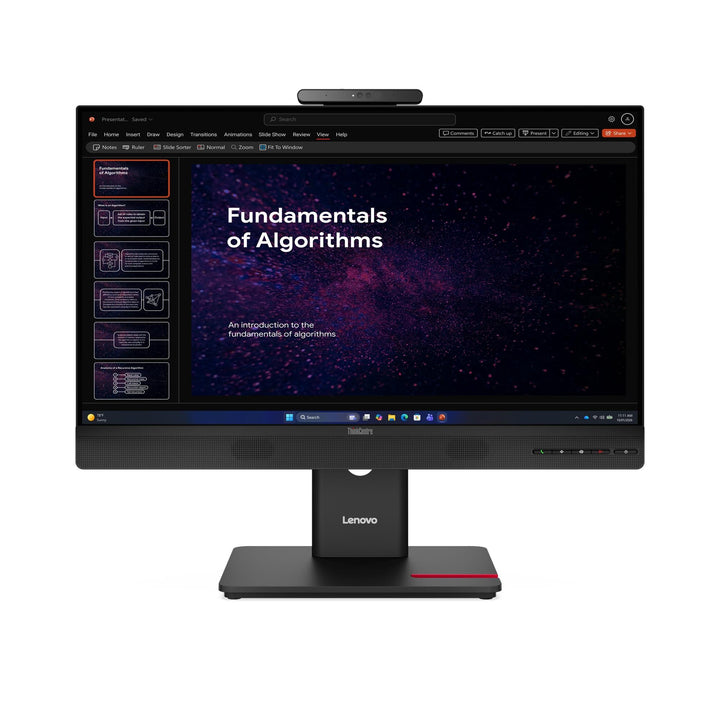


Lenovo ThinkCentre Tiny-In-One 24 Gen 6 23.8-inch FHD Monitor
PRODUCT DESCRIPTION
Lenovo ThinkCentre Tiny-In-One 24 Gen 6 (13LAGAR6MY) - 3 Years Local Warranty
The Current Generation Tiny-In-One, at 23.8 Inches
The Tiny-In-One 24 Gen 6 is a 23.8-inch Full HD business monitor with a computer bay built into the back. A ThinkCentre or ThinkStation Tiny slides in and the desk becomes an all-in-one on a single power cable — and at the next refresh you swap the Tiny and keep the monitor.
A Materially Better Panel Than the Gen 5
Contrast rises from 1000:1 to 1500:1, the refresh range from a fixed 60 Hz to 48–120 Hz, and the camera from FHD 1080p to 5 megapixels with an infrared sensor. Lenovo also publishes a factory calibration of average Delta E under 4 at sRGB, which the Gen 5 sheet does not carry at all.
This Is the Non-Touch Version
Lenovo sells this monitor in touch and non-touch versions. This part number, 13LAGAR6MY, is the non-touch one. The 20-point touch version is 13LBGAR6MY, linked in the ordering table below. Lenovo publishes only three differences between them: touch, 1 W of power draw, and 200 grams.
Manageable Across a Fleet, and Pen-Capable
Lenovo publishes Display Fleet Manager (LDFM) support, so a floor of these can be managed centrally rather than one at a time, plus a mirrored power button and passive pen and digitiser support. Certification runs to EPEAT Gold, ENERGY STAR, TCO generation 10 with TCO Edge 2.1 and Eyesafe Certified 2.0.
Lenovo ThinkCentre Tiny-In-One 24 Gen 6 Datasheet — Technical Specifications
General
| Product | Lenovo ThinkCentre Tiny-In-One 24 Gen 6 |
| Part Number | 13LAGAR6MY |
| Machine Type | 13LA |
| Type | 23.8-inch Tiny-In-One monitor |
| Warranty | 3-Year Limited Warranty (Lenovo, per PSREF) |
| Local Warranty (Singapore) | Included with every SourceIT purchase, with GST invoice |
Tiny Computer Bay
| Computer Bay | Built into the rear of the panel, for a ThinkCentre or ThinkStation Tiny |
| Internal Connection | Lenovo's 3-in-1 cable — power, USB and DisplayPort. On this generation Lenovo marks which ports serve it: one of the two DisplayPort inputs and the left-side USB-A both carry the 3-in-1 connection to a fitted Tiny |
| Compatible Tiny Models | Lenovo publishes only "ThinkCentre M Series support, ThinkCentre Tiny, ThinkStation Tiny" for this generation — no generations and no model numbers. Ask us to confirm your exact Tiny model before ordering |
| Powering the Tiny | The monitor's 135 W adapter feeds the Tiny through the bay. Lenovo's documentation for its current Tiny desktops warns that some configurations need a specific "Tiny for TIO" machine type or their own higher-rated adapter |
| Tiny Computer | Not included. The Tiny is a separate purchase — ask us to quote one with the monitor |
Panel & Image
| Screen Size | 23.8" |
| Panel Type | Ultra Thin In-Plane Switching (IPS), WLED backlight |
| Resolution | 1920 x 1080 (Full HD) |
| Aspect Ratio | 16:9 |
| Refresh Rate | 48 Hz to 120 Hz |
| Response Time | 4 ms Extreme mode / 6 ms Normal mode |
| Brightness | 250 cd/m² |
| Contrast Ratio | 1500:1 typical; 3,000,000:1 dynamic |
| Colour Gamut | 99% sRGB coverage ratio (CIE 1931); 99% BT.709 (CIE 1931) |
| Colour Depth | 8-bit (6-bit + FRC), 16.7 million colours |
| Factory Calibration | Average Delta E under 4 at sRGB. Note that this is a looser figure than the Delta E under 2 published on the ThinkVision P-series — good enough that colours look right, not a colour-critical panel |
| Viewing Angles | 178° horizontal / 178° vertical |
| Surface | Anti-glare, flat |
| Bezel | 2.0 mm sides, 2.0 mm top, 41.6 mm bottom; head thickness 20.0 mm |
| Touch | None. This is the non-touch part number; the 20-point touch version is 13LBGAR6MY |
Camera, Audio & Conferencing
| Camera | 5.0 megapixel with infrared sensor |
| Windows Hello | Not published by Lenovo. The camera includes an infrared sensor, which is the hardware face sign-in normally requires — but Lenovo never names Windows Hello for this model, so we do not claim it. Ask us and we will get it confirmed |
| Microphone | Integrated |
| Speakers | Integrated, 3 W x 2 |
Connectivity
| Video Inputs | 1 x HDMI 1.4 (supports 1920 x 1080 at 120 Hz) and 2 x DisplayPort 1.2. One DisplayPort carries the 3-in-1 connection to a fitted Tiny; the other and the HDMI are free for an external PC |
| USB Ports | 1 x USB-B upstream (5 Gbps, rear) and 1 x USB-A (5 Gbps, left side, which also serves the Tiny's 3-in-1 connection). Two ports in total — this is not a USB hub |
| USB-C | None. No USB-C port of any kind, and therefore no single-cable laptop docking and no USB-C power delivery |
| Ethernet | None. No RJ45 port on the monitor. A fitted Tiny uses its own network port |
| Audio Jack | None published by Lenovo for this model — there are built-in speakers but no headphone output listed |
| Security | Kensington Nano Security Slot (2.5 x 6 mm) |
Stand & Ergonomics
| Tilt | -5° to +23.5° |
| Swivel | 45° left and right |
| Pivot | 0° to +90° |
| Height Adjustment | Up to 155 mm |
| VESA | 100 x 100 mm |
Features
| Software | Lenovo ThinkColour (Display Manager); Lenovo Display Fleet Manager (LDFM) for managing displays across a fleet |
| Mirrored Power Button | Yes |
| Pen Support | Passive pen and digitiser supported. Lenovo supplies no pen and publishes no pressure-level or protocol figure |
| Eye Care | Natural Low Blue Light |
Power & Certifications
| Power Consumption | 15 W typical / 42 W maximum |
| ENERGY STAR | Power-on 11.4 W; TEC 37.7 kWh |
| Sleep / Off Mode | < 0.5 W |
| Power Supply | External 135 W power brick, AC 100–240 V, 50–60 Hz |
| Certifications | ENERGY STAR certified; EPEAT Gold registered; RoHS (2011/65/EU); TCO Certified generation 10; TCO Certified Edge 2.1; Volatile Organic Compound certification; Eyesafe Certified 2.0; TÜV Rheinland Eye Comfort (5-star); TÜV Rheinland Flicker Free; TÜV Rheinland Low Blue Light (hardware solution) |
| EU Energy Label | D class |
Physical
| Dimensions with Stand | 539.8 x 205.0 x 388.8 mm at lowest; 539.8 x 205.0 x 543.8 mm at highest |
| Head Only | 539.8 x 79.6 x 363.4 mm |
| Weight | 5.8 kg with stand; 3.6 kg head only |
| Packaged Dimensions | 605.0 x 150.0 x 478.0 mm |
| Colour | Eclipse black |
Compatibility & Fit
What a Tiny-In-One actually is
A Tiny-In-One is a business monitor with an empty computer bay built into the back of the panel. A ThinkCentre or ThinkStation Tiny desktop slides into that bay and becomes part of the monitor, so the desk ends up with an all-in-one machine and one power cable instead of a tower, a monitor, a video cable and two mains leads.
How the Tiny goes in. Per Lenovo's own installation instructions: remove the decorative cover, press the button to open the cable cover, insert the Tiny into the bay with the Lenovo logo facing you until it rests on the stoppers, press it from the front until it snaps into position, and tighten the retaining screw. The bay itself is snap-fit; Lenovo does not state whether the final screw is captive or needs a screwdriver, so we do not claim it is tool-free.
What connects them. Lenovo describes an internal 3-in-1 cable inside the bay carrying power, USB and DisplayPort between the monitor and the Tiny. Video to the Tiny travels over DisplayPort, not HDMI. Lenovo publishes no name or standard for the connector itself.
It also works as an ordinary monitor. With no Tiny fitted — or alongside one — the monitor connects to a laptop, tower or any other PC over its own HDMI and DisplayPort inputs. The KVM function lets the monitor's camera, audio and USB port be shared between the installed Tiny and an external machine.
Before you order: check the Tiny fits. This is the one thing we cannot settle from Lenovo's published documents, and it is the thing most likely to go wrong. Lenovo publishes only "ThinkCentre M Series support, ThinkCentre Tiny, ThinkStation Tiny" for this generation — no generations and no model numbers at all. That is a step backwards from Lenovo's own earlier documentation: the Gen 4 sheet enumerated supported Tiny models and the Gen 5 sheet at least gave a generation floor. We will not carry the older lists forward onto this product, because Lenovo has not.
Also check the power adapter. The monitor ships with its own adapter and feeds the Tiny through the bay, which is the whole point — but Lenovo's documentation for its current Tiny desktops tells customers that a Tiny whose own adapter is higher-rated than the monitor's may still need its own brick, or a specific "Tiny for TIO" machine type. Lenovo does not publish which Tiny configurations cross that line. Tell us the exact ThinkCentre or ThinkStation Tiny model you intend to fit and we will confirm both the fit and the power arrangement with Lenovo before you order. It takes us a phone call and saves you a return.
What Gen 6 changed over Gen 5. Comparing Lenovo's two specification sheets directly: contrast rises from 1000:1 to 1500:1; the refresh range goes from a fixed 60 Hz to 48–120 Hz; the camera moves from FHD 1080p to 5 megapixels with an infrared sensor; DisplayPort inputs double from one to two; certification moves from TCO 9.0 to TCO generation 10 with TCO Edge 2.1; and passive pen support appears. The costs are a larger power brick and a higher draw. If you are choosing between the two generations for a new deployment, Gen 6 is the better monitor by a clear margin; Gen 5 is the one to buy to match an existing fleet.
What it does not have, stated plainly. No USB-C, no Ethernet port, no headphone jack, and only two USB ports in total — one upstream and one downstream, and the downstream one doubles as the Tiny's connection. If you are cross-shopping this against a ThinkVision docking monitor, those absences are the difference. This monitor is designed around a computer living inside it, not around a laptop plugging into it.
No video cable is in the box. If you intend to use it as a standalone monitor for a separate PC, you supply the HDMI or DisplayPort cable, and a USB-B cable if you want the USB port to work with that machine.
Package Contents & ThinkCentre Tiny-In-One Ordering Information
In the box, per Lenovo PSREF:
- Monitor with stand
- 135 W power brick
- 1 x power cable (1.0 m)
- Quick setup guide
Not included: the ThinkCentre or ThinkStation Tiny computer, any video cable, and any USB cable. Ask us to quote the Tiny and the cables alongside the monitor and we will make sure the combination works.
ThinkCentre Tiny-In-One Ordering Information
| 12N8GAR1MY | Lenovo ThinkCentre Tiny-In-One 22 Gen 5 — 21.5" FHD, non-touch, 1080p camera, 90 W |
| 12N9GAR1MY | Lenovo ThinkCentre Tiny-In-One 22 Gen 5 Touch — 21.5" FHD, 10-point touch, 1080p camera, 90 W |
| 12NAGAR1MY | Lenovo ThinkCentre Tiny-In-One 24 Gen 5 — 23.8" FHD, non-touch, 1080p camera, 90 W |
| 12NBGAR1MY | Lenovo ThinkCentre Tiny-In-One 24 Gen 5 Touch — 23.8" FHD, 10-point touch, 1080p camera, 90 W |
| 13LAGAR6MY (this listing) | Lenovo ThinkCentre Tiny-In-One 24 Gen 6 — 23.8" FHD, non-touch, 1500:1, 120 Hz, 5 MP IR camera |
| 13LBGAR6MY | Lenovo ThinkCentre Tiny-In-One 24 Gen 6 Touch — 23.8" FHD, 20-point touch, 1500:1, 5 MP IR camera |
| 13LCGAR6MY | Lenovo ThinkCentre Tiny-In-One 27 Gen 6 — 27" QHD, true 8-bit, 350 nits, 5 MP IR camera, 170 W |
| 66E4UAC1WW | Lenovo L15 Mobile Monitor — 15.6" portable USB-C monitor — not a Tiny-In-One |
Datasheet & Downloads
Lenovo publishes one specification sheet covering both the touch and non-touch versions of the 24-inch Gen 6, distinguishing them only in the weight and power rows. It is the source for every figure on this page. Lenovo publishes no marketing datasheet for this generation.
Frequently Asked Questions — Lenovo ThinkCentre Tiny-In-One 24 Gen 6
Does the Tiny computer come with it?
No. The monitor is sold on its own with an empty computer bay. The ThinkCentre or ThinkStation Tiny is a separate purchase — tell us what the desk needs to run and we will quote one and confirm the power arrangement.
Which Tiny models fit?
This is the honest weak point of the Gen 6 documentation. Lenovo publishes only "ThinkCentre M Series support, ThinkCentre Tiny, ThinkStation Tiny" — no generations, no model numbers. Lenovo's Gen 4 sheet listed supported models and the Gen 5 sheet gave a generation floor; Gen 6 gives neither, and we will not carry an older list forward onto a newer product. Send us the exact Tiny model and we will confirm the fit with Lenovo in writing before you order.
Does the monitor power the Tiny?
Through the bay's 3-in-1 cable, yes — that is the point of the design. But Lenovo's own documentation for its current Tiny desktops tells customers that some configurations need a specific "Tiny for TIO" machine type, or an additional higher-rated adapter. Lenovo does not publish which configurations those are. Tell us the Tiny model and we will check it.
Does it support Windows Hello face sign-in?
The camera has an infrared sensor, which is the hardware face sign-in normally needs — but Lenovo never names Windows Hello for this model, so we will not claim it. If face sign-in is a requirement, ask us and we will get a written answer from Lenovo before you order.
Does it have USB-C or Ethernet?
Neither, and no headphone jack either. There are two USB ports in total: one USB-B upstream and one USB-A, and the USB-A also serves the Tiny's internal connection. A fitted Tiny brings its own network port.
Can it be an ordinary monitor for my laptop?
Yes. It has an HDMI input and a spare DisplayPort input independent of the Tiny bay, so it serves a laptop or tower like any other monitor, with or without a Tiny fitted. No video cable is supplied, so ask us to add one.
How does it compare with the Gen 5?
Gen 6 is the better monitor: 1500:1 contrast against 1000:1, 48–120 Hz against a fixed 60 Hz, a 5 MP infrared camera against FHD 1080p, two DisplayPort inputs against one, TCO generation 10 against TCO 9.0, and passive pen support. It uses a larger power brick and draws more. Buy Gen 5 to match an existing fleet; buy Gen 6 for anything new.
What warranty applies in Singapore?
Lenovo publishes a 3-year limited warranty for this model. Every unit SourceIT sells also carries local Singapore warranty support and a GST invoice.


