
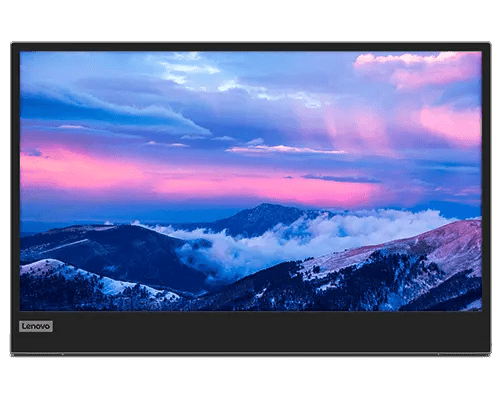


Lenovo L15 15.6 inch FHD Mobile Monitor
PRODUCT DESCRIPTION
Lenovo L15 Mobile Monitor (66E4UAC1WW) - Local Warranty
A 860-Gram 15.6-Inch Portable Monitor That Runs on One USB-C Cable
The Lenovo L15 is a 15.6-inch Full HD travelling second screen weighing 860 grams with a 6 mm panel and a sleeve in the box. One USB-C cable from the laptop carries the picture and the power; a second USB-C port lets a charger run the monitor and charge the laptop at the same time, at up to 65 W.
Three Corrections to This Listing
Our previous version of this page had this product typed as a tablet computer. It is not — it is a display panel with no processor, no operating system, no storage and no battery. It also stated a 800:1 contrast ratio where Lenovo publishes 1000:1, and a 1-year warranty. All three are corrected below, and the warranty is discussed honestly because Lenovo's own document is contradictory about it.
It Is a Lenovo L15, Not a ThinkVision
Worth knowing if you are comparing specifications: Lenovo files this monitor under its Lenovo Monitors line as the plain L15, not under ThinkVision. Its closest ThinkVision equivalent is the M15 — same 15.6-inch size and similar specification — and the ThinkVision portables generally publish more capable panels. Ask us and we will quote them side by side.
Know the Three Limits Before You Order
No power adapter in the box. No speakers. No HDMI input. Video reaches this monitor only as DisplayPort Alt Mode over USB-C, so the host laptop's USB-C port must support it — there is no fallback. Colour coverage is 45% NTSC, which makes this a productivity panel rather than a colour-work one.
Lenovo L15 Mobile Monitor Datasheet — Technical Specifications
General
| Product | Lenovo L15 Mobile Monitor |
| Part Number | 66E4UAC1WW |
| Machine Type | 66E4 |
| Type | Portable USB-C monitor. Not a tablet computer — it has no processor, no operating system, no storage and no battery |
| Lenovo Product Line | Lenovo Monitors, as the "Lenovo L15". This is not a ThinkVision product |
| Warranty | Lenovo's specification sheet states this two ways — both a "3-year limited warranty" and "1-year courier or carry-in service" — without reconciling them. We are not going to pick the more flattering one. Ask us and we will confirm the term with Lenovo before you order |
| Local Warranty (Singapore) | Included with every SourceIT purchase, with GST invoice |
Panel & Image
| Screen Size | 15.6" |
| Panel Type | In-Plane Switching (IPS), WLED backlight |
| Resolution | 1920 x 1080 (Full HD) |
| Aspect Ratio | 16:9 |
| Refresh Rate | 60 Hz |
| Response Time | 6 ms Extreme mode / 14 ms Normal mode |
| Brightness | 250 cd/m² |
| Contrast Ratio | 1000:1 typical; 3,000,000:1 dynamic. Our previous listing said 800:1, which does not appear in Lenovo's specification |
| Colour Gamut | 45% NTSC. Lenovo states no CIE standard, and publishes no sRGB figure for this model |
| Colour Depth | 8-bit, 16.7 million colours |
| Viewing Angles | 178° horizontal / 178° vertical |
| Surface | Not published by Lenovo for this model |
| Touch | None — this is not a touchscreen |
Connectivity
| USB-C | 2 x USB-C with DisplayPort 1.2 Alt Mode, one upstream and one downstream. Lenovo's specification sheet calls them USB-C 3.1 Gen 1 and its datasheet calls them USB-C 3.2 Gen 1 — the same speed class under two names |
| USB Data Rate | USB 2.0, despite the connector's 3.x designation. The downstream port is for a mouse or a dongle, not for fast storage |
| Power Delivery | Up to 65 W with power pass-through — one adapter can power the monitor and charge the laptop at the same time |
| Power Input | DC 5 V / 9 V / 15 V / 20 V over USB-C |
| HDMI | None. There is no HDMI or micro-HDMI input. Video arrives only as DisplayPort Alt Mode over USB-C |
| Speakers | None published by Lenovo for this model |
| Audio Jack | None published by Lenovo for this model |
| Camera / Microphone | None |
| Battery | None. The monitor is powered from the host or from a charger over USB-C |
| Ethernet | None |
Stand & Mounting
| Stand | Integrated |
| Lift | Up to 10 mm |
| Tilt / Swivel / Pivot | Not published by Lenovo as degree figures for this model |
| VESA | 100 mm, 2 screw holes — not the usual four. Check your arm or bracket before ordering |
Power & Certifications
| Power Consumption | 8 W typical / 9.5 W maximum |
| Power Supply | External, over USB-C. No AC adapter is included |
| Certifications | EPEAT Silver registered; RoHS compliant; TÜV Rheinland Flicker Free; TÜV Rheinland Low Blue Light |
| ENERGY STAR / TCO / EU Energy Label | Not published by Lenovo for this model |
Physical & Software
| Dimensions | 108.4 x 235.5 x 360.0 mm at lowest; 108.4 x 245.5 x 360.0 mm at highest |
| Head Thickness | 6 mm |
| Weight | 0.86 kg (1.90 lb) with stand |
| Software | Lenovo Artery |
Compatibility & Fit
The compatibility question that decides everything. Video reaches this monitor only as DisplayPort 1.2 Alt Mode over USB-C. There is no HDMI port and no other input. A host whose USB-C port carries data and power but not DisplayPort Alt Mode — which describes many budget laptops and most desktop front-panel ports — cannot drive this monitor at all, and there is no workaround. Business laptops of the last several years generally can. Send us your laptop model and we will confirm it before you order.
Powering it. In normal use the laptop powers the monitor down the same cable that carries the picture. Use the second USB-C port with your own Power Delivery adapter when you want the laptop charging at the same time, or when the host cannot spare the power — Lenovo publishes up to 65 W with pass-through. No adapter is supplied; ask us to quote one.
Where it sits against the ThinkVision portables. This is Lenovo's L-line rather than ThinkVision. At 45% NTSC it is a productivity panel — fine for documents, email, spreadsheets and code in normal office lighting, and not the right choice for colour work or for use near windows. If either matters, the ThinkVision M14d publishes 100% sRGB with 1500:1 contrast and 375 cd/m² peak brightness in a lighter body. We stock both; ask us and we will put them side by side.
Mounting. Lenovo publishes a 100 mm VESA pattern with only two screw holes, where most monitors use four. Some arms and brackets will not mate with a two-hole pattern. If arm-mounting is part of your plan, tell us the arm and we will check it first.
Package Contents & Lenovo Mobile Monitor Ordering Information
In the box, per Lenovo PSREF:
- Lenovo L15 monitor with integrated stand
- 1 x USB-C to USB-C cable (1 m)
- 1 x pair of clips
- 1 x sleeve
- Quick setup guide
Not in the box: a power adapter. Lenovo lists an external USB-C power supply for this model and includes no adapter with it.
ThinkCentre Tiny-In-One and Lenovo Monitor Ordering Information
| 12N8GAR1MY | Lenovo ThinkCentre Tiny-In-One 22 Gen 5 — 21.5" FHD, non-touch, 1080p camera, 90 W |
| 12N9GAR1MY | Lenovo ThinkCentre Tiny-In-One 22 Gen 5 Touch — 21.5" FHD, 10-point touch, 1080p camera, 90 W |
| 12NAGAR1MY | Lenovo ThinkCentre Tiny-In-One 24 Gen 5 — 23.8" FHD, non-touch, 1080p camera, 90 W |
| 12NBGAR1MY | Lenovo ThinkCentre Tiny-In-One 24 Gen 5 Touch — 23.8" FHD, 10-point touch, 1080p camera, 90 W |
| 13LAGAR6MY | Lenovo ThinkCentre Tiny-In-One 24 Gen 6 — 23.8" FHD, non-touch, 1500:1, 120 Hz, 5 MP IR camera |
| 13LBGAR6MY | Lenovo ThinkCentre Tiny-In-One 24 Gen 6 Touch — 23.8" FHD, 20-point touch, 1500:1, 5 MP IR camera |
| 13LCGAR6MY | Lenovo ThinkCentre Tiny-In-One 27 Gen 6 — 27" QHD, true 8-bit, 350 nits, 5 MP IR camera, 170 W |
| 66E4UAC1WW (this listing) | Lenovo L15 Mobile Monitor — 15.6" portable USB-C monitor — not a Tiny-In-One |
Datasheet & Downloads
Note that Lenovo files this monitor under its Lenovo Monitors family rather than ThinkVision, so the specification sheet is titled "Lenovo L15". It is the source for every figure on this page. The two Lenovo documents differ on two small points — the USB-C generation naming, and the warranty term — and both are flagged in the table above rather than resolved by us.
Frequently Asked Questions — Lenovo L15 Mobile Monitor
Is this a tablet?
No, and our listing had it categorised wrongly. The Lenovo L15 is a portable monitor — a display panel with no processor, no operating system, no storage and no battery. It shows the picture from a laptop connected over USB-C and does nothing on its own. We are correcting the product category.
What is the contrast ratio?
1000:1 typical, with a 3,000,000:1 dynamic figure. Our earlier page said 800:1, which does not appear in Lenovo's specification for this model and has been removed.
Does a power adapter come with it?
No. In most cases you do not need one — the laptop powers the monitor over the same USB-C cable that carries the picture. You need an adapter only if the host cannot spare the power, or if you want to charge the laptop and run the monitor from one socket, which the second USB-C port supports at up to 65 W. Ask us to quote a USB-C adapter alongside.
Does it have speakers?
No, and no headphone jack either — Lenovo publishes neither for this model. Sound comes from your laptop.
Can I connect it over HDMI?
No. There is no HDMI or micro-HDMI port and no other input. Video arrives only as DisplayPort Alt Mode over USB-C, which means the host's USB-C port must support it. Most business laptops of the last several years do; many budget laptops and most desktop ports do not. Tell us your machine and we will check.
Is the warranty one year or three?
Lenovo's own specification sheet says both — it lists a "3-year limited warranty" and "1-year courier or carry-in service" without reconciling them. Our earlier page picked one year. We would rather show you the contradiction than guess, and we will get the answer from Lenovo before you order. Every unit SourceIT sells carries local Singapore warranty support and a GST invoice regardless.
How does it compare with the ThinkVision portables?
The L15 is Lenovo's value line. Its 45% NTSC colour coverage is the lowest of the portable monitors we sell. The ThinkVision M15 is the same size with a similar specification; the M14d is smaller but publishes 100% sRGB, 1500:1 contrast and 375 cd/m² peak brightness at 600 grams. If colour or brightness matters, the ThinkVision models are worth the difference — ask us and we will quote them together.
Can I mount it on an arm?
Lenovo publishes a 100 mm VESA pattern with only two screw holes, not the usual four. Some arms and brackets need all four. Tell us which arm you intend to use and we will check compatibility before you order.


