
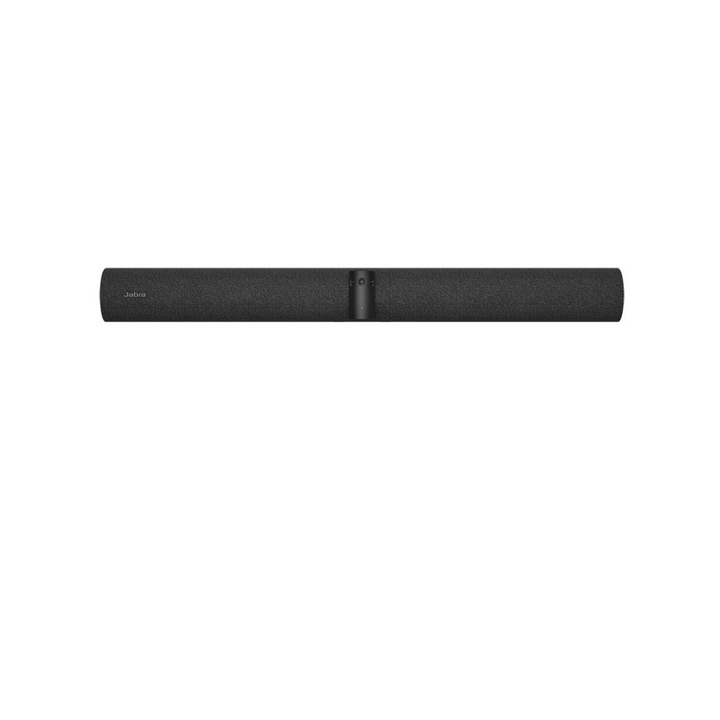


Jabra PanaCast 55 VBS Bar Only
Email sales@sourceit.com.sg or use Request for Quotation below and our team will confirm the latest price, availability and lead time.
PRODUCT DESCRIPTION
Jabra PanaCast 55 VBS Bar Only (8930-239) - 2 Years Local Warranty
Limited Time Promotion, While Stock Last Only.
Jabra PanaCast 55 VBS Bar Only — Intelligent All-in-One Video Bar for Medium Rooms and BYOD Setups
The Jabra PanaCast 55 VBS Bar Only (8930-239) is the PanaCast 55 video bar without the touch controller — the right choice when you pair it with a touchscreen display, already own a Jabra Control IP, or run the room in BYOD mode from a laptop over USB-C. Built on Microsoft's MDEP Android platform, it runs Microsoft Teams Rooms on Android or Zoom Rooms natively and is expandable with a PanaCast SpeakerMic and up to five Jabra Cam add-on cameras.
Full-Room 180° Panoramic Coverage with On-Device AI
Three cameras stitch a real-time 180° panoramic view at up to 3840 x 1080 with up to 6x lossless zoom. Intelligent Zoom, Virtual Director, Dynamic Composition, Multi-stream Dynamic Composition and Intelligent Meeting Space keep every participant perfectly framed, and Vivid HDR balances bright or backlit rooms.
8-Mic Beamforming Audio, Certified for 4.5 m x 6 m Rooms
Eight beamforming microphones with Automatic Speaker Detection, echo cancellation and Non-Speech Noise Suppression, plus dual woofers and dual tweeters for full-duplex sound. Audio covers 7 m from the bar, or up to 11 m with the optional PanaCast SpeakerMic.
Dual-Screen HDMI, Wireless Sharing and Smart Room Sensors
Two HDMI outputs, an HDMI input, Microsoft Teams Cast and Apple AirPlay sharing, Wi-Fi and Ethernet, and built-in room sensors — all remotely managed through Jabra+, the Jabra Web Console, Microsoft Teams Admin Center or Zoom Device Management.
Jabra PanaCast 55 VBS Datasheet — Technical Specifications
General
| Product | Jabra PanaCast 55 VBS Bar Only |
| Part Number | 8930-239 |
| Warranty | 2 Years Local Warranty (Singapore) |
Compute & Platform
| Built-in Compute | All-in-one Android video bar built on MDEP (Microsoft Device Ecosystem Platform), Android 13 and beyond — no room PC required |
| Modes | Appliance mode (Microsoft Teams Rooms on Android / Zoom Rooms) and BYOD mode via USB-C |
| Security | Secure boot, OS verified boot, vendor lock; media encryption via the room platform |
Camera & Video
| Camera Array | 3-camera panoramic array; resolution up to 3840 x 1080 px |
| Field of View | 180° horizontal / 54° vertical |
| Zoom | Up to 6x lossless digital zoom; digital and manual PTZ |
| Video Output | 2 x HDMI, up to 4K; touch display compatible |
| AI Video Features | Intelligent Zoom, Dynamic Composition, Multi-stream Dynamic Composition, Virtual Director, Intelligent Meeting Space, Vivid HDR, integrated People Count |
| Video Extension | Supports Jabra Cam L1 / Cam Crew add-on cameras for AI speaker tracking with Picture-in-Picture room view |
Audio
| Microphones | 8-microphone beamforming, noise-cancelling array; -37 dBFS; 100 Hz – 16,000 Hz; certified for rooms up to 4.5 m x 6 m |
| Speakers | 2 x 2" (61 mm) woofers + 2 x 3/4" (33.2 mm) tweeters; 80 Hz – 20,000 Hz |
| Audio Coverage | Up to 7 m from the bar; up to 11 m with the optional Jabra PanaCast SpeakerMic (1 supported) |
| Audio Processing | Full duplex, Automatic Speaker Detection, Noise Reduction, Echo Cancellation, Non-Speech Noise Suppression |
| Aux Out | 3.5 mm for assistive listening systems |
Connectivity
| Displays | 2 x HDMI OUT |
| Content Sharing | 1 x HDMI IN (wired); Microsoft Teams Cast (Teams Rooms) / Apple AirPlay (Zoom Rooms) |
| USB | USB-A (touch controller / peripherals); USB-C (SpeakerMic / peripherals); USB-C (BYOD); USB 2.0/3.0 |
| Network | Ethernet RJ45 (Auto-MDIX); Wi-Fi 802.11a/b/g/n/ac; IPv4/IPv6, DHCP or static IP, HTTPS proxy |
| Bluetooth | 5.1 |
| Room Sensors | Proximity, temperature, humidity, CO2, TVOC |
| Security Slot | Kensington lock; cable compartment cover |
Design & Power
| Dimensions (bar) | 730 x 77 x 146 mm |
| Weight (bar) | 2,259 g |
| Power | AC 100–240 V adapter, DC 12 V / 5 A |
| Operating Temperature | 5°C to 35°C, 15–80% humidity |
| Mounting | Wall mount included; VESA, table stand, tripod and screen mount compatible |
| Privacy | Privacy cover with sensor included |
Compatibility & Software Support
The PanaCast 55 VBS runs Microsoft Teams Rooms on Android or Zoom Rooms natively in Appliance mode, or connects over USB-C in BYOD mode to a laptop running any meeting app.
| Certifications | Microsoft Teams Rooms; Zoom Rooms |
| Platform Options | Microsoft Teams Rooms on Android; Zoom Rooms; BYOD/USB mode |
| Management | Jabra+ (Jabra Plus) for Admins; Jabra Web Console; Microsoft Teams Admin Center; Zoom Device Management |
| Room Size | Medium meeting rooms — audio certified up to 4.5 m x 6 m; extend to 11 m with the PanaCast SpeakerMic |
| Audio Extension | 1 x Jabra PanaCast SpeakerMic (8900-100) via the included SpeakerMic Adapter |
| Video Extension | Jabra Cam L1 or Cam Crew add-on cameras (Room Kit / Room Kit Multi configurations) |
Package Contents & Jabra PanaCast 55 VBS Ordering Information
In the box: PanaCast 55 VBS video bar, power supply, wall mount, privacy cover with sensor, cable compartment cover and tool, 1 x HDMI cable (1.83 m), regional power cable. (Jabra Control IP touch controller not included.)
Jabra PanaCast 55 family at SourceIT:
| Product | Part Number |
| Jabra PanaCast 55 VBS Video Bar System with Jabra Control IP | 8900-239 |
| Jabra PanaCast 55 VBS Bar Only (this model) | 8930-239 |
| Jabra PanaCast Room Kit with PanaCast 55 VBS, SpeakerMic and Cam L1 | 9000-239 |
| Jabra PanaCast Room Kit Multi with PanaCast 55 VBS, SpeakerMic and Cam Crew | 9010-239 |
| Jabra PanaCast SpeakerMic with SpeakerMic Adapter | 8900-100 |
Accessories: PanaCast SpeakerMic (8900-100), Jabra Control IP (8010-239), PanaCast 55 table stand (14307-71), wall mount (14307-57), screen mount (14207-72), PoE injector kit (14402-21), SpeakerMic grommet mount (14307-61).
Datasheet & Downloads
Download the official Jabra documentation for full technical specifications:
Frequently Asked Questions — Jabra PanaCast 55 VBS
Q: Does the PanaCast 55 VBS need a separate meeting room PC?
A: No. Compute is built into the bar on Microsoft's MDEP Android platform, so it runs Microsoft Teams Rooms on Android or Zoom Rooms natively — just add displays, network and power. It can also be used in BYOD mode over USB-C.
Q: What is the difference between the PanaCast 55 VBS and the Bar Only SKU?
A: The hardware is identical. Jabra PanaCast 55 VBS Video Bar System with Jabra Control IP (8900-239) includes the Jabra Control IP 10.1" PoE touch controller; Jabra PanaCast 55 VBS Bar Only (8930-239) ships without it — ideal when pairing with a touchscreen display or in BYOD rooms.
Q: How does the PanaCast 55 compare with the PanaCast 50 VBS?
A: The PanaCast 55 is the next-generation bar on Microsoft's MDEP Android 13 platform with expandable audio (PanaCast SpeakerMic, up to 11 m coverage) and expandable video (Jabra Cam L1 / Cam Crew add-on cameras), while keeping the 180° three-camera panoramic array and 8-mic beamforming audio. The PanaCast 50 VBS remains available for rooms that do not need expansion.
Q: Can I extend the audio or add cameras later?
A: Yes. Add one Jabra PanaCast SpeakerMic with SpeakerMic Adapter (8900-100) for room-filling audio up to 11 m, and Jabra Cam L1 / Cam Crew cameras for AI speaker tracking with Picture-in-Picture. Or choose the pre-bundled Jabra PanaCast Room Kit with PanaCast 55 VBS, SpeakerMic and Cam L1 (9000-239) or Jabra PanaCast Room Kit Multi with PanaCast 55 VBS, SpeakerMic and Cam Crew (9010-239).
Q: Can people share content wirelessly?
A: Yes — Microsoft Teams Cast on Teams Rooms and Apple AirPlay on Zoom Rooms, plus a dedicated HDMI input for wired content sharing.
Q: Does the Jabra PanaCast 55 VBS Bar Only come with warranty in Singapore?
A: Yes. Every Jabra PanaCast 55 VBS Bar Only sold by SourceIT comes with 2 years local Singapore warranty and a GST invoice.


