
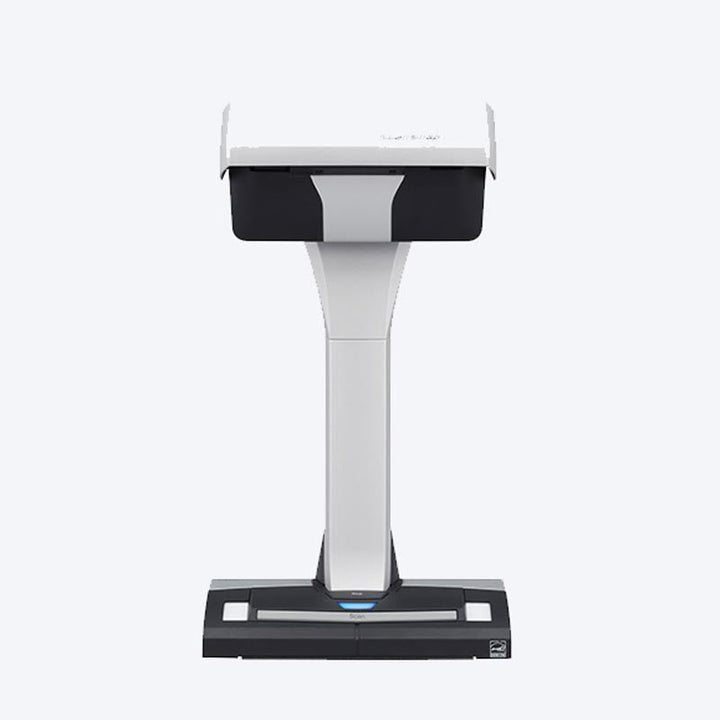


Ricoh ScanSnap SV600 Overhead Book Scanner
Prices in SGD, excluding 9% GST.
PRODUCT DESCRIPTION
Ricoh ScanSnap SV600 A3 Overhead Contactless Book Scanner, 3 Seconds per Page, USB 2.0 (PA03641-B301) - 1 Year Local Warranty
Contactless Overhead Scanning up to A3
The Ricoh ScanSnap SV600 scans from above, so books, magazines, newspapers and fragile originals never pass through rollers. It captures documents up to A3 landscape (custom sizes up to 432 x 300 mm) and material up to 30 mm thick, taking about 3 seconds per page.
Book Image Correction
Ricoh's book image correction flattens the curve distortion of an opened book, then crops and de-skews each page. Page-turning detection starts the next scan automatically when you turn a page, a timed mode scans at fixed intervals, and Point Retouch removes fingers captured while holding pages flat.
Multiple Documents in One Pass
Lay out business cards, photos or newspaper clippings together on the background pad and the SV600 scans them in one batch, cropping and rotating each item into its own image.
One-Button Scanning with ScanSnap Home
Press the scan button and ScanSnap's automatic image processing handles colour detection, page size and rotation. ScanSnap Home runs on Windows and macOS, and Kofax Power PDF Standard is bundled for PDF editing.
Need help choosing? Email sales@sourceit.com.sg with the kinds of books or documents you need to digitise and we will recommend the right ScanSnap.
Ricoh ScanSnap SV600 Datasheet — Technical Specifications
General
| Product Name | Ricoh ScanSnap SV600 |
| Part Number | PA03641-B301 |
| Series | Ricoh ScanSnap series (overhead scanner) |
| Scanner Type | Overhead system, simplex |
| Local Warranty (Singapore) | 1 year carry-in, supplied by SourceIT with a GST invoice |
Scanning
| Image Sensor | Colour CCD x 1 (lens reduction optics) |
| Optical Resolution | Horizontal 285 to 218 dpi, Vertical 283 to 152 dpi |
| Output Resolution (Colour/Grayscale, Monochrome) | Normal 150 / 300 dpi; Better 200 / 400 dpi; Best 300 / 600 dpi; Excellent 600 / 1,200 dpi |
| Scanning Speed | 3 seconds per page (A3 landscape) |
| Colour Modes | Colour, Grayscale, Monochrome, Automatic (colour / grayscale / monochrome detection) |
Document Handling
| Maximum Document Size | A3 landscape; custom up to 432 x 300 mm (17.0 x 11.8 in) |
| Minimum Document Size | 25.4 x 25.4 mm (1 x 1 in) |
| Maximum Document Thickness | 30 mm (1.18 in) |
Connectivity & Power
| Interface | USB 2.0 / USB 1.1 (Type-B) |
| Power Requirements | AC 100 to 240 V, 50/60 Hz |
| Power Consumption | Operating 20 W or less; Sleep 2.6 W; Auto Standby 0.4 W |
Physical & Environmental
| Dimensions (W x D x H) | 210 x 156 x 383 mm |
| Weight | 3.0 kg (6.62 lb) |
| Operating Temperature | 5 to 35 °C |
| Operating Humidity | 20 to 80% (non-condensing) |
| Environmental Compliance | ENERGY STAR®, RoHS |
Compatibility & Software Support
Supported Operating Systems
Windows 11 (64-bit), Windows 10 (32-bit / 64-bit) and macOS Monterey 12 or later, per Ricoh's SV600 brochure.
Driver
ScanSnap Home (ScanSnap-specific driver).
Software
ScanSnap Home and Kofax Power PDF Standard.
Image Processing
Book image correction, de-skew by text on document, automatic paper size detection, automatic image rotation, automatic colour detection and multiple document detection.
Package Contents & ScanSnap Ordering Information
In the Box (per Ricoh)
ScanSnap SV600, background pad, extenders (x2), AC cable, AC adapter, USB cable and Safety Precautions.
ScanSnap Models
| Model | Type | Speed | Connectivity | Part No. |
| iX1300 White | Compact ADF + manual feeder, duplex | 30 ppm / 60 ipm | USB + Wi-Fi | PA03805-B001 |
| iX1300 Black | Compact ADF + manual feeder, duplex | 30 ppm / 60 ipm | USB + Wi-Fi | PA03805-B101 |
| iX2500 White | 100-sheet ADF, duplex, 5" touch screen | 45 ppm / 90 ipm | USB + Wi-Fi | PA03860-B111 |
| iX2500 Black | 100-sheet ADF, duplex, 5" touch screen | 45 ppm / 90 ipm | USB + Wi-Fi | PA03860-B011 |
| SV600 (this listing) | Overhead, contactless, up to A3 | 3 seconds per page | USB 2.0 | PA03641-B301 |
Need to scan stacks of loose pages rather than books? The ScanSnap iX1300 and iX2500 feed documents automatically.
Datasheet & Downloads
| Ricoh brochure / datasheet | ScanSnap SV600 Brochure (PDF) |
| Ricoh product page | ScanSnap SV600 on pfu-asia.ricoh.com |
| Drivers, manuals & software | ScanSnap SV600 downloads |
Need a PDF sent directly? Email sales@sourceit.com.sg quoting PA03641-B301.
Frequently Asked Questions — Ricoh ScanSnap SV600
Can it scan bound books without damaging them?
Yes. The SV600 scans from above without touching the page, and book image correction flattens the curve of an opened book.
What is the largest document it can scan?
A3 landscape, or custom sizes up to 432 x 300 mm, and material up to 30 mm thick.
How fast is it?
About 3 seconds per page, and page-turning detection starts the next scan automatically when you turn the page.
Does it work with a Mac?
Yes. ScanSnap Home supports macOS Monterey 12 or later as well as Windows 11 and Windows 10.
What warranty do I get?
1 year carry-in local warranty in Singapore, supplied by SourceIT with a GST invoice.
Product Video
We Also Recommend


Ricoh ScanSnap iX2500 Black Wi-Fi Touch Screen Document Scanner


Ricoh ScanSnap iX2500 White Wi-Fi Touch Screen Document Scanner


Ricoh ScanSnap iX1300 Black Compact Wi-Fi Document Scanner


Ricoh ScanSnap iX1300 White Compact Wi-Fi Document Scanner


Ricoh fi-8950 A3 Production Document Scanner