
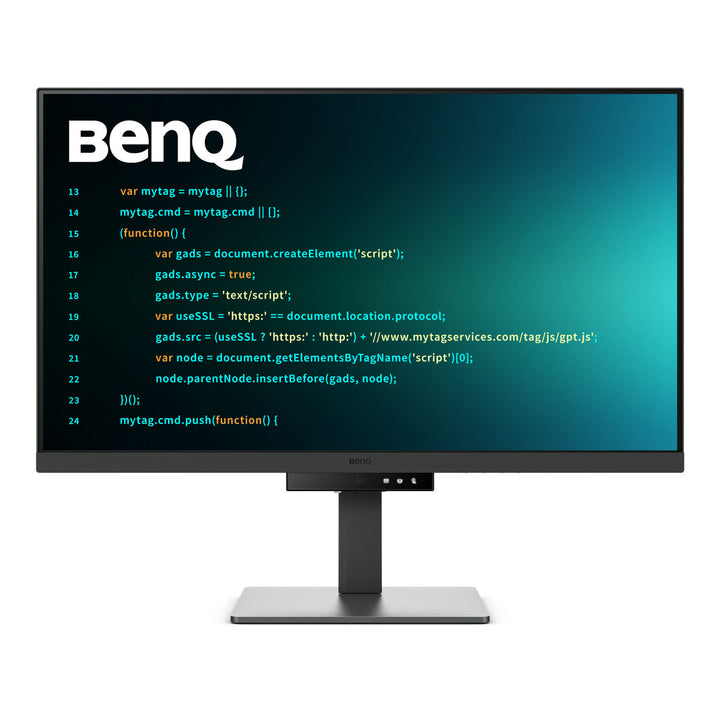


BenQ RD320U 32" 4K Programming Monitor with MoonHalo
PRODUCT DESCRIPTION
BenQ RD320U 32" 4K Programming Monitor with MoonHalo (RD320U) - 3 Year Local Warranty
A 32-Inch 4K Canvas for Three Panes Side by Side
Where the 28-inch RD models optimise for vertical lines, the RD320U optimises for width. Its 31.5-inch panel at 3840 x 2160 gives 140 pixels per inch — high enough for crisp monospaced text — across a physically large surface that comfortably holds an editor, a terminal and a browser or API reference side by side without any of them feeling cramped. For developers who work across several panes rather than deep in one long file, or who split the screen between an IDE and a running application, the extra horizontal room is the whole argument.
MoonHalo Rear Backlight and Night Hours Protection
MoonHalo is a light ring built into the rear of the chassis that washes the wall behind the monitor. It is not decorative: in a dark room a bright screen forces your eyes to keep adapting between the display and black surroundings, which is a significant part of why late sessions leave them aching. Raising the ambient level behind the panel narrows that gap. Night Hours Protection complements it by taking panel brightness below the floor a conventional office monitor allows, for genuinely dim rooms.
Nano Matte Coating and Coding Colour Modes
The Nano Matte coating scatters reflections from ceiling lights and glass partitions far more effectively than the standard matte film on an office panel, and carries a TÜV Reflection Free certification alongside Eye Comfort 2.0, EyeSafe 2.0 and Flicker-free. On a 32-inch screen showing small monospaced text all day, that matters more than on a smaller panel — there is simply more surface to catch a reflection. Coding - Dark Theme and Coding - Light Theme tune contrast for syntax highlighting on dark and light editors, with an ePaper mode for documentation.
98% P3 Colour, KVM Switch and 90 W USB-C
The RD320U has the widest gamut in the RD range at 98% DCI-P3 across 1.07 billion colours, with 400 nits typical brightness, 2000:1 native contrast and VESA DisplayHDR 400 — which makes it the pick for developers who also touch design assets or front-end colour work. A KVM switch shares one keyboard and mouse between two machines, PIP/PBP and DualView Plus put both on screen at once, and USB-C carries video, data and 90 W of Power Delivery for a 16-inch laptop under load.
BenQ RD320U Datasheet — Technical Specifications
General
| Product | BenQ RD320U 32" 4K Programming Monitor with MoonHalo |
| Part Number (SKU) | RD320U |
| Screen Size | 31.5 inch |
| Panel Type | IPS, LED backlight |
| Aspect Ratio | 16:9 |
| Manufacturer Warranty | 3 Year Local Warranty (BenQ Singapore) |
| Local Warranty (Singapore) | Supplied by SourceIT with GST invoice |
Display
| Resolution (max.) | 3840 x 2160 (4K UHD) |
| Pixel Density | 140 PPI |
| Brightness (typ.) | 400 nits |
| HDR | HDR10, VESA DisplayHDR 400 |
| Native Contrast | 2000:1 |
| Colour Gamut | 98% DCI-P3 |
| Display Colours | 1.07 billion |
| Viewing Angle (L/R) | 178° / 178° |
| Response Time (GtG) | 5 ms |
| Refresh Rate | 60 Hz |
| Panel Coating | Nano Matte |
| Gamma | 1.8 - 2.6 |
| HDCP | 2.2 |
| Colour Modes | Coding - Dark Theme, Coding - Light Theme, sRGB, HDR, M-book, User, Game, ePaper, Cinema |
| Colour Temperature | Bluish, Normal, Reddish, User Define |
| AMA (overdrive) | Yes |
Audio
| Built-in Speakers | 3 W x 2 |
| Headphone Jack | Yes |
Connectivity
| USB-C | 1 (Power Delivery 90 W, DisplayPort Alt Mode, Data) |
| HDMI (v2.0) | 2 |
| DisplayPort (v1.4) | 1 |
| Daisy Chain | USB-C out (MST) |
| USB Type-B Upstream | 1 (USB 3.2 Gen 1, 5 Gbps, data only) |
| USB Type-A Downstream | 2 (USB 3.2 Gen 2, 10 Gbps, 4.5 W charging) |
| USB Type-C Downstream | 1 at 7.5 W and 1 at 4.5 W (USB 3.2 Gen 2, 10 Gbps) |
| Supplied Signal Cables | HDMI (v2.0), USB 3.2, USB-C (may vary by region) |
Coding, Eye Care & Professional Features
| MoonHalo Rear Backlight | Yes |
| Coding Modes | Dark Theme, Light Theme |
| KVM Switch | Yes |
| DualView Plus | Yes |
| PIP / PBP | Yes |
| Auto Pivot | Yes |
| Night Hours Protection | Yes |
| Flicker-free Technology | Yes |
| Low Blue Light Plus | Yes |
| Brightness Intelligence Gen2 | Yes |
| Colour Weakness Mode | Yes |
| ePaper Mode | Yes |
| Eye Reminder | Yes |
| TÜV Certificate | Eye Comfort 2.0, EyeSafe 2.0, Flicker-free, Low Blue Light (Hardware and Software Solution), Reflection Free |
| Display Pilot 2 | Yes |
| Display QuicKit | Yes |
| Firmware Update by USB | Yes |
Physical & Environmental
| Height Adjustment | 110 mm |
| Tilt (down/up) | -5° to 20° |
| Swivel (left/right) | 15° / 15° |
| Pivot | 90° (with Auto Pivot) |
| VESA Wall Mount | 100 x 100 mm |
| Dimensions with Stand (HxWxD) | 468.6 - 581.6 x 714.6 x 263.1 mm |
| Dimensions in Portrait (HxWxD) | 740.3 x 714.6 x 263.1 mm |
| Dimensions without Stand (HxWxD) | 425 x 714.6 x 88.6 mm |
| Net Weight | 10.8 kg |
| Net Weight (without stand) | 7.3 kg |
| Energy Star | 8.0 |
| TCO Certified | 9.0 |
| EPEAT | Bronze |
Power
| Voltage Rating | 100 - 240 V |
| Power Supply | Built-in |
| USB-C Power Delivery | 90 W |
| Power Consumption (normal) | 30 W |
| Power Consumption (max) | 220 W |
| Power Consumption (sleep mode) | < 0.5 W |
Specifications are taken from BenQ's published product data for this model. Where BenQ does not publish a figure for this exact model it has been left out rather than estimated.
Compatibility & Installation
Mounting and orientation
The stand offers 110 mm of height travel, -5° to 20° tilt, 15° swivel each way and a full 90° pivot with Auto Pivot, which rotates the image as you turn the panel. In portrait the unit stands 740.3 mm tall — a considerable height, so check overhead clearance carefully at 32 inches. For an arm or wall bracket the monitor uses the standard 100 x 100 mm VESA pattern at 7.3 kg without the base; confirm your arm is rated for that load and for a 714.6 mm wide panel.
Driving it at 4K
3840 x 2160 at 60Hz is carried by DisplayPort 1.4, USB-C DisplayPort Alt Mode and both HDMI 2.0 inputs. At 140 PPI the panel sits in a useful middle ground: many developers run it at 100% scaling for maximum desktop area, while others prefer a light scaling factor for larger text. Both approaches work cleanly on current macOS and Windows builds, which is part of why this size suits multi-pane workflows.
Two machines: KVM, PIP/PBP and DualView Plus
The KVM switch passes one keyboard and mouse to whichever computer is the active video source — connect one machine over USB-C and the other over HDMI or DisplayPort with the USB Type-B upstream cable. PIP/PBP displays both simultaneously, which on a 32-inch panel is genuinely usable rather than a token feature. DualView Plus splits the screen into two halves with independent colour modes, so a coding mode can sit beside a colour-accurate preview.
USB-C power, daisy chain and peripherals
USB-C delivers 90 W over the same cable as video and data, enough for a 16-inch developer laptop or mobile workstation under genuine load. USB-C out with MST daisy chains a second display from this monitor rather than from the host; MST support depends on the graphics driver, so verify it first. Downstream ports run USB 3.2 Gen 2 at 10 Gbps — two Type-A and two Type-C — for keyboard, mouse, fast external drives and a phone.
Package Contents & BenQ RD Programmer Range
In the box
- BenQ RD320U monitor with ergonomic stand
- HDMI (v2.0) signal cable (may vary by region)
- USB 3.2 cable (may vary by region)
- USB-C cable (may vary by region)
- Quick Start Guide
- Warranty card
- Safety instruction sheet
Package contents follow BenQ's product data for this model; items not listed by BenQ are not claimed here.
BenQ RD programming range
| Model | Size, Resolution & Refresh |
| RD270Q | 27", 2560 x 1440 QHD 16:9, 144 Hz |
| RD280U | 28.2", 3840 x 2560 4K+ 3:2, 60 Hz |
| RD280UG | 28.2", 3840 x 2560 4K+ 3:2, 120 Hz |
| RD320U (this listing) | 31.5", 3840 x 2160 4K 16:9, 60 Hz |
Datasheet & Downloads
SourceIT can email the current BenQ data sheet revision for the RD320U on request with a quotation.
Frequently Asked Questions — BenQ RD320U
How do the four RD models differ — RD270Q, RD280U, RD280UG and RD320U?
The RD270Q is 27 inches, 2560 x 1440 QHD in 16:9 at 109 PPI and 144Hz — the entry model and the only one without MoonHalo. The RD280U and RD280UG share a 28.2-inch 3840 x 2560 panel in a tall 3:2 shape at 164 PPI, the RD280U at 60Hz and the RD280UG at 120Hz with 2000:1 contrast and HDMI 2.1. This RD320U is the largest: 31.5 inches, 3840 x 2160 4K in 16:9 at 140 PPI and 60Hz, with the widest gamut of the four at 98% P3 and the brightest panel at 400 nits.
Should I choose the 32-inch RD320U or a 3:2 RD280 model?
It depends on how you work. The 3:2 models give more vertical space — 2560 pixels of height against 2160 — which suits working deep in one long file with a tall terminal. The RD320U gives more horizontal room on a physically larger screen, which suits running an editor, a terminal and a browser or API reference side by side. Pixel density is higher on the 280s at 164 PPI against 140 PPI here.
What does MoonHalo do?
MoonHalo is a backlight ring on the rear of the chassis that illuminates the wall behind the monitor. In a dark room your eyes constantly re-adapt between a bright display and black surroundings, which is a real contributor to fatigue. Raising the ambient level behind the panel narrows that contrast gap. BenQ fits it to the RD280U, RD280UG and RD320U, but not the RD270Q.
Is 140 PPI sharp enough for reading code?
Yes. 3840 x 2160 across 31.5 inches is roughly 40% denser than a 27-inch QHD panel, and monospaced text renders cleanly. Many developers run it at 100% scaling for maximum desktop area; others apply a light scaling factor for larger text. Both work cleanly on current macOS and Windows builds.
Why does the wider colour gamut matter on a coding monitor?
The RD320U covers 98% DCI-P3 across 1.07 billion colours, the widest in the RD range. Developers who also touch design assets, review front-end work against a designer's colour specification, or handle image and video content get a panel accurate enough for that work without buying a second monitor.
Can I run two computers from it?
Yes. The KVM switch hands one keyboard and mouse to whichever machine is the active video source. Connect one over USB-C and the other over HDMI or DisplayPort plus the USB Type-B upstream cable. PIP/PBP shows both at once — practical on a 32-inch panel — and DualView Plus splits the screen into two colour-independent halves.
Will the 90 W USB-C port power my laptop?
90 W covers a 16-inch developer laptop or a mobile workstation under real working load, not just idling, while carrying video and data on the same cable. A machine with a high-power discrete GPU may still draw more during sustained compilation or rendering.
Does it come with a Singapore warranty and a GST invoice?
Yes. Every BenQ RD320U sold by SourceIT comes with the BenQ Singapore 3 Year Local Warranty and a GST invoice.