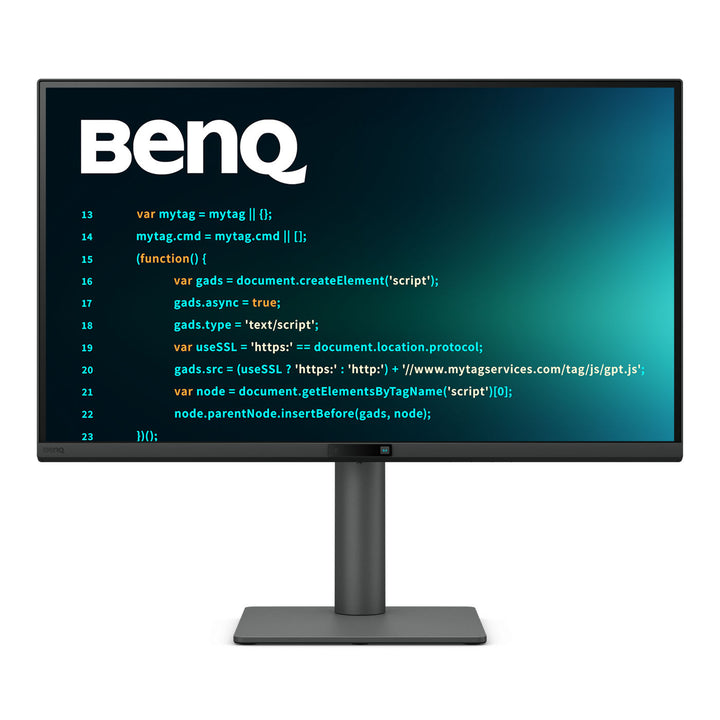


BenQ RD270Q 27" QHD 144Hz Programming Monitor
PRODUCT DESCRIPTION
BenQ RD270Q 27" QHD 144Hz Programming Monitor (RD270Q) - 3 Year Local Warranty
Coding Modes Built Around How Developers Actually Work
The RD series is BenQ's monitor line designed specifically for software developers, and the RD270Q's colour modes say so plainly: Coding - Dark Theme, Coding - Light Theme and Coding - Paper Color sit alongside the usual sRGB, HDR and Cinema presets. Dark Theme lifts the contrast between syntax-highlighted tokens on a dark IDE background, where most developers spend their day; Light Theme does the same for a bright editor. A Coding HotKey on the monitor's function bar switches between them in one press, without opening the on-screen menu mid-task.
Nano Matte Coating for Long Sessions Under Office Lighting
The panel uses BenQ's Nano Matte coating rather than the standard matte film found on office monitors. It scatters reflections from overhead lighting and glass partitions much more aggressively, which is the practical difference between reading small monospaced text comfortably and constantly repositioning your head to dodge a reflection. Combined with 99% sRGB coverage, 350 nits typical brightness and a 2560 x 1440 panel at 109 PPI, the result is a screen that stays legible through a full day of reading code rather than just a demo.
Night Hours Protection and Visual Optimizer for Late Sessions
Night Hours Protection is a BenQ feature built specifically for developers working in low light: it uses minimum brightness technology to take the panel dimmer than a conventional monitor's floor, so a dark room does not mean staring into a light source. Visual Optimizer sharpens text and image edges at those low brightness levels. Alongside these sit flicker-free operation, hardware and software Low Blue Light, ePaper mode and Colour Weakness assistance, with TÜV Rheinland certification for Eye Comfort 2.0, EyeSafe 2.0, Flicker-free and Low Blue Light.
144Hz, USB-C Docking and a Downstream USB-C Port
The RD270Q refreshes at 144Hz — the fastest panel in the RD range — with FreeSync and a 5 ms grey-to-grey response, so scrolling through a long file or a build log is noticeably smoother than on a 60Hz screen. The USB-C port carries DisplayPort Alt Mode video, data and 65 W of Power Delivery over one cable to a docked laptop, and the monitor adds two downstream USB Type-A ports plus a downstream USB Type-C at 7.5 W for a phone or a peripheral. HDMI 2.0 and DisplayPort 1.4 handle a second machine.
BenQ RD270Q Datasheet — Technical Specifications
General
| Product | BenQ RD270Q 27" QHD 144Hz Programming Monitor |
| Part Number (SKU) | RD270Q |
| Screen Size | 27 inch |
| Panel Type | IPS, LED backlight |
| Aspect Ratio | 16:9 |
| Manufacturer Warranty | 3 Year Local Warranty (BenQ Singapore) |
| Local Warranty (Singapore) | Supplied by SourceIT with GST invoice |
Display
| Resolution (max.) | 2560 x 1440 (QHD) |
| Pixel Density | 109 PPI |
| Brightness (typ.) | 350 nits |
| HDR | HDR10 |
| Native Contrast | 1300:1 |
| Colour Gamut | 99% sRGB |
| Display Colours | 16.7 million |
| Viewing Angle (L/R) | 178° / 178° |
| Response Time (GtG) | 5 ms |
| Refresh Rate | 144 Hz |
| Panel Coating | Nano Matte |
| Gamma | 1.8 - 2.6 |
| HDCP | 2.3 |
| Colour Modes | Coding - Paper Color, Coding - Dark Theme, Coding - Light Theme, sRGB, HDR, M-book, User, Game, ePaper, Cinema |
| Colour Temperature | Bluish, Normal, Reddish, User Define |
| FreeSync | Yes |
| AMA (overdrive) | Yes |
Audio
| Built-in Speakers | 2 W x 2 |
| Headphone Jack | Yes |
Connectivity
| USB-C | 1 (Power Delivery 65 W, DisplayPort Alt Mode, Data) |
| HDMI (v2.0) | 1 |
| DisplayPort (v1.4) | 1 |
| USB Type-A Downstream | 2 (USB 3.2 Gen 1, 5 Gbps, 4.5 W charging) |
| USB Type-C Downstream | 1 (USB 3.2 Gen 1, 5 Gbps, 7.5 W charging) |
| Supplied Signal Cables | HDMI (v2.0), USB-C (may vary by region) |
Coding & Eye Care
| Coding Modes | Dark Theme, Light Theme, Paper Color |
| Night Hours Protection | Yes |
| Visual Optimizer | Yes |
| Flicker-free Technology | Yes |
| Low Blue Light | Yes |
| Colour Weakness Mode | Yes |
| ePaper Mode | Yes |
| TÜV Certificate | Eye Comfort 2.0, EyeSafe 2.0, Flicker-free, Low Blue Light (Hardware and Software Solution) |
| Display Pilot 2 | Yes |
| Display QuicKit | Yes |
| Firmware Update by USB | Yes |
Physical & Environmental
| Height Adjustment | 130 mm |
| Tilt (down/up) | -5° to 20° |
| Swivel (left/right) | 15° / 15° |
| Pivot | 90° |
| VESA Wall Mount | 100 x 100 mm |
| Dimensions with Stand (HxWxD) | 398.8 - 528.8 x 613.6 x 215.7 mm |
| Dimensions in Portrait (HxWxD) | 660.8 x 364.4 x 215.7 mm |
| Dimensions without Stand (HxWxD) | 364.4 x 613.6 x 65.6 mm |
| Net Weight | 7.2 kg |
| Net Weight (without stand) | 4.7 kg |
| Energy Star | 8.0 |
| EPEAT | Bronze |
Power
| Voltage Rating | 100 - 240 V |
| Power Supply | Built-in |
| USB-C Power Delivery | 65 W |
| Power Consumption (normal) | 20 W |
| Power Consumption (max) | 140 W |
| Power Consumption (sleep mode) | < 0.5 W |
Specifications are taken from BenQ's published product data for this model. Where BenQ does not publish a figure for this exact model it has been left out rather than estimated.
Compatibility & Installation
Mounting and orientation
The stand offers 130 mm of height travel, -5° to 20° tilt, 15° swivel each way and a full 90° pivot into portrait — the most useful orientation on a developer desk, since a rotated 27-inch QHD panel shows a great deal more of a file without scrolling. In portrait the unit stands 660.8 mm tall. For an arm, the panel uses the standard 100 x 100 mm VESA pattern and weighs 4.7 kg without the base.
USB-C laptop docking
The USB-C port carries DisplayPort Alt Mode video, USB data and 65 W of Power Delivery at once, so a developer laptop docks with one cable and reaches the monitor's USB hub at the same time. 65 W suits most 13 to 14-inch machines; a 16-inch laptop running a heavy compile draws more than that, so keep its own adapter for sustained builds. HDMI 2.0 and DisplayPort 1.4 accept a second machine — a build server or a test rig — alongside the docked laptop.
Peripherals
Two downstream USB Type-A ports at USB 3.2 Gen 1 (5 Gbps) handle a mechanical keyboard and mouse, and a downstream USB Type-C at 7.5 W charges a phone or runs a USB-C peripheral. Firmware updates over USB. Built-in 2 W stereo speakers and a headphone jack cover stand-ups and pairing calls at desk volume.
Software
BenQ's Display Pilot 2 provides desktop partitioning and window layouts, monitor settings and profile switching from the operating system rather than the on-screen menu, and Display QuicKit assists with setup. The physical function bar on the front of the monitor carries a Coding HotKey that cycles the coding colour modes directly — note that a protective sticker must be removed from the function bar before it responds.
Package Contents & BenQ RD Programmer Range
In the box
- BenQ RD270Q monitor with ergonomic stand
- HDMI (v2.0) signal cable (may vary by region)
- USB-C cable (may vary by region)
- Quick Start Guide
- Safety instruction sheet
Package contents follow BenQ's product data for this model; items not listed by BenQ are not claimed here.
BenQ RD programming range
| Model | Size, Resolution & Refresh |
| RD270Q (this listing) | 27", 2560 x 1440 QHD 16:9, 144 Hz |
| RD280U | 28.2", 3840 x 2560 4K+ 3:2, 60 Hz |
| RD280UG | 28.2", 3840 x 2560 4K+ 3:2, 120 Hz |
| RD320U | 31.5", 3840 x 2160 4K 16:9, 60 Hz |
Datasheet & Downloads
SourceIT can email the current BenQ data sheet revision for the RD270Q on request with a quotation.
Frequently Asked Questions — BenQ RD270Q
How do the four RD models differ — RD270Q, RD280U, RD280UG and RD320U?
The RD270Q is the 27-inch QHD model: 2560 x 1440 in a conventional 16:9 shape at 109 PPI, and the fastest of the four at 144Hz. The RD280U and RD280UG are 28.2-inch 4K+ panels at 3840 x 2560 in a tall 3:2 aspect ratio and 164 PPI — the RD280U runs at 60Hz, the RD280UG at 120Hz with higher 2000:1 contrast, HDMI 2.1 and MoonHalo. The RD320U is 31.5 inches, 3840 x 2160 4K at 16:9, 60Hz and 98% P3.
Which one should a developer choose?
Choose the RD270Q if you want the smoothest panel and a familiar 16:9 shape at a QHD working resolution, and you sit close enough that 109 PPI reads comfortably. Choose a 3:2 RD280U or RD280UG if vertical lines of code matter more than anything — the taller aspect ratio shows meaningfully more of a file. Choose the RD320U for a physically larger 32-inch canvas for multiple side-by-side panes.
Does the RD270Q have the MoonHalo rear backlight?
No. BenQ specifies MoonHalo on the RD280U, RD280UG and RD320U, but not on the RD270Q. If the rear ambient backlight for night work is what you are after, choose one of those three models.
What do the Coding modes actually change?
Coding - Dark Theme adjusts contrast and colour to make syntax highlighting stand out on a dark IDE background; Coding - Light Theme does the equivalent for a bright editor; Coding - Paper Color renders the screen with a paper-like tone for reading documentation and long text. A Coding HotKey on the monitor's function bar cycles between them in one press. Remove the protective sticker from the function bar before first use, or the key will not respond.
What is Night Hours Protection?
It is a BenQ feature made for developers working in dim rooms. It uses minimum brightness technology to take the panel below the usual brightness floor of an office monitor, so a screen in a dark room is not an uncomfortable light source. Visual Optimizer keeps text edges sharp at those low levels.
What is the Nano Matte coating for?
It diffuses reflections from overhead lights and glass partitions far more effectively than a standard matte film. On a screen holding small monospaced text for eight hours, that is the difference between reading comfortably and constantly shifting position to dodge a reflection.
Will the 65 W USB-C port charge my development laptop?
It is enough for most 13 to 14-inch machines under normal load. A 16-inch laptop or a mobile workstation running a sustained compile draws more than 65 W, so it will charge slowly or hold level — keep its own power supply for heavy build work. The port still carries video and data over the same cable either way.
Does it come with a Singapore warranty and a GST invoice?
Yes. Every BenQ RD270Q sold by SourceIT comes with the BenQ Singapore 3 Year Local Warranty and a GST invoice.