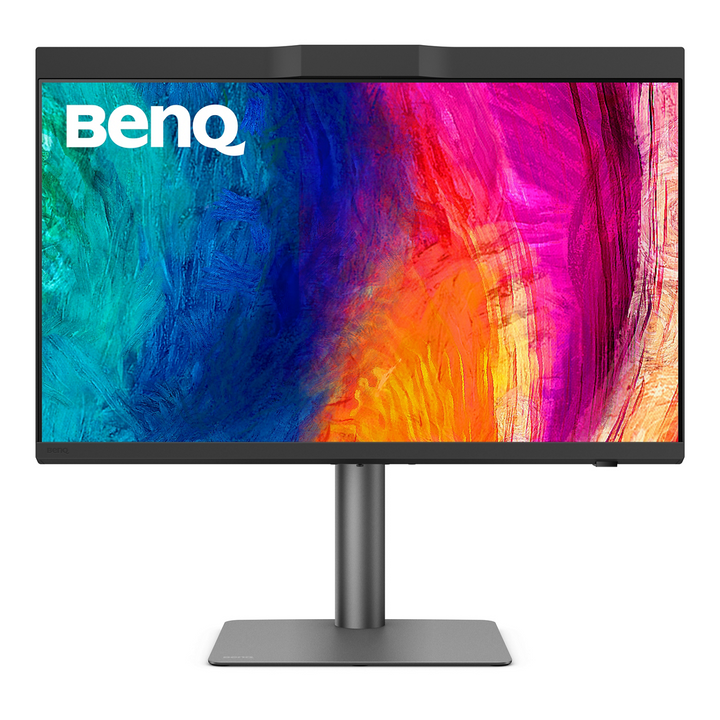


BenQ PD2770U 27" 4K Colour Management Monitor
PRODUCT DESCRIPTION
BenQ PD2770U 27" 4K Colour Management Monitor (PD2770U) - 3 Year Local Warranty
Delta E ≤ 1.5 and a 16-Bit 3D LUT for Graphic and Video Editing
The PD2770U is BenQ's colour-management DesignVue panel: a 27-inch 4K display for graphic and video editing where the screen has to be the reference, not an approximation. Average Delta E is rated at 1.5 or lower, and a 16-bit 3D lookup table handles the colour transform inside the monitor, which keeps gradients smooth and neutral tones neutral rather than pushing the correction onto the host graphics card. Every unit ships with its own factory calibration report.
99% Adobe RGB and 100% Rec.709 on One Panel
Coverage spans 100% Rec.709 for broadcast and video delivery and 99% Adobe RGB for print-oriented photography and prepress, over 1.07 billion colours. That combination is the reason this model sits above the general-purpose PD panels: a studio doing both a printed campaign and its video cut-down can grade and retouch on one screen. HDR10 and HLG support are provided for HDR video review alongside the standard-dynamic-range spaces.
Nano Matte Black Panel and a Shading Hood for Consistent Judgement
The Nano Matte Black coating diffuses ambient light without adding sparkle to fine detail, and a shading hood is supplied for landscape use so that colour decisions hold as office lighting changes through the day — a real variable in Singapore studios with glass frontage. Brightness is rated 450 nits. The supplied Hotkey Puck G3 switches colour modes from the desk, which matters when a file is checked in Rec.709, Adobe RGB and sRGB in the same session.
96W USB-C Docking and an Ergonomic Stand
A USB-C port docks a laptop with 4K video, data and 96W of Power Delivery on a single cable, with DisplayPort 1.4 and two HDMI inputs alongside for a workstation, a grading box or a second machine. The stand provides 115 mm of height travel, tilt, swivel and a 90-degree pivot, and the rear takes a VESA 100 x 100 mm arm where desk depth is at a premium.
BenQ PD2770U Datasheet — Technical Specifications
General
| Product | BenQ PD2770U 27" 4K Colour Management Monitor |
| Part Number (SKU) | PD2770U |
| Series | BenQ DesignVue PD Series |
| Panel Type | IPS, LED backlight |
| Panel Finish | Nano Matte Black |
| Local Warranty (Singapore) | 3 Year Local Warranty — supplied by SourceIT with GST invoice |
Colour & Calibration
| Colour Gamut | 100% Rec.709, 99% Adobe RGB |
| Delta E (avg.) | ≤ 1.5 |
| 3D LUT | 16 bits |
| Calibration Report | Included with each unit |
| Display Colours | 1.07 billion colours |
Display
| Screen Size | 27 inch, 16:9 |
| Resolution (max.) | 3840 x 2160 (4K UHD) |
| Pixel Density | 163 PPI |
| Brightness (typ.) | 450 nits |
| Native Contrast | 1000:1 |
| Response Time (GtG) | 5 ms |
| Refresh Rate | 60 Hz |
| HDR | HDR10, HLG |
Audio
| Headphone Jack | Yes |
Connectivity
| HDMI | 2 x HDMI |
| DisplayPort | 1 x DisplayPort 1.4 |
| USB-C (upstream) | 1 x USB-C — 96W Power Delivery, DisplayPort Alt Mode, data |
| USB Type-A Downstream | USB 3.2 Gen 1 (5 Gbps, 4.5W charging) |
Ergonomics & Physical
| Height Adjustment | 115 mm |
| Tilt (down/up) | -5° to 20° |
| Swivel (left/right) | 15° / 15° |
| Pivot | 90° |
| VESA Wall Mount | 100 x 100 mm |
| Net Weight | 8.8 kg |
Power
| Power Consumption (normal) | 33 W |
| Power Delivery to Host | 96 W over USB-C |
Specifications are taken from BenQ's published product data for this model. Where BenQ does not publish a figure for this exact model it has been left out rather than estimated.
Compatibility & Installation
What it connects to
The USB-C upstream port docks a MacBook Pro or a Windows laptop with DisplayPort Alt Mode, carrying 4K video, USB data and 96W of charging on a single cable. DisplayPort 1.4 and two HDMI inputs take a desktop workstation, a grading device or a second machine.
Colour management workflow
Colour transforms are handled by a 16-bit 3D lookup table inside the monitor, which keeps gradients clean and does not rely on the host GPU to do the correction. Each unit ships with its own calibration report and is rated to an average Delta E of 1.5 or lower over 100% Rec.709 and 99% Adobe RGB. The Hotkey Puck G3 switches modes from the desk.
Viewing conditions
A shading hood for landscape orientation is supplied to exclude ambient light from the panel, which is what makes colour judgements repeatable through a working day. The Nano Matte Black coating diffuses remaining room light without adding sparkle to fine type.
Mounting and orientation
115 mm of height travel, -5° to 20° tilt, 15° swivel each way and a 90° pivot for portrait work. A VESA 100 x 100 mm pattern is provided for arms and wall brackets.
Elsewhere in the range
For 5K density with Thunderbolt 4, see the PD2730S; for a 31.5-inch 144 Hz designer panel, the PD3226G; for photographers working to Adobe RGB, the SW272QN.
Package Contents & BenQ DesignVue PD Range
In the box
- BenQ PD2770U monitor with stand
- DisplayPort 1.4, USB 3.0 and USB-C signal cables (may vary by region)
- Power cable
- Shading hood (landscape)
- Hotkey Puck G3
- Calibration Report
- Cleaning cloth
- Quick Start Guide, Warranty Card and Safety Instruction
Package contents follow BenQ's product data for this model; items not listed by BenQ are not claimed here.
BenQ DesignVue PD range at SourceIT
| Model | Size & Description |
| PD2705U | 27", 4K HDR |
| PD2705UA | 27", 4K HDR with Ergo Stand |
| PD2706U | 27", 4K UHD USB-C designer monitor |
| PD2706UA | 27", 4K creative monitor with Ergo Stand |
| PD2725U | 27", 4K HDR IPS |
| PD2730S | 27", 5K Thunderbolt 4 |
| PD2770U (this listing) | 27", 4K colour management, 16-bit 3D LUT |
| PD3205U | 31.5", 4K HDR |
| PD3205UA | 31.5", 4K HDR with Ergo Stand |
| PD3225U | 32", 4K IPS Black Thunderbolt |
| PD3226G | 31.5", 4K UHD 144 Hz Thunderbolt 4 |
Datasheet & Downloads
SourceIT can email the current data sheet revision for the PD2770U on request with a quotation.
Frequently Asked Questions — BenQ PD2770U
What does a 16-bit 3D LUT give me that software calibration does not?
The lookup table performs the colour transform inside the monitor at 16-bit precision, so gradients stay smooth and greys stay neutral rather than banding when the correction is applied by the graphics card. It is the feature that separates a colour-management display from a general-purpose panel with an accurate preset.
What does Delta E ≤ 1.5 mean?
It is the average measured difference between the colour a file requests and the colour shown. At 1.5 or lower the difference is at or below what most people can see side by side, which is what makes on-screen approval defensible. Each PD2770U ships with its own calibration report.
Does it cover Adobe RGB for print work?
Yes — BenQ publishes 99% Adobe RGB coverage alongside 100% Rec.709 for video, which is why this model suits studios delivering both print and broadcast from one desk.
Will it charge my laptop over USB-C?
Yes. The USB-C upstream port supplies 96W of Power Delivery along with 4K video and USB data on one cable.
What is the shading hood for?
It blocks ambient light from falling on the panel, so colour judgements stay consistent as room lighting changes. It is supplied for landscape orientation.
How is this different from the PD2706U?
The PD2706U is the general-purpose 27-inch 4K designer panel, rated to an average Delta E of 3 with 95% P3 coverage. The PD2770U adds the 16-bit 3D LUT, 99% Adobe RGB coverage, a tighter Delta E of 1.5 and a shading hood — the tools for colour-critical grading and prepress.
Can I mount it on an arm or rotate it to portrait?
Yes. The stand pivots 90° and adjusts 115 mm in height, and the rear carries a VESA 100 x 100 mm pattern.
Does it come with a Singapore warranty and a GST invoice?
Yes. Every BenQ PD2770U sold by SourceIT carries the 3 year BenQ Singapore local warranty on monitors, and a GST invoice is issued with every unit.