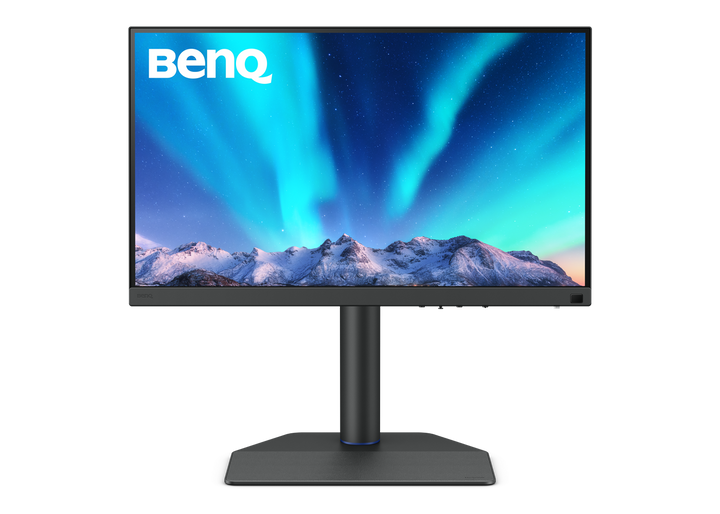


BenQ SW272QN 27" 2K QHD AdobeRGB Photographer Monitor
PRODUCT DESCRIPTION
BenQ SW272QN 27" 2K QHD AdobeRGB Photographer Monitor (SW272QN) - 3 Year Local Warranty
Delta E ≤ 1.5 Average, With a Calibration Report in the Box
The SW272QN is a PhotoVue display built for photographers who print. Average Delta E is rated at 1.5 or lower, and each unit ships with its own factory calibration report rather than a generic specification sheet, so the panel you receive is the panel that was measured. Colour covers 100% sRGB, 100% Rec.709 and 98% Display P3, with 99% Adobe RGB coverage for print-oriented work — the wide-gamut space that matters when an image is heading to an inkjet or a press rather than a phone screen.
Nano Matte Panel for Soft-Proofing Under Real Light
The 27-inch QHD panel uses BenQ's Nano Matte coating, a low-haze anti-glare treatment that diffuses overhead lighting without adding the sparkle coarse matte surfaces give to fine detail. A shading hood is supplied for landscape use, which is what makes soft-proofing repeatable in a Singapore studio where ambient light changes through the day. At 2560 x 1440 the screen keeps thumbnail grids and tool palettes at a comfortable physical size while leaving a generous image area.
90W USB-C Docking, SD Card Reader and Hotkey Puck G3
A single USB-C cable handles display, data and 90W of Power Delivery, so a laptop charges while it edits. An SD/SDHC/SDXC/MMC card reader is built into the monitor, which removes the dongle from the ingest step entirely — card straight into the screen, import, back to shooting. Two HDMI inputs and a DisplayPort 1.4 input cover a desktop workstation or a second machine, and the supplied Hotkey Puck G3 switches colour modes without hunting through an on-screen menu.
Black & White Mode and a Studio-Ready Stand
A dedicated Black & White mode previews a monochrome conversion before the edit is committed, which is faster and more honest than toggling an adjustment layer. The stand gives 140 mm of height travel, 30 degrees of swivel each way and a 90-degree pivot for portrait work, and the rear takes a VESA 100 x 100 mm arm. An IO cover is included to keep the cable run tidy on a client-facing desk.
BenQ SW272QN Datasheet — Technical Specifications
General
| Product | BenQ SW272QN 27" 2K QHD AdobeRGB Photographer Monitor |
| Part Number (SKU) | SW272QN |
| Series | BenQ PhotoVue SW Series |
| Panel Type | IPS, LED backlight |
| Panel Finish | Nano Matte |
| Local Warranty (Singapore) | 3 Year Local Warranty — supplied by SourceIT with GST invoice |
Display
| Screen Size | 27 inch, 16:9 |
| Resolution (max.) | 2560 x 1440 (QHD) |
| Pixel Density | 109 PPI |
| Brightness (typ.) | 300 nits |
| Native Contrast | 1000:1 |
| Response Time (GtG) | 5 ms |
| Refresh Rate | 60 Hz |
| HDR | HDR10 |
| Display Colours | 1.07 billion colours |
Colour & Calibration
| Colour Gamut | 100% sRGB, 100% Rec.709, 98% Display P3 |
| Adobe RGB Coverage | 99% |
| Delta E (avg.) | ≤ 1.5 |
| Calibration Report | Included with each unit |
| Black & White Mode | Yes |
Audio
| Headphone Jack | Yes |
Connectivity
| HDMI | 2 x HDMI 2.0 |
| DisplayPort | 1 x DisplayPort 1.4 |
| USB-C (upstream) | 1 x USB-C — 90W Power Delivery, DisplayPort Alt Mode, data |
| Card Reader | SD / SDHC / SDXC / MMC |
| KVM Switch | Yes |
Ergonomics & Physical
| Height Adjustment | 140 mm |
| Tilt (down/up) | -5° to 20° |
| Swivel (left/right) | 30° / 30° |
| Pivot | 90° |
| VESA Wall Mount | 100 x 100 mm |
| Dimensions (H x W x D) | 451.8-591.8 x 613.9 x 274 mm |
| Net Weight | 8.3 kg |
Power
| Power Consumption (normal) | 25 W |
| Power Delivery to Host | 90 W over USB-C |
Specifications are taken from BenQ's published product data for this model. Where BenQ does not publish a figure for this exact model it has been left out rather than estimated.
Compatibility & Installation
What it connects to
Two HDMI 2.0 inputs and a DisplayPort 1.4 input take a desktop workstation, a second machine or a camera output. The USB-C upstream port carries display, data and 90W of charging on one cable for a MacBook Pro, a Windows ultrabook or any laptop with DisplayPort Alt Mode. A built-in KVM switch lets one keyboard and mouse serve two connected machines.
Card reader and ingest
The integrated SD/SDHC/SDXC/MMC reader takes the card straight from the camera, so a shoot can be ingested without a separate dongle on the desk.
Colour management workflow
Each unit ships with its own calibration report and is rated to an average Delta E of 1.5 or lower across 100% sRGB, 100% Rec.709, 99% Adobe RGB and 98% Display P3. The supplied Hotkey Puck G3 switches between colour modes from the desk, and the shading hood supplied for landscape orientation controls ambient light when soft-proofing.
Mounting and orientation
The stand travels 140 mm in height, tilts -5° to 20°, swivels 30° each way and pivots 90° for portrait editing. A VESA 100 x 100 mm pattern is provided for arms and wall brackets.
Elsewhere in the range
For 4K at the same size, see the SW272U; for 32 inches with Adobe RGB and USB-C, the SW321C.
Package Contents & BenQ PhotoVue SW Range
In the box
- BenQ SW272QN monitor with stand
- DisplayPort 1.4, HDMI (v2.0) and USB-C signal cables (may vary by region)
- Power cable
- Shading hood (landscape)
- Hotkey Puck G3
- IO cover
- Calibration Report
- Quick Start Guide and Warranty Card
Package contents follow BenQ's product data for this model; items not listed by BenQ are not claimed here.
BenQ PhotoVue SW range at SourceIT
| Model | Size & Panel |
| SW240 | 24.1", 16:10 PhotoVue IPS |
| SW272Q | 27", 1440p HDR |
| SW272QN (this listing) | 27", 2560 x 1440 Nano Matte, 90W USB-C |
| SW272U | 27", 4K HDR |
| SW321C | 32", 4K Adobe RGB USB-C |
Datasheet & Downloads
SourceIT can email the current data sheet revision for the SW272QN on request with a quotation.
Frequently Asked Questions — BenQ SW272QN
Is QHD enough for photo editing, or should I buy 4K?
At 27 inches, 2560 x 1440 gives 109 PPI, so menus, brushes and thumbnails sit at a comfortable physical size without scaling. Choose 4K — the SW272U — if you routinely inspect fine detail at 100% or deliver video at UHD. For colour-critical print work, gamut and Delta E matter more than pixel count.
What does Delta E ≤ 1.5 actually mean for my prints?
Delta E is the measured difference between the colour requested and the colour shown. An average of 1.5 or lower is below or near the threshold at which most people see a difference side by side, which is what makes a soft proof trustworthy. Each SW272QN ships with its own calibration report recording that measurement.
Does it cover Adobe RGB?
Yes — BenQ publishes 99% Adobe RGB coverage for this model, alongside 100% sRGB, 100% Rec.709 and 98% Display P3, which is the combination print and web delivery both need.
What is the card reader for?
The monitor has a built-in SD/SDHC/SDXC/MMC reader, so a camera card goes directly into the screen for ingest instead of into a separate dongle or hub.
Will it charge my laptop over USB-C?
Yes. The USB-C upstream port supplies 90W of Power Delivery alongside display signal and USB data, which covers most 13 to 15-inch laptops on one cable.
What is the Hotkey Puck G3 and the shading hood for?
The Hotkey Puck G3 is a desk controller for switching colour modes and adjusting settings without using the on-screen menu. The shading hood, supplied for landscape orientation, blocks ambient light falling on the panel so that colour judgements stay consistent through the day.
Can I mount it on an arm and rotate it to portrait?
Yes. The supplied stand pivots 90°, swivels 30° each way and adjusts 140 mm in height, and the rear carries a VESA 100 x 100 mm pattern.
Does it come with a Singapore warranty and a GST invoice?
Yes. Every BenQ SW272QN sold by SourceIT carries the 3 year BenQ Singapore local warranty on monitors, and a GST invoice is issued with every unit.