
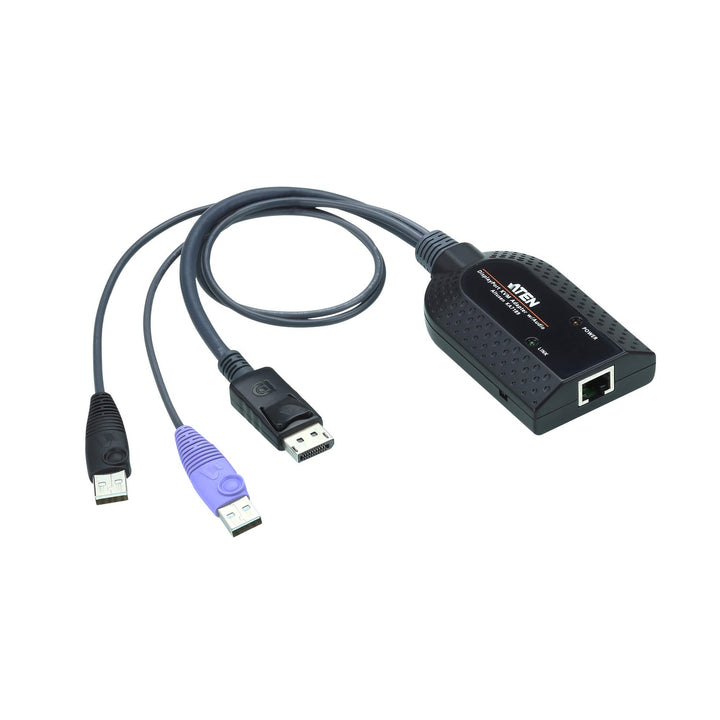

ATEN KA7189 USB DisplayPort Virtual Media KVM Adapter with Audio De-Embedder
PRODUCT DESCRIPTION
ATEN KA7189 USB DisplayPort Virtual Media KVM Adapter with Audio De-Embedder - 2 Years Local Warranty
DisplayPort Servers With Audio
The KA7189 connects a computer's DisplayPort and USB ports to an ATEN KVM switch over an RJ-45 cable, and its audio de-embedder extracts the audio from the DisplayPort signal so it can be carried with the video.
Virtual Media and Smart Card Support
With compatible ATEN switches it supports virtual media for remote drive and image mounting and smart card / CAC readers for secure authentication.
Auto Signal Compensation
ASC adjusts video for different distances automatically, with no DIP switches, at up to 1920 x 1200 (reduced blanking).
Reliable in the Rack
Keyboard and mouse emulation, built-in ASIC and firmware upgrade support keep servers responsive and the adapter up to date.
Planning a KVM over IP rollout for DisplayPort servers? Email sales@sourceit.com.sg for configuration advice and a project quote.
ATEN KA7189 Datasheet — Technical Specifications
General
| Product Name | ATEN USB DisplayPort Virtual Media KVM Adapter (Smart Card Reader and Audio De-Embedder) |
| Model | KA7189 |
| Order Code | KA7189-AX |
| Local Warranty (Singapore) | 2 years carry-in warranty |
Connectors
| Link | 1 x RJ-45 Female |
| Computer | 1 x DisplayPort Male, 2 x USB Type-A Male |
| Cable Lengths | DisplayPort: 25 cm; USB: 50 cm |
Video & Audio
| Maximum Resolution | 1920 x 1200 (reduced blanking) |
| Signal Compensation | Auto Signal Compensation (ASC), no DIP switch setting needed |
| Audio | Audio de-embedder extracts audio from the DisplayPort signal |
Features
| Virtual Media | Supported with compatible switches |
| Smart Card / CAC Reader | Supported with compatible switches |
| Emulation | Keyboard and mouse emulation |
| Firmware | Upgradeable |
| LEDs | Link (green), Power (orange) |
Environmental
| Operating Temperature | 0–50 °C |
| Storage Temperature | -20–60 °C |
Physical
| Housing | Plastic |
| Weight | 0.11 kg |
| Dimensions (L x W x H) | 9.10 x 5.60 x 2.14 cm |
Compatible ATEN KVM Switches (as listed by ATEN)
| KVM over IP | KN2124VB, KN2132VB, KN4064VB, KN4032VB, KN4024VB, KN2116VB, KN4016VB, KN1132VB, KN8032VB, KN8064VB, KN1108VA, KN1116VA, KN2116VA, KN4116VA |
| LCD KVM | KL1116V, KL1108V |
| Remote Control & Monitoring | RCM416A, RCM416VA, RCM432VA, RCM464VA, RCM816A, RCM416, RCM464V |
Compatibility & Applications
Typical Computers
Servers and workstations with a full-size DisplayPort output and two free USB ports.
Typical Use
Remote management of DisplayPort servers through ATEN KN-series KVM over IP switches, KL1108V/KL1116V LCD KVM switches and RCM units, where audio from the server is also needed.
Installation Tip
Plug both USB connectors into the computer for sufficient power and correct operation. On runs over 40 m, ATEN notes that unshielded cable may cause interference between video and audio.
Package Contents & ATEN KVM Adapter Ordering Information
In the Box
1 x KA7189 KVM adapter cable.
ATEN KVM Adapter Models
| Model | Key feature |
| KA7570 | USB VGA KVM adapter |
| KA7170 | USB VGA KVM adapter with composite video support |
| KA7168 | USB HDMI virtual media KVM adapter with smart card support |
| KA7169 | USB DisplayPort virtual media KVM adapter with smart card support |
| KA7189 (this listing) | USB DisplayPort virtual media KVM adapter with audio de-embedder |
| KA7183 | USB-C virtual media KVM adapter |
| KH1508A | 8-port Cat 5 KVM switch with daisy-chain |
Datasheet & Downloads
| Datasheet | KA7189 Datasheet (PDF) |
| ATEN product page | KA7189 on aten.com |
Need a PDF sent directly? Email sales@sourceit.com.sg quoting KA7189-AX.
Frequently Asked Questions — ATEN KA7189
Which KVM switches is it for?
ATEN lists KN-series KVM over IP switches (such as the KN1108VA, KN2116VA, KN4116VA and KN8064VB), the KL1108V and KL1116V LCD KVM switches, and RCM-series units.
What does the audio de-embedder do?
It extracts the audio from the computer's DisplayPort signal so audio can be carried alongside the video through the KVM link.
Do both USB plugs need to be connected?
Yes. ATEN states both USB connectors must be plugged into the target computer for sufficient power and operation.
KA7189 or KA7169?
Both are DisplayPort virtual media adapters with smart card support; choose the KA7189 if you also need DisplayPort audio.
What warranty do I get?
2 years local carry-in warranty. Supplied by SourceIT with a GST invoice.


