
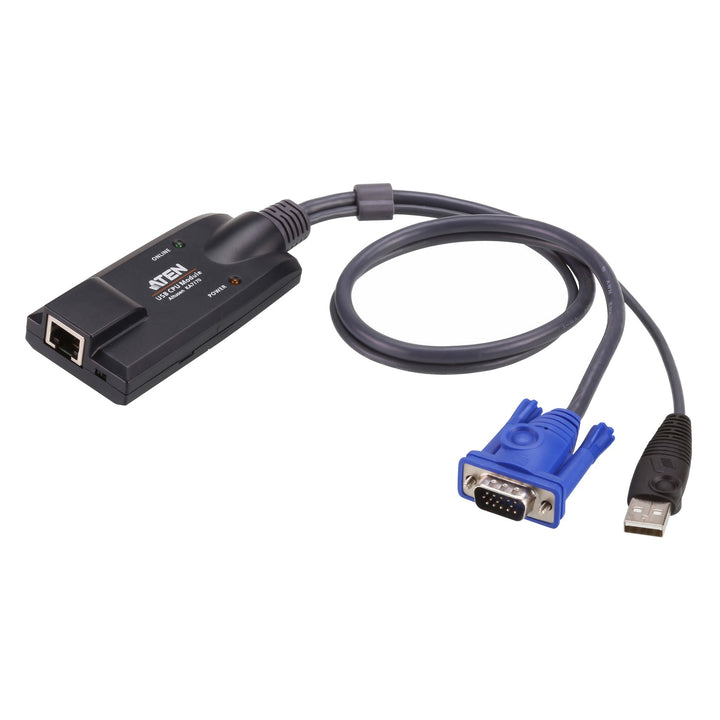

ATEN KA7170 USB VGA KVM Adapter with Composite Video Support
PRODUCT DESCRIPTION
ATEN KA7170 USB VGA KVM Adapter with Composite Video Support - 2 Years Local Warranty
Connect Computers to ATEN Cat 5 KVM Switches
The KA7170 plugs into a computer's VGA and USB ports and connects to an ATEN Cat 5 KVM switch over a standard RJ-45 cable, replacing bulky KVM cable bundles in the rack.
Auto Signal Compensation
Auto Signal Compensation (ASC) tunes the video for different cable lengths automatically, with no DIP switches to set, and supports resolutions up to 1920 x 1200 (reduced blanking).
Keyboard and Mouse Emulation
Keyboard and mouse emulation keeps the server running smoothly even when the console is switched away or the adapter is moved, and the adapter is hot pluggable.
Compact, With Rack Mount Kit
A small, lightweight plastic housing with built-in ASIC and lifetime firmware upgrades; a rack mount kit is included.
Fitting out a server rack with Cat 5 KVM? Email sales@sourceit.com.sg for volume pricing on adapters and switches.
ATEN KA7170 Datasheet — Technical Specifications
General
| Product Name | ATEN USB VGA KVM Adapter with Composite Video Support |
| Model | KA7170 |
| Order Code | KA7170-AX |
| Local Warranty (Singapore) | 2 years carry-in warranty |
Connectors
| Link | 1 x RJ-45 Female |
| Computer | 1 x USB Type-A Male, 1 x HDB-15 (VGA) Male |
Video
| Maximum Resolution | 1920 x 1200 (reduced blanking); may vary with transmission distance |
| Signal Compensation | Auto Signal Compensation (ASC), no DIP switch setting needed |
| Composite Video | Supported |
Features
| Emulation | Keyboard and mouse emulation |
| Hot Pluggable | Yes |
| Firmware | Lifetime firmware upgrades |
| LEDs | Online (green), Power (orange) |
Environmental
| Operating Temperature | 0–50 °C |
| Storage Temperature | -20–60 °C |
Physical
| Housing | Plastic |
| Weight | 0.14 kg |
| Dimensions (L x W x H) | 9.00 x 4.30 x 2.18 cm |
Compatible ATEN KVM Switches (as listed by ATEN)
| Cat 5 KVM | KH1532A, KH1508A, KH1516A, KH2508A, KH2516A, CE750A, CE770 |
| KVM over IP | KN2124VB, KN2132VB, KN4064VB, KN4032VB, KN4024VB, KN2116VB, KN4016VB, KN1132VB, KN8032VB, KN8064VB, KN1108VA, KN1116VA, KN2116A, KH1508Ai, KH1516Ai, KN2116VA, KN4116VA |
| LCD KVM | KL1116V, KL1108V, KL1508A, KL1508Ai, KL1516A, KL1516Ai |
| Remote Control & Monitoring | RCM416A, RCM416VA, RCM432VA, RCM464VA, RCM816A, RCM416 |
Compatibility & Applications
Typical Computers
Servers and PCs with a VGA output and USB keyboard/mouse ports.
Typical Use
Connecting rack servers to ATEN KH-series Cat 5 KVM switches, KN-series KVM over IP switches and KL-series LCD KVM switches in data centres and server rooms.
Selection Tip
Order one adapter per computer. For HDMI servers choose the KA7168, for DisplayPort the KA7169 or KA7189, and for USB-C the KA7183.
Package Contents & ATEN KVM Adapter Ordering Information
In the Box
1 x KVM adapter cable, 1 x rack mount kit, 1 x rack mounting guide.
ATEN KVM Adapter Models
| Model | Key feature |
| KA7570 | USB VGA KVM adapter |
| KA7170 (this listing) | USB VGA KVM adapter with composite video support |
| KA7168 | USB HDMI virtual media KVM adapter with smart card support |
| KA7169 | USB DisplayPort virtual media KVM adapter with smart card support |
| KA7189 | USB DisplayPort virtual media KVM adapter with audio de-embedder |
| KA7183 | USB-C virtual media KVM adapter |
| KH1508A | 8-port Cat 5 KVM switch with daisy-chain |
Datasheet & Downloads
| Datasheet | KA7170 Datasheet (PDF) |
| ATEN product page | KA7170 on aten.com |
Need a PDF sent directly? Email sales@sourceit.com.sg quoting KA7170-AX.
Frequently Asked Questions — ATEN KA7170
Which KVM switches does it work with?
ATEN lists KH-series Cat 5 KVM switches (e.g. KH1508A, KH1516A, KH1532A), CE750A and CE770, KN-series KVM over IP switches, KL-series LCD KVM switches (e.g. KL1508A, KL1516A) and RCM-series units. See the compatibility table in the specifications.
What cable connects it to the switch?
A standard Cat 5e/6 cable with RJ-45 connectors.
Do I need to set DIP switches for cable length?
No. Auto Signal Compensation handles different distances automatically.
What resolution does it support?
Up to 1920 x 1200 (reduced blanking). The achievable resolution may vary with transmission distance.
What warranty do I get?
2 years local carry-in warranty. Supplied by SourceIT with a GST invoice.


