
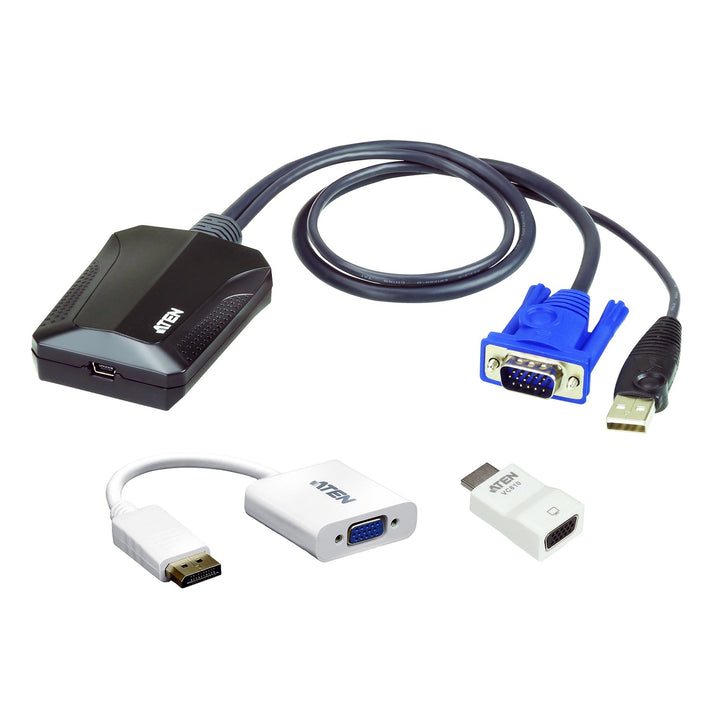


ATEN CV211CP Laptop USB KVM Console Crash Cart Adapter IT Kit
PRODUCT DESCRIPTION
ATEN CV211CP Laptop USB KVM Console Crash Cart Adapter IT Kit - 2 Years Local Warranty
Your Laptop Becomes the Crash Cart
The CV211 adapter turns a laptop into a portable console for servers, PCs, kiosks and ATMs. Plug it into the target's USB and VGA ports and its Mini-USB port into your laptop to see and control the machine, with no heavy crash cart required.
IT Kit with DisplayPort and HDMI Adapters
The CV211CP kit adds a VC925 DisplayPort-to-VGA adapter and a VC810 HDMI-to-VGA adapter, so the same adapter works on servers and PCs with DisplayPort or HDMI video as well as VGA.
BIOS-Level Access and Virtual Media
Get instant BIOS-level control during hardware or OS failures. Virtual media enables file transfers, OS patching, diagnostics and software installs, and you can record video and take screenshots of the session.
Pocket-Sized and Bus-Powered
No software installation is needed on either side. The adapter is USB bus-powered, hot-pluggable, supports up to 1920 x 1200 at 60 Hz and includes Mouse DynaSync, an on-screen keyboard and hotkey macros.
Equipping a data centre or field-service team? Email sales@sourceit.com.sg for volume pricing.
ATEN CV211CP Datasheet — Technical Specifications
General
| Product Name | ATEN Laptop USB KVM Console Crash Cart Adapter IT Kit |
| Model | CV211CP (CV211 + VC925 + VC810) |
| Order Code | CV211CP-AT |
| Local Warranty (Singapore) | 2 years carry-in warranty |
CV211 Adapter
| Computer Connections | 1 |
| Laptop USB Console Port | 1 x USB Mini Type B Female |
| KVM (Computer) Ports | 1 x USB Type A Male; 1 x VGA Male |
| Video | Up to 1920 x 1200 @ 60 Hz |
| Power | USB bus-powered; DC 5 V, 2.35 W, 11 BTU |
| Housing | Plastic |
| Weight | 0.13 kg |
| Dimensions (L x W x H) | 7.05 x 5.37 x 3.01 cm |
| Operating Temperature | 0–40 °C |
VC925 DisplayPort to VGA Adapter
| Input | 1 x DisplayPort Male |
| Output | 1 x HDB-15 (VGA) Female |
| Max. Resolution | 1920 x 1200 @ 60 Hz (PC) / 1080p (HDTV) |
| Max. Pixel Clock | 165 MHz |
| Compliance | DP 1.1a |
| Weight | 0.04 kg |
| Dimensions | 18.00 x 4.50 x 1.50 cm |
VC810 HDMI to VGA Adapter
| Input | 1 x HDMI Type A Male |
| Output | 1 x HDB-15 (VGA) Female |
| Max. Resolution | Up to 1920 x 1200 |
| Max. Pixel Clock | 200 MHz |
| Weight | 0.01 kg |
| Dimensions | 4.55 x 2.30 x 1.48 cm |
Features
| Access | BIOS-level access |
| Virtual Media | File transfer, OS patching, diagnostics, software installation |
| Tools | Video recording, screenshots, on-screen keyboard (multi-language), hotkey macros, Mouse DynaSync, desktop scaling |
| Installation | Plug-and-play; no software installation on either side |
Compatibility & Applications
Typical Targets
Rack servers, headless PCs, kiosks, ATMs, POS terminals and industrial PCs with USB and VGA, DisplayPort or HDMI video outputs.
Typical Use
Data centre and server room troubleshooting, field service, branch IT support and first-time server setup without a monitor and keyboard on site.
Selection Tip
Choose the CV211CP kit if you support a mix of VGA, DisplayPort and HDMI machines. If all your targets have VGA, the standalone CV211 is enough.
Package Contents & ATEN Crash Cart Adapter Ordering Information
In the Box
1 x CV211 laptop USB console adapter, 1 x VC925 DisplayPort to VGA adapter, 1 x VC810 HDMI to VGA adapter, 1 x USB Type-A to Mini-B cable (1.8 m), 1 x user instructions.
ATEN Crash Cart and Video Adapter Models
| Model | Key feature |
| CV211CP (this listing) | CV211 IT kit with VC925 and VC810 adapters |
| CV211 | Laptop USB KVM console crash cart adapter |
| VC925 | DisplayPort to VGA adapter |
| VC810 | HDMI to VGA adapter |
| CN800 | USB VGA KVM over IP Mini |
Datasheet & Downloads
| Datasheet | CV211CP Datasheet (PDF) |
| User manual | CV211 User Manual (PDF) |
| Quick start guide | CV211 Quick Start Guide (PDF) |
| ATEN product page | CV211CP on aten.com |
Need a PDF sent directly? Email sales@sourceit.com.sg quoting CV211CP-AT.
Frequently Asked Questions — ATEN CV211CP
Do I need to install software on my laptop?
No. ATEN states it is plug-and-play with no software installation on either side.
Can I get into the BIOS?
Yes. It gives BIOS-level access, useful when the OS or network is down.
What if the server has HDMI or DisplayPort instead of VGA?
Use the included VC810 (HDMI to VGA) or VC925 (DisplayPort to VGA) adapter between the target and the CV211.
Does it need a power supply?
No. It is powered from the laptop's USB port.
What is the maximum resolution?
Up to 1920 x 1200 at 60 Hz.
What warranty do I get?
2 years local carry-in warranty. Supplied by SourceIT with a GST invoice.


