
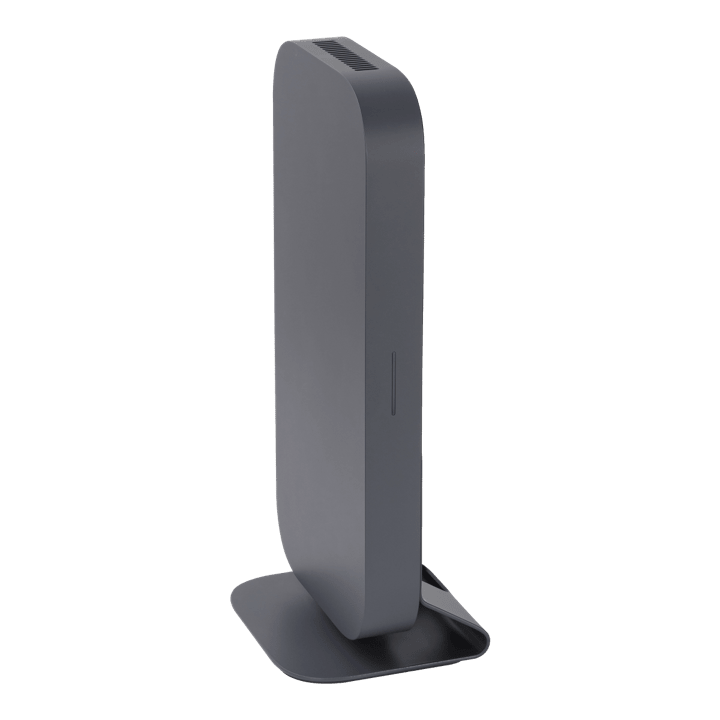


Asus GQE20A-G5037UN Google Meet Compute System CN65H3
PRODUCT DESCRIPTION
Asus GQE20A-G5037UN Google Meet Compute System CN65H3 (ASU-90MS02U2-M00150) - 3 Year Local Warranty
The Compute Unit on Its Own — Not a Full Room Kit
The ASUS GQE20A-G5037UN is the CN65H3 compute unit from ASUS's current Google Meet hardware line, sold on its own rather than bundled with a camera, speakerphone or touch controller. It is the same Intel Core i5-1335U engine that drives ASUS's Starter, Small/Medium Room and Large Room kits, so it is the right choice when you already own compatible Google Meet peripherals, need a spare or replacement compute unit for an existing installation, or want to build a room around specific camera and audio hardware rather than take a fixed bundle.
If you are starting a room from nothing and want camera, audio and control hardware included, look at the GQE20A-G5039UN Starter, GQE20A-G5010UN Small/Medium Room or GQE20A-G5040UN Large Room kits in our catalogue instead — all three use this same compute platform with peripherals added.
Intel Core i5-1335U for Smooth Conferencing
The GQE20A-G5037UN runs a 13th Generation Intel Core i5-1335U processor with 16GB of DDR4 memory and a 256GB NVMe SSD, giving it enough headroom to encode and decode video, run screen sharing, and drive a display simultaneously without the stutter that undersized meeting-room hardware produces on a busy call. This is the same silicon ASUS uses across the whole current Google Meet room kit range, so performance is consistent whichever tier you deploy.
ChromeOS, Managed Centrally, Updated Automatically
The unit runs ChromeOS built for Google Meet Rooms rather than a general-purpose desktop OS. It is managed through the Google Admin Console alongside any other Google Meet hardware on your account, and ASUS documents eight years of auto-update support on this compute generation, so patching and feature updates roll out centrally without a technician visiting each room.
Compact and Mountable Behind Any Display
At roughly 284 x 135 x 29.5 mm and under a kilogram, the CN65H3 unit is small enough to sit on a VESA mount on the back of a meeting-room display, on a table mount, or tucked into a credenza, keeping the room free of visible computing hardware. The same mounting hardware ASUS ships with its full room kits applies here.
Supplied Locally, with GST Invoice and Singapore Warranty
SourceIT supplies the GQE20A-G5037UN as a currently stocked ASUS product with a full GST invoice and local Singapore warranty support, matched to ASUS's 3-year on-site service term for this Google Meet compute generation.
Not sure whether you need the bare compute unit or a complete kit with camera, audio and control hardware included? Email sales@sourceit.com.sg and we will help you work out what your room is missing.
Asus GQE20A-G5037UN Datasheet — Technical Specifications
General
| ASUS Product Name | ASUS Google Meet Compute System CN65H3 |
| Model | GQE20A-G5037UN |
| Part Number (SKU) | ASU-90MS02U2-M00150 |
| Product Type | Google Meet Rooms compute unit only — camera, speakerphone and touch controller are not included |
| Form Factor | Compact compute box, VESA/table/wall mountable |
| Manufacturer Warranty | 3-Year On-Site Service (ASUS) |
| Local Warranty (Singapore) | Included with every unit supplied by SourceIT, together with a GST invoice |
Compute Platform
| Processor | Intel Core i5-1335U (13th Generation), 10 cores (2 Performance + 8 Efficient) / 12 threads, up to 4.6 GHz turbo |
| Graphics | Intel integrated graphics (Iris Xe class), sufficient for meeting-room display output — not intended for gaming or GPU-accelerated workloads |
| Memory | 16GB DDR4 |
| Storage | 256GB M.2 NVMe SSD |
| Operating System | ChromeOS, built for Google Meet Rooms |
Connectivity & Ports
| Wired Network | 2.5G LAN (RJ45), backward compatible with Gigabit and 100/10 Mbps switches |
| Wi-Fi | Wi-Fi 6E |
| Bluetooth | Bluetooth 5.3, for pairing a remote control or wireless peripheral |
| Video Output | 2 x HDMI (CEC-capable) for the room display |
| USB / Peripheral Ports | USB-C and USB-A ports for connecting a camera, speakerphone and touch controller of your choice |
| Audio | 3.5 mm audio jack |
| Power Input | Dedicated power input, 19V DC power adapter |
Software & Management
| Platform | Google Meet Rooms, managed through the Google Admin Console |
| Security | ChromeOS Verified Boot, on-device encryption |
| Update Support | ASUS documents eight years of auto-update support on this Google Meet compute generation |
| Peripheral Compatibility | Works with ASUS's own Google Meet cameras, speakerphones and touch controllers, and with other Google Meet certified peripherals on Google's hardware list |
Physical & Environmental
| Dimensions | Approximately 284 x 135 x 29.5 mm |
| Weight | Approximately 0.93 kg |
| Mounting | VESA mount behind a display, table mount, or wall/under-desk mount using the supplied hardware |
| Power Adapter | 19V DC external power adapter, approximately 90W |
Connectivity & Setup
What You Need to Bring
Because this listing is the compute unit only, you will need your own Google Meet certified camera, speakerphone or microphone, and — if you want in-room touch control rather than a laptop or remote — a compatible touch controller. Google publishes a list of certified Google Meet hardware; ASUS's own camera, speakermic and touch panel accessories (as bundled in our Starter, Small/Medium Room and Large Room kits) are a safe, tested match for this compute unit specifically.
Cabling and Display Connection
Video to the room display runs over HDMI, with CEC support so the display can be powered on and switched to the right input automatically when a meeting starts. Peripherals — camera, speakerphone, controller — connect over the USB-C and USB-A ports; network connects over 2.5G wired LAN or Wi-Fi 6E, with wired Ethernet recommended for a permanent room install.
Mounting
The compute unit is small enough to VESA-mount directly to the back of the room display, keeping it out of sight, or to sit on a table or shelf using the included table mount. Both mounting options ship in the box.
Enrolment and Google Workspace Setup
Once cabled and powered, the unit is enrolled as a Google Meet Rooms device through the Google Admin Console, the same process used for ASUS's full kits and for other vendors' Google Meet hardware. From there it inherits your organisation's calendar integration, room booking and centralised update policy automatically — there is no per-room manual configuration once enrolment is done.
Choosing Peripherals to Match Your Room Size
A wide-angle fixed camera with a few times digital zoom, as used in our Starter and Small/Medium kits, suits a room where everyone sits within a fairly tight field of view. A true pan-tilt-zoom camera with tens of times optical zoom, as used in our Large Room kit, suits a bigger room or a boardroom table where participants are spread further apart and the camera needs to reframe on active speakers. If you are unsure which camera class fits your room, email us the room dimensions and seating count and we will recommend a match.
Package Contents & Ordering Information
In the Box
ASUS Google Meet compute unit (CN65H3), power adapter, VESA/table mounting hardware, network and video cables, user documentation. Camera, speakerphone and touch controller are not included — this listing is the compute unit only.
ASUS Google Meet Room Kit Range — Current Models
| GQE20A-G5037UN (this listing) | Compute unit only | No camera, audio or controller | Bring your own peripherals, or spare/replacement unit |
| GQE20A-G5039UN — Starter Kit | Compute + ePTZ camera + speakerphone + remote control | Up to around 9 people | Entry-level complete kit |
| GQE20A-G5010UN — Small/Medium Room Kit | Compute + ePTZ camera + speakermic + 10.1in touch panel | Up to around 9 people | Touch-panel control instead of remote |
| GQE20A-G5040UN — Large Room Kit | Compute + true PTZ camera + speakerphone + 10.1in touch panel | Above 10 people | Optical zoom PTZ camera for larger rooms |
If you are replacing a failed compute unit in an existing ASUS Google Meet room and the camera, speakerphone and controller are already in place and working, this GQE20A-G5037UN listing is normally the right part to order rather than a full kit. Email sales@sourceit.com.sg with your existing setup if you are unsure.
Datasheet & Downloads
ASUS's Singapore product page for the current Google Meet hardware line describes the CN65H3 compute platform used across this listing and the Starter, Small/Medium Room and Large Room kits.
| ASUS Singapore product page | ASUS Room Kit for Google Meet — Product Page |
| ASUS technical specifications page | ASUS Room Kit for Google Meet — Tech Specs |
For the full PDF datasheet or user manual for this exact compute unit, email sales@sourceit.com.sg quoting GQE20A-G5037UN and we will send you the current document directly.
Frequently Asked Questions — Asus GQE20A-G5037UN
Does this listing include a camera and speakerphone?
No. The GQE20A-G5037UN is the compute unit only. If you need camera, audio and touch-control hardware included, choose the GQE20A-G5039UN Starter, GQE20A-G5010UN Small/Medium Room, or GQE20A-G5040UN Large Room kit instead.
Why would I buy the compute unit on its own?
Two common reasons: you already have compatible Google Meet peripherals from an earlier install and just need to add or replace the compute engine, or you are standardising your camera and audio hardware separately from ASUS and only need the certified compute unit to run Google Meet Rooms.
What peripherals is it compatible with?
It works with ASUS's own Google Meet camera, speakermic and touch controller accessories — the same ones bundled in our Starter, Small/Medium Room and Large Room kits — and with other hardware on Google's certified Google Meet device list.
How is it managed once installed?
Through the Google Admin Console, the same way as any other Google Meet Rooms device on your account. It receives updates automatically; ASUS documents eight years of auto-update support on this compute generation.
How is it mounted?
The unit is small and light enough to VESA-mount to the back of the room display or sit on a table mount, both included in the box.
What network connection does it need?
2.5G wired Ethernet or Wi-Fi 6E. A wired connection is generally the more reliable choice for a permanent meeting-room install.
Is this the same compute hardware used in the full room kits?
Yes — the GQE20A-G5037UN uses the same Intel Core i5-1335U compute platform ASUS fits inside the Starter, Small/Medium Room and Large Room kits, so performance and update support are identical; only the bundled peripherals differ.
Does it come with a Singapore warranty and a GST invoice?
Yes. Every GQE20A-G5037UN sold by SourceIT comes with local Singapore warranty support and a GST invoice; ASUS backs this compute generation with a 3-year on-site service term.


