
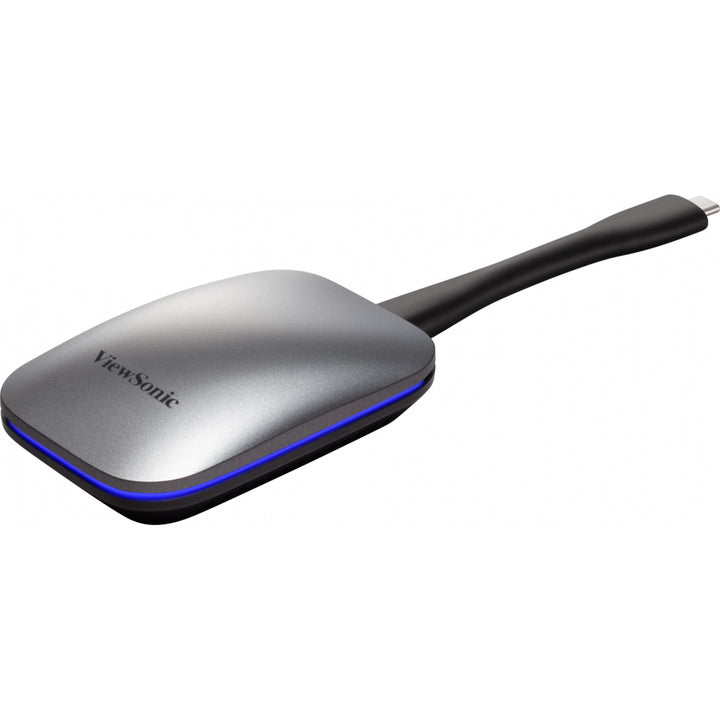


ViewSonic VB-WPS-001 ViewBoard Cast Button USB-C Wireless Screen Sharing
Prices in SGD, excluding 9% GST.
PRODUCT DESCRIPTION
ViewSonic ViewBoard Cast Button VB-WPS-001 Screen Sharing Button with USB-C Connector - 1 Year Local Warranty
Share Your Screen with One Click
The ViewSonic ViewBoard Cast Button (VB-WPS-001) casts a laptop screen to the display with a single tap of the button — no complicated setup. A single USB-C connection carries the video and powers the button.
Up to Four Presenters on Screen
Any number of buttons can stay connected, and up to 4 sources can be shown at once with the ViewBoard Cast receiver (16 with ViewBoard Cast Pro). Content is shared in Full HD at 30 fps, with extended desktop and 10-point touch control back from the display.
Secure by Design
Sharing does not require the laptop to join the company network, and the connection is secured with WPA2-PSK encryption over dual-band 2.4 GHz / 5 GHz Wi-Fi.
Works with Windows, Mac and Chrome OS
ViewSonic lists Windows, macOS 10.10 or later, Chrome OS and Linux. For laptops with HDMI and USB-A ports, see the VB-WPS-003 version.
Need buttons for several meeting rooms? Email sales@sourceit.com.sg for volume pricing and delivery lead time.
ViewSonic VB-WPS-001 Datasheet — Technical Specifications
General
| Product Name | ViewSonic ViewBoard Cast Button (VB-WPS-001) — screen sharing button with USB-C connector |
| Model | VB-WPS-001 |
| Local Warranty (Singapore) | 1 year carry-in limited warranty |
Screen Sharing
| Resolution / Frame Rate | Full HD, 30 fps |
| Extended Desktop | Supported |
| Simultaneous Connections | Unlimited |
| Simultaneous Sources on Screen | 4 (ViewBoard Cast receiver); 16 (ViewBoard Cast Pro receiver) |
| Touch Control | 10 points |
Connectivity
| Connector | USB 3.1 Type-C |
| System Requirement | A full-featured USB Type-C port with display output and power delivery |
| Wi-Fi | Dual band 2.4 GHz and 5 GHz / 5.8 GHz, IEEE 802.11 a/b/g/n/ac |
| Security | WPA2-PSK |
| Supported Operating Systems | Windows, macOS 10.10 or later, Chrome OS, Linux |
| Power | 5 V, 650 mA |
Physical & Environmental
| Dimensions | 203.8 x 61.8 x 25.5 mm |
| Packaging Dimensions | 260.5 x 42 x 103.5 mm |
| Net Weight | 103 g |
| Gross Weight | 331 g |
| Operating Temperature | 0–40 °C |
| Operating Humidity | 20–90% non-condensing |
| Storage Temperature | -10 to 60 °C |
| Regulations | FCC, FCC ID, IC ID, CE, RED, RCM, WPC |
| Package Contents | VB-WPS-001, quick start guide, USB-C to USB Type-A adapter (for pairing) |
Compatibility & Software Support
Receivers
A ViewSonic IFP or CDE display with vCastReceiver installed and activated, or a slot-in PC running ViewBoard Cast Pro.
Compatible ViewBoard Interactive Displays
ViewSonic Singapore lists: IFP110, IFP5550-5, IFP5550-5F, IFP5551, IFP6533-G, IFP6550-5F, IFP6551, IFP6552, IFP6552-1C, IFP6552-1CF, IFP6570, IFP7533-G, IFP7534, IFP7550-5F, IFP7551, IFP7552, IFP7552-1C, IFP7552-1CF, IFP8633-G, IFP8634, IFP8650-5F, IFP8651, IFP8652, IFP8652-1C and IFP8652-1CF.
Compatible Commercial Displays
CDE6530.
Pairing
Attach the supplied USB-C to USB Type-A adapter and plug the button into the display's USB port to pair it; the ViewSonic user guide gives the full steps.
Datasheet & Downloads
| ViewSonic datasheet | VB-WPS-001 Datasheet |
| User guide | ViewBoard Cast Button User Guide (PDF) |
| BYOM user guide | BYOM for ViewBoard Cast Button User Guide (PDF) |
| ViewSonic product page | VB-WPS-001 on viewsonic.com Singapore |
Need a PDF sent directly? Email sales@sourceit.com.sg quoting VB-WPS-001.
Frequently Asked Questions — ViewSonic VB-WPS-001
What does my laptop need?
A full-featured USB Type-C port with display output and power delivery.
How many people can present at once?
Up to 4 sources on screen with the ViewBoard Cast receiver, or 16 with ViewBoard Cast Pro. The number of connected buttons is unlimited.
What is the difference between VB-WPS-001 and VB-WPS-003?
VB-WPS-001 has a USB-C connector; VB-WPS-003 is the version for laptops with HDMI and USB-A ports. Screen sharing features are the same.
Do I need to join the office network?
No. ViewSonic states no connection to the company network is required, and the link is protected with WPA2-PSK encryption.
What warranty do I get?
1 year carry-in limited warranty. Supplied by SourceIT with a GST invoice.
We Also Recommend


ViewSonic VG2740V 27" Full HD IPS Video Conferencing Monitor with Webcam


ViewSonic LS832WU 5,000 ANSI Lumens WUXGA Ultra Short Throw Laser Projector


ViewSonic LS711HD 4,200 ANSI Lumens 1080p Short Throw Laser Projector


ViewSonic M1 Max 1080p Smart LED Portable Projector with Google TV


ViewSonic VA3208-4K-MHD 32" 4K UHD HDR10 Monitor with Speakers