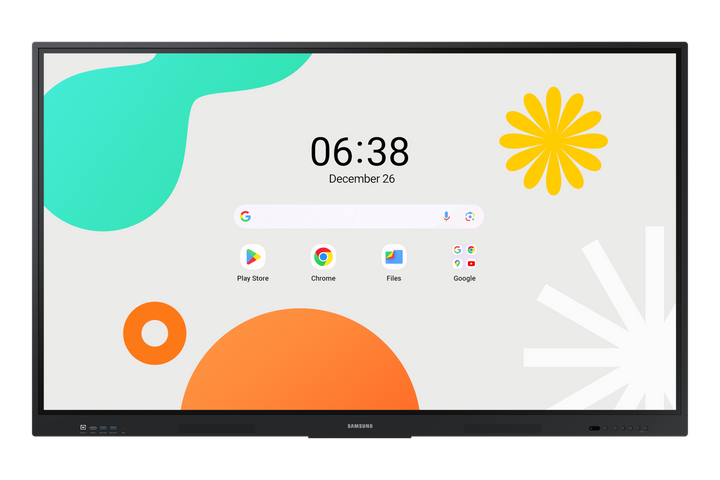


Samsung WA65F 65" 4K Android Interactive Display
PRODUCT DESCRIPTION
Samsung WA65F 65" Android Interactive Display (LH65WAFWLGCXXS) - Local Warranty
One Panel Replaces the Whiteboard, the Projector and the Room PC
The Samsung WA65F is a 65-inch UHD interactive display that collapses three pieces of room equipment into one. A 3840 x 2160 IPS screen at 400 nits with a 1200:1 contrast ratio keeps handwriting, spreadsheets and video legible from anywhere in a meeting room or classroom, and 178-degree viewing angles mean nobody has to move seats to read the board. Writing, annotating and presenting all happen on the panel itself, so a session starts the moment somebody walks up and touches the screen.
40-Point IR Touch, Split Note Mode and a Dual-Sided Pen
Infrared touch tracking recognises up to 40 simultaneous touch points, so a whole group can write at once without the panel losing track of anyone. The bundled dual-sided, dual-colour pen switches ink simply by flipping it over — no menu, no second pen to lose. Split Note Mode divides the canvas into four independent note zones, letting four people or four project teams work side by side on the same display, and Annotation On lets anyone mark up whatever is currently on screen without leaving the source application.
EDLA-Certified Android 14 with Licensed Google Play
The WA65F runs Android 14 and is EDLA-certified, which means licensed Google Play, YouTube and Google Classroom are installed and supported rather than side-loaded. Teachers and staff sign in with the Google accounts they already use, pull up their own apps and Drive files, and receive proper updates through the normal channel. With 64 GB of onboard flash and multi-window support, the panel runs the tools your organisation already standardises on with no external PC sitting in the room.
Mirror Nine Devices Wirelessly, or Connect with One USB-C Cable
Up to nine devices can mirror to the screen wirelessly at once across iOS, macOS, Windows and Android, so presenters swap without swapping cables. For wired connections, the 3-in-1 USB-C port carries video, touch-back and 65 W of power delivery down a single lead, charging a laptop while it presents. Two HDMI 2.1 inputs, HDMI Out for a second screen, RJ45, RS232, Wi-Fi 5 and an OPS slot cover the rest of the room's requirements.
Samsung WA65F Datasheet — Technical Specifications
General
| Product | Samsung WA65F 65" Android Interactive Display |
| Part Number (SKU) | LH65WAFWLGCXXS |
| Display Type | Interactive display (WAF series) |
| Platform | Android 14, EDLA-certified |
| Licensed Google Services | Google Play, YouTube, Google Classroom |
| Internal Storage | 64 GB flash |
| Expansion | OPS slot |
| Local Warranty (Singapore) | Supplied by SourceIT with GST invoice |
Display
| Screen Size | 65" |
| Resolution | 3840 x 2160 (UHD 4K) |
| Brightness | 400 nit (typical) |
| Panel Type | IPS |
| Contrast Ratio | 1200:1 |
| Viewing Angle | 178° / 178° |
Touch & Writing
| Touch Technology | Infrared (IR) |
| Touch Points | Up to 40 simultaneous |
| Pen | Dual-sided, dual-colour |
| Note Taking | Split Note Mode with 4 independent note zones |
| Annotation | Annotation On over any source |
| Multitasking | Multi-window |
Smart Platform & Management
| Operating System | Android 14 |
| Certification | EDLA (Enterprise Devices Licensing Agreement) |
| App Store | Licensed Google Play |
| Education Tools | Google Classroom, YouTube |
| Wireless Mirroring | Up to 9 devices (iOS, macOS, Windows, Android) |
Connectivity
| HDMI In | 2 x HDMI 2.1 |
| HDMI Out | 1 |
| USB-C | 3-in-1 USB-C with 65 W power delivery |
| LAN | RJ45 |
| Wi-Fi | Wi-Fi 5 |
| Serial | RS232 |
| Expansion Slot | OPS |
Physical & Environmental
| Colour | Black |
Specifications are taken from Samsung's published product data for this model. Where Samsung does not publish a figure for this exact model it has been left out rather than estimated.
Compatibility & Installation
Mounting and orientation
The WA65F is designed as a landscape front-of-room display for classrooms, training rooms and meeting rooms, on either a wall bracket or a mobile trolley. In a teaching space, set the mounting height so the lower edge of the writing area is reachable for the shortest user, since a 40-point touch panel is only useful if people can actually reach it. Confirm the VESA pattern and load rating against the Samsung installation guide for this exact part number before ordering a mount or stand.
What it connects to
The 3-in-1 USB-C port is the simplest connection: one lead carries video, touch-back and 65 W of charging, so a laptop presents and charges at the same time. Two HDMI 2.1 inputs take a room PC, a document camera or a visualiser, and HDMI Out feeds an overflow display. RJ45 gives a wired network drop, RS232 supports a control system, and Wi-Fi 5 covers rooms with no cabling. The OPS slot takes an OPS PC if your organisation standardises on Windows in the room.
Network and content management
Because the WA65F is EDLA-certified Android 14, it enrols with licensed Google services rather than side-loaded apps, so staff sign in with existing Google Workspace accounts and IT manages it the way it manages other Google-licensed devices. Put it on a managed VLAN over RJ45 where update and access control matters. Ask your SourceIT account manager which Samsung management tooling is licensed for this model before planning a school-wide or multi-site rollout.
Accessories
The dual-sided, dual-colour pen is supplied with the display. The Samsung Flip connectivity tray CY-TF65BFCXXS is a Flip accessory and is not an accessory for this WAF model.
Package Contents & Samsung WAF Range
In the box
- Samsung WA65F 65" Android interactive display
- Dual-sided, dual-colour pen
Package contents follow Samsung's product data for this model; items not listed by Samsung are not claimed here.
Samsung WAF range
| Model | Size |
| WA65D | 65" |
| WA75D | 75" |
| WA86D | 86" |
| WA65F (this listing) | 65" |
| WA75F | 75" |
| WA86F | 86" |
| WA65FX-P (with camera) | 65" |
| WA75FX-P (with camera) | 75" |
| WA86FX-P (with camera) | 86" |
Datasheet & Downloads
Samsung has not published a public Singapore data sheet page for the WA65F (LH65WAFWLGCXXS) that we can link to here, so no download link is given rather than pointing you at the wrong revision. SourceIT can email the current data sheet revision for this exact part number on request, together with a quotation.
Frequently Asked Questions — Samsung WA65F
What do the suffix letters mean — WMF, WAF and FX-P?
They are three different products that buyers mix up constantly. WAF, which this listing is, is the Samsung Interactive Display: an Android 14, EDLA-certified panel with licensed Google Play, YouTube and Google Classroom, 40-point touch and a 3-in-1 USB-C port. WMF (the WMFX generation) is the Samsung Flip, a Tizen digital flipchart built around writing, with Enhanced Whiteboard, SMARTVIEW+ and Knox. FX-P is this WAF plus a built-in 48 MP camera, a far-field microphone array and dual 20 W speakers, so the room needs no separate video kit.
Does it have a built-in camera and microphone?
No. The WA65F has no built-in camera or microphone array. If you want video calling without a separate camera bar and microphone, choose the WA65FX-P, which adds a 48 MP camera, a far-field microphone array and dual 20 W speakers.
Do I need an external PC?
No. Android 14 runs on the display with 64 GB of flash and multi-window multitasking. An OPS slot is available if your organisation still wants a Windows PC in the room.
Is Google Play properly licensed?
Yes. The WA65F is EDLA-certified, so Google Play, YouTube and Google Classroom are licensed and supported rather than side-loaded, and users sign in with their existing Google accounts.
How many people can write on it at the same time?
Infrared touch tracks up to 40 simultaneous touch points, and Split Note Mode gives four independent note zones so four people or teams can work side by side.
Can one cable handle video, touch and laptop charging?
Yes. The 3-in-1 USB-C port carries video, touch-back and 65 W of power delivery on a single lead.
How does it differ from the WA75F and WA86F?
Only in size. The WA75F and WA86F share the same Android 14 EDLA platform, the same 400 nit IPS panel with 1200:1 contrast, the same 40-point touch and the same port set on 75" and 86" screens.
What warranty and invoice do I get?
Every unit sold by SourceIT carries local Singapore warranty and comes with a GST invoice.