
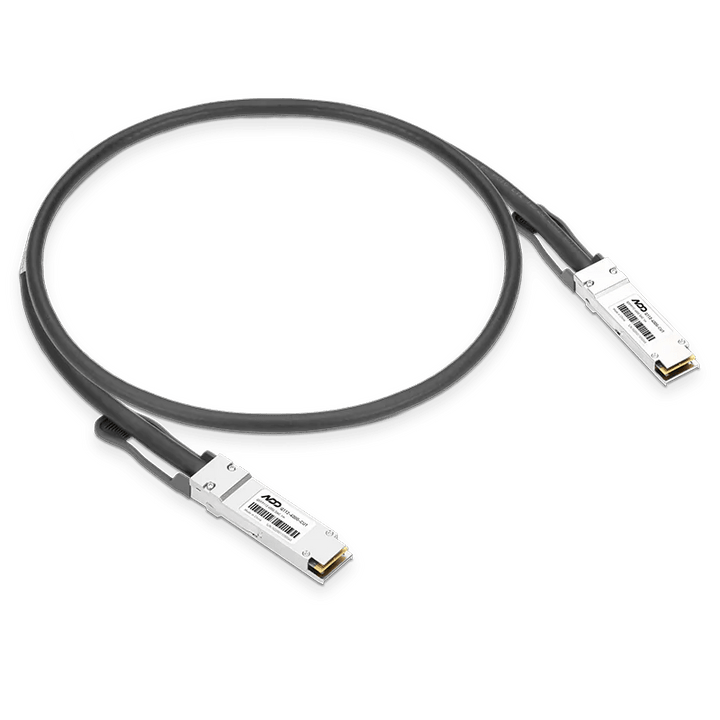

NVIDIA QSFP112 400G DAC Cable 40CM
PRODUCT DESCRIPTION
NVIDIA QSFP112 400G Passive DAC Cable, 40 cm (0.4 m), for Linking Two NVIDIA DGX Spark / GB10 AI Systems over ConnectX-7 (X0101G00400A) - Local Warranty
The Stacking Cable for NVIDIA DGX Spark and Every GB10 Desktop AI Supercomputer
The NVIDIA QSFP112 400G DAC Cable (X0101G00400A) is a 40 cm passive direct-attach copper cable with a QSFP112 connector at each end, made for the job that matters most on a GB10 system: linking two units back-to-back through their NVIDIA ConnectX-7 QSFP ports. Paired this way, two 128 GB systems work as one cluster, and NVIDIA and its OEM partners cite models of up to 405 billion parameters across the pair — double what a single unit can hold — with no switch, no optical transceivers and no extra adapters.
Because every GB10 desktop uses the same ConnectX-7 controller with two QSFP ports, the cable fits the NVIDIA DGX Spark and the OEM builds SourceIT stocks: ASUS Ascent GX10, HP ZGX Nano G1n, Dell Pro Max with GB10, Lenovo ThinkStation PGX, GIGABYTE AI TOP ATOM, MSI EdgeXpert and xFusion FusionXpark GB10. SourceIT, an authorised IT reseller in Singapore, supplies it with a GST invoice and local warranty.
400 mm QSFP112 400G DAC — the Length and Specification NVIDIA Documents for Spark Stacking
NVIDIA's Spark Stacking documentation approves 400 mm QSFP112 400G DAC cables for the DGX Spark ConnectX-7 ports, and HP lists the same 400 mm QSFP112 400G DAC specification for the ZGX Nano. At 40 cm the cable reaches comfortably between two 150 mm units placed side by side or stacked, without a loop of excess cable on the desk.
200GbE Link Between Two GB10 Systems
The cable is 400G-rated; on DGX Spark and OEM GB10 systems the ConnectX-7 QSFP port runs Ethernet at up to 200 Gb/s, so a pair links at 200GbE. NVIDIA's "Connect Two Sparks" playbook states that one QSFP cable is enough for the full direct link — a second cable between the same two units is not needed. The ConnectX-7 ports on GB10 systems support Ethernet configuration only.
Passive Copper — No Power, No Transceivers, Low Latency
A passive DAC has no electronics in the plug, so it draws effectively no power, adds no heat and introduces minimal latency compared with optical links — exactly what distributed inference and fine-tuning traffic between two neighbouring machines needs. It plugs in like any QSFP module and is hot-pluggable.
Available in Singapore Through SourceIT
SourceIT supplies the NVIDIA QSFP112 400G DAC Cable 40 cm with a GST invoice and local warranty, alongside the full range of GB10 and GB300 systems in our NVIDIA DGX Spark & DGX Station collection.
NVIDIA QSFP112 400G DAC Cable 40 cm (X0101G00400A) Datasheet — Technical Specifications
General
| Product Name | NVIDIA QSFP112 400G DAC Cable, 40 cm |
| Part Number | X0101G00400A |
| GTIN | 812674029180 |
| Category | Passive direct-attach copper (DAC) cable — DGX Spark / GB10 stacking cable |
| Warranty | Local warranty, supplied by SourceIT with GST invoice |
Cable & Connectors
| Connectors | QSFP112 to QSFP112 |
| Cable Type | Passive direct-attach copper (twinax) |
| Length | 400 mm (0.4 m) |
| Rated Speed | 400 Gb/s |
| Link Speed on GB10 Systems | Up to 200 Gb/s Ethernet per ConnectX-7 port |
| Protocol | Ethernet (GB10 ConnectX-7 ports support Ethernet only) |
| Power | Passive — no active electronics |
| Hot-Pluggable | Yes |
Compatibility
| Host Interface | NVIDIA ConnectX-7 QSFP ports on NVIDIA GB10 Grace Blackwell systems |
| Systems | NVIDIA DGX Spark; ASUS Ascent GX10; HP ZGX Nano G1n; Dell Pro Max with GB10; Lenovo ThinkStation PGX; GIGABYTE AI TOP ATOM; MSI EdgeXpert; xFusion FusionXpark GB10 |
| Topology | Two units back-to-back with one cable; larger clusters through a 200G-class QSFP switch |
| Setup | NVIDIA "Connect Two Sparks" playbook / Spark Stacking guide (netplan configuration on DGX OS) |
Compatibility & Two-Unit Setup
Which Systems It Links
Any two NVIDIA GB10 desktops: the NVIDIA DGX Spark and its OEM builds all share the same ConnectX-7 controller and QSFP ports. Mixed-brand pairs (for example a DGX Spark with an ASUS GX10) use the same cable; both units should run DGX OS or Ubuntu 24.04 with the NVIDIA driver stack.
How to Connect Two Units
- Place the two systems side by side or stacked within 40 cm.
- Plug one end into a QSFP port on each unit — use the same port position on both.
- Apply NVIDIA's ConnectX-7 netplan configuration from the "Connect Two Sparks" playbook on both units.
- Run NVIDIA's discovery script to set up passwordless SSH, then launch distributed workloads with NCCL and MPI.
The 10GbE RJ-45 port on each unit stays connected to your office network for internet access and model downloads.
What It Is Not For
This is a short, passive 400 mm cable for neighbouring units. For runs between racks, InfiniBand fabrics or breakout to multiple ports, use the appropriate longer DAC, active cable or optical transceiver — ask us for the right part.
Package Contents & Ordering Information
What Ships in the Box
- 1 × NVIDIA QSFP112 400G passive DAC cable, 40 cm (X0101G00400A)
One cable links two units. GB10 systems are sold separately.
GB10 Systems at SourceIT Singapore
- NVIDIA DGX Spark 4TB
- ASUS Ascent GX10 — 1TB / 2TB / 4TB
- HP ZGX Nano G1n — 4TB
- Dell Pro Max with GB10 — 2TB / 4TB
- Lenovo ThinkStation PGX — 1TB / 4TB
- GIGABYTE AI TOP ATOM — 1TB / 4TB
- MSI EdgeXpert MS-C931 — 4TB
- xFusion FusionXpark GB10 — 1TB / 2TB / 4TB
For bundle pricing on two units plus cable, volume orders, GST invoicing and lead times, email sales@sourceit.com.sg quoting X0101G00400A.
Datasheet, Downloads & Setup Guide
Frequently Asked Questions — NVIDIA QSFP112 400G DAC Cable 40 cm
What is this cable for?
Linking two NVIDIA DGX Spark or other GB10 systems directly through their ConnectX-7 QSFP ports so they work as one two-node AI cluster.
Does it work with ASUS GX10, HP ZGX Nano, Dell, Lenovo, GIGABYTE and MSI GB10 systems?
Yes. All GB10 desktops use the same ConnectX-7 controller and QSFP ports as the DGX Spark.
It says 400G — will I get 400 Gb/s?
The cable is 400G-rated, but GB10 ConnectX-7 ports run Ethernet at up to 200 Gb/s, so the link between two units is 200GbE.
Do I need two cables between two units?
No. NVIDIA's playbook uses one cable for the full direct link; a second cable between the same pair does not add bandwidth.
Do I need a switch?
Not for two units. Larger clusters need a 200G-class QSFP switch.
Is it active or passive?
Passive copper — no power, no transceivers, minimal latency.
How large a model can two linked units run?
NVIDIA and HP cite models of up to 405 billion parameters across two 128 GB GB10 systems.
How do I buy it in Singapore?
Order on this page or email sales@sourceit.com.sg quoting X0101G00400A.


