
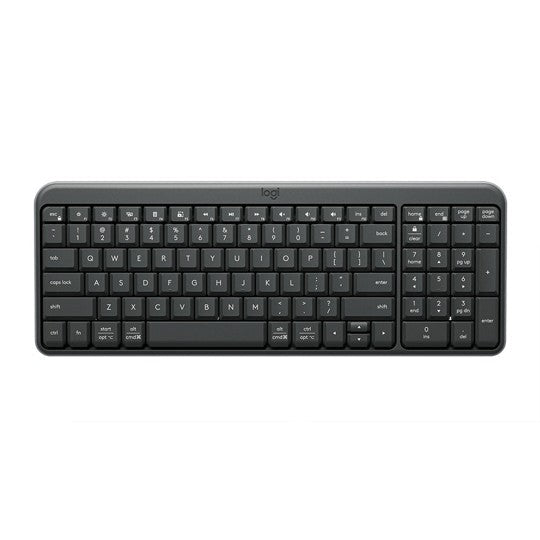


Logitech K250 Compact Wireless Keyboard Graphite
PRODUCT DESCRIPTION
Logitech K250 Compact Wireless Keyboard Graphite (920-013491) - 2 Years Local Warranty
Logitech K250 Compact Bluetooth Wireless Keyboard — Full Number Pad, No Dongle
The Logitech K250 (part number 920-013491) is a compact Bluetooth Low Energy keyboard that keeps a full number pad while trimming the overall footprint to 369.9 mm wide. There is no USB receiver to plug in or lose, which matters on modern USB-C notebooks and on hot-desks where every port is already spoken for. Pairing is a single button press, and the green status LED confirms the connection.
Deep-Profile Keys Rated for 5 Million Presses
Logitech specifies 50 g actuation force and 2.5 mm of key travel on deep-profile keys rated for 5 million key presses, with dual Windows and macOS legends printed on the keycaps so the same keyboard reads correctly on either platform. The F1–F12 row doubles as media and productivity controls, and Fn+Esc toggles FN-Lock so you can choose which behaviour is the default.
Spill-Resistant to 60 ml and Built with 64% Recycled Plastic
The deck is spill-resistant, tested up to 60 ml, with drainage holes to move liquid away from the electronics. Logitech builds the K250 with a minimum of 64% post-consumer recycled plastic, excluding the printed wiring assembly and packaging — a useful data point for Singapore tenders and corporate ESG reporting.
Up to 12 Months of Battery Life on Two AAA Cells
Two user-replaceable AAA batteries are pre-installed and rated for up to 12 months, so a fleet of these keyboards will not generate a stream of support tickets. At 380 g with batteries fitted and 22.8 mm tall with the tilt legs down, the K250 is light enough to move between desks yet stable enough to stay put while typing.
Logitech K250 Datasheet — Technical Specifications
General
| Product Name | Logitech K250 Compact Bluetooth Wireless Keyboard |
| Part Number | 920-013491 (Asia Pacific / Singapore) |
| Regulatory Model Number | YR0107 |
| Colour | Graphite |
| Layout | Compact full-size layout with number pad — 99 keys (US), 100 (UK), 101 (BR), 103 (JP) |
| Function Row | F1–F12 with dual media and productivity functions; Fn+Esc toggles FN-Lock |
| Key Legends | Dual legends — upper row Windows, lower row macOS |
| Key Profile | Deep-profile keys |
| Actuation Force | 50 g |
| Key Travel | 2.5 mm |
| Key Durability | 5 million key presses (standard keys) |
| Spill Resistance | Spill-resistant, tested up to 60 ml, with drainage holes |
| Adjustable Tilt | Tilt legs |
| Status LED | Green LED for on/off and pairing status |
| Warranty | 2 Years Local Warranty (Singapore) |
Connectivity
| Wireless Technology | Bluetooth Low Energy |
| USB Receiver | None — this keyboard does not ship with, and is not compatible with, a Unifying or Logi Bolt receiver |
| Wireless Range | 10 m |
| Pairing | Single pairing button; press and hold for 3 seconds to pair a new device |
Design & Power
| Dimensions (W × D × H) | 369.9 mm × 136.9 mm × 22.8 mm |
| Weight | 380 g with batteries / 355 g without batteries |
| Retail Box | 381 mm × 149 mm × 31 mm, 430 g |
| Battery | 2 × AAA, user-replaceable, pre-installed |
| Battery Life | Up to 12 months |
| Recycled Content | Minimum 64% post-consumer recycled plastic (excludes plastic in the printed wiring assembly and packaging) |
Compatibility & Software Support
Logitech publishes the following operating-system support for this keyboard. It connects over Bluetooth Low Energy only — the host device must have Bluetooth.
| Windows | Windows 10, Windows 11 or later |
| macOS | macOS 12 or later |
| ChromeOS | Supported |
| Linux | Supported |
| iPadOS / iOS | iPadOS 15 or later / iOS 15 or later |
| Android | Android 12 or later |
| Logi Options+ | Not supported. Logitech states that all functions work without any software installed. |
| Receiver Compatibility | Not compatible with Logitech Unifying or Logi Bolt receivers |
Because there is no companion application, there is nothing to deploy or patch on managed endpoints — but equally, the keys cannot be remapped in software. Key behaviour is switched on the keyboard itself using Fn+Esc for FN-Lock.
Package Contents & K250 / K251 Series Ordering Information
In the Box
- Logitech K250 compact wireless keyboard
- 2 × AAA batteries
- User documentation
Logitech Keyboard Ordering Information — SourceIT Singapore
| Logitech K120 Wired Keyboard | 920-002582 |
| Logitech K270 Wireless Keyboard | 920-003057 |
| Logitech K400 Plus HTPC Wireless Keyboard Black | 920-007165 |
| Logitech K250 Compact Wireless Keyboard Graphite (this listing) | 920-013491 |
| Logitech K251 Compact Wireless Keyboard Graphite | 920-013490 |
| Logitech Alto Keys K98M Wireless Keyboard Graphite | 920-013584 |
Combo option: the same keyboard is sold with a Logitech M196 Bluetooth mouse as the MK250 Compact Wireless Combo — Graphite (920-013559), Off White (920-013560) and Rose (920-013561).
Datasheet & Downloads
- Logitech Support — Specification: K250
- Logitech Support — Getting Started: K250
- Logitech Support — K250 product hub
- Logitech Support — Warranty: K250
- Logitech Singapore — K250 product page
Logitech does not publish a standalone datasheet PDF for the current K250/K251 generation; the support Specification article above is the authoritative source. Note that an unrelated legacy “Wireless Keyboard K250” from around 2010 used a 2.4 GHz Unifying receiver — its documentation is still online and does not apply to this Bluetooth model.
Frequently Asked Questions — Logitech K250
What is the difference between the Logitech K250 and the K251?
There is no hardware difference. Logitech publishes identical specification sheets for both, including the same regulatory model number YR0107, and its own product page presents K250 and K251 as two platform options for the same keyboard. The names are regional designations, not different products — both are Bluetooth Low Energy only.
Does the K250 come with a USB receiver?
No. Logitech states plainly that this keyboard does not include a USB receiver and is not compatible with Unifying or Logi Bolt receivers. It connects over Bluetooth Low Energy, so your PC, Mac, Chromebook or tablet must have Bluetooth.
Is it supported by Logi Options+?
No. Logitech confirms that this keyboard is not supported by Logi Options+ and that all functions work without any software. If you need software-level key customisation and Smart Actions, look at the MX Keys S or the Alto Keys K98M.
How many devices can it pair with at once?
The keyboard has a single pairing button rather than Easy-Switch 1-2-3 keys, and Logitech does not publish a multi-device channel count for it. Treat it as a one-host keyboard. For genuine multi-device switching, the K380s Pebble Keys 2 and K580 Multi-Device are designed for it.
How long does the battery last and what type does it take?
Two user-replaceable AAA batteries are pre-installed and rated by Logitech for up to 12 months of use.
Can I get the keyboard bundled with a mouse?
Yes. The MK250 Compact Wireless Combo pairs this keyboard with a Logitech M196 Bluetooth mouse and is stocked in Graphite, Off White and Rose.
Which part number will I receive in Singapore?
This listing ships 920-013491. Logitech uses 920-013442 for the K250 in the Americas and 920-013363 for the K251 in China, so a datasheet or overseas listing may quote a different number for the same keyboard.
Does the K250 come with a local Singapore warranty from SourceIT?
Yes. Every K250 sold by SourceIT comes with 2 years local Singapore warranty and a GST invoice. Logitech's own published manufacturer warranty for this model is 1 year.


