
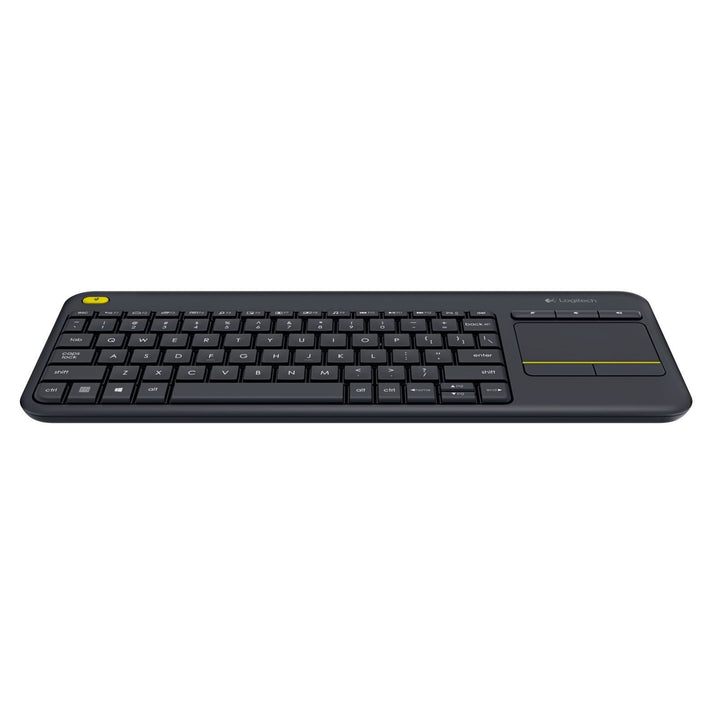


Logitech K400 Plus HTPC Wireless Keyboard Black
PRODUCT DESCRIPTION
Logitech K400 Plus HTPC Wireless Touch Keyboard Black (920-007165) - 2 Years Local Warranty
Logitech K400 Plus Wireless Touch Keyboard — Keyboard and Touchpad in One
The Logitech K400 Plus (part number 920-007165) combines a compact wireless keyboard with a 3.5-inch multi-touch touchpad, so you can drive a TV-connected PC, a digital signage player or a meeting-room display from the sofa, the lectern or the back of the room without a separate mouse or a flat surface to roll it on. A second left-click button sits at the top left for one-handed navigation.
3.5-Inch Multi-Touch Touchpad with Gesture Scrolling
The integrated touchpad measures 76 mm × 47 mm and supports the gestures you expect: a one-finger tap to click, two taps to double-click, a two-finger tap for right-click and two-finger swipes for vertical and horizontal scrolling. Holding Fn with the left mouse button disables tap-to-click when you want to avoid stray input during a presentation.
10-Metre Unifying Wireless Range and Up to 18 Months of Battery Life
The K400 Plus connects through the supplied Logitech Unifying nano receiver over 2.4 GHz with a working range beyond 10 metres, which is enough to cover a boardroom or a training room from the far wall. Two pre-installed AA batteries are rated for up to 18 months, and the power switch plus power-saving mode stretch that further on meeting-room units that sit idle between bookings.
Built to Last, Made with Recycled Plastic
Logitech rates the K400 Plus keys for up to 5 million keystrokes and keeps typing noise within 55 dBA across all keys — quiet enough to use during a live call. The deck is spill-resistant to a tested maximum of 60 ml, and the dark plastic parts are made with 60% post-consumer recycled material, which supports the sustainability criteria that increasingly appear in Singapore corporate and government tenders.
Logitech K400 Plus Datasheet — Technical Specifications
General
| Product Name | Logitech K400 Plus Wireless Touch Keyboard |
| Part Number | 920-007165 (Asia Pacific / Singapore) |
| Regulatory Model Number | Y-R0055 (keyboard); C-U0007 / C-U0008 (receiver) |
| Colour | Black |
| Media Keys | Mute, Volume Down, Volume Up |
| Additional Controls | Second left-click button (top left), arrow-key navigation, Windows and Android shortcut keys, Connect button, power switch |
| Key Life | Up to 5,000,000 keystrokes |
| Typing Noise | Within 55 dBA for all keys |
| Spill Resistance | Spill-resistant, tested to a maximum of 60 ml |
| Backlighting | Not available |
| Warranty | 2 Years Local Warranty (Singapore) |
Touchpad
| Touchpad Size | 3.5 inch multi-finger touchpad, 76 mm × 47 mm |
| Click | 1-finger tap = single click; 2 taps = double-click; 2-finger tap = right-click |
| Scrolling | 2-finger swipe up/down = vertical scroll; left/right = horizontal scroll |
| Alternate Scroll | Fn + 1-finger slide scrolls in that direction |
| Tap-to-Click Toggle | Fn + left mouse button disables or enables tap-to-click |
Connectivity
| Wireless Technology | Logitech Unifying protocol, 2.4 GHz |
| Receiver | Logitech Unifying nano receiver, USB-A (USB 2.0, full speed) |
| Wireless Range | More than 10 m (33 ft) |
| Bluetooth | Not supported |
Design & Power
| Dimensions (L × D × H) | 354.3 mm × 139.9 mm × 23.5 mm |
| Weight | 390 g (with batteries) |
| Receiver Dimensions | 18.7 mm × 14.4 mm × 6.1 mm, 1.8 g |
| Battery | 2 × AA, pre-installed, non-rechargeable |
| Battery Life | Up to 18 months, with on/off switch and power-saving mode |
| Recycled Content | Dark plastics contain 60% post-consumer recycled material |
| Product Carbon Footprint | 4.9 kg CO2e (Logitech published figure) |
Compatibility & Software Support
Logitech's published platform support for the K400 Plus:
| Windows | Windows 7, Windows 8, Windows 10 and later |
| ChromeOS | Supported |
| Android | Android 7 or later (Logitech's original specification listed Android 5.0 or later) |
| macOS / Linux | Not listed by Logitech for the K400 Plus |
| Software | Logitech Options for customisable controls; Logitech Unifying software for pairing additional Unifying devices |
| Port Requirement | One free USB-A port for the Unifying nano receiver |
Logitech markets the K400 Plus for TV-connected PCs and home-theatre PC use, but does not claim native smart-TV support — it needs a PC, media player or Android host with a USB-A port for the receiver.
Package Contents & K-Series Keyboard Ordering Information
In the Box
- Logitech K400 Plus wireless touch keyboard
- Logitech Unifying nano receiver
- 2 × AA batteries (pre-installed)
- User documentation
Logitech Keyboard Ordering Information — SourceIT Singapore
| Logitech K120 Wired Keyboard | 920-002582 |
| Logitech K270 Wireless Keyboard | 920-003057 |
| Logitech K400 Plus HTPC Wireless Keyboard Black (this listing) | 920-007165 |
| Logitech K250 Compact Wireless Keyboard Graphite | 920-013491 |
| Logitech K251 Compact Wireless Keyboard Graphite | 920-013490 |
| Logitech Alto Keys K98M Wireless Keyboard Graphite | 920-013584 |
Regional part-number note: the same Black K400 Plus is sold as 920-007119 in the Americas. The Singapore carton carries 920-007165, and Logitech's global datasheet PDF does not print part numbers at all.
Datasheet & Downloads
Frequently Asked Questions — Logitech K400 Plus
Will the K400 Plus work directly with my smart TV?
Not on its own. The K400 Plus needs a host with a free USB-A port for the Unifying receiver — typically a TV-connected PC, a media player or an Android device. Logitech lists Windows, ChromeOS and Android 7 or later, and does not claim native smart-TV support.
How big is the touchpad and what gestures does it support?
It is a 3.5-inch multi-finger touchpad measuring 76 mm × 47 mm. Logitech documents one-finger tap to click, two taps to double-click, two-finger tap for right-click, and two-finger swipes for vertical and horizontal scrolling.
Does it connect over Bluetooth?
No. It uses the Logitech Unifying 2.4 GHz receiver supplied in the box. If a dongle-free Bluetooth keyboard is required for your meeting rooms, ask us about the K380s Pebble Keys 2 instead.
How is it different from the K270 or the K120?
The K270 and K120 are full-size desk keyboards with number pads and no pointing device. The K400 Plus is a compact lap keyboard with an integrated touchpad, made for controlling a display from a distance rather than for day-long desk typing.
Can I turn off tap-to-click during a presentation?
Yes. Holding Fn and pressing the left mouse button disables and re-enables tap-to-click, which prevents accidental clicks when the keyboard is resting on a lectern or a lap.
Is it suitable for a meeting room or digital signage deployment?
Yes — the 10-metre-plus range, up to 18 months of AA battery life and sub-55 dBA typing noise suit boardrooms, training rooms and signage players. SourceIT can quote multi-room quantities with staged delivery across your Singapore sites.
Does the K400 Plus come with a local Singapore warranty from SourceIT?
Yes. Every K400 Plus sold by SourceIT comes with 2 years local Singapore warranty and a GST invoice.


