
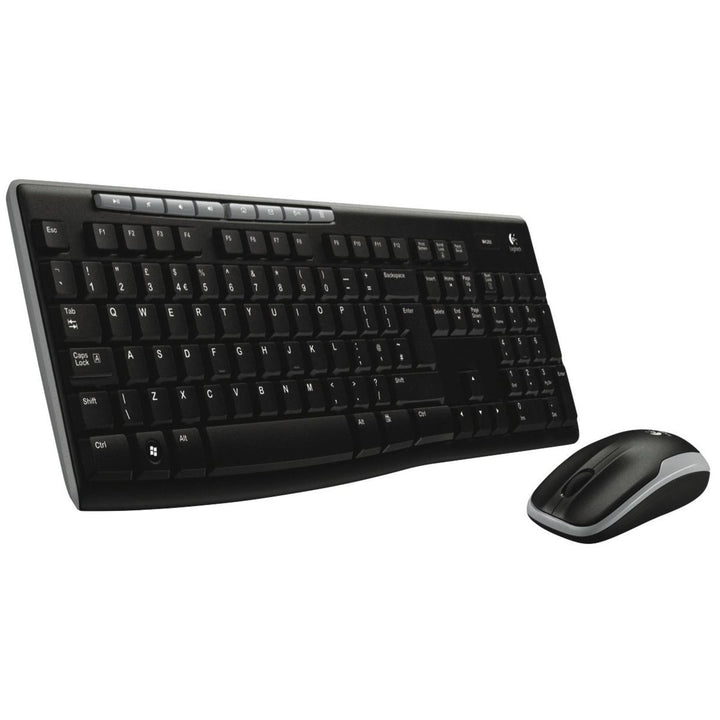

Logitech MK270R Wireless Keyboard and Mouse Combo
PRODUCT DESCRIPTION
Logitech MK270R Wireless Keyboard and Mouse Combo (920-006314) - 2 Years Local Warranty
Full-Size 2.4 GHz Wireless Combo with Eight Media Controls
The Logitech MK270R Wireless Combo (920-006314) is the full-size, no-nonsense wireless set that Singapore offices, classrooms and home desks have standardised on for years. A single tiny USB receiver serves both the keyboard and the mouse, and eight media controls put volume, playback and shortcuts one press away without any software to install.
Full Layout with Number Pad and Adjustable Tilt
The keyboard carries a full-size layout with number pad and arrow keys — 103 keys in the US layout — using a plunger key mechanism for a familiar desktop typing feel. Sturdy tilt legs offer two height settings, flat at 0° or tilted at 8°, and the board is spill-resistant to a maximum of 60 ml. On/off switches on both devices help stretch battery life further.
Three Years of Keyboard Battery Life
Logitech rates the keyboard for up to 36 months on two AAA cells and the mouse for up to 12 months on a single AA, with a battery indicator on the keyboard. For a fleet of shared desks that means battery changes measured in years rather than months, and one less recurring task for the helpdesk.
Compact Ambidextrous Mouse with a Programmable Button
The 1000 DPI optical mouse is a compact ambidextrous design at 99 x 60 x 39 mm and 75 g, with left, right and middle click plus one programmable button and mechanical-encoder line-by-line scrolling. Logitech quotes MTTF above 150,000 hours and a 5 million click service life, and the combo is made with recycled plastic with a published carbon footprint of 7.93 kg CO2e.
Logitech MK270R Datasheet — Technical Specifications
General
| Model | Logitech MK270R Wireless Combo |
| Part Number | 920-006314 |
| Manufacturer | Logitech |
| Product Type | 2.4 GHz wireless keyboard and mouse combo |
| Colour | Black |
| Reliability | MTTF greater than 150,000 hours; 5 million click service life |
| Operating Temperature | 0 to 40 °C (storage −5 to 45 °C) |
| Carbon Footprint | 7.93 kg CO2e |
| Warranty | 2 Years Local Warranty (Singapore) |
Keyboard
| Layout | Full-size with number pad and arrow keys — 103 keys (US layout) |
| Key Mechanism | Plunger |
| Media Controls | 8 media controls |
| Tilt Legs | 2 height options — 0° flat and 8° tilt |
| Spill Resistance | Spill-resistant, tested to a maximum of 60 ml |
| Power Switch | On/off switch with battery indicator |
| Dimensions | 442 x 149 x 18 mm |
| Weight | 498 g |
Mouse
| Design | Compact, contoured, ambidextrous — suitable for left- and right-handed users |
| Sensor | Optical |
| Resolution | 1000 DPI |
| Buttons | Left, right and middle click plus 1 programmable button |
| Scrolling | Mechanical encoder, line-by-line |
| Power Switch | On/off switch |
| Dimensions | 99 x 60 x 39 mm |
| Weight | 75 g |
Connectivity
| Wireless Technology | Advanced 2.4 GHz wireless via USB receiver |
| Receiver | Single compact USB receiver serving both keyboard and mouse |
| Range | 10 m (33 ft) |
| Bluetooth | Not supported — 2.4 GHz receiver only |
| Unifying / Logi Bolt | Logitech does not label the MK270R as Unifying or Logi Bolt; see the FAQ below |
Battery
| Keyboard Battery | 2 x AAA, user-replaceable |
| Keyboard Battery Life | Up to 36 months |
| Mouse Battery | 1 x AA, user-replaceable |
| Mouse Battery Life | Up to 12 months |
| Battery Indicator | On keyboard |
Design & Power
| Form Factor | Full-size keyboard with compact ambidextrous mouse |
| Materials | Made with recycled plastic (Logitech does not publish a percentage for this model) |
| Packaging | 510 x 158 x 46 mm; 744 g total weight with packaging |
| Colour | Black |
Compatibility & Software Support
Operating system support
- Windows 7, Windows 8, Windows 10 or later
- ChromeOS
An available USB-A port is required for the receiver. Logitech’s current MK270 business datasheet lists only Windows and ChromeOS; certain legacy MK270 hardware configurations on Logitech’s support portal additionally list macOS 10.10 or later and Linux kernel 2.6, but because Logitech does not state which hardware configuration ships in 920-006314 we do not claim macOS support for this listing.
Software
None required — the MK270R is plug-and-play. Logitech lists Logitech Options for Windows and macOS as an optional download for the MK270 platform; note that Logitech Options has since reached end of support and Logitech now directs users to Logi Options+. The combo is fully functional with no software installed, which suits locked-down SOE and classroom images.
SourceIT supplies this product with 2 years local Singapore warranty and a GST invoice. Logitech’s own published manufacturer warranty period may differ by region — contact SourceIT if you need the manufacturer terms in writing.
Package Contents & MK Combo Ordering Information
In the box
Logitech does not publish a current in-the-box list for the MK270R. The combo ships as a full-size wireless keyboard, a wireless mouse, a USB receiver, batteries for both devices and user documentation. (A much older 2012-era MK270 datasheet additionally listed a USB range extender; that revision describes different hardware to the current product, so we do not carry its contents list over.)
Logitech MK combo range at SourceIT
| MK120 Corded Combo | 920-002586 |
| MK200 Media Combo (corded) | 920-002693 |
| MK220 Compact Wireless Combo | 920-003235 |
| MK250 Compact Wireless Combo — Graphite | 920-013559 |
| MK250 Compact Wireless Combo — Off White | 920-013560 |
| MK250 Compact Wireless Combo — Rose | 920-013561 |
| MK270R Wireless Combo (this listing) | 920-006314 |
| MK295 Silent Wireless Combo | 920-009814 |
| MK345 Wireless Combo (palm rest) | 920-012926 |
| MK470 Slim Combo — Graphite | 920-009182 |
| MK470 Slim Combo — Off White | 920-009183 |
| MK470 Slim Combo — Rose | 920-011326 |
| MK540 Advanced Wireless Combo | 920-008682 |
| MK850 Performance Wireless Combo | 920-008233 |
Naming note: in Singapore, Logitech’s “MK270” product URL redirects to the MK270R page, so the MK270R is the current MK270 for this region. Logitech’s current MK270 business datasheet explicitly lists 920-006314 among its SKUs, which is why that datasheet is the correct technical reference for this listing.
Datasheet & Downloads
Frequently Asked Questions — Logitech MK270R
What does the R in MK270R mean, and is it different from the MK270?
MK270R is Logitech’s regional refresh designation for this platform. In Singapore they are effectively the same product line — Logitech’s MK270 page redirects to the MK270R page, and Logitech’s current MK270 business datasheet explicitly lists this listing’s part number, 920-006314, among its SKUs. The specifications above are taken from that datasheet and from the MK270R product pages.
Is the receiver a Unifying receiver?
We cannot confirm that, so we do not claim it. Logitech’s MK270R product page describes only a “USB receiver”, and Logitech’s support portal documents three different MK270 hardware configurations — two with a non-Unifying nano receiver and one with a Unifying receiver — without saying which ships in 920-006314. If your deployment specifically requires Unifying, choose the MK540 Advanced or MK850 Performance combos, where Logitech states Unifying support explicitly.
How does the MK270R compare with the MK295 Silent?
Both are full-size 2.4 GHz combos with eight shortcut keys and a 10 m range. The MK295 adds SilentTouch, which Logitech rates at over 90% less keyboard and mouse noise, and gives 18 months of mouse battery life against 12 on the MK270R. Choose the MK295 for open-plan floors, shared homes and libraries; choose the MK270R where noise is not a concern and budget matters more.
Do I need a room PC, licence or software to use it?
No. The MK270R is a standard desktop peripheral set — there is no licence, subscription or compute appliance involved. Plug the receiver into any available USB-A port and both devices work immediately. Logitech Options is offered as an optional download for the platform but is not needed for normal use.
How long will the batteries last?
Logitech rates the keyboard at up to 36 months on two AAA cells and the mouse at up to 12 months on a single AA. Both devices have on/off switches that help extend that further on desks used intermittently, and the keyboard carries a battery indicator so you get warning before it goes flat.
Is the mouse suitable for left-handed users?
Yes. The MK270R mouse is a compact contoured ambidextrous design, which means one part number covers left- and right-handed staff. If you specifically want a sculpted right-handed mouse with a palm rest keyboard instead, look at the MK345 or the MK850.
Are spare receivers available if one is lost?
Logitech does not offer the MK270R receiver as a separately orderable spare part, and because we cannot confirm whether a given unit ships with a Unifying or non-Unifying receiver, a generic Unifying dongle is not a reliable substitute. For hot-desking environments where dongles go missing, a Bluetooth combo such as the MK250 avoids the problem entirely.
Does the MK270R come with warranty in Singapore?
Yes. Every MK270R sold by SourceIT comes with 2 years local Singapore warranty and a GST invoice.


