
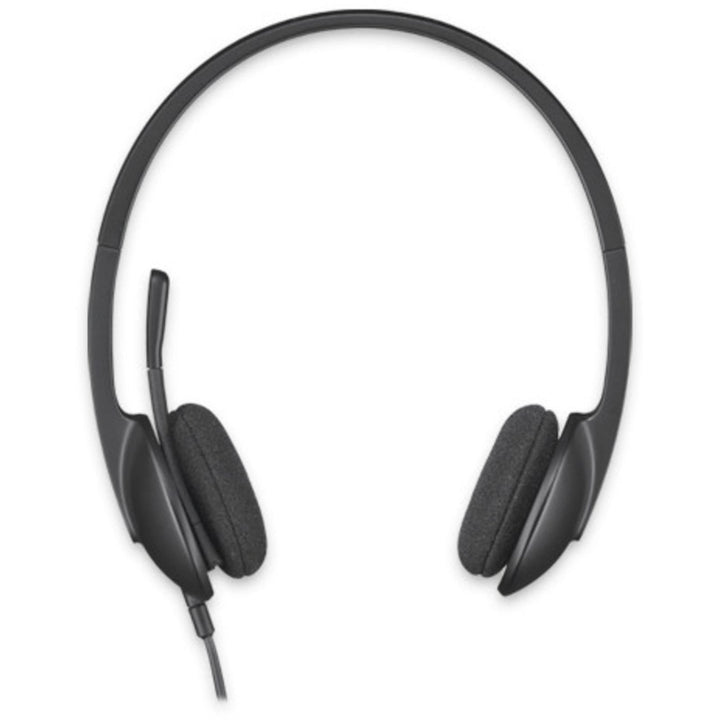

Logitech H340 USB Wired Headset
PRODUCT DESCRIPTION
Logitech H340 USB Wired Headset (981-000477) - 2 Years Local Warranty
Logitech H340 USB Headset for Consistent Digital Audio on Every PC
The Logitech H340 (981-000477) connects over USB rather than a 3.5 mm jack, which means the headset itself handles the digital-to-analogue conversion. Audio sounds the same on every machine regardless of the quality of the built-in sound card, and there is no risk of a user plugging the microphone into the wrong socket. For Singapore IT teams standardising a mixed fleet of desktops, laptops and docking stations, that consistency is the main reason to specify USB.
Noise-Cancelling Rotating Boom Microphone
The H340 uses a rotating boom microphone with noise cancelling, tuned across a 100 Hz to 6.5 kHz voice band so speech carries clearly on Microsoft Teams, Zoom, Google Meet and Webex calls. The boom rotates so the headset can be worn on either side and lifted clear when you are listening rather than talking.
Over-the-Ear Comfort for Long Shifts
An adjustable over-the-head band with over-the-ear cups spreads weight comfortably at 120 g, and a 20 Hz to 20 kHz stereo frequency response covers calls, recorded training and music. The 1.8 m cable is sized for desk and laptop use without leaving a loop of slack on the floor.
True Plug-and-Play USB-A Deployment
The H340 is a USB 2.0 high-speed audio device that needs no drivers and no software. Plug it into any USB-A port on Windows, macOS or ChromeOS and it is ready to use, which keeps rollout time and helpdesk load to a minimum across large deployments.
Logitech H340 Datasheet — Technical Specifications
General
| Model | Logitech USB Headset H340 |
| Part Number | 981-000477 |
| Product Type | Wired USB stereo headset |
| Wearing Style | Over-the-head, over-the-ear, adjustable headband |
| Warranty | 2 Years Local Warranty (Singapore) |
Audio
| Headphone Frequency Response | 20 Hz – 20 kHz |
| Device Type | Stereo |
| Microphone Type | Rotating boom |
| Microphone Noise Cancelling | Yes |
| Microphone Frequency Response | 100 Hz – 6.5 kHz |
Connectivity
| Connector | USB-A (corded) |
| USB Protocol | USB 2.0, high-speed |
| USB VID_PID | 0x046D_0x0A38 (Logicool version 0x046D_0x0A3A) |
| Cable Length | 1.8 m (6.15 ft) |
| Audio Controls | None (no in-line or ear cup controls) |
| Indicator Lights | None |
| Power | Bus powered over USB — no external power required |
Design & Power
| Dimensions (H × W × D) | 185 mm × 200 mm × 65 mm |
| Weight | 120 g |
| Adjustable Headband | Yes |
| Colour | Black |
Compatibility & Software Support
The Logitech H340 is a USB Audio Class device, so the operating system recognises it as a headset without any driver installation.
Operating System and Platform Support
| Windows | Supported over standard USB audio |
| macOS | Supported over standard USB audio |
| ChromeOS | Supported over standard USB audio |
| Linux | Supported over standard USB audio |
| Port Required | One free USB-A port |
Meeting and Softphone Applications
The H340 works as the audio input and output device for Microsoft Teams, Zoom, Google Meet, Webex, Skype for Business and other softphone applications. Logitech does not publish a Microsoft Teams, Zoom or Google Meet device certification for the H340, so it should be quoted as a compatible USB headset rather than a certified one. If a certified device is a tender requirement, specify the H570e Teams version instead.
Software
No drivers, software or firmware tools are required, and the H340 is not managed by Logitech Sync, Logi Options+ or Logi Tune. Because the headset has no physical controls, volume and mute are handled in the operating system or the meeting application.
Package Contents & H-Series Ordering Information
In the Box
- Logitech H340 USB Headset
- User documentation
Logitech H-Series Wired Headsets at SourceIT
Logitech H340 USB Headset — 981-000477 (this listing)
| Model | Part Number | Notes |
| H111 Stereo Headset | 981-000588 | 3.5 mm single jack, 73.2 g |
| H151 Stereo Headset | 981-000587 | 3.5 mm single jack, in-line controls |
| H340 USB Headset | 981-000477 | USB-A, no in-line controls |
| H540 USB Headset | 981-000482 | USB-A, on-earcup controls (clearance — while stocks last) |
| H390 USB Headset | 981-000485 | USB-A, in-line controls, leatherette pads |
| H570e Stereo Business Headset | 981-000574 | USB-A, dual noise-cancelling mics |
| H650e Business Headset | 981-000545 | USB-A, 32 mm driver with Dynamic EQ |
Datasheet & Downloads
Frequently Asked Questions — Logitech H340
Does the H340 have volume or mute buttons?
No. Logitech lists the H340 as having no in-line or ear cup audio controls — volume and mute are handled in Windows, macOS, ChromeOS or the meeting application. If users need hardware controls, choose the Logitech H390, which adds an in-line controller with volume up, volume down and microphone mute.
What is the difference between the H340 and the H390?
Both are USB headsets with noise-cancelling boom microphones. The H390 adds in-line volume and mute controls, uses 30 mm drivers with leatherette padded ear pads, extends microphone response to 10 kHz and has a longer 1.9 m cable. The H340 is the lighter and simpler of the two at 120 g against 197 g, and is usually specified where cost per seat is the deciding factor.
Why choose a USB headset over a 3.5 mm one?
USB carries digital audio and the headset does its own conversion, so sound quality does not depend on the laptop's analogue audio circuitry and does not vary between docking stations. USB also removes the most common user error with analogue headsets — plugging the microphone into the wrong socket. If you need the headset to work with phones and tablets as well, choose the 3.5 mm H151 instead.
Will the H340 work with a USB-C only laptop?
The H340 has a USB-A connector, so a USB-C laptop needs a USB-C to USB-A adapter or a dock. If you would rather avoid the adapter, the Logitech H390 USB-C (981-001577) ships with a native USB-C plug.
Is the H340 suitable for a contact centre?
It is fine for general office and e-learning use. For sustained contact-centre work we would specify the H570e or H650e, which add dual noise-cancelling microphones, in-line call answer and end controls, a mute status LED and hearing protection against sounds above 100 dBA.
Does the H340 need a room PC, licence or software subscription?
No. It is a plug-and-play peripheral for an existing computer. There is no licence, no subscription and no management software involved.
Does this headset come with a Singapore warranty?
Yes. Every H340 sold by SourceIT comes with 2 years local Singapore warranty and a GST invoice.


