
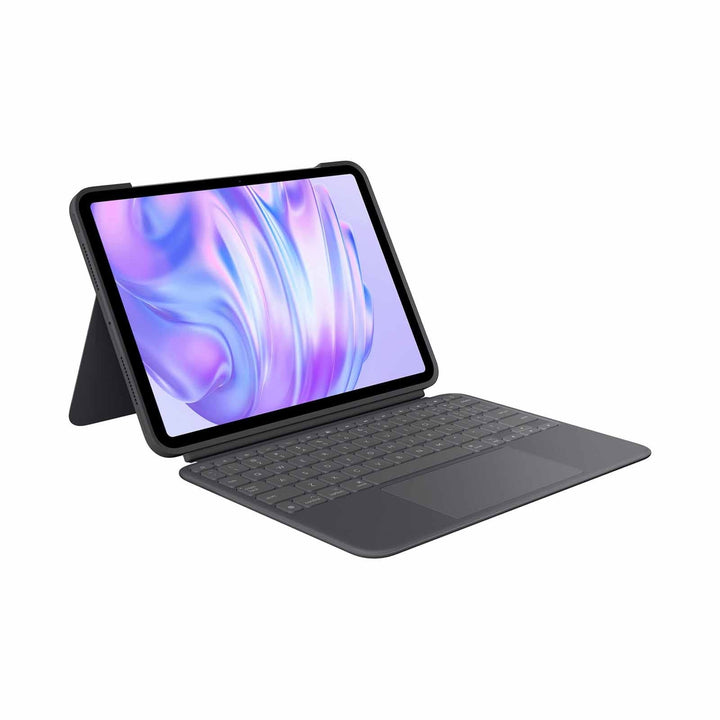


Logitech Folio Touch for iPad Air 4th & 5th Gen / 11 M2 & M3 & M4
PRODUCT DESCRIPTION
Logitech Folio Touch for iPad Air 4th & 5th Gen / 11 M2 & M3 & M4 (920-009954) - 2 Years Limited Hardware Warranty
Backlit Keyboard Case with Precision Trackpad for iPad Air
The Logitech Folio Touch for iPad Air (920-009954) turns an iPad Air into a laptop-class productivity tool. It is the one case in Logitech's iPad Air range that combines a backlit keyboard, a high-precision trackpad and instant Smart Connector power — with a 2-year Logitech limited hardware warranty behind it.
Trackpad Gestures Without Reaching for the Screen
The high-precision trackpad supports the full set of iPadOS multi-touch gestures — swipe between apps, two-finger scroll, pinch to zoom and double-tap to select. For anyone moving between a MacBook and an iPad Air through the working day, it removes the constant reach-to-screen that makes iPad document work feel slower than it should.
Backlit Keys That Adjust to the Room
Backlit keys adjust automatically to the surrounding light, with manual brightness levels available. A full row of iPadOS shortcut keys covers volume, media playback, screen brightness and search. Late flights, dim meeting rooms and early-morning site visits stop being a problem.
Four Modes, 40° Kickstand, Smart Connector Power
An adjustable kickstand with up to 40° of tilt and a foldable keyboard give four working modes — type, view, sketch and read. Folio Touch connects through the Apple Smart Connector for instant pairing and power, so there is no Bluetooth setup, no batteries and no charging. There is space to store a Logitech Crayon, and an Apple Pencil (2nd generation) charges magnetically with the case fitted.
Logitech Folio Touch Datasheet — Technical Specifications
General
| Product Name | Logitech Folio Touch for iPad Air |
| Part Number | 920-009954 |
| Regulatory Model Number | YU0043 |
| Product Type | iPad keyboard folio case with trackpad |
| Colour | Graphite (marketed as Oxford Grey in the Americas and UK) |
| Warranty | 2 Years Limited Hardware Warranty (Logitech), honoured locally in Singapore by SourceIT |
Keyboard & Trackpad
| Backlighting | Yes — backlit keys that adjust automatically to the environment, with adjustable brightness levels |
| Trackpad | Yes — high-precision trackpad with iPadOS multi-finger gesture support (swipe, scroll, pinch, double-tap) |
| Shortcut Keys | Full row of iPadOS shortcut keys including volume, media controls and brightness |
Connectivity & Power
| Connection | Apple Smart Connector |
| Pairing | None required — instant connection |
| Power Source | Drawn directly from the iPad Air |
| Battery | None — no batteries and no charging required |
| Bluetooth | Not used on this model |
Design & Physical
| Use Modes | Type, View, Sketch, Read |
| Kickstand | Adjustable, up to 40° of tilt |
| Stylus Support | Stores a Logitech Crayon; Apple Pencil (2nd generation) charges with the case fitted |
| Sustainability | 14.16 kg CO2e product carbon footprint (Logitech-published) |
Compatibility & Software Support
Supported iPad Air Models
| iPad Air 11-inch (M2) | Supported |
| iPad Air 11-inch (M3) | Supported |
| iPad Air 11-inch (M4) | Supported |
| iPad Air (4th generation) | Supported |
| iPad Air (5th generation) | Supported |
| iPad (10th gen / A16) and 10.2-inch iPad | Not supported — see the Slim Folio and Rugged Folio range |
Operating System and Setup
iPadOS. Trackpad gesture support requires iPadOS 13.4 or later, which every supported iPad Air model ships with. Because the case uses the Smart Connector, there is no pairing procedure and no companion app.
Software
No Logitech software is required. Logi Options+, Logi Tune and Logitech Sync do not apply to this product. Trackpad behaviour, tracking speed and natural scrolling are configured in iPadOS under Settings → General → Trackpad.
Package Contents & Folio Touch Ordering Information
In the Box
Logitech does not publish an itemised in-box list for this model. The retail package contains the Folio Touch case with integrated keyboard and trackpad, plus user documentation. No batteries, charger or cable are supplied because the case is powered by the iPad Air.
Logitech iPad Keyboard Case Range at SourceIT
Logitech Folio Touch for iPad Air — 920-009954 (this listing)
| Logitech Slim Folio for iPad (7th, 8th & 9th gen) | 920-009469 — View product |
| Logitech Slim Folio for iPad (10th Gen & A16) | 920-011432 — View product |
| Logitech Rugged Folio for iPad (10th Gen & A16) | 920-011296 — View product |
| Logitech Folio Touch for iPad Air | 920-009954 — View product |
Regional Part Numbers
Logitech's Americas listings use part number 920-009952 and name the colour Oxford Grey. SourceIT supplies the Singapore/Asia-Pacific SKU 920-009954, shown on Logitech's own Singapore store as Graphite. The hardware is the same; the suffix and colour name reflect the region.
Datasheet & Downloads
- Logitech Folio Touch — official support page
- Logitech Folio Touch — Singapore product page (920-009954)
- Logitech Folio Touch — Getting Started guide
- Logitech Folio Touch — official 2-year warranty statement
Logitech does not publish a standalone datasheet PDF, or a dimensions and weight table, for the Folio Touch for iPad Air. Where a specification is not published by Logitech, SourceIT omits it rather than quoting a third-party figure.
Frequently Asked Questions — Logitech Folio Touch
Which iPad Air models does it fit?
iPad Air 11-inch M2, M3 and M4, plus iPad Air 4th and 5th generation. It does not fit the standard iPad or iPad Pro — for the 10th-generation iPad and iPad A16 see the Slim Folio or Rugged Folio.
Does the trackpad work like a MacBook trackpad?
Close to it. It is a high-precision trackpad supporting iPadOS multi-finger gestures — swipe between apps, two-finger scroll, pinch to zoom, double-tap to select. Sensitivity and natural scrolling are set in iPadOS under Settings → General → Trackpad.
Does it need charging?
No. Folio Touch connects through the Apple Smart Connector and draws power from the iPad Air, including for the backlight. There are no batteries and no charging port.
Can I still charge an Apple Pencil with the case on?
Yes. An Apple Pencil (2nd generation) charges magnetically on the iPad Air's side with the Folio Touch fitted, and there is storage space for a Logitech Crayon.
How does it compare with the Flip Folio?
Folio Touch is the integrated laptop-replacement option — backlit keys, a trackpad, iPad-powered, keyboard fixed to the case. The Flip Folio takes the opposite approach: a fully detachable Bluetooth keyboard you can position anywhere, with Easy-Switch across three devices, but no trackpad and no backlight. Choose Folio Touch for desk-and-lap productivity, Flip Folio for flexible positioning and multi-device work.
Is it durable enough for a school?
It is a sturdy protective folio, but Logitech makes no drop-test or military-standard claim for the Folio Touch. For education deployments where drops are routine, the Rugged Folio is the purpose-built choice.
Does this come with a Singapore warranty and GST invoice?
Yes. Every Folio Touch sold by SourceIT comes with Logitech's 2-year limited hardware warranty honoured locally in Singapore and a GST invoice.


