
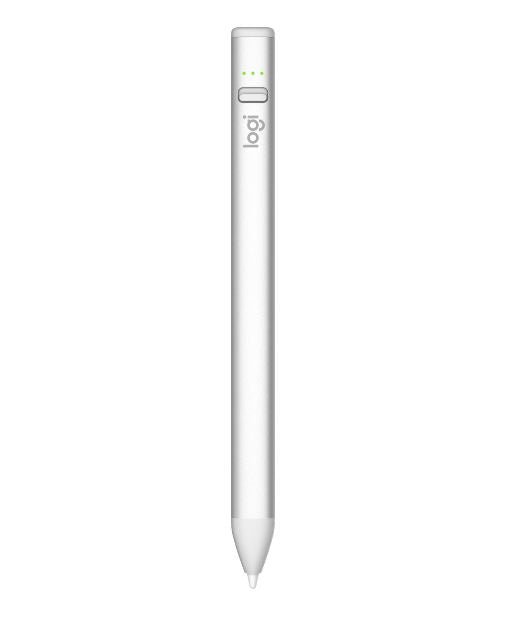


Logitech Crayon Digital Pencil with USB-C for iPad
PRODUCT DESCRIPTION
Logitech Crayon Digital Pencil with USB-C for iPad (914-000073) - 1 Year Local Warranty
Pixel-Precise Digital Pencil for iPad, Built on Apple Pencil Technology
The Logitech Crayon Digital Pencil with USB-C (914-000073) is a digital stylus for iPad users who write, sketch, annotate and mark up. Built on Apple Pencil technology, it delivers accurate, low-latency input across the hundreds of iPad apps that support Apple Pencil — for students, teachers, engineers and anyone signing off drawings or documents on an iPad.
No Pairing, No Bluetooth Setup — Switch On and Write
Crayon needs no Bluetooth pairing at all. Turn it on and it works with a compatible iPad immediately. For shared iPads in classrooms, clinics and meeting rooms, that single design decision removes the most common support call: the stylus that will not connect for the next user.
Palm Rejection and Tilt for a Natural Writing Feel
Palm rejection lets you rest your hand on the screen while writing, and tilt sensitivity varies line weight as you angle the tip, just like a real pencil. Note that Logitech states clearly that Crayon is not pressure sensitive — there is no need to press hard, and line weight comes from tilt rather than pressure. If your workflow depends on pressure-variable brushes, an Apple Pencil is the correct tool.
USB-C Charging with a Two-Minute Rescue Charge
Crayon charges over USB-C using the same cable as a modern iPad and delivers up to 7 hours of active writing time. A two-minute charging boost adds around 30 minutes of writing — enough to get through a lesson or a client meeting. A three-LED indicator shows the remaining charge at a glance. The aluminium body withstands falls of up to 1.2 m (4 ft) and the flat shape stops it rolling off desks.
Logitech Crayon Datasheet — Technical Specifications
General
| Product Name | Logitech Crayon (USB-C) |
| Part Number | 914-000073 |
| Logitech Model Number | F00006 |
| Product Type | Digital pencil / iPad stylus |
| Colour | Silver |
| Warranty | 1 Year Local Warranty via SourceIT Singapore |
Writing & Input
| Technology | Apple Pencil technology |
| Palm Rejection | Yes — ignores stray touches while writing |
| Tilt Sensitivity | Yes — dynamic line weight from tilt angle |
| Pressure Sensitivity | Not supported. Logitech states Crayon is not pressure sensitive; there is no need to press down hard |
| Pairing | None required — switch on and write |
| Tip | Replaceable (purchased separately) |
Battery & Charging
| Battery Type | Lithium battery, rechargeable |
| Writing Time | Up to 7 hours of active writing |
| Charging Port | USB-C — charges with the iPad's own USB-C cable |
| Fast Charge | 2-minute charging boost provides approximately 30 minutes of writing time |
| Battery Indicator | 3 green LEDs above 66%; 2 green above 33%; 1 green above 15%; 1 red blinking below 15% |
Design & Physical
| Dimensions | 163 × 12 × 8 mm (Logitech also publishes a 159 mm length figure on its education datasheet) |
| Weight | 20 g |
| Materials | Aluminium tube; PC+ABS tip cover |
| Shape | Flat anti-roll profile |
| Drop Resistance | Withstands falls of up to 1.2 m (4 ft) |
Compatibility & Software Support
Supported iPad Models
Logitech's current published compatibility statement for the USB-C Crayon is “all iPads 2018 and later, and iPad Air (M2, M3, M4)”. Its 2022 launch documentation gave the following enumerated list:
| iPad Pro 12.9-inch | 3rd, 4th, 5th & 6th generation |
| iPad Pro 11-inch | 2nd, 3rd & 4th generation |
| iPad | 6th, 7th, 8th, 9th & 10th generation |
| iPad Air | 3rd, 4th & 5th generation, plus iPad Air M2, M3 and M4 |
| iPad mini | 5th generation |
iPad models released after 2022 are covered by Logitech's broader “all iPads 2018 and later” statement rather than by an updated enumerated list. If you need written confirmation for a specific iPad model before ordering in volume, contact SourceIT and we will confirm with Logitech.
Operating System and Software
iPadOS. Crayon works with any iPad app that supports Apple Pencil input — Notes, Notability, GoodNotes, Procreate, Microsoft OneNote, Adobe apps and PDF markup tools among hundreds of others. No driver, app or licence is required, and Logi Options+ does not apply.
Package Contents & Crayon Ordering Information
In the Box
- Logitech Crayon (USB-C)
- Quick start guide
A USB-C charging cable is not included — Crayon charges from the same USB-C cable supplied with the iPad.
Logitech Crayon Range at SourceIT
Logitech Crayon Digital Pencil with USB-C — 914-000073 (this listing)
| Logitech Crayon Digital Pencil with USB-C | 914-000073 — View product |
| Logitech Crayon for iPad (Lightning) | 914-000035 — View product |
Regional Part Numbers
914-000073 is the Asia-Pacific SKU, confirmed on Logitech's own Singapore and Hong Kong stores. Logitech's Americas listings use 914-000070 for the same product, and its education channel uses 914-000078. Global datasheets may quote the Americas number — the hardware is identical.
Storage
The Logitech Slim Folio and Folio Touch both include a holder sized for the Crayon.
Datasheet & Downloads
Frequently Asked Questions — Logitech Crayon
USB-C or Lightning — which one do I need?
This is the USB-C version, which charges from the same cable as a modern iPad. If your iPad has a Lightning port and you would rather use one cable for both, the Logitech Crayon for iPad (Lightning, 914-000035) is the alternative. Note that the charging port on the Crayon is independent of the iPad it writes on — either version works on a compatible iPad; the difference is which cable you carry.
Is it pressure sensitive?
No, and this matters. Logitech states plainly that Crayon is not pressure sensitive — line weight comes from tilt, not from how hard you press. For handwriting, note-taking, annotation and mark-up this is not a limitation. For pressure-variable digital painting, an Apple Pencil is the right tool.
Do I have to pair it every time, especially on a shared iPad?
No. There is no Bluetooth pairing at all. Switch it on and it writes on any compatible iPad, which is exactly why it is popular in classrooms and shared meeting rooms — no pairing menu, no per-user setup.
How long does it last on a charge?
Up to 7 hours of active writing. If you find it flat before a meeting, a two-minute charge gives you roughly 30 minutes of writing time to get through it.
Will it survive being dropped?
Logitech rates the aluminium body for falls of up to 1.2 m (4 ft), and the flat anti-roll shape means it tends not to reach the floor in the first place. This is why it is specified for education deployments rather than more fragile styluses.
Which iPads does it work with?
Logitech's current statement is all iPads from 2018 onward, plus iPad Air M2, M3 and M4. The Compatibility section above lists the full enumerated model range. If you need written confirmation for one specific iPad model before a volume order, contact us.
Does this come with a Singapore warranty and GST invoice?
Yes. Every Crayon sold by SourceIT comes with a 1-year local Singapore warranty and a GST invoice.


