
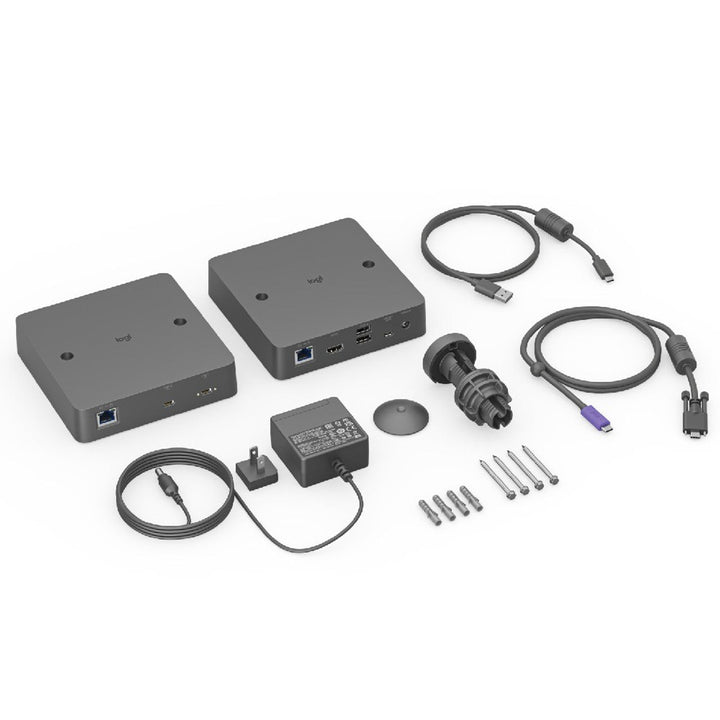


Logitech Extend Single Cable BYOD Connection
PRODUCT DESCRIPTION
Logitech Extend Single Cable BYOD Connection (952-000200) - 2 Years Local Warranty
Single USB-C Cable BYOD for Logitech Rally Bar and MeetUp Rooms
Logitech Extend (952-000200) turns a meeting room into a genuine bring-your-own-device space with one cable on the table. A guest or staff laptop plugs into a single USB-C connector and immediately drives the room's camera, microphone and speakers along with the room display — no HDMI run to the table, no separate USB cable, no drivers, no presenter software. For Singapore offices that host clients, auditors and vendors in the same boardroom every week, it removes the five minutes normally lost to cabling.
Two-Box Architecture Over Standard Category Cable
Extend ships as a Table-Side transmitter and a Display-Side receiver, each 143 × 143 × 34.5 mm with a 100 × 100 mm VESA pattern. They are joined by ordinary structured cabling rather than a proprietary run, reaching up to 100 m over Cat6a or up to 60 m over Cat5e or Cat6. That means the AV contractor can use the cable already pulled into the room, and the table-side box stays clean with a magnetic dock and a 25.4 mm grommet adapter supplied in the box.
4K60 4:4:4 to the Display, USB Peripherals at the Far End
The Display-Side box outputs HDMI 2.0 at 4K60 with full 4:4:4 chroma, so text on a shared spreadsheet stays crisp rather than smearing, and carries two USB 2.0 Type-A ports for room peripherals. Traffic between the two boxes is encrypted using NIST SHA-256, which matters when the room is used by external parties.
Works With the Logitech Room Systems You Already Own
Logitech lists Extend as compatible with Rally Bar, Rally Bar Mini, Rally Bar Huddle, Rally Board 65, MeetUp and MeetUp 2, with the room running Microsoft Teams Rooms on Android, Zoom Rooms Appliance or Google Meet on Android. Guest laptops need only Windows 10 or 11, or one of the two most recent macOS releases.
Logitech Extend Datasheet — Technical Specifications
General
| Product Name | Logitech Extend — single-cable BYOD connection |
| Part Number | 952-000200 (Asia Pacific SKU). Logitech’s Americas datasheet quotes 952-000188 for the same product. |
| Product Type | Two-box BYOD extension system: Table-Side transmitter and Display-Side receiver |
| Deployment | BYOD meeting rooms, boardrooms, training rooms and hybrid collaboration spaces |
| Security | Traffic between the Table-Side and Display-Side units is encrypted using NIST SHA-256 |
| Warranty | 2 Years Local Warranty (Singapore) |
Table-Side (TX) Unit
| Laptop Connection | USB-C 3.2 Gen 1 with DisplayPort Alternate Mode |
| Power Input | Optional USB-C Power Delivery input |
| Link Port | RJ45 to the Display-Side unit |
| Dimensions (H × W × D) | 143 × 143 × 34.5 mm |
| Mounting | 100 × 100 mm VESA pattern; magnetic dock and 25.4 mm (1 in) grommet adapter supplied |
Display-Side (RX) Unit
| Display Output | HDMI 2.0, up to 4K60 at 4:4:4 chroma |
| USB Ports | 2 × USB 2.0 Type-A |
| Management Port | Micro-USB |
| Link Port | RJ45 to the Table-Side unit |
| Dimensions (H × W × D) | 143 × 143 × 34.5 mm |
| Mounting | 100 × 100 mm VESA pattern |
Cabling & Reach
| Category Cable Reach | Up to 100 m (328 ft) over Cat6a; up to 60 m (197 ft) over Cat5e or Cat6. The category cable between the two units is user-supplied. |
| Supplied USB-C Cable | USB-C to USB-C, 1.5 m (4.9 ft) |
| Supplied Management Cable | Micro-USB to USB-A, 1 m (3.3 ft) |
| Supplied DC Cable | 1.5 m |
Power & Environment
| Power Supply | Auto-sensing external supply, 100–240 V AC input, 48 V / 0.5 A DC output |
| Power Supply Dimensions | 73.5 × 53 × 35 mm |
| Laptop Charging | Optional USB-C Power Delivery to the connected laptop, up to 100 W, using an additional accessory |
| Operating Temperature | 0 to 40 °C |
| Storage Temperature | −25 to 70 °C |
| Humidity | 10 to 90% |
Compatibility & Software Support
| Logitech Room Systems | Rally Bar, Rally Bar Mini, Rally Bar Huddle, Rally Board 65, MeetUp and MeetUp 2. |
| Room Operating Systems | Microsoft Teams Rooms on Android, Zoom Rooms Appliance and Google Meet on Android. |
| Guest Laptop Operating Systems | Windows 10 and Windows 11; macOS, latest two releases. |
| Drivers and Software | None required on the guest laptop — plug and play over a single USB-C cable. |
| Structured Cabling | Standard Cat5e, Cat6 or Cat6a between the Table-Side and Display-Side units. Category cable is not supplied. |
Package Contents & Logitech Extend Ordering Information
In the box
- Display-Side (RX) unit
- Table-Side (TX) unit
- USB-C to USB-C cable (1.5 m)
- Micro-USB to USB-A cable (1 m)
- Power supply
- Mounting hardware
- 25.4 mm (1 in) grommet adapter
- Magnetic dock
- Documentation
Logitech Extend ordering information
| Logitech Extend — 952-000200 (this listing) | Asia Pacific part number — the SKU supplied in Singapore |
| Logitech Extend — 952-000188 | Americas part number for the identical product, quoted on Logitech’s global datasheet |
Room systems that pair with Extend: Rally Bar (960-001312), Rally Bar Mini (960-001340) and Rally Bar Huddle (960-001577). For the opposite scenario — handing a room’s camera and audio out to a visiting laptop that runs the meeting itself — see Logitech Swytch (952-000010).
Datasheet & Downloads
Frequently Asked Questions — Logitech Extend
What problem does Logitech Extend actually solve?
It collapses BYOD room cabling down to one USB-C connector at the table. Without it, a guest laptop typically needs an HDMI cable to the display and a separate USB cable back to the room camera and audio, both run under or through the table. With Extend, the guest plugs in one cable and gets the room camera, microphones, speakers and display at once, then runs the meeting from their own laptop in whatever application they prefer.
Which Logitech room systems does it work with?
Logitech lists Rally Bar, Rally Bar Mini, Rally Bar Huddle, Rally Board 65, MeetUp and MeetUp 2, with the room running Microsoft Teams Rooms on Android, Zoom Rooms Appliance or Google Meet on Android.
How far apart can the table and the display be?
Up to 100 m over Cat6a, or up to 60 m over Cat5e or Cat6. The category cable between the Table-Side and Display-Side units is not supplied — in most fit-outs the contractor uses structured cabling already pulled into the room, which is exactly the point of the design.
Does it need its own power?
Yes. Extend uses an external auto-sensing power supply, 100–240 V AC in and 48 V / 0.5 A DC out. It is not a USB-powered accessory. It can also deliver USB-C Power Delivery to the guest laptop, up to 100 W, using an additional accessory.
Does the room still need a compute appliance or a licence?
Extend does not replace the room system. It is an extension and BYOD connection layer for a room that already has a Logitech video bar. If the room runs an appliance-mode system such as Rally Bar in CollabOS, no separate room PC is needed for the native meeting mode — but the platform licence for Microsoft Teams Rooms, Zoom Rooms or Google Meet is a separate purchase from the room platform vendor.
How is Extend different from Logitech Swytch?
Both deliver one-cable BYOD, but Extend is the newer two-box system that also carries a 4K60 4:4:4 HDMI output to the room display over standard category cable at up to 100 m, with SHA-256 encryption on the link. Logitech Swytch (952-000010) is the earlier laptop-link kit. If you are specifying a new room, Extend is the current product.
Why does the Logitech datasheet show part number 952-000188?
Logitech numbers this product differently by region. 952-000188 is the Americas SKU and 952-000200 is the Asia Pacific SKU supplied in Singapore. The hardware and specification are the same.
Does SourceIT provide local warranty on the Logitech Extend?
Yes. Every Logitech Extend sold by SourceIT comes with 2 years local Singapore warranty and a GST invoice.


